


 本文介绍了Linux系统中查看内存信息、文件通配符使用、文件管理、命令行操作、文件时间戳、SSH连接、屏幕会话管理和系统服务控制等基础知识。通过实例展示了如ls、touch、ssh、screen及系统服务命令的用法。
ll /proc/meminfo 大小为0,不是硬盘文件。在内存里,只不过以文件的方式显示出来给我们看。
文件通配符
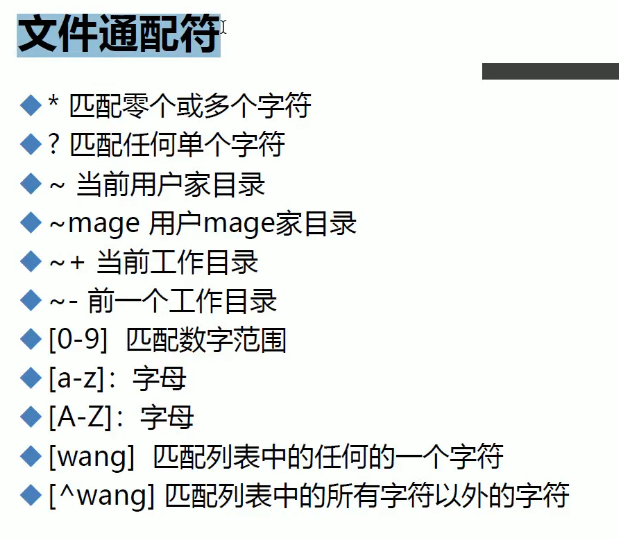
ls *.conf
ls f??.conf
ls ~
ls ~mage
ls ~- 前一个工作目录
ls ~+ 当前
ls f?[0-9].*
touch a{0..9}.txt
ll a[0-9].txt
ls b[ACz].txt
ls b[^ACz].txt 除掉ACz
预定义的字符类
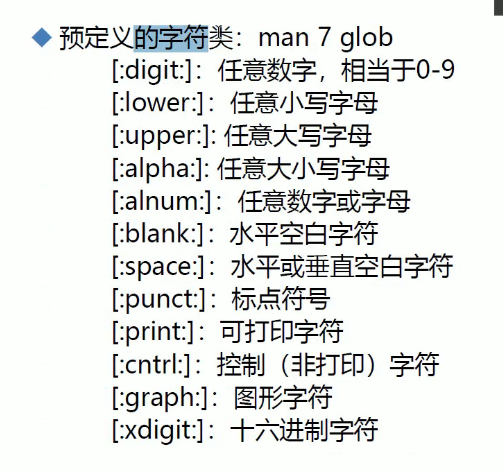
ls b[[:lower:]].txt //[]表示一个
ls .*
ls .[^.]* -d 只显示当前目录的名称,不进入目录
ls -d .*
ls -aI "[^.]*"
vm加一个桥接
ssh 桥接分配的IP地址
screen
df 看光盘挂载的目录
rpm -ivh /run/media/root/CetOS 7 x86_64/packages/screen补全
centos7关闭防火墙
systemctl stop firewalld
systemctl disable firewalld
centos6关闭防火墙
systemctl stop firewalld service iptables stop
chkconfig iptables off
ssh 桥接分配的IP地址 -p 12365
screen -S help 开启一个会话
screen -x 加入
ls /etc/[0-9]*[^0-9] -d
ssh IP地址
passwd 改口令
exit 退出会话
screen -ls 显示会话
screen -x CentOS7 加入会话
screen -x 3666
创建空文件和刷新时间
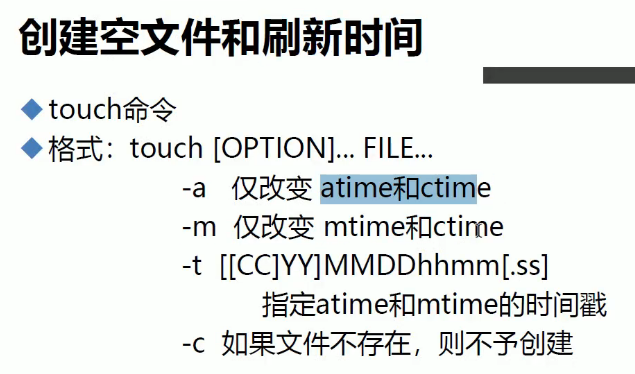
文件读时间 内容修改时间 属性修改时间
ll --time=atime ctime 默认是显示修改时间
touch 1.txt 默认三个时间都变了
stat 1.txt 显示三个时间
touch `date +%F`.log
touch -t 201910200830.20 1.txt
ll f[0-9] f10





 扫一扫
扫一扫


 1072
1072

 被折叠的 条评论
为什么被折叠?
被折叠的 条评论
为什么被折叠?
 到【灌水乐园】发言





