



 本文深入解析持久登录机制的实现方式,介绍如何通过Cookie和数据库记录identifier、token及timeout来维持用户的登录状态,确保用户在一定时间内无需重复登录。
实现持久登录,即用户在登录时,勾选了"记住我"之后,无论是否关闭浏览器,只要不退出登录,在指定的时间内始终保持登录状态(缺点是在另一台电脑上登录过后,之前那台电脑就不能继续保持登录状态)。
首先,持久登陆使用 cookie 实现,但是 cookie 中不能保存用户密码这样重要的信息,即使加密过。解决方案是在用户登录表中新建3个字段identifier:第二身份标识,token:永久登录标识,timeout:永久登录超时时间。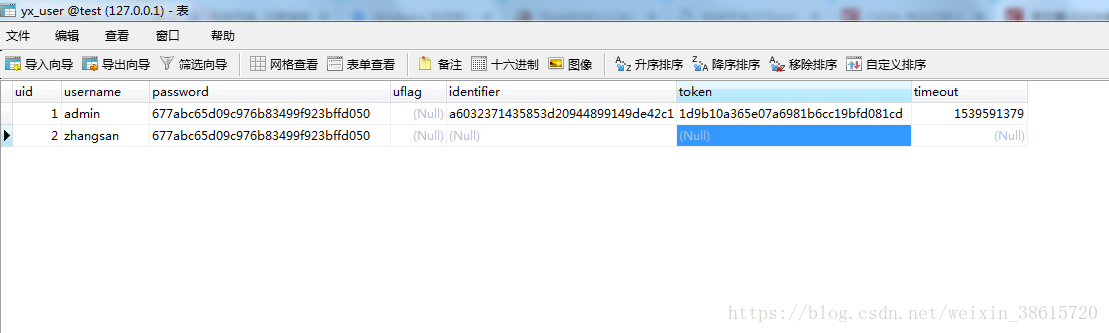
在用户勾选了"记住我"登录时,应该生成一个唯一的 identifier,一个唯一的 token,并且设置一个过期时间 timeout,把两个代表身份的值写入cookie,设置 cookie 过期时间为 timeout,例如:setcookie('auth',"$identifier:$token",$timeout); 同时把三个值插入数据表;当用户再一次访问网站时,首先判断 cookie 中是否含有 auth,如果含有,则去数据库中进行身份比对(identifier 和 token),比对成功时,把用户信息写入 session,同时用户保持登录状态。
代码:
LoginController.class.php
<?php
/**
 * Created by PhpStorm.
 * User: Administrator
 * Date: 2018/10/15
 * Time: 13:51
 */
namespace Home\Controller;
use Think\Controller;
class LoginController extends Controller{
    /**
     * thinkphp3.2.3  自动登录
     */
    public function index(){
        //判断是否永久登录
        checkLong();
        //已经登录则跳转至个人中心
        if(isset($_SESSION['username'])){
            $this->redirect('User/ucenter');
        }else{
            //判断是否存在cookie
            if(isset($_COOKIE['username'])){
               $this->assign('username',$_COOKIE['username']);
            }
            //显示注册页
            $this->display();
        }
    }
    //显示验证码
    public function verifyImg(){
        ob_clean();
        $Verify = new \Think\Verify();
        $Verify->fontSize = 18;
        $Verify->length   = 4;
        $Verify->codeSet = '0123456789';
        $Verify->entry();
    }
    //验证登录
    public function check(){
        header("Content-type:text/html;charset=utf-8");
        $verify = new \Think\Verify();
        $yzm = I("post.yzm",'trim');
        $username = I("post.username","trim");
        $password = I("post.password","trim");
        $remember = I("post.remember","trim");
        if($verify->check($yzm)){
            //判断用户名密码
            $user = new \Home\Model\UserModel();
            $res = $user->checkName($username,$password);
            if($res === false){
                $this->error("用户名或密码错误");
            }else{
                //用户信息存入session
                session("username",$res['username']);
                session("uid",$res['uid']);
                //如果用户勾选了"记住我",则保持持久登陆
                if($remember){
                    $salt = random_str(16);
                    //第二分身标识
                    $identifier = md5($salt . md5($username) . $salt);
                    //永久登录标识
                    $token = md5(uniqid(rand(), true));
                    //永久登录超时时间(1周)
                    $timeout = time()+60*2;
                    //存入cookie
                    cookie('auth',"$identifier:$token",$timeout);
                    $user->saveRemember($res['uid'],$identifier,$token,$timeout);
                }
                //把用户名存入cookie,退出登录后在表单保存用户名信息
                cookie('username',$username,time()+3600*24);
                //跳转至会员中心
                $this->redirect('Home/User/ucenter');
            }
        }else{
            $this->error("验证码不正确");
        }
    }
    //退出登录
    public function loginout(){
        session(null);
        cookie('auth', '', time()-1);
        $this->redirect("Login/index");
    }

}
UserController.class.php
<?php
/**
 * Created by PhpStorm.
 * User: Administrator
 * Date: 2018/10/15
 * Time: 13:59
 */
namespace Home\Controller;
class UserController extends CommonController{
    /**
     * 用户中心
     */
    public function ucenter(){
        //判断是否永久登录
        //$this->checkLong();
        $this->assign("session",$_SESSION);
        $this->display();
    }

}
CommonController.class.php
<?php
/**
 * Created by PhpStorm.
 * User: Administrator
 * Date: 2018/10/15
 * Time: 16:01
 */
namespace Home\Controller;
use Think\Controller;
class CommonController extends  Controller{
    public function _initialize(){
        //判断是否永久登录
        checkLong();
        //未登录
        if(!isset($_SESSION['username'])){
            //判断是否存在cookie
            if(isset($_COOKIE['username'])){
                $this->assign('username',$_COOKIE['username']);
            }
            $this->redirect('Login/index');
        }
    }

}
function.php
<?php
/**
 * Created by PhpStorm.
 * User: Administrator
 * Date: 2018/10/15
 * Time: 16:06
 */
//判断是否持久登录
function checkLong(){
    $check = new \Home\Model\UserModel();
    $is_long = $check->checkRemember();
    if($is_long === false){//token不对或者失效的状态
        cookie('auth', '', time()-1);
        session(null);
    }else{
        session("username",$is_long['username']);
        session("uid",$is_long['uid']);
    }
}
//生成随机数,用于生成salt
function random_str($length){
    //生成一个包含 大写英文字母, 小写英文字母, 数字 的数组
    $arr = array_merge(range(0, 9), range('a', 'z'), range('A', 'Z'));
    $str = '';
    $arr_len = count($arr);
    for ($i = 0; $i < $length; $i++){
        $rand = mt_rand(0, $arr_len-1);
        $str.=$arr[$rand];
    }
    return $str;
}
UserModel.class.php
<?php
/**
 * Created by PhpStorm.
 * User: Administrator
 * Date: 2018/10/15
 * Time: 14:35
 */
namespace Home\Model;
use Think\Model;
class UserModel extends Model{
    //验证登录信息
    public function checkName($name,$pwd){
        $admin = M("user");
        $ini = array();
        $ini['username']  = $name;
        $salt    = 'user';
        $pwdword = md5($pwd.$salt);
        $info = $admin->where($ini)->find();
        if($info != null){
            //验证密码
            if($info['password'] == $pwdword){
                return $info;
            }else{
                return false;
            }
        }else{
            return false;
        }
    }
    //当用户勾选"记住我"
    public function saveRemember($uid,$identifier,$token,$timeout){
        $admin = M("user");
        $data['identifier'] = $identifier;
        $data['token'] = $token;
        $data['timeout'] = $timeout;
        $where = " uid = ".$uid;
        $res = $admin->data($data)->where($where)->save();
        return $res;
    }
    //验证用户是否永久登录(记住我)
    public function checkRemember(){
        $arr = array();
        $now = time();
        list($identifier,$token) = explode(':',$_COOKIE['auth']);
        if (ctype_alnum($identifier) && ctype_alnum($token)){
            $arr['identifier'] = $identifier;
            $arr['token'] = $token;
        }else{
            return false;
        }
        $admin = M("user");
        $ini['identifier'] = $arr['identifier'];//
        $info = $admin->where($ini)->find();
        if($info != null){
            if($arr['token'] != $info['token']){
                return false;
            }else if($now > $info['timeout']){
                return false;
            }else{
                return $info;
            }
        }else{
            return false;
        }
    }


}
index.html
<!DOCTYPE html>
<html lang="en">
<head>
    <meta charset="UTF-8">
    <title>登录页面</title>
</head>
<body>
    <form action="__CONTROLLER__/check" method="post">
        <if condition="$username neq null">
            <input type="text" name="username" placeholder="用户名" value="{$username}"><br>
            <else />
            <input type="text" name="username" placeholder="用户名"><br>
        </if>
        <input type="password" name="pwd" placeholder="密码"><br>
        <input type="text" name="yzm" placeholder="验证码"><img src="__CONTROLLER__/verifyImg" onClick="this.src=this.src+'?'+Math.random()"><br>
        <input type="checkbox" name="remember" id="remember"><label for="remember">记住我</label>
        <input type="submit" value="提交">
    </form>
</body>
</html>
ucenter.html
<!DOCTYPE html>
<html lang="en">
<head>
    <meta charset="UTF-8">
    <title>个人中心</title>
        </head>
<body>
<if condition="$session['username'] neq null">
    <i>{$session.username},</i>
    <else />
    <i>游客,</i>
</if>
欢迎您<br>
<a href="{:U('Login/loginout')}">退出登录</a>
</body>
</html>





 扫一扫
扫一扫


 292
292

 被折叠的 条评论
为什么被折叠?
被折叠的 条评论
为什么被折叠?
 到【灌水乐园】发言





