


理解 IntroductionAdvisor的关键在于认识到它是 Spring AOP 中一种改变类结构的特殊增强方式。与常规的 PointcutAdvisor(在方法调用前后插入逻辑)不同,IntroductionAdvisor是为目标类动态添加新接口实现的能力。
引介切面和切点切面对比
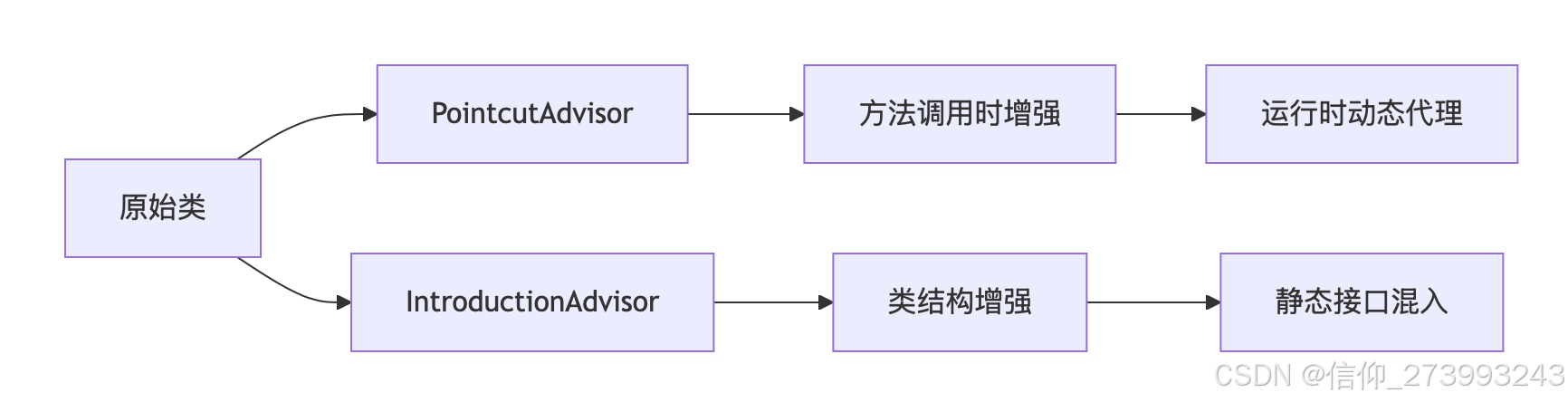
如何使用
IntroductionAdvisor一个是类结构增强, PointcutAdvisor是方法调用时的增强。
案例:给业务类,增加缓存能力
// 1、业务类
@Service
public class ProductService {
    // 原本没有缓存能力
    public Product getProduct(String id) {
        // 数据库查询
    }
}


// 缓存能力接口
public interface Cacheable {
    void cacheResult(String key, Object value);
    Object getCached(String key);
}
// 缓存能力实现逻辑
public class CacheableImpl implements Cacheable {
    private Map<String, Object> cache = new ConcurrentHashMap<>();

    public void cacheResult(String key, Object value) {
        cache.put(key, value);
    }

    public Object getCached(String key) {
        return cache.get(key);
    }
}


// 创建引介切面Advisor,让缓存和业务类建立绑定关系。
public class CacheableAdvisor extends DefaultIntroductionAdvisor {
    public CacheableAdvisor() {
        super(new CacheableImpl(), Cacheable.class);
    }

    // 指定哪些类需要增强
    @Override
    public ClassFilter getClassFilter() {
        return clazz -> ProductService.class.isAssignableFrom(clazz);
    }

    //这2个方法就是让Cacheable和ProductService建立关系。
}


// 使用增强后的ProductService
ProductService service = ...;
Cacheable cacheable = (Cacheable) service; // 强制转换
cacheable.cacheResult("p123", product);
生成的代理对象
// Spring生成的代理类(概念模型)  包含:继承原始类(ProductService)+实现引入的接口(Cacheable)
public class ProductService$$EnhancerBySpringCGLIB extends ProductService implements Cacheable, SpringProxy {

    // 委托对象
    private Cacheable cacheDelegate = new CacheableImpl();

    // 实现Cacheable接口
    public void cacheResult(String key, Object value) {
        cacheDelegate.cacheResult(key, value);
    }

    public Object getCached(String key) {
        return cacheDelegate.getCached(key);
    }

    // 原始方法(可能被增强)
    public Product getProduct(String id) {
        return super.getProduct(id);
    }
}
使用场景
租户上下文传递,比如在Controller统一获取shareId





 扫一扫
扫一扫


 1169
1169

 被折叠的 条评论
为什么被折叠?
被折叠的 条评论
为什么被折叠?
 到【灌水乐园】发言





