






 本文档详细介绍了如何将SpringBoot应用与Seata 1.5.2集成,并通过Nacos 2.0.4进行配置管理。首先,需要下载Seata服务器,执行SQL脚本,配置application.yml并启动服务。接着,在Nacos上创建事务组。客户端配置包括设置service.vgroupMapping与spring.application.name匹配。最后,完成seata-client端的构建,包括pom.xml和application.yml的修改,以及主启动类的准备。文章提供了AT模式下的SQL脚本,启动应用即可完成整合。
springboot整合seata1.5.2+nacos2.0.4
下载seata服务器,并配置server端
执行脚本seata-server.sql
-- -------------------------------- The script used when storeMode is 'db' --------------------------------
-- the table to store GlobalSession data
CREATE TABLE IF NOT EXISTS `global_table`
(
    `xid`                       VARCHAR(128) NOT NULL,
    `transaction_id`            BIGINT,
    `status`                    TINYINT      NOT NULL,
    `application_id`            VARCHAR(32),
    `transaction_service_group` VARCHAR(32),
    `transaction_name`          VARCHAR(128),
    `timeout`                   INT,
    `begin_time`                BIGINT,
    `application_data`          VARCHAR(2000),
    `gmt_create`                DATETIME,
    `gmt_modified`              DATETIME,
    PRIMARY KEY (`xid`),
    KEY `idx_status_gmt_modified` (`status` , `gmt_modified`),
    KEY `idx_transaction_id` (`transaction_id`)
) ENGINE = InnoDB
  DEFAULT CHARSET = utf8mb4;

-- the table to store BranchSession data
CREATE TABLE IF NOT EXISTS `branch_table`
(
    `branch_id`         BIGINT       NOT NULL,
    `xid`               VARCHAR(128) NOT NULL,
    `transaction_id`    BIGINT,
    `resource_group_id` VARCHAR(32),
    `resource_id`       VARCHAR(256),
    `branch_type`       VARCHAR(8),
    `status`            TINYINT,
    `client_id`         VARCHAR(64),
    `application_data`  VARCHAR(2000),
    `gmt_create`        DATETIME(6),
    `gmt_modified`      DATETIME(6),
    PRIMARY KEY (`branch_id`),
    KEY `idx_xid` (`xid`)
) ENGINE = InnoDB
  DEFAULT CHARSET = utf8mb4;

-- the table to store lock data
CREATE TABLE IF NOT EXISTS `lock_table`
(
    `row_key`        VARCHAR(128) NOT NULL,
    `xid`            VARCHAR(128),
    `transaction_id` BIGINT,
    `branch_id`      BIGINT       NOT NULL,
    `resource_id`    VARCHAR(256),
    `table_name`     VARCHAR(32),
    `pk`             VARCHAR(36),
    `status`         TINYINT      NOT NULL DEFAULT '0' COMMENT '0:locked ,1:rollbacking',
    `gmt_create`     DATETIME,
    `gmt_modified`   DATETIME,
    PRIMARY KEY (`row_key`),
    KEY `idx_status` (`status`),
    KEY `idx_branch_id` (`branch_id`),
    KEY `idx_xid_and_branch_id` (`xid` , `branch_id`)
) ENGINE = InnoDB
  DEFAULT CHARSET = utf8mb4;

CREATE TABLE IF NOT EXISTS `distributed_lock`
(
    `lock_key`       CHAR(20) NOT NULL,
    `lock_value`     VARCHAR(20) NOT NULL,
    `expire`         BIGINT,
    primary key (`lock_key`)
) ENGINE = InnoDB
  DEFAULT CHARSET = utf8mb4;

INSERT INTO `distributed_lock` (lock_key, lock_value, expire) VALUES ('AsyncCommitting', ' ', 0);
INSERT INTO `distributed_lock` (lock_key, lock_value, expire) VALUES ('RetryCommitting', ' ', 0);
INSERT INTO `distributed_lock` (lock_key, lock_value, expire) VALUES ('RetryRollbacking', ' ', 0);
INSERT INTO `distributed_lock` (lock_key, lock_value, expire) VALUES ('TxTimeoutCheck', ' ', 0);
修改seata/conf/application.yml,参考application.explame.yaml
server:
  port: 7091

spring:
  application:
    name: seata-server

logging:
  config: classpath:logback-spring.xml
  file:
    path: ${user.home}/logs/seata
  extend:
    logstash-appender:
      destination: 127.0.0.1:4560
    kafka-appender:
      bootstrap-servers: 127.0.0.1:9092
      topic: logback_to_logstash

### 必须添加
console:
  user:
    username: seata
    password: seata

seata:
#### 必须添加
  security:
    secretKey:
    tokenValidityInMilliseconds: 1800000

#  tx-service-group: order-tx-group
#  service:
#    vgroupMapping:
#      order-tx-group: default
#    grouplist:
#      order-tx-group: 127.0.0.1
#   使用JDK代理
#  use-jdk-proxy: false
#  excludes-for-auto-proxying: firstClassNameForExclude,secondClassNameForExclude

  config:
    # support: nacos 、 consul 、 apollo 、 zk  、 etcd3  修改成nacos
    type: nacos
    nacos:
      server-addr: 127.0.0.1:8848
      namespace: 65488447-896f-4971-be88-43f4af23cb99
      group: SEATA_GROUP
      username: nacos
      password: nacos
      ##if use MSE Nacos with auth, mutex with username/password attribute
      #access-key: ""
      #secret-key: ""
      data-id: seata-server.yml

  registry:
    # support: nacos 、 eureka 、 redis 、 zk  、 consul 、 etcd3 、 sofa  修改成nacos
    type: nacos
    preferred-networks: 30.240.*
    nacos:
      application: seata-server
      server-addr: 127.0.0.1:8848
      group: SEATA_GROUP
      namespace: 65488447-896f-4971-be88-43f4af23cb99
      cluster: default
      username: nacos
      password: nacos
      ##if use MSE Nacos with auth, mutex with username/password attribute
      #access-key: ""
      #secret-key: ""


  server:
    service-port: 8091 #If not configured, the default is '${server.port} + 1000'
    max-commit-retry-timeout: -1
    max-rollback-retry-timeout: -1
    rollback-retry-timeout-unlock-enable: false
    enable-check-auth: true
    enable-parallel-request-handle: true
    retry-dead-threshold: 130000
    xaer-nota-retry-timeout: 60000
    recovery:
      handle-all-session-period: 1000
    undo:
      log-save-days: 7
      log-delete-period: 86400000
    session:
      branch-async-queue-size: 5000 #branch async remove queue size
      enable-branch-async-remove: false #enable to asynchronous remove branchSession
  store:
    # support: file 、 db 、 redis  修改成数据库
    mode: db
    session:
      mode: db
    lock:
      mode: db
    file:
      dir: sessionStore
      max-branch-session-size: 16384
      max-global-session-size: 512
      file-write-buffer-cache-size: 16384
      session-reload-read-size: 100
      flush-disk-mode: async
    db:
      datasource: druid
      db-type: mysql
      driver-class-name: com.mysql.jdbc.Driver
      url: jdbc:mysql://0.0.108.44:3308/order?allowMultiQueries=true
      user: root
      password: 55.
      min-conn: 5
      max-conn: 100
      global-table: global_table
      branch-table: branch_table
      lock-table: lock_table
      distributed-lock-table: distributed_lock
      query-limit: 100
      max-wait: 5000

  metrics:
    enabled: false
    registry-type: compact
    exporter-list: prometheus
    exporter-prometheus-port: 9898
  transport:
    rpc-tc-request-timeout: 30000
    enable-tc-server-batch-send-response: false
    shutdown:
      wait: 3
    thread-factory:
      boss-thread-prefix: NettyBoss
      worker-thread-prefix: NettyServerNIOWorker
      boss-thread-size: 1
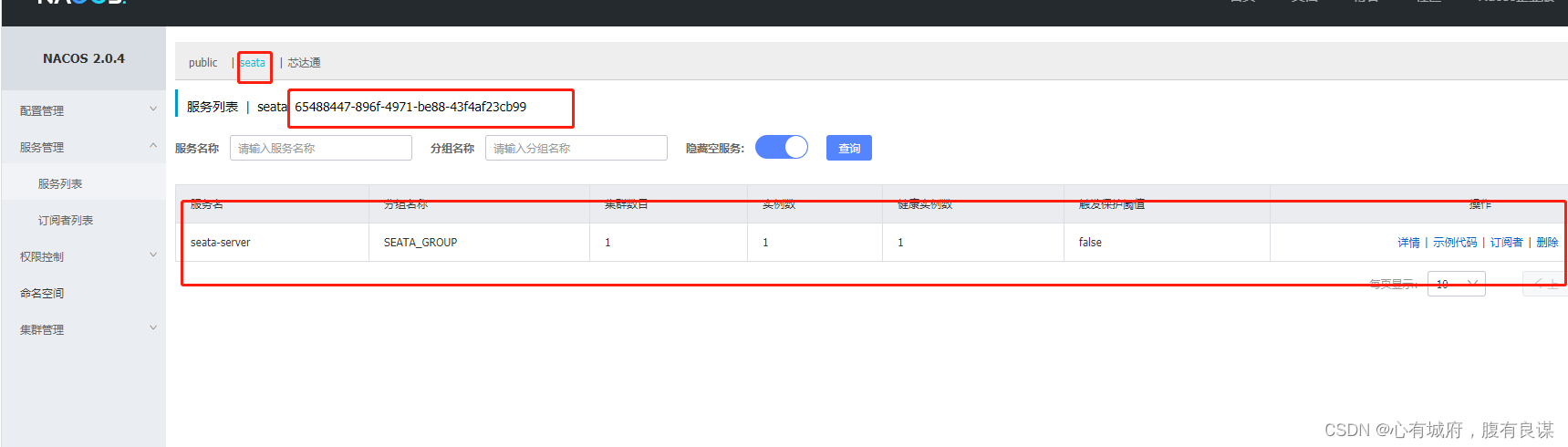
然后执行seata-server.sh,注册到指定的namespace下
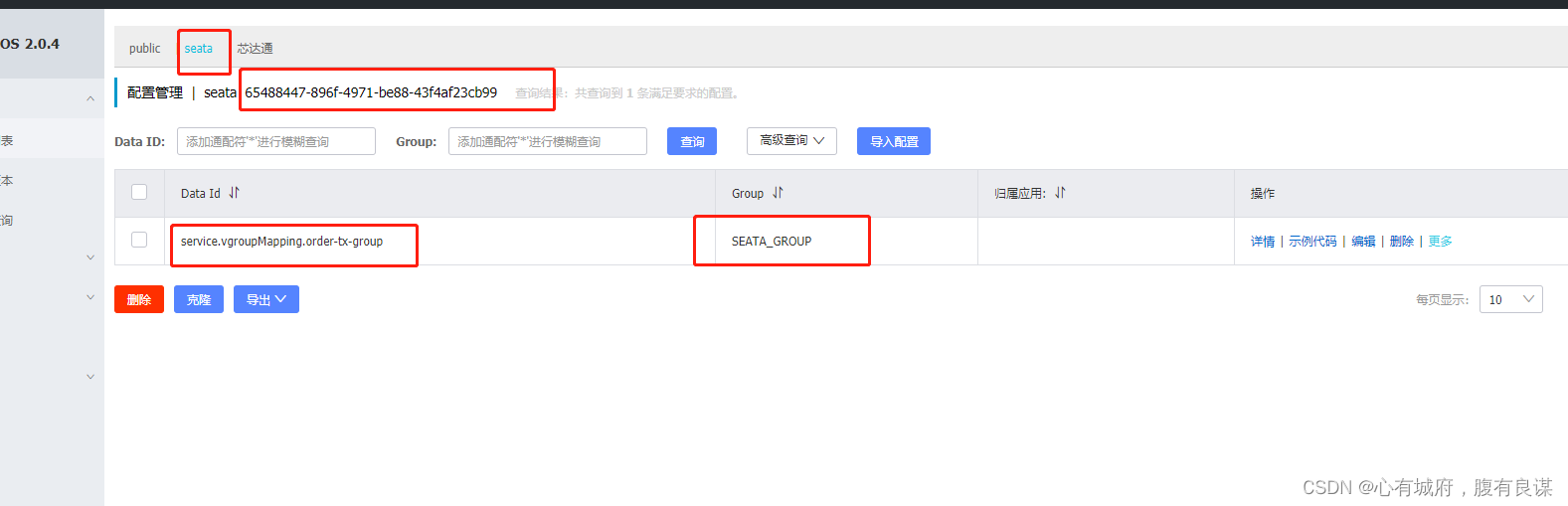
在nacos上面创建事务组
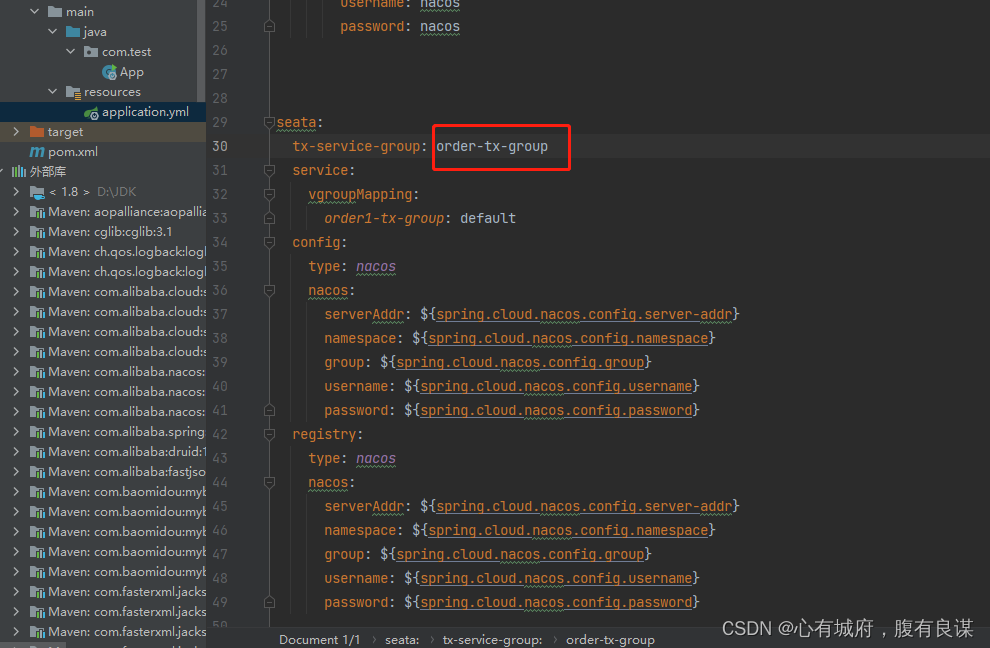
service.vgroupMapping 前面固定的格式,后面加**.order-tx-group**。后面这个可以是client端的spring.application.name的value值,但是它们拼接起来要和nacos的添加的配置文件要保持一致
对应客户端的spring.application.name
构建seata-client端
1. 上面已经再nacos配置的配置了service.vgroupMapping.xxxxx-group
不用使用下划线可能会有问题
2. pom文件
<?xml version="1.0" encoding="UTF-8"?>

<project xmlns="http://maven.apache.org/POM/4.0.0" xmlns:xsi="http://www.w3.org/2001/XMLSchema-instance"
  xsi:schemaLocation="http://maven.apache.org/POM/4.0.0 http://maven.apache.org/xsd/maven-4.0.0.xsd">
  <modelVersion>4.0.0</modelVersion>


  <parent>
    <groupId>org.springframework.boot</groupId>
    <artifactId>spring-boot-starter-parent</artifactId>
    <version>2.6.6</version>
    <relativePath/> <!-- lookup parent from repository -->
  </parent>

  <groupId>org.example</groupId>
  <artifactId>untitled</artifactId>
  <version>1.0-SNAPSHOT</version>
  <packaging>war</packaging>

  <name>untitled Maven Webapp</name>
  <!-- FIXME change it to the project's website -->
  <url>http://www.example.com</url>

  <properties>
    <project.build.sourceEncoding>UTF-8</project.build.sourceEncoding>
    <maven.compiler.source>1.7</maven.compiler.source>
    <maven.compiler.target>1.7</maven.compiler.target>
  </properties>

  <dependencies>
    <dependency>
      <groupId>org.springframework.boot</groupId>
      <artifactId>spring-boot-starter</artifactId>
    </dependency>
    <dependency>
      <groupId> org.springframework.boot</groupId>
      <artifactId>spring-boot-starter-web</artifactId>
    </dependency>
    <dependency>
      <groupId>junit</groupId>
      <artifactId>junit</artifactId>
      <version>4.11</version>
      <scope>test</scope>
    </dependency>
    <dependency>
      <groupId>com.alibaba.cloud</groupId>
      <artifactId>spring-cloud-starter-alibaba-nacos-discovery</artifactId>
      <version>2021.0.1.0</version>
    </dependency>
    <dependency>
      <groupId>com.alibaba.cloud</groupId>
      <artifactId>spring-cloud-starter-alibaba-nacos-config</artifactId>
      <version>2021.0.1.0</version>
    </dependency>

    <dependency>
      <groupId>io.seata</groupId>
      <artifactId>seata-spring-boot-starter</artifactId>
      <version>1.5.1</version>
      <exclusions>
        <exclusion>
          <artifactId>checker-qual</artifactId>
          <groupId>org.checkerframework</groupId>
        </exclusion>
        <exclusion>
          <artifactId>error_prone_annotations</artifactId>
          <groupId>com.google.errorprone</groupId>
        </exclusion>
        <exclusion>
          <artifactId>guava</artifactId>
          <groupId>com.google.guava</groupId>
        </exclusion>
      </exclusions>
    </dependency>
    <dependency>
      <groupId>com.alibaba.cloud</groupId>
      <artifactId>spring-cloud-starter-alibaba-seata</artifactId>
      <version>2.2.8.RELEASE</version>
      <exclusions>
        <exclusion>
          <groupId>io.seata</groupId>
          <artifactId>seata-spring-boot-starter</artifactId>
        </exclusion>
      </exclusions>
    </dependency>
    <dependency>
      <groupId>org.springframework.boot</groupId>
      <artifactId>spring-boot-actuator</artifactId>
    </dependency>
    <dependency>
      <groupId>org.projectlombok</groupId>
      <artifactId>lombok</artifactId>
    </dependency>
    <!-- mybatis -->
    <dependency>
      <groupId>com.baomidou</groupId>
      <artifactId>mybatis-plus-boot-starter</artifactId>
      <version>3.3.0</version>
    </dependency>
    <!--mybatis-generator-->
    <dependency>
      <groupId>org.mybatis.generator</groupId>
      <artifactId>mybatis-generator-core</artifactId>
      <version>1.3.7</version>
    </dependency>
    <dependency>
      <groupId>mysql</groupId>
      <artifactId>mysql-connector-java</artifactId>
    </dependency>


  </dependencies>

  <build>
    <finalName>untitled</finalName>
    <pluginManagement><!-- lock down plugins versions to avoid using Maven defaults (may be moved to parent pom) -->
      <plugins>
        <plugin>
          <artifactId>maven-clean-plugin</artifactId>
          <version>3.1.0</version>
        </plugin>
        <!-- see http://maven.apache.org/ref/current/maven-core/default-bindings.html#Plugin_bindings_for_war_packaging -->
        <plugin>
          <artifactId>maven-resources-plugin</artifactId>
          <version>3.0.2</version>
        </plugin>
        <plugin>
          <artifactId>maven-compiler-plugin</artifactId>
          <version>3.8.0</version>
        </plugin>
        <plugin>
          <artifactId>maven-surefire-plugin</artifactId>
          <version>2.22.1</version>
        </plugin>
        <plugin>
          <artifactId>maven-war-plugin</artifactId>
          <version>3.2.2</version>
        </plugin>
        <plugin>
          <artifactId>maven-install-plugin</artifactId>
          <version>2.5.2</version>
        </plugin>
        <plugin>
          <artifactId>maven-deploy-plugin</artifactId>
          <version>2.8.2</version>
        </plugin>
      </plugins>
    </pluginManagement>
  </build>
</project>
3. 修改application.yml
spring:
  application:
    name: orde1r-service
  datasource:
    url: jdbc:mysql://0.0.108.44:3308/order?allowMultiQueries=true
    driverClassName: com.mysql.jdbc.Driver
    username: root
    password: 121132132

  cloud:
    nacos:
      #注册中心地址集群
      discovery:
        server-addr: 192.168.29.45:8848
        group: SEATA_GROUP
        namespace: 65488447-896f-4971-be88-43f4af23cb99
        username: nacos
        password: nacos
      #配置中心地址集群
      config:
        server-addr: 192.168.29.45:8848
        group: SEATA_GROUP
        namespace: 65488447-896f-4971-be88-43f4af23cb99
        username: nacos
        password: nacos


seata:
  tx-service-group: order-tx-group
  service:
    vgroupMapping:
      order1-tx-group: default
  config:
    type: nacos
    nacos:
      serverAddr: ${spring.cloud.nacos.config.server-addr}
      namespace: ${spring.cloud.nacos.config.namespace}
      group: ${spring.cloud.nacos.config.group}
      username: ${spring.cloud.nacos.config.username}
      password: ${spring.cloud.nacos.config.password}
  registry:
    type: nacos
    nacos:
      serverAddr: ${spring.cloud.nacos.config.server-addr}
      namespace: ${spring.cloud.nacos.config.namespace}
      group: ${spring.cloud.nacos.config.group}
      username: ${spring.cloud.nacos.config.username}
      password: ${spring.cloud.nacos.config.password}

logging:
  level:
    io:
      seata: debug

mybatis-plus:
  global-config:
    banner: false
  configuration:
    map-underscore-to-camel-case: true
    auto-mapping-behavior: full
    log-impl: org.apache.ibatis.logging.stdout.StdOutImpl
  mapper-locations: classpath*:mapper/**/*Mapper.xml
  type-aliases-package: com.test
4. 主启动类 其他业务类小编没有写,家人么可以自己发挥
package com.test;

import org.springframework.boot.SpringApplication;
import org.springframework.boot.autoconfigure.SpringBootApplication;
import org.springframework.cloud.client.discovery.EnableDiscoveryClient;
import org.springframework.transaction.annotation.EnableTransactionManagement;

@SpringBootApplication
@EnableDiscoveryClient
@EnableTransactionManagement
public class App {

    public static void main(String[] args) {
        SpringApplication.run(App.class,args);
        System.out.println("启动成功");
    }
}
AT模式sql脚本
SET NAMES utf8mb4;
SET FOREIGN_KEY_CHECKS = 0;

-- ----------------------------
-- Table structure for undo_log
-- ----------------------------
DROP TABLE IF EXISTS `undo_log`;
CREATE TABLE `undo_log`  (
  `branch_id` bigint(20) NOT NULL COMMENT '分支事务ID',
  `xid` varchar(100) CHARACTER SET utf8 COLLATE utf8_general_ci NOT NULL COMMENT '全局事务ID',
  `context` varchar(128) CHARACTER SET utf8 COLLATE utf8_general_ci NOT NULL COMMENT '上下文',
  `rollback_info` longblob NOT NULL COMMENT '回滚信息',
  `log_status` int(11) NOT NULL COMMENT '状态,0正常,1全局已完成',
  `log_created` datetime(6) NOT NULL COMMENT '创建时间',
  `log_modified` datetime(6) NOT NULL COMMENT '修改时间',
  UNIQUE INDEX `ux_undo_log`(`xid`, `branch_id`) USING BTREE
) ENGINE = InnoDB CHARACTER SET = utf8 COLLATE = utf8_general_ci COMMENT = 'AT transaction mode undo table' ROW_FORMAT = Compact;

SET FOREIGN_KEY_CHECKS = 1;
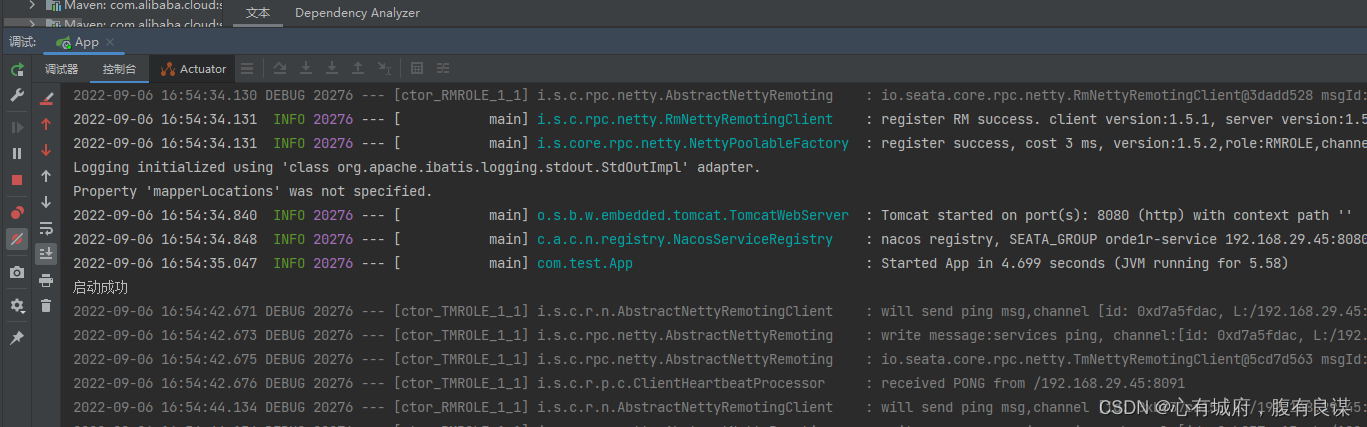
直接启动





 扫一扫
扫一扫


 947
947

 被折叠的 条评论
为什么被折叠?
被折叠的 条评论
为什么被折叠?
 到【灌水乐园】发言





