Tkinter批量截取log

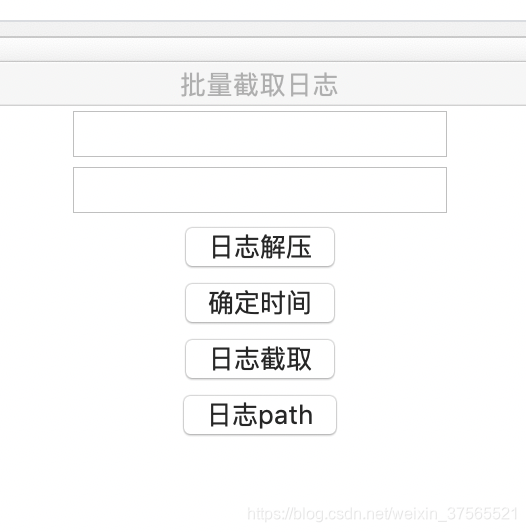
本文介绍了一款基于Python的GUI工具,用于批量处理日志文件,包括解压缩、过滤和截取特定时间段的日志数据,适用于ADAS系统日志分析。

http://automap.bj.bcebos.com/mapautozip/5.3.0/20201020/repacked_path_for_10x_adas/BaiduNavi_china.zip
#!/usr/bin/python

-- coding: UTF-8 --

import Tkinter
import os,sys;
import time;
import tkinter.messagebox
reload(sys)
sys.setdefaultencoding(‘utf-8’)
top = Tkinter.Tk()
top.geometry(‘580x500’)
top.resizable(100, 100)
top.title(“批量截取日志”)
e = Tkinter.StringVar()
logdir = Tkinter.Entry(top, textvariable=e)
logdir.pack()
e1 = Tkinter.StringVar()
bugstart = Tkinter.Entry(top, textvariable=e1)
valtime=bugstart.get();
bugstart.pack()
global dir;
def getdir():
if len(logdir.get())!= 0:
logdircontext = logdir.get()
dir=logdircontext #把这个目录改成你存放log的目录
return dir;
else:
time.sleep(2)
getdir()
def logunzip():
os.system(‘gunzip -d %s/ -name .log.gz -d %s/’ % (dir,dir))
def loggrep():
list = valtime.split(’|’);
print list[0]
for times in list:
time.sleep(10)
os.system('cat %s/
.log | grep %s >> %s/%s.txt’ % (getdir(),times,getdir(),times));
tkinter.messagebox.askokcancel(title=‘标题’, message=‘截取数据完毕’)
def comfiretext():
global valtime
valtime = bugstart.get()
print valtime
start = Tkinter.Button(top, text=“日志解压”, command=logunzip)
comfire =Tkinter.Button(top, text=“确定时间”, command=comfiretext)
stop = Tkinter.Button(top, text=“日志截取”, command=loggrep)
getdirc = Tkinter.Button(top, text=“日志path”, command=getdir)
buttonlist =[start,comfire,stop,getdirc];
for buttons in buttonlist:
buttons.pack();
top.mainloop()
在这里插入图片描述

修改文字识别方案为ddddocr:import tkinter as tk from tkinter import ttk, scrolledtext, messagebox, simpledialog import time import pyautogui import pyperclip import threading import random import queue import os import sys import subprocess import platform from PIL import ImageGrab, Image class SuperTyperPro: def __init__(self): self.root = tk.Tk() self.root.title("超级打字助手 Pro v4.2") self.root.geometry("750x700") self.root.resizable(True, True) # 全局状态控制 self.running_flag = False self.custom_content = [] self.default_content = [str(i) for i in range(10)] self.interval = 1.0 # 默认间隔1秒 # 模式系统 - 永久设置为最强模式 self.mode = "ultimate" self.max_content_items = 999 # 无限制 self.min_interval = 0.05 # 最快0.05秒 self.random_output_mode = False # 性能优化 self.log_queue = queue.Queue() self.last_log_time = 0 self.log_batch = [] # 文字识别相关 self.text_detection_enabled = False self.text_detection_interval = 5 # 5秒检测一次 self.text_to_detect = "生成" self.tesseract_installed = False self.tesseract_path = "" # 检查并设置 Tesseract OCR self.setup_tesseract() # 创建界面 self.setup_ui() # 启动日志处理循环 self.root.after(100, self.process_log_queue) # 设置关闭事件处理 self.root.protocol("WM_DELETE_WINDOW", self.on_closing) # 显示模式信息 self.update_mode_display() def setup_tesseract(self): """设置 Tesseract OCR 路径""" try: # 尝试导入 pytesseract import pytesseract self.tesseract_installed = True # 尝试自动查找 Tesseract 路径 self.tesseract_path = self.find_tesseract_path() if self.tesseract_path: pytesseract.pytesseract.tesseract_cmd = self.tesseract_path self.fast_log(f"✅ Tesseract 已配置: {self.tesseract_path}") else: self.tesseract_installed = False self.fast_log("⚠️ 未找到 Tesseract OCR,文字识别功能将不可用") except ImportError: self.tesseract_installed = False self.fast_log("⚠️ pytesseract 未安装,文字识别功能将不可用") def find_tesseract_path(self): """尝试在常见位置查找 Tesseract 可执行文件""" # Windows 常见安装路径 if platform.system() == "Windows": paths = [ r"C:\Program Files\Tesseract-OCR\tesseract.exe", r"C:\Program Files (x86)\Tesseract-OCR\tesseract.exe" ] for path in paths: if os.path.exists(path): return path # 对于 Linux/macOS,尝试在 PATH 中查找 try: result = subprocess.run(['which', 'tesseract'], capture_output=True, text=True) if result.returncode == 0 and result.stdout.strip(): return result.stdout.strip() except: pass return "" def install_tesseract(self): """提供安装 Tesseract OCR 的指导""" messagebox.showinfo( "安装 Tesseract OCR", "文字识别功能需要 Tesseract OCR 引擎:\n\n" "1. Windows 用户:\n" " - 下载安装程序: https://github.com/UB-Mannheim/tesseract/wiki\n" " - 安装时勾选 'Additional language data' 并选择中文\n" " - 安装后重启程序\n\n" "2. macOS 用户:\n" " - 使用 Homebrew: brew install tesseract\n" " - 安装中文语言包: brew install tesseract-lang\n\n" "3. Linux 用户 (Debian/Ubuntu):\n" " - sudo apt install tesseract-ocr\n" " - sudo apt install tesseract-ocr-chi-sim\n\n" "安装后请重启本程序。" ) def setup_ui(self): """创建用户界面""" # 设置样式 self.setup_styles() # 创建主框架 main_frame = ttk.Frame(self.root) main_frame.pack(fill=tk.BOTH, expand=True, padx=10, pady=10) # 上半部分:控制面板 control_frame = ttk.Frame(main_frame) control_frame.pack(fill=tk.BOTH, expand=True) # 标题和模式信息 title_frame = ttk.Frame(control_frame) title_frame.pack(fill=tk.X, pady=(0, 15)) # 应用标题 title_label = ttk.Label(title_frame, text="超级打字助手 Pro", style="Title.TLabel") title_label.pack(side=tk.LEFT) # 版本信息 version_label = ttk.Label(title_frame, text="v4.2", style="Version.TLabel") version_label.pack(side=tk.LEFT, padx=(5, 0)) # 右侧按钮区域 right_frame = ttk.Frame(title_frame) right_frame.pack(side=tk.RIGHT) self.mode_label = ttk.Label(right_frame, text="", style="Mode.TLabel") self.mode_label.pack(side=tk.TOP, anchor=tk.E) button_frame = ttk.Frame(right_frame) button_frame.pack(side=tk.TOP, pady=(5, 0)) about_btn = ttk.Button(button_frame, text="关于", command=self.show_about, width=8) about_btn.pack(side=tk.LEFT, padx=2) # 控制按钮框架 control_buttons_frame = ttk.Frame(control_frame) control_buttons_frame.pack(fill=tk.X, pady=5) # 使用tk.Button并设置正确的样式 self.start_btn = tk.Button( control_buttons_frame, text="开始输入 (F9)", command=self.toggle_start, bg="white", fg="black", font=("Microsoft YaHei", 9), relief="raised", bd=1, padx=10, pady=5, highlightbackground="black", highlightcolor="blue", highlightthickness=1 ) self.start_btn.pack(side=tk.LEFT, padx=5) self.stop_btn = tk.Button( control_buttons_frame, text="停止输入 (F10)", command=self.stop_typing, state=tk.DISABLED, bg="white", fg="black", font=("Microsoft YaHei", 9), relief="raised", bd=1, padx=10, pady=5, highlightbackground="black", highlightcolor="blue", highlightthickness=1 ) self.stop_btn.pack(side=tk.LEFT, padx=5) content_btn = tk.Button( control_buttons_frame, text="设置内容 (F11)", command=self.open_content_dialog, bg="white", fg="black", font=("Microsoft YaHei", 9), relief="raised", bd=1, padx=10, pady=5, highlightbackground="black", highlightcolor="blue", highlightthickness=1 ) content_btn.pack(side=tk.LEFT, padx=5) # 随机输出模式按钮 self.random_mode_btn = tk.Button( control_buttons_frame, text="随机模式: 关闭", command=self.toggle_random_mode, bg="#f0f0f0", fg="black", font=("Microsoft YaHei", 9), relief="raised", bd=1, padx=10, pady=5, highlightbackground="black", highlightcolor="blue", highlightthickness=1 ) self.random_mode_btn.pack(side=tk.LEFT, padx=5) # 文字识别按钮 self.text_detect_btn = tk.Button( control_buttons_frame, text="文字识别: 关闭", command=self.toggle_text_detection, bg="#f0f0f0", fg="black", font=("Microsoft YaHei", 9), relief="raised", bd=1, padx=10, pady=5, highlightbackground="black", highlightcolor="blue", highlightthickness=1 ) self.text_detect_btn.pack(side=tk.LEFT, padx=5) # OCR状态显示 self.ocr_status_var = tk.StringVar(value="OCR状态: 未知") ocr_status_label = ttk.Label(control_buttons_frame, textvariable=self.ocr_status_var, style="Small.TLabel") ocr_status_label.pack(side=tk.LEFT, padx=10) self.update_ocr_status() # 频率控制框架 freq_frame = ttk.LabelFrame(control_frame, text="发送频率控制", padding="15") freq_frame.pack(fill=tk.X, pady=10) # 频率滑块 freq_scale_frame = ttk.Frame(freq_frame) freq_scale_frame.pack(fill=tk.X, pady=5) ttk.Label(freq_scale_frame, text="快", style="Small.TLabel").pack(side=tk.LEFT) self.freq_scale = tk.Scale( freq_scale_frame, from_=self.min_interval, to=5.0, resolution=0.1, orient=tk.HORIZONTAL, length=350, showvalue=True, command=self.update_frequency, troughcolor="#e1e1e1", sliderrelief="raised", bg="#f5f5f5" ) self.freq_scale.set(self.interval) self.freq_scale.pack(side=tk.LEFT, fill=tk.X, expand=True, padx=10) ttk.Label(freq_scale_frame, text="慢", style="Small.TLabel").pack(side=tk.LEFT) # 预设频率按钮 preset_frame = ttk.Frame(freq_frame) preset_frame.pack(fill=tk.X, pady=5) ttk.Button(preset_frame, text="1秒1条", command=lambda: self.set_preset_frequency(1.0), style="Small.TButton").pack(side=tk.LEFT, padx=2) ttk.Button(preset_frame, text="1秒2条", command=lambda: self.set_preset_frequency(0.5), style="Small.TButton").pack(side=tk.LEFT, padx=2) ttk.Button(preset_frame, text="1秒5条", command=lambda: self.set_preset_frequency(0.2), style="Small.TButton").pack(side=tk.LEFT, padx=2) ttk.Button(preset_frame, text="1秒10条", command=lambda: self.set_preset_frequency(0.1), style="Small.TButton").pack(side=tk.LEFT, padx=2) ttk.Button(preset_frame, text="1秒20条", command=lambda: self.set_preset_frequency(0.05), style="Small.TButton").pack(side=tk.LEFT, padx=2) # 当前频率显示 self.freq_var = tk.StringVar(value=f"当前频率: 每{self.interval}秒发送一条") freq_label = ttk.Label(freq_frame, textvariable=self.freq_var, style="Bold.TLabel") freq_label.pack(pady=5) # 状态显示 status_frame = ttk.LabelFrame(control_frame, text="状态信息", padding="10") status_frame.pack(fill=tk.X, pady=10) self.status_var = tk.StringVar(value="就绪 - 等待开始...") status_label = ttk.Label(status_frame, textvariable=self.status_var, style="Status.TLabel") status_label.pack(anchor=tk.W) # 当前内容显示 content_frame = ttk.LabelFrame(control_frame, text="当前输出内容", padding="10") content_frame.pack(fill=tk.BOTH, expand=True, pady=10) self.content_text = scrolledtext.ScrolledText( content_frame, height=6, wrap=tk.WORD, bg="#fafafa", relief="solid", borderwidth=1 ) self.content_text.pack(fill=tk.BOTH, expand=True) self.update_content_display() # 日志面板 log_frame = ttk.LabelFrame(control_frame, text="操作日志") log_frame.pack(fill=tk.BOTH, expand=True, pady=10) # 日志工具栏 log_toolbar = ttk.Frame(log_frame) log_toolbar.pack(fill=tk.X, padx=5, pady=5) ttk.Button(log_toolbar, text="清空日志", command=self.clear_log, style="Small.TButton").pack(side=tk.LEFT, padx=2) ttk.Button(log_toolbar, text="复制日志", command=self.copy_log, style="Small.TButton").pack(side=tk.LEFT, padx=2) # OCR安装按钮 ttk.Button( log_toolbar, text="安装OCR指南", command=self.install_tesseract, style="Small.TButton" ).pack(side=tk.LEFT, padx=2) self.log_text = scrolledtext.ScrolledText( log_frame, wrap=tk.WORD, state=tk.DISABLED, bg="#fafafa", relief="solid", borderwidth=1 ) self.log_text.pack(fill=tk.BOTH, expand=True, padx=5, pady=5) # 绑定快捷键 self.root.bind('<F9>', lambda e: self.toggle_start()) self.root.bind('<F10>', lambda e: self.stop_typing()) self.root.bind('<F11>', lambda e: self.open_content_dialog()) # 免责声明 - 放在整个窗口最底部 disclaimer_frame = ttk.Frame(main_frame) disclaimer_frame.pack(fill=tk.X, padx=10, pady=15) disclaimer_label = tk.Label( disclaimer_frame, text="本作者开发的初衷是和朋友游玩,他人行为与本作者没有任何关系,仅供学习游玩", font=("Microsoft YaHei", 17), fg="#e74c3c", justify=tk.CENTER, bg="#f9f9f9" ) disclaimer_label.pack(fill=tk.X, pady=2) # 版权信息 copyright_frame = ttk.Frame(main_frame) copyright_frame.pack(fill=tk.X, padx=10, pady=(0, 5)) copyright_label = ttk.Label( copyright_frame, text="© 2024 超级打字助手 Pro", style="Copyright.TLabel", cursor="hand2" ) copyright_label.pack(side=tk.RIGHT) copyright_label.bind("<Button-1>", lambda e: self.show_about()) # 设置焦点 self.root.focus_set() # 绑定按钮事件以改变边框颜色 self.bind_button_events() def update_ocr_status(self): """更新 OCR 状态显示""" if self.tesseract_installed: self.ocr_status_var.set("OCR状态: 已安装") else: self.ocr_status_var.set("OCR状态: 未安装") def bind_button_events(self): """绑定按钮事件以改变边框颜色""" # 开始按钮 self.start_btn.bind("<ButtonPress-1>", lambda e: self.start_btn.config(highlightbackground="blue")) self.start_btn.bind("<ButtonRelease-1>", lambda e: self.start_btn.config(highlightbackground="black")) # 停止按钮 self.stop_btn.bind("<ButtonPress-1>", lambda e: self.stop_btn.config(highlightbackground="blue")) self.stop_btn.bind("<ButtonRelease-1>", lambda e: self.stop_btn.config(highlightbackground="black")) # 随机模式按钮 self.random_mode_btn.bind("<ButtonPress-1>", lambda e: self.random_mode_btn.config(highlightbackground="blue")) self.random_mode_btn.bind("<ButtonRelease-1>", lambda e: self.random_mode_btn.config(highlightbackground="black")) # 文字识别按钮 self.text_detect_btn.bind("<ButtonPress-1>", lambda e: self.text_detect_btn.config(highlightbackground="blue")) self.text_detect_btn.bind("<ButtonRelease-1>", lambda e: self.text_detect_btn.config(highlightbackground="black")) def toggle_text_detection(self): """切换文字识别模式""" if not self.tesseract_installed: self.install_tesseract() return self.text_detection_enabled = not self.text_detection_enabled if self.text_detection_enabled: self.text_detect_btn.config( text="文字识别: 开启", bg="#4CAF50", # 绿色背景 fg="white" ) self.fast_log("🔍 文字识别模式已开启") # 启动文字识别线程 threading.Thread(target=self.detect_text_and_click, daemon=True).start() else: self.text_detect_btn.config( text="文字识别: 关闭", bg="#f0f0f0", # 默认灰色背景 fg="black" ) self.fast_log("🔍 文字识别模式已关闭") def detect_text_and_click(self): """检测屏幕上的文字并模拟点击""" while self.text_detection_enabled: try: # 截取整个屏幕 screenshot = ImageGrab.grab() # 使用OCR识别文字 import pytesseract text = pytesseract.image_to_string(screenshot, lang='chi_sim') # 检查是否包含目标文字 if self.text_to_detect in text: self.fast_log(f"✅ 检测到文字 '{self.text_to_detect}',模拟点击屏幕") # 获取屏幕中心位置 screen_width, screen_height = pyautogui.size() center_x = screen_width // 2 center_y = screen_height // 2 # 模拟点击 pyautogui.click(center_x, center_y) # 等待5秒 time.sleep(self.text_detection_interval) except Exception as e: self.fast_log(f"❌ 文字识别失败: {e}") time.sleep(5) def toggle_random_mode(self): """切换随机输出模式""" self.random_output_mode = not self.random_output_mode if self.random_output_mode: self.random_mode_btn.config( text="随机模式: 开启", bg="#4CAF50", # 绿色背景 fg="white" ) self.fast_log("🎲 随机输出模式已开启") else: self.random_mode_btn.config( text="随机模式: 关闭", bg="#f0f0f0", # 默认灰色背景 fg="black" ) self.fast_log("📝 顺序输出模式已开启") # 更新内容显示 self.update_content_display() def setup_styles(self): """设置界面样式""" style = ttk.Style() # 配置不同样式 style.configure("Title.TLabel", font=("Microsoft YaHei", 16, "bold"), foreground="#2c3e50") style.configure("Version.TLabel", font=("Microsoft YaHei", 10), foreground="#7f8c8d") style.configure("Mode.TLabel", font=("Microsoft YaHei", 9, "bold"), foreground="#2980b9") style.configure("Bold.TLabel", font=("Microsoft YaHei", 10, "bold")) style.configure("Small.TLabel", font=("Microsoft YaHei", 8)) style.configure("Status.TLabel", font=("Microsoft YaHei", 9)) style.configure("Copyright.TLabel", font=("Microsoft YaHei", 8), foreground="#3498db") style.configure("TButton", padding=6) style.configure("Small.TButton", font=("Microsoft YaHei", 8), padding=3) style.configure("TLabelFrame", font=("Microsoft YaHei", 10, "bold")) style.configure("TLabelFrame.Label", font=("Microsoft YaHei", 10, "bold")) def show_about(self): """显示关于对话框""" messagebox.showinfo("关于", "超级打字助手 Pro v4.2\n" "作者: 云醉\n" "邮箱: 1153430448@qq.com\n\n" "功能特点:\n" "- 自动输入文本\n" "- 可自定义输入内容\n" "- 高级文字识别功能\n" "- 随机输出模式\n" "- 多频率控制\n\n" "注意: 文字识别功能需要安装 Tesseract OCR" ) def update_mode_display(self): """更新模式显示""" mode_text = "最强模式" self.mode_label.config(text=f"模式: {mode_text}") def update_frequency(self, value): """更新发送频率""" self.interval = float(value) self.freq_var.set(f"当前频率: 每{self.interval:.2f}秒发送一条") def set_preset_frequency(self, interval): """设置预设频率""" self.freq_scale.set(interval) self.interval = interval self.freq_var.set(f"当前频率: 每{self.interval:.2f}秒发送一条") self.fast_log(f"📶 预设频率已设置: 每{self.interval:.2f}秒发送一条") def update_content_display(self): """更新内容显示区域""" self.content_text.config(state=tk.NORMAL) self.content_text.delete(1.0, tk.END) content_list = self.custom_content if self.custom_content else self.default_content if self.random_output_mode: self.content_text.insert(tk.END, "【随机输出模式】\n") random.shuffle(content_list) for i, content in enumerate(content_list[:self.max_content_items]): self.content_text.insert(tk.END, f"{i+1}. {content}\n") self.content_text.config(state=tk.DISABLED) def open_content_dialog(self): """打开内容设置对话框""" dialog = tk.Toplevel(self.root) dialog.title("设置输入内容") dialog.geometry("500x400") dialog.resizable(True, True) dialog.transient(self.root) dialog.grab_set() # 主框架 main_frame = ttk.Frame(dialog, padding=15) main_frame.pack(fill=tk.BOTH, expand=True) # 提示文字 prompt_label = ttk.Label( main_frame, text="请输入要自动输入的内容(每行一条):", justify=tk.LEFT ) prompt_label.pack(anchor=tk.W, pady=(0, 5)) # 内容输入框 content_entry = scrolledtext.ScrolledText( main_frame, wrap=tk.WORD, height=12 ) content_entry.pack(fill=tk.BOTH, expand=True, pady=5) # 填充当前内容 content_list = self.custom_content if self.custom_content else self.default_content content_entry.insert(tk.END, "\n".join(content_list)) # 按钮框架 button_frame = ttk.Frame(main_frame) button_frame.pack(fill=tk.X, pady=(10, 0)) def save_content(): content = content_entry.get(1.0, tk.END).strip() if content: self.custom_content = [line.strip() for line in content.split('\n') if line.strip()] self.fast_log(f"✅ 已保存 {len(self.custom_content)} 条自定义内容") self.update_content_display() dialog.destroy() ttk.Button(button_frame, text="保存", command=save_content, width=10).pack(side=tk.RIGHT, padx=5) ttk.Button(button_frame, text="取消", command=dialog.destroy, width=10).pack(side=tk.RIGHT) def toggle_start(self): """切换开始/停止状态""" if not self.running_flag: self.start_typing() else: self.stop_typing() def start_typing(self): """开始自动输入""" self.running_flag = True self.start_btn.config(state=tk.DISABLED) self.stop_btn.config(state=tk.NORMAL) self.status_var.set("运行中...") self.fast_log("▶️ 开始自动输入") # 启动输入线程 threading.Thread(target=self.type_content, daemon=True).start() def stop_typing(self): """停止自动输入""" self.running_flag = False self.start_btn.config(state=tk.NORMAL) self.stop_btn.config(state=tk.DISABLED) self.status_var.set("已停止") self.fast_log("⏹️ 停止自动输入") def type_content(self): """自动输入内容""" content_list = self.custom_content if self.custom_content else self.default_content if not content_list: self.fast_log("⚠️ 没有可输入的内容") self.stop_typing() return # 如果开启了随机模式,打乱内容顺序 if self.random_output_mode: content_list = content_list.copy() random.shuffle(content_list) self.fast_log(f"📝 准备输入 {len(content_list)} 条内容") # 获取焦点到目标应用 self.fast_log("⚠️ 请确保目标应用窗口已激活") time.sleep(2) # 给用户时间切换窗口 # 开始输入循环 while self.running_flag: for content in content_list[:self.max_content_items]: if not self.running_flag: break try: # 复制内容到剪贴板 pyperclip.copy(content) # 粘贴内容 pyautogui.hotkey('ctrl', 'v') self.fast_log(f"📤 输入: {content}") # 发送(回车键) pyautogui.press('enter') # 等待指定间隔 time.sleep(self.interval) except Exception as e: self.fast_log(f"❌ 输入失败: {e}") time.sleep(1) def fast_log(self, message): """快速日志记录(使用队列,减少GUI更新)""" current_time = time.time() # 如果是高频日志,进行批量处理 if current_time - self.last_log_time < 0.1 and "输入:" in message: self.log_batch.append(message) if len(self.log_batch) >= 5: batch_msg = f"📤 批量输入: {len(self.log_batch)}条消息..." self.log_queue.put(batch_msg) self.log_batch.clear() else: if self.log_batch: batch_msg = f"📤 批量输入: {len(self.log_batch)}条消息..." self.log_queue.put(batch_msg) self.log_batch.clear() self.log_queue.put(message) self.last_log_time = current_time def process_log_queue(self): """处理日志队列(减少GUI更新频率)""" try: while True: message = self.log_queue.get_nowait() self.log_text.config(state=tk.NORMAL) self.log_text.insert(tk.END, f"{time.strftime('%H:%M:%S')} - {message}\n") self.log_text.see(tk.END) self.log_text.config(state=tk.DISABLED) # 更新状态栏(仅重要消息) if "✅" in message or "❌" in message or "🛑" in message: self.status_var.set(message.split(" - ")[-1]) except queue.Empty: pass self.root.after(100, self.process_log_queue) # 每100ms处理一次 def clear_log(self): """清空日志""" self.log_text.config(state=tk.NORMAL) self.log_text.delete(1.0, tk.END) self.log_text.config(state=tk.DISABLED) self.fast_log("🧹 日志已清空") def copy_log(self): """复制日志内容""" log_content = self.log_text.get(1.0, tk.END) pyperclip.copy(log_content) self.fast_log("📋 日志已复制到剪贴板") def on_closing(self): """关闭窗口时的处理""" self.running_flag = False # 停止任何正在进行的输入 self.text_detection_enabled = False # 停止文字识别 self.root.destroy() # 程序入口 if __name__ == "__main__": app = SuperTyperPro() app.root.mainloop()
11-18
【import tkinter as tk from tkinter import ttk, scrolledtext, messagebox, filedialog import threading from openpyxl import Workbook from openpyxl.drawing.image import Image as ExcelImage from PIL import Image import requests import base64 import json import os from datetime import datetime, timedelta import time from selenium import webdriver from selenium.webdriver.support.ui import WebDriverWait from selenium.webdriver.chrome.options import Options import cv2 import numpy as np import easyocr import io import pyautogui from selenium.webdriver.chrome.service import Service import openpyxl as Excelopenpyxl from openpyxl.utils import get_column_letter class FOFASearchGUI: def __init__(self, root): self._stop_flag = False self.root = root self.root.title("FOFA搜索工具 - APK下载检测整合版") self.root.geometry("1000x950") root.geometry("+900+200") # 变量 self.rules_file = "rules2.txt" self.api_key = "723e2138c72d9320c5bb2e884cb43eed" self.results = [] # 存储FOFA搜索结果 self.apk_results = {} # 存储每个URL对应的APK检测结果 self.setup_ui() # 自动加载规则 self.auto_load_rules(0) self.GuiZhi = None # 自动点击配置 self.download_folder = self.setup_download_folder() self.driver = None self.ret_down_path = None self.keywords = self.load_keywords_from_file() # -------监控-------------------------- # 设置默认监控路径 self.active_downloads = {} self.monitor_running = False self.root.grid_rowconfigure(1, weight=1) # 进度区域可扩展 self.root.grid_columnconfigure(0, weight=1) # 主列可扩展 # 设置关闭事件处理 self.root.protocol("WM_DELETE_WINDOW", self.on_close) # 初始化行计数器 self.row_counter = 0 # -------监控-------------------------- def setup_download_folder(self): """设置下载文件夹""" download_folder = os.path.join(os.getcwd(), "downloads") if not os.path.exists(download_folder): os.makedirs(download_folder) return download_folder def get_past_date(self, days=3): """获取指定天数前的日期""" past_date = datetime.now() - timedelta(days=days) return past_date.strftime("%Y-%m-%d") def setup_ui(self): main_frame = ttk.Frame(self.root, padding="10") main_frame.grid(row=0, column=0, sticky=(tk.W, tk.E, tk.N, tk.S)) self.root.columnconfigure(0, weight=1) self.root.rowconfigure(0, weight=1) # 设置左右列权重为7:3 main_frame.columnconfigure(0, weight=8) # 左侧区域占比70% main_frame.columnconfigure(1, weight=2) # 右侧区域占比30% # === 左侧区域 (规则和结果显示) === left_frame = ttk.Frame(main_frame) left_frame.grid(row=0, column=0, rowspan=3, sticky=(tk.W, tk.E, tk.N, tk.S)) left_frame.columnconfigure(0, weight=1) main_frame.rowconfigure(0, weight=1) # 运行显示区域 rules_frame = ttk.LabelFrame(left_frame, text="运行结果", padding="5") rules_frame.grid(row=0, column=0, sticky=(tk.W, tk.E, tk.N, tk.S), pady=(0, 5)) rules_frame.columnconfigure(0, weight=1) rules_frame.rowconfigure(0, weight=1) # self.rules_tree = ttk.Treeview(rules_frame, columns=(), height=8) self.rules_tree = scrolledtext.ScrolledText(rules_frame, height=15, wrap=tk.WORD) self.rules_tree.grid(row=0, column=0, sticky=(tk.W, tk.E, tk.N, tk.S)) # -------监控-------------------------- # 添加开始监控按钮 # =============== 中间进度区域 =============== progress_frame = ttk.LabelFrame(self.root, text="下载进度", padding=10) progress_frame.grid(row=1, column=0, sticky="nsew", padx=10, pady=5) progress_frame.grid_rowconfigure(0, weight=1) # canvas行可扩展 progress_frame.grid_columnconfigure(0, weight=1) # canvas列可扩展 # 创建带滚动条的画布 self.canvas = tk.Canvas(progress_frame) self.scrollbar = ttk.Scrollbar( progress_frame, orient="vertical", command=self.canvas.yview ) # 可滚动区域 self.scrollable_frame = ttk.Frame(self.canvas) self.scrollable_frame.bind( "<Configure>", lambda e: self.canvas.configure(scrollregion=self.canvas.bbox("all")) ) # 网格布局滚动区域 self.canvas.create_window((0, 0), window=self.scrollable_frame, anchor="nw") self.canvas.configure(yscrollcommand=self.scrollbar.set) # 布局画布和滚动条 self.canvas.grid(row=0, column=0, sticky="nsew") self.scrollbar.grid(row=0, column=1, sticky="ns") # =============== 底部按钮区域 =============== bottom_frame = ttk.Frame(self.root, padding=10) bottom_frame.grid(row=2, column=0, sticky="ew", padx=10, pady=5) bottom_frame.grid_columnconfigure(0, weight=1) # 退出按钮区域居右 # 退出按钮 ttk.Button( bottom_frame, text="退出", command=self.on_close, width=10 ).grid(row=0, column=1, sticky="e") # -------监控-------------------------- scrollbar = ttk.Scrollbar(rules_frame, orient=tk.VERTICAL, command=self.rules_tree.yview) scrollbar.grid(row=0, column=1, sticky=(tk.N, tk.S)) self.rules_tree.configure(yscrollcommand=scrollbar.set) # 日志显示区域 result_frame = ttk.LabelFrame(left_frame, text="运行日志", padding="5") result_frame.grid(row=2, column=0, sticky=(tk.W, tk.E, tk.N, tk.S), pady=(5, 0)) result_frame.columnconfigure(0, weight=1) result_frame.rowconfigure(0, weight=1) self.result_text = scrolledtext.ScrolledText(result_frame, height=30, wrap=tk.WORD) self.result_text.grid(row=0, column=0, sticky=(tk.W, tk.E, tk.N, tk.S)) # 进度条 self.progress = ttk.Progressbar(left_frame, mode='determinate', maximum=100) self.progress.grid(row=3, column=0, sticky=(tk.W, tk.E), pady=(5, 0)) # === 右侧区域 (其他组件) === # 创建右侧框架 - 修复未定义错误 right_frame = ttk.Frame(main_frame) right_frame.grid(row=0, column=1, sticky=(tk.N, tk.S, tk.W, tk.E)) right_frame.columnconfigure(0, weight=1) right_frame.rowconfigure(0, weight=1) # 添加此行确保Notebook填充空间 # 在right_frame中创建Notebook选项卡 notebook = ttk.Notebook(right_frame) notebook.grid(row=0, column=0, sticky=(tk.N, tk.S, tk.W, tk.E)) # 创建选项卡1:搜索配置 tab_search = ttk.Frame(notebook) notebook.add(tab_search, text="自定义配置搜索") # 文件选择区域 file_frame = ttk.LabelFrame(tab_search, text="规则文件配置", padding="5") file_frame.pack(fill="x", pady=(0, 10), padx=5) ttk.Label(file_frame, text="规则文件:").grid(row=0, column=0, sticky=tk.W, padx=(0, 5)) self.file_label = ttk.Label(file_frame, text=self.rules_file) self.file_label.grid(row=0, column=1, sticky=(tk.W, tk.E), padx=(0, 5)) file_frame.columnconfigure(1, weight=1) # 搜索配置区域 config_frame = ttk.LabelFrame(tab_search, text="搜索配置", padding="5") config_frame.pack(fill="x", pady=(0, 10), padx=5) ttk.Label(config_frame, text="返回数量:").grid(row=0, column=0, sticky=tk.W, padx=(0, 5)) self.size_entry = ttk.Entry(config_frame, width=20) self.size_entry.grid(row=0, column=1, sticky=tk.W, padx=(0, 5)) self.size_entry.insert(0, "1") ttk.Label(config_frame, text="时间范围:").grid(row=1, column=0, sticky=tk.W, padx=(0, 5)) self.days_var = tk.StringVar(value="3") days_spinbox = ttk.Spinbox(config_frame, from_=1, to=30, width=5, textvariable=self.days_var) days_spinbox.grid(row=1, column=1, sticky=tk.W, padx=(0, 5)) ttk.Label(config_frame, text="天前").grid(row=1, column=2, sticky=tk.W) # 搜索按钮区域 search_btn_frame = ttk.LabelFrame(tab_search, text="搜索相关按钮", padding="5") search_btn_frame.pack(fill="x", pady=(0, 10), padx=5) ttk.Button(search_btn_frame, text="开始搜索链接", command=self.perform_search).pack(fill="x", pady=2) ttk.Button(search_btn_frame, text="清空结果", command=self.clear_results).pack(fill="x", pady=2) ttk.Button(search_btn_frame, text="导出结果", command=self.export_results).pack(fill="x", pady=2) ttk.Button(search_btn_frame, text="查看完整规则", command=self.show_full_rule).pack(fill="x", pady=2) # APK检测按钮区域 apk_btn_frame = ttk.LabelFrame(tab_search, text="APK检测相关按钮", padding="5") apk_btn_frame.pack(fill="x", pady=(0, 10), padx=5) ttk.Button(apk_btn_frame, text="APK链接检测", command=self.start_apk_detection).pack(fill="x", pady=2) ttk.Button(apk_btn_frame, text="存活链接检测", command=self.start_apk_detection).pack(fill="x", pady=2) ttk.Button(apk_btn_frame, text="停止检测APK下载", command=self.stop_apk_detection).pack(fill="x", pady=2) # APK下载相关按钮 apk_dou_frame = ttk.LabelFrame(tab_search, text="APK检测相关按钮", padding="5") apk_dou_frame.pack(fill="x", pady=(0, 10), padx=5) ttk.Button(apk_dou_frame, text="APK下载", command=self.process_single_url).pack(fill="x", pady=2) ttk.Button(apk_dou_frame, text="APK重复删除", command=self.process_single_url).pack(fill="x", pady=2) ttk.Button(apk_dou_frame, text="停止APK下载", command=self.stop_apk_detection).pack(fill="x", pady=2) ttk.Button(apk_dou_frame, text="搜索保存网页图片", command=self.start_web_save).pack(fill="x", pady=2) # 创建选项卡2:APK检测 tab_apk = ttk.Frame(notebook) notebook.add(tab_apk, text="一键配置搜索") # APK检测按钮区域 apk_btn_frame = ttk.LabelFrame(tab_apk, text="一键配置搜索", padding="5") apk_btn_frame.pack(fill="x", pady=(0, 10), padx=5) ttk.Button(apk_btn_frame, text="一键配置搜索", command=self.start_apk_detection).pack(fill="x", pady=2) def log_message(self, message): """添加日志消息""" # timestamp = datetime.datetime.now().strftime("%Y%m%d %H:%M:%S") timestamp = datetime.now().strftime("%Y%m%d %H:%M:%S") log_msg = f"[{timestamp}] {message}\n" # self.result_text.config(state=tk.NORMAL) self.result_text.insert(tk.END, log_msg + "\n") self.result_text.see(tk.END) # self.result_text.config(state=tk.DISABLED) def result_message(self, message): """添加结果消息""" self.rules_tree.insert(tk.END, message) self.rules_tree.see(tk.END) def start_web_save(self): if not self.results: messagebox.showwarning("警告", "请先执行FOFA搜索以获取目标链接") return threading.Thread(target=self.run_web_save, daemon=True).start() def run_web_save(self): # 配置 Chrome 浏览器选项 chrome_options = Options() chrome_options.add_argument('--headless') chrome_options.add_argument('--disable-gpu') # 创建 Excel 工作簿和工作表 wb = Workbook() ws = wb.active ws.append(['规则', '链接', '截图']) for idx, result_row in enumerate(self.results): # 假设 link 是第8列 (索引7),即 result_row[7] # try: url = result_row[0].strip() guize = result_row[3].strip() # 实例化浏览器 service = Service(executable_path=r'chromedriver.exe') br = webdriver.Chrome(service=service,options=chrome_options) # 打开链接 br.get(url) # 截取网页图,以二进制形式获取 screenshot_binary = br.get_screenshot_as_png() # 使用 io 模块将二进制数据转换为文件对象 img = ExcelImage(io.BytesIO(screenshot_binary)) # 将链接添加到 Excel 工作表中 ws.cell(row=idx + 2, column=1, value=guize) ws.cell(row=idx + 2, column=2, value=url) # 将图片插入到 Excel 工作表中 ws.add_image(img, f'C{idx + 2}') self.log_message(f"保存{url}网页图片成功!" + "\n") # 退出浏览器 br.quit() # except Exception as e: # self.log_message(f"处理链接 {result_row[7].strip()} 时出错: {e}" + "\n") # 保存 Excel 文件 wb.save('web_and_screenshots.xlsx') self.log_message(f"处理完毕!结果保存在web_and_screenshots.xlsx" + "\n") def stop_apk_detection(self): """设置停止标志,等待线程自然退出""" self._stop_flag = True self.log_message("正在停止检测...") def process_rule(self, rule): rule = rule.strip() if not rule: return None, None days = int(self.days_var.get()) past_date = self.get_past_date(days) processed_rule = f'{rule} && after="{past_date}"' base64_rule = base64.b64encode(processed_rule.encode('utf-8')).decode('utf-8') return processed_rule, base64_rule def auto_load_rules(self,zt): """加载规则文件""" if not os.path.exists(self.rules_file): print(f"规则文件不存在: {self.rules_file}") return [] try: with open(self.rules_file, 'r', encoding='utf-8') as f: raw_rules = [line.strip() for line in f if line.strip()] for line in raw_rules: self.result_message(f"{line}\n\n") processed_rules = [] for raw_rule in raw_rules: processed_rule, base64_rule = self.process_rule(raw_rule) if processed_rule and base64_rule: processed_rules.append({ 'raw': raw_rule, 'processed': processed_rule, 'base64': base64_rule }) if zt ==0: self.log_message(f"成功加载 {len(processed_rules)} 条规则") return processed_rules except Exception as e: self.log_message(f"加载规则文件失败: {str(e)}") return [] def perform_search(self, size=50): self.progress['value'] = 0 self.results = [] try: # 加载规则 rules = self.auto_load_rules(1) if not rules: self.log_message("没有可用的规则,程序退出") return # 对每条规则进行搜索 for i, rule_data in enumerate(rules): try: cha_rule = self.search_fofa(rule_data['base64'], rule_data['processed']) self.results.extend(cha_rule) self.log_message("规则:"+ "\n"f"{rule_data['processed']}" + "\n" + f"找到 {len(cha_rule)} 条结果:") for sublist in cha_rule: self.log_message(f"结果:{sublist[0]}") except Exception as e: self.log_message(f"规则 '{rule_data['processed']}' 搜索失败: {str(e)}") self.log_message(f"搜索完成,共找到 {len(self.results)} 条结果") except Exception as e: self.root.after(0, messagebox.showerror, "错误", f"搜索过程中发生错误: {str(e)}") finally: self.progress.stop() def search_fofa(self, base64_rule, rule_data): url = f"https://fofa.info/api/v1/search/next" params = { 'key': self.api_key, 'size': self.size_entry.get().strip(), 'fields': 'link,ip,lastupdatetime', 'qbase64': base64_rule } headers = { 'User-Agent': 'Mozilla/5.0 (Windows NT 10.0; Win64; x64) AppleWebKit/537.36 (KHTML, like Gecko) Chrome/88.0.4324.41 Safari/537.36 Edg/88.0.705.22', 'Accept-Encoding': 'gzip, deflate', 'Cache-Control': 'no-cache', 'Pragma': 'no-cache', 'Host': 'fofa.info', 'Accept': 'text/html, image/gif, image/jpeg, *; q=.2, */*; q=.2', 'Connection': 'close' } response = requests.get(url, params=params, headers=headers, timeout=30) response.raise_for_status() data = response.json() if data.get('error'): raise Exception(f"API返回错误: {data.get('errmsg')}") retu_dg = data.get('results', []) for sub_list in retu_dg: sub_list.append(rule_data) return retu_dg def update_results(self, rule_data, results): self.log_message(f"规则 {rule_data['original']}: {rule_data['processed']}") # self.log_message(f"找到 {len(results)} 条结果:\n{results['link']}") self.log_message(f"找到 {len(results)} 条结果:") for idx, result_row in enumerate(results): self.log_message(result_row[0].strip()) def clear_results(self): self.result_text.delete(1.0, tk.END) self.results = [] self.apk_results = {} self.log_message("结果已清空") self.progress['value'] = 0 def export_results(self): if not self.results: messagebox.showwarning("警告", "没有结果可导出") return filename = filedialog.asksaveasfilename( title="导出结果", defaultextension=".json", filetypes=[("JSON files", "*.json"), ("Text files", "*.txt"), ("All files", "*.*")] ) if filename: try: with open(filename, 'w', encoding='utf-8') as f: json.dump(self.results, f, ensure_ascii=False, indent=2) messagebox.showinfo("成功", f"结果已导出到: {filename}") except Exception as e: messagebox.showerror("错误", f"导出失败: {str(e)}") def show_full_rule(self): selected = self.rules_tree.selection() if not selected: messagebox.showinfo("提示", "请先选择一个规则") return item = selected[0] values = self.rules_tree.item(item)['values'] if values and len(values) >= 2: messagebox.showinfo( "完整规则信息", f"处理后的规则:\n{values[0]}\nBase64编码:\n{values[1]}" ) def start_apk_detection(self): """APK检测相关按钮""" if not self.results: messagebox.showwarning("警告", "请先执行FOFA搜索以获取目标链接") return threading.Thread(target=self.run_apk_detection, daemon=True).start() def run_apk_detection(self): """APK检测相关按钮""" self.log_message("APK检测完成未发现APK下载链接") def load_keywords_from_file(self, filename="keywords.txt"): """从txt文件中读取关键字列表""" keywords = [] try: if os.path.exists(filename): with open(filename, 'r', encoding='utf-8') as file: for line in file: keyword = line.strip() if keyword: keywords.append(keyword) self.log_message(f"从 {filename} 中读取了 {len(keywords)} 个关键字: {', '.join(keywords)} "+ "\n") else: default_keywords = ['安卓下载', '立即下载','点击下载', 'Android download', 'Download','android download', 'download','下载', 'apk', '安装包', '安卓版', 'install', 'Android', 'android', 'download-apk', '客户端', '获取', 'down load', '安装'] with open(filename, 'w', encoding='utf-8') as file: for keyword in default_keywords: file.write(keyword + '\n') keywords = default_keywords self.log_message(f"创建了默认关键字文件 {filename},包含 {len(keywords)} 个关键字 "+ "\n") except Exception as e: self.log_message(f"读取关键字文件时出错: {e} "+ "\n") keywords = ['安卓下载', '立即下载','点击下载', 'Android download', 'Download','android download', 'download','下载', 'apk', '安装包', '安卓版', 'install', 'Android', 'android', 'download-apk', '客户端', '获取', 'down load', '安装'] self.log_message(f"使用默认关键字 "+ "\n") return keywords def init_driver(self): """初始化浏览器驱动""" self.ret_down_path = self.down_path() if self.driver is not None: return self.driver options = Options() options.add_argument('--ignore-certificate-errors') options.add_argument('--ignore-ssl-errors') options.add_argument('--disable-web-security') options.add_argument('--allow-running-insecure-content') options.add_argument('--disable-blink-features=AutomationControlled') options.add_experimental_option("excludeSwitches", ["enable-automation", "enable-logging"]) options.add_argument("--window-size=1200,800") custom_user_agent = "Mozilla/5.0 (Linux; Android 10; K) AppleWebKit/537.36 (KHTML, like Gecko) Chrome/141.0.0.0 Mobile Safari/537.36" options.add_argument(f'--user-agent={custom_user_agent}') prefs = { "download.default_directory":self.ret_down_path, "download.prompt_for_download": False, "download.directory_upgrade": True, "safebrowsing.enabled": True, "profile.default_content_settings.popups": 0, "profile.default_content_setting_values.notifications": 2, } options.add_experimental_option("prefs", prefs) try: # 初始化浏览器 service = Service(executable_path=r'chromedriver.exe') self.driver = webdriver.Chrome(service=service,options=options) # self.driver = webdriver.Chrome(options=options) self.log_message("浏览器初始化成功 "+ "\n") return self.driver except Exception as e: self.log_message(f"浏览器初始化失败: {str(e)} "+ "\n") return None def down_path(self): """创建新的带唯一时间文件夹""" # 获取当前系统时间 curr_time = datetime.now() time_str = curr_time.strftime('%m%d%H%M%S') # 创建子文件夹 sub_folder_path = os.path.join(self.download_folder, time_str) if not os.path.exists(sub_folder_path): os.makedirs(sub_folder_path) # 记录文件夹路径 return sub_folder_path def gengxin_down_path(self): """更新下载文件夹""" # 新的下载文件夹路径 new_download_folder = self.down_path() options = Options() # 更新下载文件夹 options.add_experimental_option("prefs", { "download.default_directory": new_download_folder, "download.prompt_for_download": False, "download.directory_upgrade": True, "safebrowsing.enabled": True }) # 虽然更新了options,但需要重新创建一个新的会话来应用新的设置 # 这里可以通过执行一个简单的JavaScript来模拟重新加载浏览器设置 self.driver.execute_cdp_cmd('Page.setDownloadBehavior', { 'behavior': 'allow', 'downloadPath': new_download_folder }) return new_download_folder def close_driver(self): """关闭浏览器驱动""" if self.driver: try: self.driver.quit() self.driver = None self.log_message(f"浏览器已关闭 "+ "\n") except Exception as e: self.log_message(f"关闭浏览器时出错: {str(e)} "+ "\n") def find_keyword_locations(self): """使用EasyOCR识别页面中包含关键字的文字位置""" if not self.driver: return [] try: # 等待页面完全加载 time.sleep(6) # 获取页面截图 screenshot = self.driver.get_screenshot_as_png() image = Image.open(io.BytesIO(screenshot)) open_cv_image = cv2.cvtColor(np.array(image), cv2.COLOR_RGB2BGR) # 初始化OCR阅读器 reader = easyocr.Reader(['ch_sim', 'en']) results = reader.readtext(open_cv_image) keyword_locations = [] key_word = [] # 查找包含关键字的文本 for (bbox, text, confidence) in results: text = text.strip() for keyword in self.keywords: if keyword.lower() in text.lower(): # 计算边界框的中心点 top_left = bbox[0] bottom_right = bbox[2] center_x = int((top_left[0] + bottom_right[0]) / 2) center_y = int((top_left[1] + bottom_right[1]) / 2) keyword_locations.append({ 'text': text, 'keyword': keyword, 'x': center_x, 'y': center_y, 'confidence': confidence }) key_word.append(keyword) self.log_message(f"找到关键字 '{keyword}' 在文字: '{text}',置信度: {confidence:.2f} "+ "\n") break # 按置信度排序 keyword_locations.sort(key=lambda x: x['confidence'], reverse=True) return keyword_locations,screenshot,key_word except Exception as e: self.log_message(f"OCR识别失败: {e} "+ "\n") return [] def get_window_position(self): """获取浏览器窗口在屏幕上的位置""" if not self.driver: return 0, 0 try: window_rect = self.driver.get_window_rect() return window_rect['x'], window_rect['y'] except: return 0, 0 def click_all_locations_with_pyautogui(self, locations): """使用pyautogui点击所有找到的位置""" if not locations: self.log_message("没有找到可点击的位置 "+ "\n") return False window_x, window_y = self.get_window_position() success_count = 0 self.log_message(f"准备点击 {len(locations)} 个位置 "+ "\n") for i, location in enumerate(locations, 1): try: self.log_message(f"正在点击第 {i}/{len(locations)} 个位置: '{location['text']}' (关键字: '{location['keyword']}') "+ "\n") # 计算在屏幕上的绝对坐标 screen_x = window_x + location['x'] + 10 screen_y = window_y + location['y'] + 80 # 移动鼠标到指定位置 pyautogui.moveTo(screen_x, screen_y, duration=0.3) time.sleep(0.3) # 模拟鼠标点击 pyautogui.click() self.log_message(f"成功点击第 {i} 个位置: '{location['text']}' "+ "\n") success_count += 1 # 点击后等待一段时间 time.sleep(2) except Exception as e: self.log_message(f"点击第 {i} 个位置时出错: {e} "+ "\n") continue self.log_message(f"成功点击了 {success_count}/{len(locations)} 个位置 "+ "\n") return success_count > 0 def click_all_locations_with_javascript(self, locations): """使用JavaScript直接点击所有元素""" if not locations: return False success_count = 0 for i, location in enumerate(locations, 1): try: self.log_message(f"正在使用JavaScript点击第 {i}/{len(locations)} 个位置: '{location['text']}' "+ "\n") script = f""" var element = document.elementFromPoint({location['x']}, {location['y']}); if (element) {{ element.click(); console.log('JavaScript点击成功'); return true; }} else {{ console.log('未找到元素'); return false; }} """ result = self.driver.execute_script(script) if result: self.log_message(f"JavaScript点击第 {i} 个位置成功 "+ "\n") success_count += 1 else: self.log_message(f"JavaScript点击第 {i} 个位置失败 "+ "\n") # 点击后等待一段时间 time.sleep(2) except Exception as e: self.log_message(f"JavaScript点击第 {i} 个位置时出错: {e} "+ "\n") continue self.log_message(f"JavaScript成功点击了 {success_count}/{len(locations)} 个位置 "+ "\n") return success_count > 0 def navigate_to_url(self, url): """导航到指定URL""" if not self.driver: return False try: self.log_message(f"正在打开网页: {url} "+ "\n") self.driver.get(url) # self.GuiZhi.set(url) self.log_message("等待页面完全加载... "+ "\n") # 使用显式等待等待页面加载完成 WebDriverWait(self.driver, 30).until( lambda driver: driver.execute_script("return document.readyState "+ "\n") == "complete" ) # 等待内容加载 time.sleep(5) self.log_message("网页加载完成") return True except Exception as e: self.log_message(f"导航到URL失败: {str(e)} "+ "\n") return False def get_save_excel(self, guize, url, gxshijian, tupian, key_word, gx_down_path): """下载结果保存FofaApkDownLog""" try: # 尝试打开已有的 Excel 文件 workbook = Excelopenpyxl.load_workbook('FofaApkDownLog.xlsx') sheet = workbook.active except FileNotFoundError: # 如果文件不存在,创建一个新的工作簿和工作表 workbook = Excelopenpyxl.Workbook() sheet = workbook.active # 添加表头 headers = ['规则','链接','时间','截图','关键字','包名','大小','包地址'] for col_num, header in enumerate(headers, 1): col_letter = get_column_letter(col_num) sheet[f'{col_letter}1'] = header try: # 找到空白行 row_num = sheet.max_row + 1 # 插入数值 sheet.cell(row=row_num, column=1, value=guize) sheet.cell(row=row_num, column=2, value=url) sheet.cell(row=row_num, column=3, value=gxshijian) # 将图片插入到 Excel 工作表中 img = ExcelImage(io.BytesIO(tupian)) # img = Image.open(io.BytesIO(tupian)) sheet2 = sheet.cell(row=row_num, column=4) sheet.add_image(img, sheet2.coordinate) sheet.cell(row=row_num, column=5, value=' '.join(map(str, key_word))) sheet.cell(row=row_num, column=6, value='') sheet.cell(row=row_num, column=7, value='') sheet.cell(row=row_num, column=8, value=gx_down_path) except Exception as e: # 插入数值 sheet.cell(row=row_num, column=1, value="出错") sheet.cell(row=row_num, column=2, value=url.strip()) sheet.cell(row=row_num, column=3, value="出错") sheet.cell(row=row_num, column=4, value="出错") sheet.cell(row=row_num, column=5, value="出错") sheet.cell(row=row_num, column=6, value="出错") self.log_message(f"保存{url.strip()}时出错: {e}" + "\n") # 保存工作簿 workbook.save('FofaApkDownLog.xlsx') self.log_message(f"下载结果保存在FofaApkDownLog.xlsx" + "\n\n") # -------<监控-------------------------- def start_monitoring(self,folder_down_path): """开始监控线程""" # 初始化行计数器 self.row_counter = 0 # 扫描并添加已有的apk文件 self.add_existing_apk_files(folder_down_path) self.monitor_running = True # 创建线程监控文件下载 self.monitor_thread = threading.Thread(target=self.monitor_folder, args=(folder_down_path,)) self.monitor_thread.daemon = True self.monitor_thread.start() def add_existing_apk_files(self,folder_down_path): """添加文件夹中已存在的APK文件到列表""" if not os.path.exists(folder_down_path): return for filename in os.listdir(folder_down_path): if filename.endswith('.apk'): file_path = os.path.join(folder_down_path, filename) try: file_size = os.path.getsize(file_path) self.add_completed_file(filename, file_size) except OSError: continue def stop_monitoring(self): """停止监控线程""" if self.monitor_running: self.monitor_running = False if hasattr(self, 'monitor_thread') and self.monitor_thread.is_alive(): self.monitor_thread.join(timeout=1.0) def update_progress(self, filename, current_size, increment, is_new=False): """更新下载进度条""" if filename not in self.active_downloads: # 创建新的进度条组件(使用网格布局) frame = ttk.Frame(self.scrollable_frame, padding=5) # 新下载文件放在最上面 if is_new: frame.grid(row=0, column=0, sticky="ew", pady=2) # 将已有项目下移 for name, data in self.active_downloads.items(): current_row = data['frame'].grid_info()['row'] data['frame'].grid(row=current_row + 1) else: frame.grid(row=self.row_counter, column=0, sticky="ew", pady=2) self.row_counter += 1 frame.grid_columnconfigure(1, weight=1) # 进度条区域可扩展 # 文件名标签 file_label = ttk.Label(frame, text=filename, width=30, anchor="w") file_label.grid(row=0, column=0, padx=(0, 5), sticky="w") # 进度条 progress = ttk.Progressbar( frame, orient="horizontal", length=300, mode="determinate", maximum=(current_size + 1024 * 100) / 1024 ) progress.grid(row=0, column=1, sticky="ew", padx=5) # 下载信息标签 size_label = ttk.Label(frame, text=f"{current_size / 1024:.2f} KB", width=15, anchor="e") size_label.grid(row=0, column=2, padx=5) # 速度标签 speed_label = ttk.Label(frame, text="0 KB/s", width=10, anchor="e") speed_label.grid(row=0, column=3, padx=5) # 存储组件引用 self.active_downloads[filename] = { 'frame': frame, 'progress': progress, 'size_label': size_label, 'speed_label': speed_label, 'last_size': current_size, 'last_time': time.time(), 'total_downloaded': 0, 'completed': False } else: data = self.active_downloads[filename] if data['completed']: return # 计算下载速度 current_time = time.time() time_diff = current_time - data['last_time'] speed_kbs = (increment / 1024) / time_diff if time_diff > 0 else 0 # 更新UI组件 current_kb = current_size / 1024 data['progress']['value'] = current_kb data['size_label'].config(text=f"{current_size / 1024:.2f} KB") data['speed_label'].config(text=f"{speed_kbs:.2f} KB/s") # 更新内部状态 data['last_size'] = current_size data['last_time'] = current_time data['total_downloaded'] += increment def add_completed_file(self, filename, final_size): """添加已完成的文件到列表""" # 创建新的进度条组件(使用网格布局) frame = ttk.Frame(self.scrollable_frame, padding=5) frame.grid(row=self.row_counter, column=0, sticky="ew", pady=2) self.row_counter += 1 frame.grid_columnconfigure(1, weight=1) # 进度条区域可扩展 # 文件名标签 file_label = ttk.Label(frame, text=filename, width=30, anchor="w") file_label.grid(row=0, column=0, padx=(0, 5), sticky="w") # 进度条(设置为100%) progress = ttk.Progressbar( frame, orient="horizontal", length=300, mode="determinate", value=100, maximum=100 ) progress.grid(row=0, column=1, sticky="ew", padx=5) # 下载信息标签 size_label = ttk.Label(frame, text=f"{final_size / 1024:.2f} KB", width=15, anchor="e") size_label.grid(row=0, column=2, padx=5) # 速度标签(显示已完成) speed_label = ttk.Label(frame, text="完成", width=10, anchor="e") speed_label.grid(row=0, column=3, padx=5) # 存储组件引用 self.active_downloads[filename] = { 'frame': frame, 'progress': progress, 'size_label': size_label, 'speed_label': speed_label, 'completed': True } def complete_download(self, filename, final_size,folder_down_path): """标记下载完成""" if filename in self.active_downloads: data = self.active_downloads[filename] data['progress'].configure(value=100, maximum=100) data['size_label'].config(text=f"{final_size / 1024:.2f} KB") data['speed_label'].config(text="完成") data['completed'] = True def remove_progress(self, filename): """移除完成的下载进度条""" if filename in self.active_downloads: data = self.active_downloads[filename] data['frame'].destroy() del self.active_downloads[filename] # 重新计算行号 self.row_counter = 0 for i, (name, item) in enumerate(self.active_downloads.items()): item['frame'].grid(row=i, column=0, sticky="ew", pady=2) self.row_counter = i + 1 def monitor_folder(self,folder_down_path): """监控文件夹的核心函数""" while self.monitor_running: try: # 1. 检查APK文件 for filename in os.listdir(folder_down_path): if filename.endswith('.apk'): file_path = os.path.join(folder_down_path, filename) file_size = os.path.getsize(file_path) # 标记对应的下载任务完成 crdownload_name = filename.replace('.apk', '.crdownload') if crdownload_name in self.active_downloads: self.root.after(0, self.complete_download, crdownload_name, file_size,folder_down_path) # 2. 扫描下载中的.crdownload文件 current_files = set(os.listdir(folder_down_path)) crdownload_files = [f for f in current_files if f.endswith('.crdownload')] # 4. 处理下载文件 for filename in crdownload_files: file_path = os.path.join(folder_down_path, filename) try: current_size = os.path.getsize(file_path) last_size = self.active_downloads[filename][ 'last_size'] if filename in self.active_downloads else 0 increment = current_size - last_size if increment > 0 or filename not in self.active_downloads: # 新下载文件放在最上面 is_new = filename not in self.active_downloads self.root.after(0, self.update_progress, filename, current_size, increment, is_new) except FileNotFoundError: self.root.after(0, filename) except Exception: pass time.sleep(1) except Exception: time.sleep(5) def on_close(self): """关闭应用时停止监控线程""" self.stop_monitoring() self.root.destroy() # -------监控>-------------------------- def process_single_url(self): """L:打开页面,识别并点击所有下载按钮""" # 初始化浏览器 if not self.init_driver(): self.result_text.insert(tk.END,"浏览器初始化失败,程序退出 "+ "\n") return if not self.driver: self.log_message("浏览器未初始化 "+ "\n") return False if not self.results: messagebox.showwarning("警告", "请先执行FOFA搜索以获取目标链接 "+ "\n") return # 进度条 self.progress['value'] = 0 total = len(self.results) if total == 0: return for idx, result_row in enumerate(self.results): # 假设 link 是第8列 (索引7),即 result_row[7] try: url = result_row[0].strip() guize = result_row[3].strip() gxshijian = result_row[2].strip() self.log_message(f"正在检测APK: {idx + 1}/{total} " + "\n") # 更新下载文件夹 gx_down_path = self.gengxin_down_path() self.log_message(f"更新了下载文件夹: {gx_down_path} " + "\n") # 导航到目标URL if not self.navigate_to_url(url): return self.log_message(f"正在使用EasyOCR识别页面中的关键字文字... "+ "\n") keyword_locations,tupian,key_word= self.find_keyword_locations() if not keyword_locations: self.log_message(f"未找到任何包含关键字的文字位置 "+ "\n") self.log_message(f"找到 {len(keyword_locations)} 个包含关键字的文字位置 "+ "\n") # 先尝试使用pyautogui进行所有点击 pyautogui_success = self.click_all_locations_with_pyautogui(keyword_locations) # 如果pyautogui点击失败,尝试JavaScript点击 if not pyautogui_success: self.log_message(f"pyautogui点击效果不佳,尝试JavaScript点击所有位置... "+ "\n") javascript_success = self.click_all_locations_with_javascript(keyword_locations) # 等待下载完成 self.log_message(f"等待下载完成... "+ "\n") # 保存到excel 规则3 链接0 时间2 截图 关键字 包名 大小 包地址 self.get_save_excel(guize,url,gxshijian,tupian,key_word,gx_down_path) # 检查是否有新文件下载 # 启动监控线程 self.start_monitoring(gx_down_path) time.sleep(2) except IndexError: continue self.log_message(f"执行完成"+ "\n") # self.close_driver() def main(): root = tk.Tk() app = FOFASearchGUI(root) root.mainloop() if __name__ == "__main__": main() 】 运行日志区域【self.log_message("")】及时更新消息。下载速度区域及时更新下载进度条。而不是执行完成后才一次更新全部。
最新发布
11-21
import os import tempfile import pythoncom import win32com.client import threading import shutil import tkinter as tk from tkinter import filedialog, ttk, messagebox, scrolledtext from docx import Document from PyPDF2 import PdfMerger, PdfReader, PdfWriter from reportlab.pdfgen import canvas from reportlab.lib.pagesizes import letter from reportlab.pdfbase import pdfmetrics from reportlab.pdfbase.ttfonts import TTFont from reportlab.lib.colors import red, black, white from reportlab.platypus import Table, TableStyle from io import BytesIO from datetime import datetime import wx from collections import defaultdict # 用于分组处理文件 class PDFConverterApp: def __init__(self, root): self.root = root self.root.title("audio_data") self.root.geometry("800x650") # 增加窗口高度以容纳新控件 self.folders = [] self.log_messages = [] self.output_path = "" # 存储自定义输出路径 self.backup_mode = tk.BooleanVar(value=True) # 添加备份模式开关 self.point_22_mode = tk.BooleanVar(value=False) # 新增22号点位开关 self.rename_mode = tk.BooleanVar(value=True) # +++ 新增重命名开关 +++ self.output_filename = tk.StringVar(value="听筒磁干扰_Simulation_Result") # 默认文件名 self.create_widgets() def create_widgets(self): # 创建顶部框架 top_frame = ttk.Framae(self.root, padding=10) top_frame.pack(fill=tk.X) output_frame = ttk.LabelFrame(self.root, text="输出设置", padding=10) output_frame.pack(fill=tk.X, padx=10, pady=(0, 5)) # 文件名输入框 ttk.Label(output_frame, text="文件名:").grid(row=0, column=0, sticky=tk.W, padx=(0, 5)) filename_entry = ttk.Entry(output_frame, textvariable=self.output_filename, width=30) filename_entry.grid(row=0, column=1, sticky=tk.W, padx=5) # 输出路径选择 ttk.Label(output_frame, text="输出路径:").grid(row=0, column=2, sticky=tk.W, padx=(20, 5)) self.path_entry = ttk.Entry(output_frame, width=40, state='readonly') self.path_entry.grid(row=0, column=3, sticky=tk.EW, padx=5) browse_btn = ttk.Button(output_frame, text="浏览...", command=self.choose_output_path) browse_btn.grid(row=0, column=4, padx=(5, 0)) # 设置网格列权重 output_frame.columnconfigure(3, weight=1) # +++ 创建复选框容器框架 +++ check_frame = ttk.Frame(output_frame) check_frame.grid(row=1, column=0, columnspan=5, sticky=tk.W, padx=0, pady=5) # 22号点位复选框 self.point_22_check = ttk.Checkbutton( check_frame, text="2号点位", variable=self.point_22_mode ) self.point_22_check.pack(side=tk.LEFT, padx=(0, 15)) # 报告存档复选框 self.backup_check = ttk.Checkbutton( check_frame, text="报告存档", variable=self.backup_mode ) self.backup_check.pack(side=tk.LEFT, padx=(0, 15)) # 启用重命名复选框 self.rename_check = ttk.Checkbutton( check_frame, text="启用重命名", variable=self.rename_mode ) self.rename_check.pack(side=tk.LEFT) # 添加文件夹按钮 add_btn = ttk.Button(top_frame, text="添加文件夹", command=self.add_folder) add_btn.pack(side=tk.LEFT, padx=5) # 移除文件夹按钮 remove_btn = ttk.Button(top_frame, text="移除选中", command=self.remove_selected) remove_btn.pack(side=tk.LEFT, padx=5) # 清空列表按钮 clear_btn = ttk.Button(top_frame, text="清空列表", command=self.clear_list) clear_btn.pack(side=tk.LEFT, padx=5) # 处理按钮 process_btn = ttk.Button(top_frame, text="开始处理", command=self.start_processing) process_btn.pack(side=tk.RIGHT, padx=5) # 创建文件夹列表 list_frame = ttk.LabelFrame(self.root, text="待处理文件夹", padding=10) list_frame.pack(fill=tk.BOTH, expand=True, padx=10, pady=5) # 滚动条 scrollbar = ttk.Scrollbar(list_frame) scrollbar.pack(side=tk.RIGHT, fill=tk.Y) # 文件夹列表 self.folder_list = tk.Listbox( list_frame, selectmode=tk.EXTENDED, yscrollcommand=scrollbar.set, height=10 ) self.folder_list.pack(fill=tk.BOTH, expand=True) scrollbar.config(command=self.folder_list.yview) # 创建日志区域 log_frame = ttk.LabelFrame(self.root, text="处理日志", padding=10) log_frame.pack(fill=tk.BOTH, expand=True, padx=10, pady=5) # 日志文本框 self.log_text = scrolledtext.ScrolledText( log_frame, wrap=tk.WORD, state=tk.DISABLED ) self.log_text.pack(fill=tk.BOTH, expand=True) # 进度条 self.progress = ttk.Progressbar( self.root, orient=tk.HORIZONTAL, mode='determinate' ) self.progress.pack(fill=tk.X, padx=10, pady=5) def choose_output_path(self): """选择输出文件夹""" path = filedialog.askdirectory(title="选择输出文件夹") if path: self.output_path = path self.path_entry.config(state='normal') self.path_entry.delete(0, tk.END) self.path_entry.insert(0, path) self.path_entry.config(state='readonly') self.log(f"已设置输出路径: {path}") # +++ 新增方法:应用重命名规则 +++ def apply_rename_rule(self, original_files): """应用重命名规则:使用文件夹名称作为文件名""" renamed_files = [] folder_file_counts = {} # 记录每个文件夹下的文件数量 for file_path in original_files: # 获取文件所在文件夹的路径和名称 folder_path = os.path.dirname(file_path) folder_name = os.path.basename(folder_path) # 获取文件扩展名 _, ext = os.path.splitext(file_path) # 初始化或更新文件夹文件计数器 if folder_path not in folder_file_counts: folder_file_counts[folder_path] = 1 else: folder_file_counts[folder_path] += 1 # 生成新文件名:文件夹名称 + 序号(如果多于一个文件) file_count = folder_file_counts[folder_path] if file_count == 1: new_name = f"{folder_name}{ext}" # 单文件不加序号 else: new_name = f"{folder_name}_{file_count}{ext}" # 多文件加序号 new_path = os.path.join(folder_path, new_name) # 确保新文件名不冲突 counter = 1 while os.path.exists(new_path): # 如果文件名冲突,添加后缀序号 new_name = f"{folder_name}_{file_count}_{counter}{ext}" new_path = os.path.join(folder_path, new_name) counter += 1 # 执行重命名 try: os.rename(file_path, new_path) self.log(f"已将 '{os.path.basename(file_path)}' 重命名为 '{new_name}'") renamed_files.append(new_path) except Exception as e: self.log(f"重命名失败: {str(e)}") renamed_files.append(file_path) # 保留原文件路径 return renamed_files def add_folder(self): """添加要处理的文件夹""" folders = filedialog.askdirectory( title="选择要处理的文件夹", mustexist=True ) if folders: self.folders.append(folders) self.folder_list.insert(tk.END, folders) self.log(f"已添加文件夹: {folders}") def remove_selected(self): """移除选中的文件夹""" selected = self.folder_list.curselection() for index in selected[::-1]: folder = self.folder_list.get(index) self.folder_list.delete(index) self.folders.remove(folder) self.log(f"已移除文件夹: {folder}") def clear_list(self): """清空文件夹列表""" self.folder_list.delete(0, tk.END) self.folders = [] self.log("已清空文件夹列表") def log(self, message): """向日志区域添加消息""" timestamp = datetime.now().strftime("%H:%M:%S") log_entry = f"[{timestamp}] {message}" self.log_messages.append(log_entry) self.log_text.config(state=tk.NORMAL) self.log_text.insert(tk.END, log_entry + "\n") self.log_text.config(state=tk.DISABLED) self.log_text.yview(tk.END) # 自动滚动到底部 self.root.update_idletasks() def start_processing(self): """启动处理过程""" if not self.folders: messagebox.showwarning("警告", "请先添加要处理的文件夹") return # 禁用处理按钮 self.root.title("Word 转 PDF 合并工具 - 处理中...") self.progress["value"] = 0 # 在新线程中处理,避免界面冻结 thread = threading.Thread(target=self.process_folders) thread.daemon = True thread.start() # +++ 修改方法:备份时获取校准数据 +++ def backup_data_files(self, folder_path, backup_dir): """递归查找并备份所有.xlsx和.csv文件并返回校准数据""" self.log(f"开始在文件夹中搜索所有Excel和CSV文件: {folder_path}") backup_count = 0 calibration_data = {'j2': None, 'j3': None} # 存储校准数据 for root, dirs, files in os.walk(folder_path): for file in files: if file.lower().endswith(('.xlsx', '.csv')): file_path = os.path.join(root, file) file_name = os.path.basename(file_path) dest_path = os.path.join(backup_dir, file_name) try: os.makedirs(backup_dir, exist_ok=True) shutil.copy2(file_path, dest_path) backup_count += 1 self.log(f"备份成功: {file_path} → {dest_path}") except Exception as e: self.log(f"备份失败 {file_path}: {str(e)}") self.log(f"共找到并备份 {backup_count} 个Excel和CSV文件") def process_folders(self): """处理多个文件夹中的Word文件""" try: # 提前初始化 output_folder if self.output_path: output_folder = self.output_path else: output_folder = next((p for p in self.folders if os.path.isdir(p)), os.getcwd()) self.log(f"开始处理 {len(self.folders)} 个文件夹...") # 获取所有文件夹中的Word文件 word_files = self.get_all_word_files(self.folders) if not word_files: self.log("没有找到任何Word文档") return # +++ 应用重命名规则 +++ if self.rename_mode.get(): self.log("应用重命名规则...") word_files = self.apply_rename_rule(word_files) self.log(f"共找到 {len(word_files)} 个Word文档") self.progress["maximum"] = len(word_files) + 5 # 文件数 + 合并步骤 backup_root = os.path.join(output_folder, "报告存档") # 统一备份根目录 if self.backup_mode.get(): os.makedirs(backup_root, exist_ok=True) # 创建临时目录存储转换后的PDF with tempfile.TemporaryDirectory() as temp_dir: pdf_files_with_header = [] toc_entries = [] all_tables = {} current_page = 1 # 处理每个Word文件 for i, word_file in enumerate(word_files): self.progress["value"] = i + 1 file_name = os.path.splitext(os.path.basename(word_file))[0] display_name = file_name # 修改Word文档逻辑 modified_word_path = word_file if self.point_22_mode.get() or "GSM" in file_name.upper(): # 创建临时副本进行修改 temp_word_path = os.path.join(temp_dir, os.path.basename(word_file)) shutil.copy2(word_file, temp_word_path) if self.modify_word_spec(temp_word_path): modified_word_path = temp_word_path original_pdf = os.path.join(temp_dir, f"{file_name}_original.pdf") pdf_with_header = os.path.join(temp_dir, f"{file_name}_with_header.pdf") if self.backup_mode.get(): try: # 为每个Word文件创建备份目录 dest_dir = os.path.join(backup_root, file_name) os.makedirs(dest_dir, exist_ok=True) # 备份Word文件 word_dest = os.path.join(dest_dir, os.path.basename(modified_word_path)) shutil.copy2(modified_word_path, word_dest) self.log(f"Word文件备份成功: {word_file} → {word_dest}") # +++ 备份数据文件并获取校准数据 +++ folder_path = os.path.dirname(word_file) except OSError as e: self.log(f"文件备份失败: {e}") except Exception as e: self.log(f"未知错误: {e}") # 提取表格数据 tables = self.extract_spec_table(modified_word_path) if tables: all_tables[display_name] = tables self.log(f"已从 {display_name} 中提取 {len(tables)} 个数据表格") # 转换为PDF if self.word_to_pdf(modified_word_path, original_pdf): # 添加内联标题 if self.add_inline_header(original_pdf, display_name, pdf_with_header): pdf_files_with_header.append(pdf_with_header) toc_entries.append((display_name, current_page)) current_page += self.get_pdf_page_count(pdf_with_header) else: pdf_files_with_header.append(original_pdf) toc_entries.append((display_name, current_page)) current_page += self.get_pdf_page_count(original_pdf) else: self.log(f"跳过 {display_name},转换失败") # 更新进度条 self.progress["value"] = len(word_files) + 1 if not pdf_files_with_header: self.log("没有成功转换的PDF文件,无法进行合并") return # 获取输出路径 if self.output_path: output_folder = self.output_path else: output_folder = next((p for p in self.folders if os.path.isdir(p)), os.getcwd()) # 获取文件名 report_name = self.output_filename.get().strip() if not report_name: report_name = self.get_folder_name_parts(self.folders[0]) # 使用默认规则 output_pdf = os.path.join(output_folder, f"{report_name}.pdf") # 合并PDF success = self.merge_pdfs_with_summary( pdf_files_with_header, toc_entries, all_tables, output_pdf ) self.progress["value"] = len(word_files) + 3 if success: self.log(f"处理完成!输出文件: {output_pdf}") messagebox.showinfo("完成", f"处理完成!输出文件: {output_pdf}") else: self.log("处理失败") messagebox.showerror("错误", "处理过程中出现错误") self.root.title("Word 转 PDF 合并工具") except Exception as e: self.log(f"处理过程中出现错误: {str(e)}") messagebox.showerror("错误", f"处理过程中出现错误: {str(e)}") self.root.title("Word 转 PDF 合并工具") # 以下是原有的处理函数,保持不变但添加为类方法 def extract_spec_table(self, word_path): """从Word文档中提取SPEC(dB)、Simulation和Pass/Fail数据表格""" try: doc = Document(word_path) tables = [] for table in doc.tables: headers = [cell.text.strip() for cell in table.rows[0].cells] if "SPEC(dB)" in headers and "Simulation" in headers and "Pass/Fail" in headers: table_data = [] table_data.append(headers) for row in table.rows[1:]: row_data = [cell.text.strip() for cell in row.cells] table_data.append(row_data) tables.append(table_data) return tables except Exception as e: self.log(f"提取 {os.path.basename(word_path)} 中的表格时出错: {str(e)}") return [] def modify_word_spec(self, word_path): try: doc = Document(word_path) filename = os.path.basename(word_path).upper() has_gsm = "GSM" in filename # 移动到try块内部 # 确定SPEC基准值 if self.point_22_mode.get(): # 默认22号点位 spec_value = 20 if has_gsm else 18 else: # 2号点位未启用 spec_value = 22 if has_gsm else 20 modified = False # 初始化修改标志 # 遍历文档所有表格 for table in doc.tables: headers = [cell.text.strip() for cell in table.rows[0].cells] try: spec_index = headers.index("SPEC(dB)") # 定位SPEC列 sim_index = headers.index("Simulation") # 定位Simulation列 pf_index = headers.index("Pass/Fail") # 定位Pass/Fail列 except ValueError: continue # 跳过不含目标列的表 # 标记已找到可修改表格 modified = True # 修改每行数据 for row in table.rows[1:]: cells = row.cells # 更新SPEC值 if spec_index < len(cells): cells[spec_index].text = str(spec_value) # 更新Pass/Fail状态 if sim_index < len(cells) and pf_index < len(cells): try: sim_value = float(cells[sim_index].text) new_status = "PASS" if sim_value < spec_value else "FAIL" cells[pf_index].text = new_status except ValueError: pass # 忽略格式错误 # 保存修改后的文档 if modified: doc.save(word_path) self.log(f"已修改 {os.path.basename(word_path)} 的SPEC值为{spec_value}") return modified except Exception as e: self.log(f"修改 {os.path.basename(word_path)} 失败: {str(e)}") return False def add_inline_header(self, pdf_path, title, output_path): """在PDF的第一页顶部添加一行红色加粗的标题""" try: reader = PdfReader(pdf_path) writer = PdfWriter() if len(reader.pages) > 0: first_page = reader.pages[0] packet = BytesIO() can = canvas.Canvas(packet, pagesize=letter) width, height = letter font_name = "Helvetica-Bold" try: pdfmetrics.registerFont(TTFont('SimSun', 'simsun.ttc')) pdfmetrics.registerFont(TTFont('SimSun-Bold', 'simsun.ttc')) font_name = "SimSun-Bold" except: pass can.setFont(font_name, 14) can.setFillColor(red) can.drawString(50, height - 50, title) can.save() packet.seek(0) title_reader = PdfReader(packet) title_page = title_reader.pages[0] first_page.merge_page(title_page) writer.add_page(first_page) for page in reader.pages[1:]: writer.add_page(page) with open(output_path, "wb") as f: writer.write(f) return True return False except Exception as e: self.log(f"PDF添加标题失败: {str(e)}") return False # +++ 修改方法:创建Summary页(核心修改) +++ def create_summary_page(self, toc_entries, all_tables, output_path): """创建包含三列数据的Summary页(无Calibration列)""" try: c = canvas.Canvas(output_path, pagesize=letter) width, height = letter font_name = "Helvetica" try: pdfmetrics.registerFont(TTFont('SimSun', 'simsun.ttc')) font_name = "SimSun" except: pass # Summary标题 c.setFont(font_name, 24) c.setFillColor(red) c.drawCentredString(width / 2.0, height - 50, "Summary") c.setFillColor(black) y_position = height - 100 # 添加数据汇总表格 if all_tables: c.setFont(font_name, 16) c.drawString(50, y_position, "Data Summary:") y_position -= 30 c.setFont(font_name, 10) table_width = width - 100 for doc_name, tables in all_tables.items(): c.setFont(font_name, 12) c.setFillColor(red) c.drawString(60, y_position, f"Document: {doc_name}") y_position -= 20 c.setFillColor(black) c.setFont(font_name, 10) # 处理每个表格 for table_data in tables: # 确保表格有数据行 if len(table_data) < 2: # 至少包含表头+1行数据 continue # 表头格式(三列) headers = ["SPEC(dB)", "Simulation", "Pass/Fail"] # 提取第一行原始数据(跳过表头) data_row = table_data[1] if len(table_data) > 1 else ["N/A"] * 3 # 确保数据行有足够列 while len(data_row) < 3: data_row.append("N/A") # 创建数据行:三列 new_row = [ data_row[0], # SPEC(dB)值 data_row[1], # Simulation值 data_row[2], # Pass/Fail值 ] # 表格数据:表头+数据行 modified_table = [headers, new_row] # 设置三列等宽布局 col_widths = [table_width / 3] * 3 table = Table(modified_table, colWidths=col_widths) # 设置表格样式 style = TableStyle([ ('BACKGROUND', (0, 0), (-1, 0), white), ('TEXTCOLOR', (0, 0), (-1, 0), black), ('ALIGN', (0, 0), (-1, -1), 'CENTER'), ('FONTNAME', (0, 0), (-1, 0), font_name), ('FONTNAME', (0, 1), (-1, -1), font_name), ('BOTTOMPADDING', (0, 0), (-1, 0), 12), ('BACKGROUND', (0, 1), (-1, -1), white), ('GRID', (0, 0), (-1, -1), 1, black) ]) table.setStyle(style) # 计算表格高度并绘制 table_height = table.wrap(0, 0)[1] if y_position - table_height < 50: c.showPage() y_position = height - 50 c.setFont(font_name, 24) c.setFillColor(red) c.drawCentredString(width / 2.0, y_position, "Summary") y_position -= 50 c.setFillColor(black) table.drawOn(c, 50, y_position - table_height) y_position -= (table_height + 20) c.save() return output_path except Exception as e: self.log(f"创建Summary页失败: {str(e)}") return None def word_to_pdf(self, word_path, pdf_path): """将Word文档转换为PDF""" pythoncom.CoInitialize() try: word = win32com.client.Dispatch("Word.Application") word.Visible = False doc = word.Documents.Open(os.path.abspath(word_path)) doc.SaveAs(os.path.abspath(pdf_path), FileFormat=17) doc.Close() word.Quit() self.log(f"已将 {os.path.basename(word_path)} 转换为PDF") return True except Exception as e: self.log(f"转换 {os.path.basename(word_path)} 时出错: {str(e)}") return False finally: pythoncom.CoUninitialize() def get_pdf_page_count(self, pdf_path): """获取PDF文件的页数""" try: reader = PdfReader(pdf_path) return len(reader.pages) except: return 0 def merge_pdfs_with_summary(self, pdf_files, toc_entries, all_tables, output_path): """合并PDF文件并添加Summary页""" try: with tempfile.NamedTemporaryFile(delete=False, suffix='.pdf') as summary_file: summary_path = summary_file.name # 调用修改后的create_summary_page,传入三个参数 self.create_summary_page(toc_entries, all_tables, summary_path) summary_page_count = self.get_pdf_page_count(summary_path) updated_toc_entries = [(title, page_num + summary_page_count) for title, page_num in toc_entries] merger = PdfMerger() merger.append(summary_path) current_page = summary_page_count for pdf, (title, _) in zip(pdf_files, updated_toc_entries): merger.append(pdf) merger.add_outline_item(title, current_page) current_page += self.get_pdf_page_count(pdf) merger.write(output_path) merger.close() os.remove(summary_path) self.log(f"已成功合并 {len(pdf_files)} 个PDF文件") return True except Exception as e: self.log(f"合并PDF时出错: {str(e)}") return False def get_all_word_files(self, folder_paths): """获取所有Word文件""" word_extensions = ['.docx', '.doc'] word_files = [] for folder_path in folder_paths: if not os.path.isdir(folder_path): continue for file in os.listdir(folder_path): file_ext = os.path.splitext(file)[1].lower() if file_ext in word_extensions: word_path = os.path.join(folder_path, file) word_files.append(word_path) return word_files def get_folder_name_parts(self, folder_paths): """生成报告文件名""" if not folder_paths: return "听筒磁干扰仿真报告" folder_path = folder_paths[0] norm_path = os.path.normpath(folder_path) parts = [p for p in norm_path.split(os.sep) if p] if len(parts) >= 3: return f"{parts[-3]}_{parts[-2]}_{parts[-1]}" elif len(parts) == 2: return f"{parts[-2]}_{parts[-1]}" elif len(parts) == 1: return parts[0] return "听筒磁干扰仿真报告" if __name__ == "__main__": root = tk.Tk() app = PDFConverterApp(root) root.mainloop() # 添加这行启动事件循环 帮我在这段代码修改并且标注修改位置
10-03
评论
添加红包

请填写红包祝福语或标题

红包个数最小为10个

红包金额最低5元

当前余额3.43前往充值 >
需支付:10.00
成就一亿技术人!
领取后你会自动成为博主和红包主的粉丝 规则
hope_wisdom
发出的红包
实付
使用余额支付
点击重新获取
扫码支付
钱包余额 0

抵扣说明:

1.余额是钱包充值的虚拟货币,按照1:1的比例进行支付金额的抵扣。
2.余额无法直接购买下载,可以购买VIP、付费专栏及课程。

余额充值