


 本文介绍了使用Java实现Excel公式创建和读取的方法。通过Java类库Free Spire.XLS for Java,可创建Workbook对象,设置工作表、单元格等,写入不同类型公式并保存文档;还能加载文档,遍历单元格,判断并打印含公式的单元格及其公式。
java怎样实现创建和读取excel中的公式?
发布时间:2020-05-22 17:42:54
来源:亿速云
阅读:170
作者:鸽子
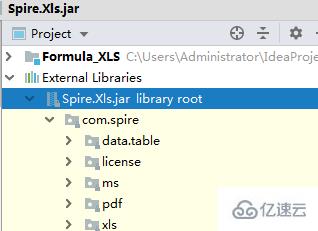
操作excel表格用公式来处理数据时,可通过创建公式来运算数据,或通过读取公式来获取数据信息来源。这里使用了java类库(Free Spire.XLS for Java 免费版)获取文件包后,解压,将lib文件夹下的jar文件导入Java程序。
如图:
1、创建公式import com.spire.xls.*;
public class AddFormula {
public static void main(String[] args) {
//创建Workbook对象
Workbook wb = new Workbook();
//获取第一个工作表
Worksheet sheet = wb.getWorksheets().get(0);
//声明两个变量
int currentRow = 1;
String currentFormula = null;
//设置列宽
sheet.setColumnWidth(1, 32);
sheet.setColumnWidth(2, 16);
//写入用于测试的数据到单元格
sheet.getCellRange(currentRow,1).setValue("测试数据:");
sheet.getCellRange(currentRow,2).setNumberValue(1);
sheet.getCellRange(currentRow,3).setNumberValue(2);
sheet.getCellRange(currentRow,4).setNumberValue(3);
sheet.getCellRange(currentRow,5).setNumberValue(4);
sheet.getCellRange(currentRow,6).setNumberValue(5);
//写入文本
currentRow += 2;
sheet.getCellRange(currentRow,1).setValue("公式:") ; ;
sheet.getCellRange(currentRow,2).setValue("结果:");
//设置单元格格式
CellRange range = sheet.getCellRange(currentRow,1,currentRow,2);
range.getStyle().getFont().isBold(true);
range.getStyle().setKnownColor(ExcelColors.LightGreen1);
range.getStyle().setFillPattern(ExcelPatternType.Solid);
range.getStyle().getBorders().getByBordersLineType(BordersLineType.EdgeBottom).setLineStyle(LineStyleType.Medium);
//算数运算
currentFormula = "=1/2+3*4";
sheet.getCellRange(++currentRow,1).setText(currentFormula);
sheet.getCellRange(currentRow,2).setFormula(currentFormula);
//日期函数
currentFormula = "=TODAY()";
sheet.getCellRange(++currentRow,1).setText(currentFormula);
sheet.getCellRange(currentRow,2).setFormula(currentFormula);
sheet.getCellRange(currentRow,2).getStyle().setNumberFormat("YYYY/MM/DD");
//时间函数
currentFormula = "=NOW()";
sheet.getCellRange(++currentRow,1).setText(currentFormula);
sheet.getCellRange(currentRow,2).setFormula(currentFormula);
sheet.getCellRange(currentRow,2).getStyle().setNumberFormat("H:MM AM/PM");
//IF函数
currentFormula = "=IF(B1=5,\"Yes\",\"No\")";
sheet.getCellRange(++currentRow,1).setText(currentFormula);
sheet.getCellRange(currentRow,2).setFormula(currentFormula);
//PI函数
currentFormula = "=PI()";
sheet.getCellRange(++currentRow,1).setText(currentFormula);
sheet.getCellRange(currentRow,2).setFormula(currentFormula);
//三角函数
currentFormula = "=SIN(PI()/6)";
sheet.getCellRange(++currentRow,1).setText(currentFormula);
sheet.getCellRange(currentRow,2).setFormula(currentFormula);
//计数函数
currentFormula = "=Count(B1:F1)";
sheet.getCellRange(++currentRow,1).setText(currentFormula);
sheet.getCellRange(currentRow,2).setFormula(currentFormula);
//最大值函数
currentFormula = "=MAX(B1:F1)";
sheet.getCellRange(++currentRow,1).setText(currentFormula);
sheet.getCellRange(currentRow,2).setFormula(currentFormula);
//平均值函数
currentFormula = "=AVERAGE(B1:F1)";
sheet.getCellRange(++currentRow,1).setText(currentFormula);
sheet.getCellRange(currentRow,2).setFormula(currentFormula);
//求和函数
currentFormula = "=SUM(B1:F1)";
sheet.getCellRange(++currentRow,1).setText(currentFormula);
sheet.getCellRange(currentRow,2).setFormula(currentFormula);
//保存文档
wb.saveToFile("AddFormulas.xlsx",FileFormat.Version2013);
wb.dispose();
}
}
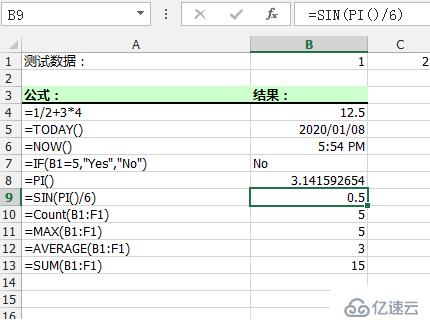
公式创建结果:
2、读取公式import com.spire.xls.*;
public class ReadFormula {
public static void main(String[] args) {
//加载Excel文档
Workbook wb = new Workbook();
wb.loadFromFile("AddFormulas.xlsx");
//获取第一个工作表
Worksheet sheet = wb.getWorksheets().get(0);
//遍历B1到B13的单元格
for (Object cell: sheet.getCellRange("B1:B13"))
{
CellRange cellRange = (CellRange)cell;
//判断单元格是否含有公式
if (cellRange.hasFormula())
{
//打印单元格及公式
String certainCell = String.format("单元格[%d, %d]含有公式:", cellRange.getRow(), cellRange.getColumn());
System.out.println(certainCell + cellRange.getFormula());
}
}
}
}
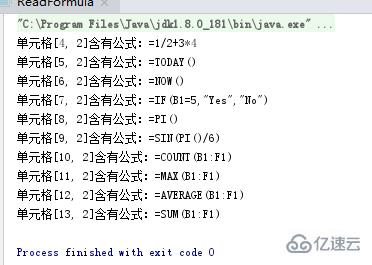
公式读取结果:





 扫一扫
扫一扫


 被折叠的 条评论
为什么被折叠?
被折叠的 条评论
为什么被折叠?
 到【灌水乐园】发言





