


 本文介绍如何解决 MySQL 5.7 登录问题,并提供详细的密码重置步骤。同时,讲解了如何调整密码策略及创建新用户。
由于5.7 的策略已经改变。因此要做点事方可登录。
Step 1:
先退出mysql
Step 2:
mysqld_safe --skip-grant-tables &
你会看到以下信息:
2017-04-17T09:27:25.447837Z mysqld_safe Logging to '/var/log/mysql/mysqld.log'.
2017-04-17T09:27:25.467994Z mysqld_safe Starting mysqld daemon with databases from /data/mysql
Step 3:
ps -ef | grep mysql
root 131849 112122 0 17:27 pts/0 00:00:00 /bin/sh /usr/bin/mysqld_safe --skip-grant-tables
mysql 132011 131849 1 17:27 pts/0 00:00:00 /usr/sbin/mysqld --basedir=/usr --datadir=/data/mysql --plugin-dir=/usr/lib64/mysql/plugin --user=mysql --skip-grant-tables --log-error=/var/log/mysql/mysqld.log --pid-file=/var/run/mysqld/mysqld.pid --socket=/data/mysql/mysql.sock
root 132045 112122 0 17:27 pts/0 00:00:00 grep mysql
Step 4:
执行:
mysql
mysql> use mysql;
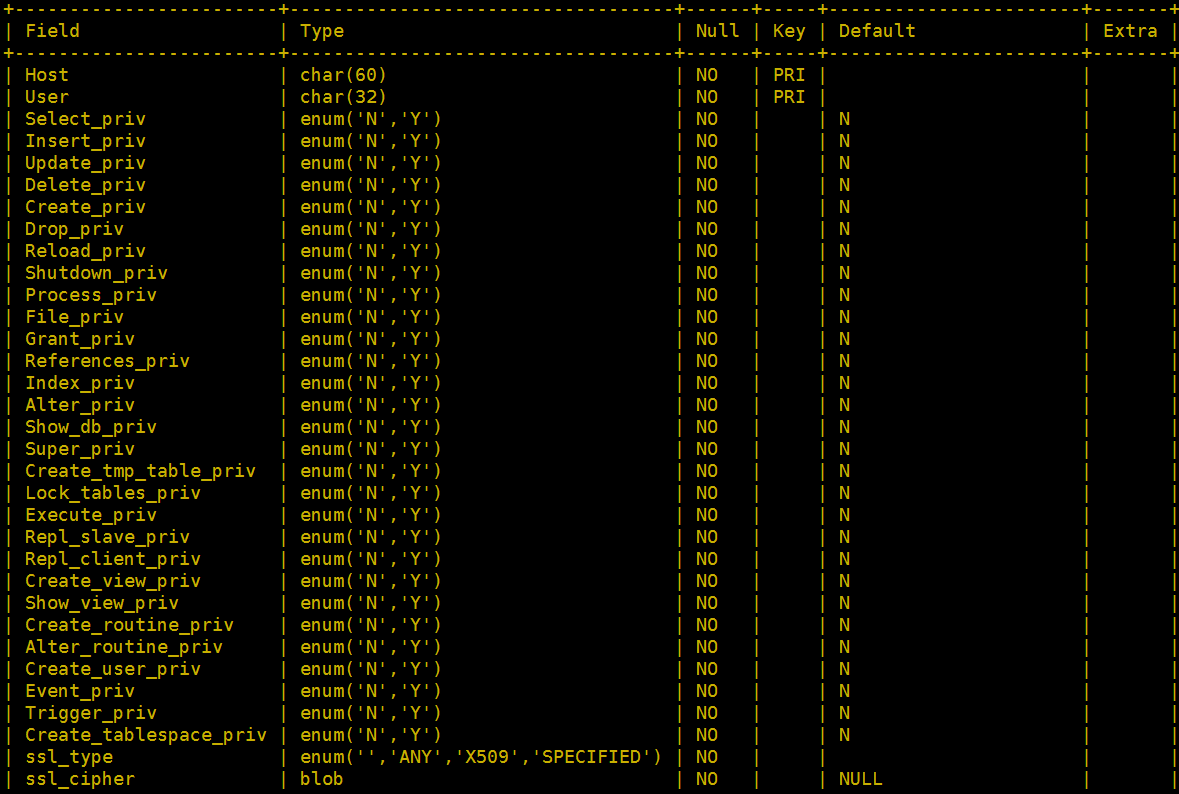
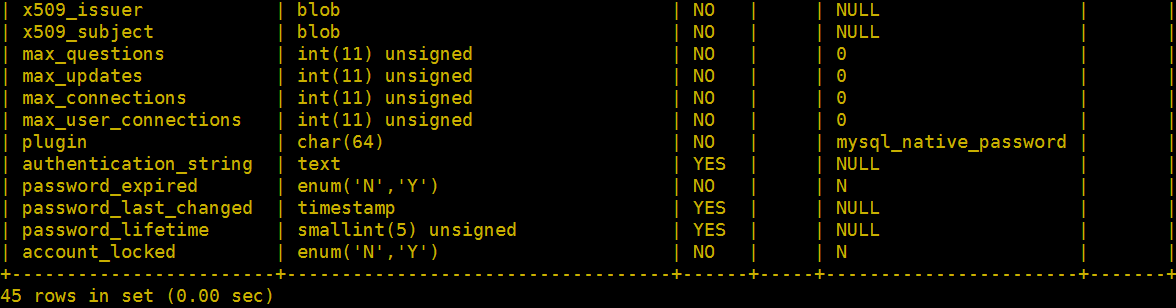
mysql> desc user;
mysql> select user,host,authentication_string,password_expired from user;

更改密码的指令:
mysql> update user set authentication_string=password('xxxxxx') where user='root';
Query OK, 1 row affected, 1 warning (0.01 sec)
Rows matched: 1 Changed: 1 Warnings: 1
mysql> flush privileges;
Query OK, 0 rows affected (0.00 sec)
mysql> exit
Bye
Step 5:
/etc/rc.d/init.d/mysqld restart
2017-04-17T09:40:42.707647Z mysqld_safe mysqld from pid file /var/run/mysqld/mysqld.pid ended
停止 mysqld: [确定]
正在启动 mysqld: [确定]
[1]+ Done mysqld_safe --skip-grant-tables
证实一下:
mysql -p
Enter password:
Welcome to the MySQL monitor. Commands end with ; or \g.
Your MySQL connection id is 5
Server version: 5.7.18-log
Copyright (c) 2000, 2017, Oracle and/or its affiliates. All rights reserved.
Oracle is a registered trademark of Oracle Corporation and/or its
affiliates. Other names may be trademarks of their respective
owners.
Type 'help;' or '\h' for help. Type '\c' to clear the current input statement.
mysql>
来来,设定好了进来爽一下,
mysql> show databases;
ERROR 1820 (HY000): You must reset your password using ALTER USER statement before executing this statement.
mysql>
额,必须重置?必须通过alter user重置一下密码。好吧,乖乖的再重置一下。
mysql> alter user root@'localhost' identified by 'your_are_pig';
ERROR 1819 (HY000): Your password does not satisfy the current policy requirements
额,看样子密码太过简单,系统让你复杂一点。好吧,复杂一点吧。
mysql> alter user 'root'@'localhost' identified by 'What!!The!!Hell##';
ERROR 1819 (HY000): Your password does not satisfy the current policy requirements
额,还是太简单?好吧,大小写,加英文字,加符号,加数字试试。。。。
mysql> alter user 'root'@'localhost' identified by 'What!!995##';
Query OK, 0 rows affected (0.01 sec)
终于。。。。改。。。成。。。。。功。。。。。。。。再来玩一下。。。
mysql> show database;
ERROR 1064 (42000): You have an error in your SQL syntax; check the manual that corresponds to your MySQL server version for the right syntax to use near 'database' at line 1
额。。。。唉,少了个s。再来。。。。
mysql> show databases;
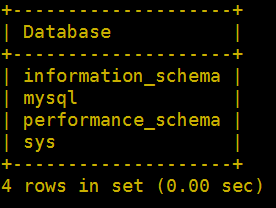
不容易啊。。。终于改好可以用了。
基本上就搞定了。
如果,你不想那么复杂的密码,想把该策略关了,那么继续看下去。。。
mysql> SHOW VARIABLES LIKE 'validate_password%';
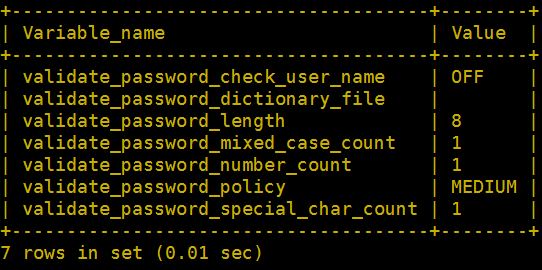
validate_password_dictionary_file : 插件用于验证密码强度的字典文件路径。
validate_password_length : 密码最小长度。
validate_password_mixed_case_count : 密码至少要包含的小写字母个数和大写字母个数。
validate_password_number_count : 密码至少要包含的数字个数。
validate_password_policy : 密码强度检查等级,0/LOW、1/MEDIUM、2/STRONG。
validate_password_special_char_count: 密码至少要包含的特殊字符数。
其中关于validate_password_policy-密码强度检查等级:
0.LOW > 只检查长度。
1.MEDIUM > 检查长度、数字、大小写、特殊字符。
2.STRONG > 检查长度、数字、大小写、特殊字符字典文件。
估计有插件在检查策略。
mysql> show plugins;
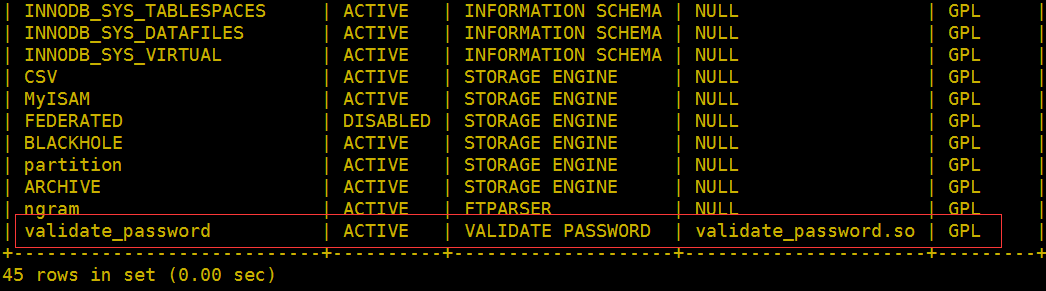
好吧,估计就是这个了,试试改 ACTIVE 为 DISABLE
简单一点,不下指令了,直接改 my.cnf 文件:
[mysqld]
validate_password=off
然后重启一下mysql,再执行
mysql>show plugins;
。。。截掉前一大半内容。。。| FEDERATED | DISABLED | STORAGE ENGINE | NULL | GPL |
| BLACKHOLE | ACTIVE | STORAGE ENGINE | NULL | GPL |
| partition | ACTIVE | STORAGE ENGINE | NULL | GPL |
| ARCHIVE | ACTIVE | STORAGE ENGINE | NULL | GPL |
| ngram | ACTIVE | FTPARSER | NULL | GPL |
| validate_password | DISABLED | VALIDATE PASSWORD | validate_password.so | GPL |
+----------------------------+----------+--------------------+----------------------+---------+
45 rows in set (0.01 sec)
这时,可以看到 validate_password 已经为disable 状态了。
接下来,顺便也建个用户帐号和密码吧。
建新用户:
先列出用户的表结构看看和之前有没有区别。
mysql> desc mysql.user;+------------------------+-----------------------------------+------+-----+-----------------------+-------+
| Field | Type | Null | Key | Default | Extra |
+------------------------+-----------------------------------+------+-----+-----------------------+-------+
| Host | char(60) | NO | PRI | | |
| User | char(32) | NO | PRI | | |
| Select_priv | enum('N','Y') | NO | | N | |
| Insert_priv | enum('N','Y') | NO | | N | |
| Update_priv | enum('N','Y') | NO | | N | |
| Delete_priv | enum('N','Y') | NO | | N | |
| Create_priv | enum('N','Y') | NO | | N | |
| Drop_priv | enum('N','Y') | NO | | N | |
| Reload_priv | enum('N','Y') | NO | | N | |
| Shutdown_priv | enum('N','Y') | NO | | N | |
| Process_priv | enum('N','Y') | NO | | N | |
| File_priv | enum('N','Y') | NO | | N | |
| Grant_priv | enum('N','Y') | NO | | N | |
| References_priv | enum('N','Y') | NO | | N | |
| Index_priv | enum('N','Y') | NO | | N | |
| Alter_priv | enum('N','Y') | NO | | N | |
| Show_db_priv | enum('N','Y') | NO | | N | |
| Super_priv | enum('N','Y') | NO | | N | |
| Create_tmp_table_priv | enum('N','Y') | NO | | N | |
| Lock_tables_priv | enum('N','Y') | NO | | N | |
| Execute_priv | enum('N','Y') | NO | | N | |
| Repl_slave_priv | enum('N','Y') | NO | | N | |
| Repl_client_priv | enum('N','Y') | NO | | N | |
| Create_view_priv | enum('N','Y') | NO | | N | |
| Show_view_priv | enum('N','Y') | NO | | N | |
| Create_routine_priv | enum('N','Y') | NO | | N | |
| Alter_routine_priv | enum('N','Y') | NO | | N | |
| Create_user_priv | enum('N','Y') | NO | | N | |
| Event_priv | enum('N','Y') | NO | | N | |
| Trigger_priv | enum('N','Y') | NO | | N | |
| Create_tablespace_priv | enum('N','Y') | NO | | N | |
| ssl_type | enum('','ANY','X509','SPECIFIED') | NO | | | |
| ssl_cipher | blob | NO | | NULL | |
| x509_issuer | blob | NO | | NULL | |
| x509_subject | blob | NO | | NULL | |
| max_questions | int(11) unsigned | NO | | 0 | |
| max_updates | int(11) unsigned | NO | | 0 | |
| max_connections | int(11) unsigned | NO | | 0 | |
| max_user_connections | int(11) unsigned | NO | | 0 | |
| plugin | char(64) | NO | | mysql_native_password | |
| authentication_string | text | YES | | NULL | |
| password_expired | enum('N','Y') | NO | | N | |
| password_last_changed | timestamp | YES | | NULL | |
| password_lifetime | smallint(5) unsigned | YES | | NULL | |
| account_locked | enum('N','Y') | NO | | N | |
+------------------------+-----------------------------------+------+-----+-----------------------+-------+
45 rows in set (0.00 sec)
建用户步骤:
mysql> create user mysql identified by 'mysql.pass';
Query OK,0 rows affected (0.00sec)
mysql> create databasetestDB;
Query OK,1 row affected (0.00sec)
mysql> grant all on testDB.* tomysql;
Query OK,0 rows affected (0.00 sec)
试试看。。。
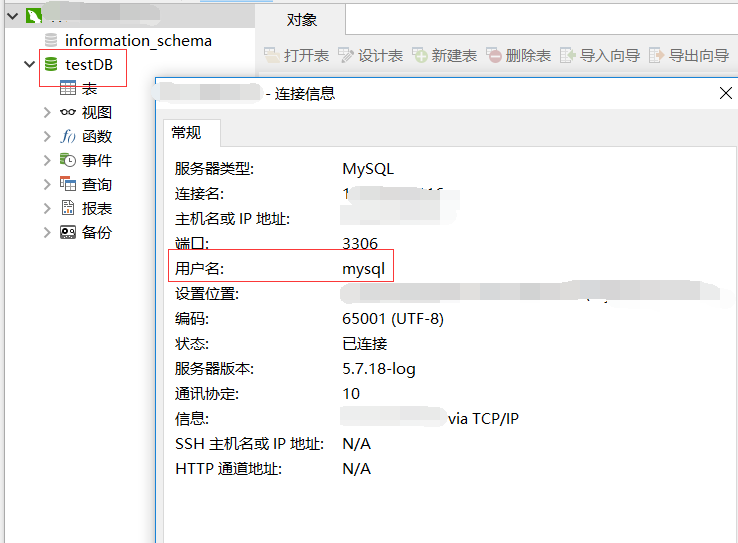
成功。





 扫一扫
扫一扫


 776
776

 被折叠的 条评论
为什么被折叠?
被折叠的 条评论
为什么被折叠?
 到【灌水乐园】发言





