


 博主想创建一个横向卡片列表,一次显示3张卡片,其余可横向滚动,想用Bootstrap实现该布局。因Bootstrap 4 Alpha 6使用了flexbox,实现此横向滚动布局变得容易,可使用flex - row和flex - nowrap,2019年更新的Bootstrap 4.3+版本上述方法仍适用,也可在卡片容器中使用flexbox工具。
I am trying to create a horizontal list of cards where 3 cards are shown at a time and the other ones are horizontally scrollable, like this:
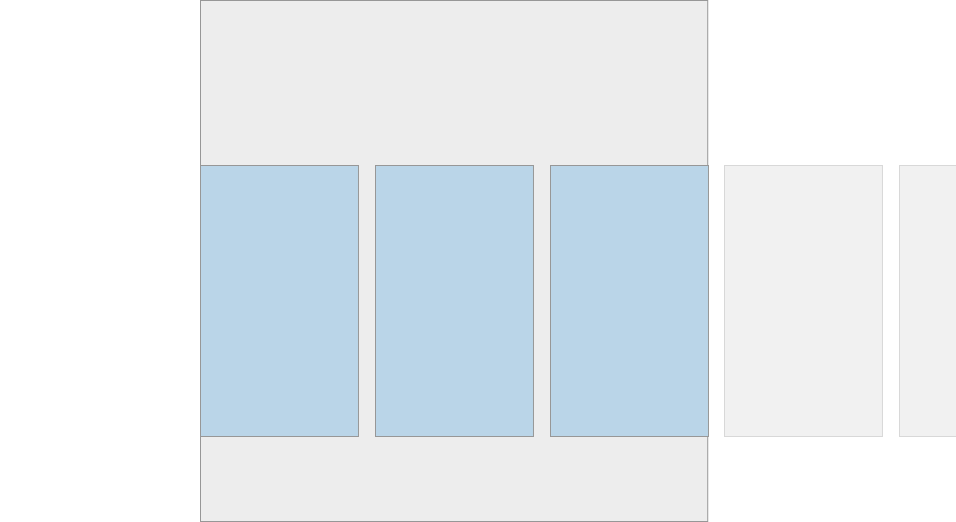
This can be done with CSS pretty easily, but I want to do this using Bootstrap. Bootstrap 4 ships with cards as popularized by material design and they are as easy to use as anything else in Bootstrap. For this example instead of cards it could also be regular divs.
The thing I am struggling with is creating a scrollable container of X cards (or divs) where 3 of them are shown at a time and the others overflow to the right and are scrollable. I am not sure how to use Bootstrap give the cards (or divs) a width so that 3 are shown at a time and the other ones lie next to them on the right.
解决方案
Now that Bootstrap 4 Alpha 6 uses flexbox, this horizontal scrolling layout is much easier. You can simply use flex-row and flex-nowrap:
...
Update 2019 Bootstrap 4.3+
The above method still works, or you can use the flexbox utils in the container of the cards: https://www.codeply.com/go/PF4APyGj7F





 扫一扫
扫一扫


 1145
1145

 被折叠的 条评论
为什么被折叠?
被折叠的 条评论
为什么被折叠?
 到【灌水乐园】发言





