


惯例广告一发,对于初学真,真的很有用www.java1234.com,去试试吧!
selector {property: value}
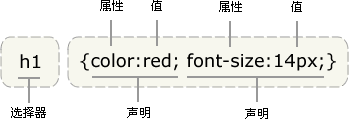
提示:如果值为若干单词,则要给值加引号:
你应该在每行只描述一个属性,这样可以增强样式定义的可读性,就像这样:
p {font-family: "sans serif";}
p {
text-align: center;
color: black;
font-family: arial;
}
可以对选择器进行用逗号分组
h1,h2,h3,h4,h5,h6 {
color: green;
}
id 选择器
#red {color:red;}#green {color:green;}
<p id="red">这个段落是红色。</p>
<p id="green">这个段落是绿色。</p>
下面的例子为 title="W3School" 的所有元素设置样式:
[title=W3School]
{
border:5px solid blue;
}
属性选择器在为不带有 class 或 id 的表单设置样式时特别有用:
input[type="text"]
{
  width:150px;
  display:block;
  margin-bottom:10px;
  background-color:yellow;
  font-family: Verdana, Arial;
}

input[type="button"]
{
  width:120px;
  margin-left:35px;
  display:block;
  font-family: Verdana, Arial;
}
外部样式表
<head>
<link rel="stylesheet" type="text/css" href="mystyle.css" />
</head>
内部样式表
<head><style type="text/css">
hr {color: sienna;}
p {margin-left: 20px;}
body {background-image: url("images/back40.gif");}</style>
</head>
多重样式:
如果某些属性在不同的样式表中被同样的选择器定义,那么属性值将从更具体的样式表中被继承过来。





 扫一扫
扫一扫


 1757
1757

 被折叠的 条评论
为什么被折叠?
被折叠的 条评论
为什么被折叠?
 到【灌水乐园】发言





