
Always run a program in administrator mode in Windows 10

本文介绍如何设置Windows 10程序默认以管理员模式运行,包括打开程序快捷方式所在位置、更改程序属性及高级设置等步骤,适用于经常进行系统调整的用户。

From: https://www.cnet.com/how-to/always-run-a-program-in-administrator-mode-in-windows-10/


If you're sick of seeing those UAC pop-ups, you can get rid of them by setting programs to run in administrator mode by default.



Some of our Windows 10 tips involve tweaking the Registry (for example, this tip on how to get rid of default cloud service icons in File Explorer) or running a few lines of code in the Command Prompt or the Windows PowerShell.

If you're beyond basic Windows 10 customization -- and comfortable working in the Registry or the Command Prompt -- you've probably noticed that you can't run programs as an administrator by default. Instead, you have to right-click on the shortcut in the Start menu, click Run as administrator, and then click Yes when the User Account Control (UAC) window pops up. This is the case even if you have an administrator's account. It's a minor inconvenience, but if you're in the middle of adjusting your system, it can get pretty annoying.

Here's how to set a program to always run in administrator mode, so you don't have to go through the UAC warning every time you want to use the Run command box. Remember -- the UAC warning is there to keep you from inadvertently making big changes to your system, so it's important that you only apply this tip to programs you're completely comfortable using.
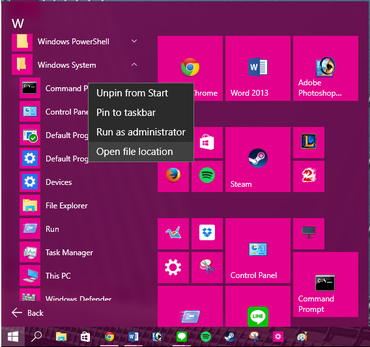
 

Step 1: Open the Start menu and click All apps. Find the program you want to always run in administrator mode and right-click on the shortcut. In the pop-up menu, click Open file location. Only desktop programs (not native Windows 10 apps) will have this option.
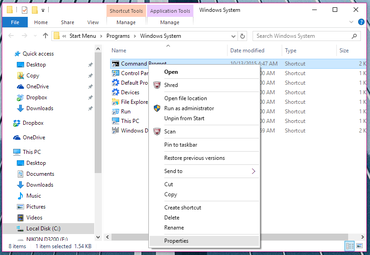


Step 2: A File Explorer window will open to the location of the program you want to access. Right-click on the program and click Properties from the pop-up menu.
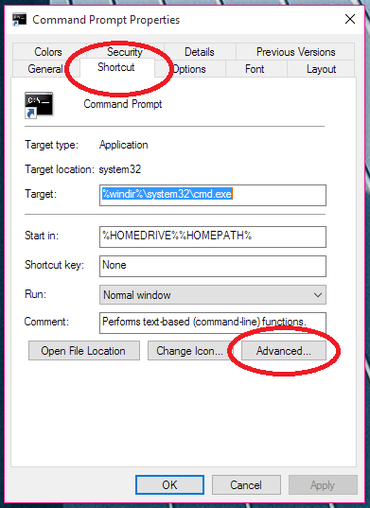


Step 3: In the Properties window, click the Shortcut tab and then click Advanced...
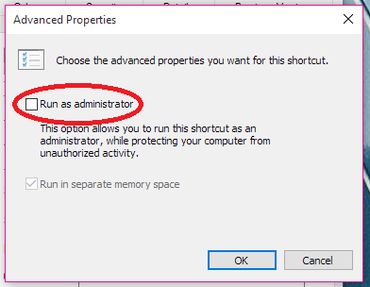


Step 4: In the Advanced Properties window, check the box next to Run as administrator and click OK.

Step 5: The program will now open in administrator mode when you click the shortcut from the Start menu. You'll need to repeat these steps for each program you want to have this feature.

Pretty simple, right? There is a way to set all programs to always run in administrator mode without changing the properties for each individual app, but it's better to start slow (and it involves a Registry edit), so maybe we'll tackle that next week.

转载于:https://www.cnblogs.com/time-is-life/p/9008720.html

E:\anaconda\lib\site-packages\conda_package_streaming\package_streaming.py:25: UserWarning: zstandard could not be imported. Running without .conda support. warnings.warn("zstandard could not be imported. Running without .conda support.") E:\anaconda\lib\site-packages\conda_package_handling\api.py:29: UserWarning: Install zstandard Python bindings for .conda support _warnings.warn("Install zstandard Python bindings for .conda support") Error while loading conda entry point: anaconda-cloud-auth (DLL load failed while importing _ssl: 找不到指定的模块。) Error while loading conda entry point: conda-content-trust (DLL load failed while importing _rust: 找不到指定的模块。) Error while loading conda entry point: conda-libmamba-solver (DLL load failed while importing bindings: 找不到指定的模块。) Collecting package metadata (repodata.json): - E:\anaconda\lib\site-packages\conda_package_streaming\package_streaming.py:25: UserWarning: zstandard could not be imported. Running without .conda support. warnings.warn("zstandard could not be imported. Running without .conda support.") E:\anaconda\lib\site-packages\conda_package_handling\api.py:29: UserWarning: Install zstandard Python bindings for .conda support _warnings.warn("Install zstandard Python bindings for .conda support") failed # >>>>>>>>>>>>>>>>>>>>>> ERROR REPORT <<<<<<<<<<<<<<<<<<<<<< Traceback (most recent call last): File "E:\anaconda\lib\site-packages\conda\exception_handler.py", line 17, in __call__ return func(*args, **kwargs) File "E:\anaconda\lib\site-packages\conda\cli\main.py", line 78, in main_subshell exit_code = do_call(args, parser) File "E:\anaconda\lib\site-packages\conda\cli\conda_argparse.py", line 166, in do_call result = getattr(module, func_name)(args, parser) File "E:\anaconda\lib\site-packages\conda\notices\core.py", line 124, in wrapper return func(*args, **kwargs) File "E:\anaconda\lib\site-packages\conda\cli\main_install.py", line 26, in execute install(args, parser, "install") File "E:\anaconda\lib\site-packages\conda\cli\install.py", line 320, in install unlink_link_transaction = solver.solve_for_transaction( File "E:\anaconda\lib\site-packages\conda\core\solve.py", line 139, in solve_for_transaction unlink_precs, link_precs = self.solve_for_diff( File "E:\anaconda\lib\site-packages\conda\core\solve.py", line 200, in solve_for_diff final_precs = self.solve_final_state( File "E:\anaconda\lib\site-packages\conda\core\solve.py", line 345, in solve_final_state ssc = self._collect_all_metadata(ssc) File "E:\anaconda\lib\site-packages\conda\common\io.py", line 85, in decorated return f(*args, **kwds) File "E:\anaconda\lib\site-packages\conda\core\solve.py", line 565, in _collect_all_metadata index, r = self._prepare(prepared_specs) File "E:\anaconda\lib\site-packages\conda\core\solve.py", line 1280, in _prepare reduced_index = get_reduced_index( File "E:\anaconda\lib\site-packages\conda\core\index.py", line 267, in get_reduced_index new_records = SubdirData.query_all( File "E:\anaconda\lib\site-packages\conda\core\subdir_data.py", line 165, in query_all result = tuple( File "E:\anaconda\lib\concurrent\futures\_base.py", line 600, in result_iterator yield fs.pop().result() File "E:\anaconda\lib\concurrent\futures\_base.py", line 440, in result return self.__get_result() File "E:\anaconda\lib\concurrent\futures\_base.py", line 389, in __get_result raise self._exception File "E:\anaconda\lib\concurrent\futures\thread.py", line 52, in run result = self.fn(*self.args, **self.kwargs) File "E:\anaconda\lib\site-packages\conda\core\subdir_data.py", line 150, in subdir_query return tuple( File "E:\anaconda\lib\site-packages\conda\core\subdir_data.py", line 172, in query self.load() File "E:\anaconda\lib\site-packages\conda\core\subdir_data.py", line 272, in load _internal_state = self._load() File "E:\anaconda\lib\site-packages\conda\core\subdir_data.py", line 315, in _load repodata, state = fetcher.fetch_latest_parsed() File "E:\anaconda\lib\site-packages\conda\gateways\repodata\__init__.py", line 716, in fetch_latest_parsed parsed, state = self.fetch_latest() File "E:\anaconda\lib\site-packages\conda\gateways\repodata\__init__.py", line 828, in fetch_latest raw_repodata = repo.repodata(cache.state) # type: ignore File "E:\anaconda\lib\site-packages\conda\gateways\repodata\__init__.py", line 148, in repodata response: Response = session.get( File "E:\anaconda\lib\site-packages\requests\sessions.py", line 602, in get return self.request("GET", url, **kwargs) File "E:\anaconda\lib\site-packages\requests\sessions.py", line 589, in request resp = self.send(prep, **send_kwargs) File "E:\anaconda\lib\site-packages\requests\sessions.py", line 703, in send r = adapter.send(request, **kwargs) File "E:\anaconda\lib\site-packages\requests\adapters.py", line 667, in send resp = conn.urlopen( File "E:\anaconda\lib\site-packages\urllib3\connectionpool.py", line 768, in urlopen conn = self._get_conn(timeout=pool_timeout) File "E:\anaconda\lib\site-packages\urllib3\connectionpool.py", line 294, in _get_conn return conn or self._new_conn() File "E:\anaconda\lib\site-packages\urllib3\connectionpool.py", line 1059, in _new_conn raise ImportError( ImportError: Can't connect to HTTPS URL because the SSL module is not available. `$ E:\anaconda\Scripts\conda-script.py install anaconda-clean` environment variables: CIO_TEST=<not set> CONDA_BAT=E:\anaconda\condabin\conda.bat CONDA_EXE=E:\anaconda\condabin\..\Scripts\conda.exe CONDA_EXES="E:\anaconda\condabin\..\Scripts\conda.exe" CONDA_ROOT=E:\anaconda CONDA_SHLVL=0 CUDA_PATH=E:\cudaer CURL_CA_BUNDLE=<not set> HOMEPATH=\Users\23194 LD_PRELOAD=<not set> PATH=E:\anaconda\condabin;C:\Users\23194\Desktop\python_project\python_edit or\python309\Scripts\;C:\Users\23194\Desktop\python_project\python_edi tor\python309\;C:\Users\23194\Desktop\python_project\python_editor\pyt hon308\Scripts\;C:\Users\23194\Desktop\python_project\python_editor\py thon308\;C:\Users\23194\Desktop\python_project\python_editor\python310 \Scripts\;C:\Users\23194\Desktop\python_project\python_editor\python31 0\;C:\Users\23194\Desktop\python_project\python_editor\python311\Scrip ts\;C:\Users\23194\Desktop\python_project\python_editor\python311\;C:\ Users\23194\Desktop\python_project\python_editor\Scripts\;C:\Users\231 94\Desktop\python_project\python_editor\;E:\SIMULIA\Commands;C:\Progra m Files\Microsoft MPI\Bin\;C:\Program Files\Common Files\Oracle\Java\j avapath;E:\cudaer\bin;E:\cudaer\libnvvp;C:\Windows\system32;C:\Windows ;C:\Windows\System32\Wbem;C:\Windows\System32\WindowsPowerShell\v1.0\; C:\Windows\System32\OpenSSH\;C:\Program Files\NVIDIA Corporation\NVIDIA NvDLISR;C:\Program Files\Bandizip\;C:\Program Files\Microsoft SQL Server\150\Tools\Binn\;C:\Program Files\Microsoft SQL Server\Client SDK\ODBC\170\Tools\Binn\;C:\Program Files (x86)\Windows Kits\10\Windows Performance Toolkit\;D:\MATLAB\runtime\win64;D:\MATLAB\bin;C:\Program Files (x86)\NVIDIA Corporation\PhysX\Common;E:\anaconda;E:\anaconda\Scripts;C:\Program Files\NVIDIA Corporation\Nsight Compute 2024.1.0\;E:\cudaer\include;E:\cudaer\lib;C:\Program Files\dotnet\;C:\ WINDOWS\system32;C:\WINDOWS;C:\WINDOWS\System32\Wbem;C:\WINDOWS\System 32\WindowsPowerShell\v1.0\;C:\WINDOWS\System32\OpenSSH\;C:\Program Fil es\Git\cmd;C:\Users\23194\Desktop\python_project\python_editor\python3 12\Scripts\;C:\Users\23194\Desktop\python_project\python_editor\python 312\;D:\python\python\Scripts\;D:\python\python\;D:\python\Scripts\;D: \python\;C:\Users\23194\AppData\Local\Microsoft\WindowsApps;C:\Users\2 3194\.dotnet\tools;F:\QQGameTempest\Hall.58319\;C:\Users\23194\AppData \Local\Programs\Ollama;F:\vs_code\Microsoft VS Code\bin;%USERPROFILE%\AppData\Local\Microsoft\WindowsApps; PSMODULEPATH=C:\Program Files\WindowsPowerShell\Modules;C:\WINDOWS\system32\Windows PowerShell\v1.0\Modules REQUESTS_CA_BUNDLE=<not set> SSL_CERT_FILE=<not set> active environment : None shell level : 0 user config file : C:\Users\23194\.condarc populated config files : C:\Users\23194\.condarc conda version : 23.9.0 conda-build version : 3.28.4 python version : 3.9.0.final.0 virtual packages : __archspec=1=x86_64 __cuda=12.6=0 __win=0=0 base environment : E:\anaconda (writable) conda av data dir : E:\anaconda\etc\conda conda av metadata url : None channel URLs : https://repo.anaconda.com/pkgs/main/win-64 https://repo.anaconda.com/pkgs/main/noarch https://repo.anaconda.com/pkgs/r/win-64 https://repo.anaconda.com/pkgs/r/noarch https://repo.anaconda.com/pkgs/msys2/win-64 https://repo.anaconda.com/pkgs/msys2/noarch package cache : E:\anaconda\pkgs C:\Users\23194\.conda\pkgs C:\Users\23194\AppData\Local\conda\conda\pkgs envs directories : E:\anaconda\envs C:\Users\23194\.conda\envs C:\Users\23194\AppData\Local\conda\conda\envs platform : win-64 user-agent : conda/23.9.0 requests/2.32.3 CPython/3.9.0 Windows/10 Windows/10.0.26100 aau/0.4.4 c/. s/. e/. administrator : False netrc file : None offline mode : False An unexpected error has occurred. Conda has prepared the above report. If you suspect this error is being caused by a malfunctioning plugin, consider using the --no-plugins option to turn off plugins. Example: conda --no-plugins install <package> Alternatively, you can set the CONDA_NO_PLUGINS environment variable on the command line to run the command without plugins enabled. Example: CONDA_NO_PLUGINS=true conda install <package> If submitted, this report will be used by core maintainers to improve future releases of conda. Would you like conda to send this report to the core maintainers? [y/N]: y Upload did not complete. Thank you for helping to improve conda. Opt-in to always sending reports (and not see this message again) by running $ conda config --set report_errors true 怎么解决
07-01
评论
添加红包

请填写红包祝福语或标题

红包个数最小为10个

红包金额最低5元

当前余额3.43前往充值 >
需支付:10.00
成就一亿技术人!
领取后你会自动成为博主和红包主的粉丝 规则
hope_wisdom
发出的红包
实付
使用余额支付
点击重新获取
扫码支付
钱包余额 0

抵扣说明:

1.余额是钱包充值的虚拟货币,按照1:1的比例进行支付金额的抵扣。
2.余额无法直接购买下载,可以购买VIP、付费专栏及课程。

余额充值


