


《Java技术》第十次作业
(一)学习总结
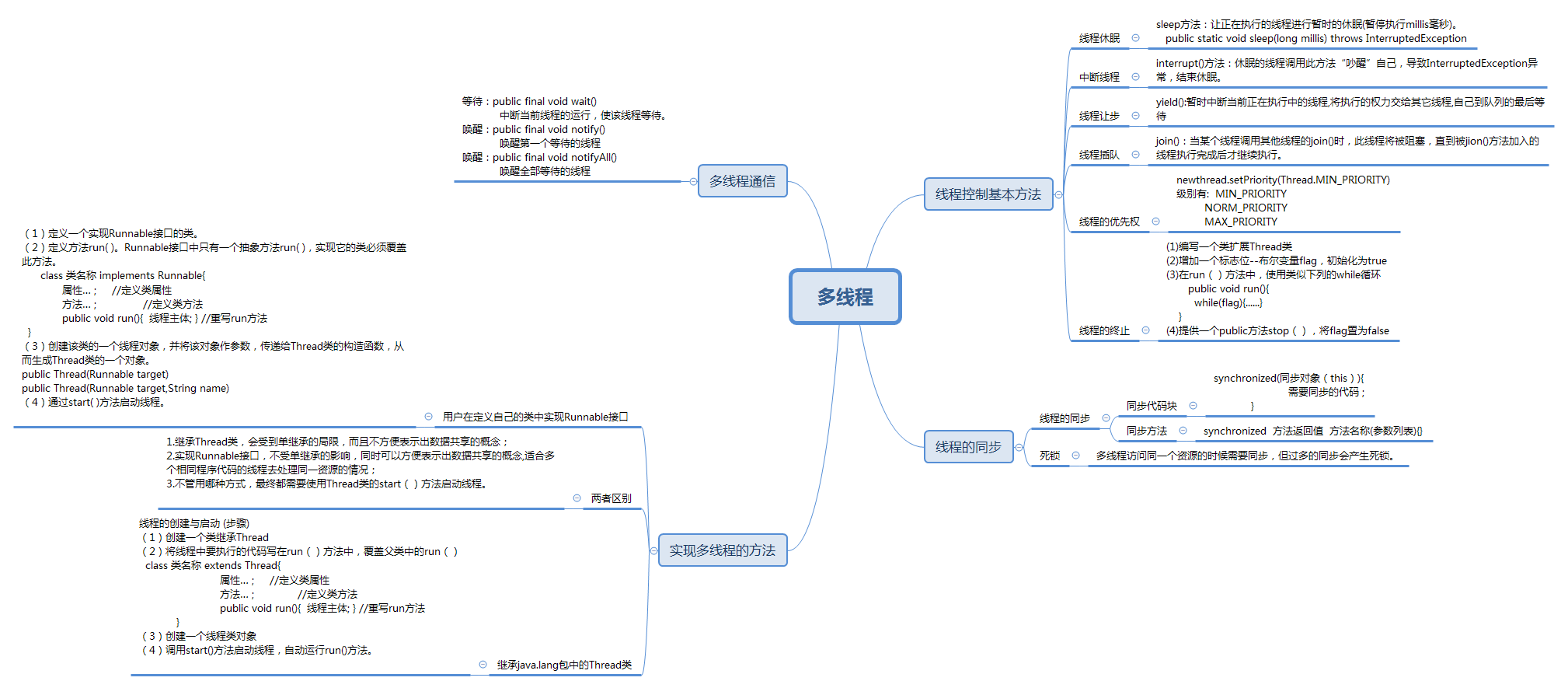
1.用思维导图对java多线程的学习内容进行总结。
2.下面是一个单线程实现的龟兔赛跑游戏。
public class TortoiseHareRace {
    public static void main(String[] args) {
        int totalStep = 10;
        int tortoiseStep = 0;
        int hareStep = 0;
        boolean[] flags = {true,false};
        System.out.println("龟兔赛跑开始了...");
        while(tortoiseStep < totalStep && hareStep < totalStep){
            tortoiseStep++;
            System.out.println("乌龟跑了"+tortoiseStep+"步...");
            boolean isHareSleep = flags[((int)(Math.random()*10))%2];
            if(isHareSleep){
                System.out.println("兔子睡着了zzzz");
            }else{
                hareStep += 2;
                System.out.println("兔子跑了"+hareStep  +"步...");
            }
        }
    }
}
阅读程序,采用实现Runnable接口的方式用多线程实现这个小游戏。下面给出主线程类,补充Tortoise线程类和Hare线程类。
public class TortoiseHareRace {
    public static void main(String[] args) {
        Tortoise tortoise = new Tortoise(10);
        Hare hare = new Hare(10);
        Thread tortoiseThread = new Thread(tortoise);
        Thread hareThread = new Thread(hare);
        tortoiseThread.start();
        hareThread.start();
    }
}
Tortoise线程
  class Tortoise implements Runnable {
      private int tortoiseStep;
      private int step = 0;

      public Tortoise(int tortoiseStep) {
          this.tortoiseStep = tortoiseStep;
      }

      public void run() {
          tortoiseRun();
      }
      private synchronized void tortoiseRun() {
          boolean flag = true;
          while (flag) {
              if (step < this.tortoiseStep) {
                  try {
                      Thread.sleep(300);
                      step++;
                      System.out.println("小乌龟走了" + step + "步");
                  } catch (InterruptedException e) {
                      e.printStackTrace();
                  }
              }
          }
      }
  }
Hare线程
  class Hare implements Runnable {
      private int hareStep;
      private int step = 0;

      public Hare(int hareStep) {
          this.hareStep = hareStep;
      }

      public void run() {
          hareRun();
      }

      private synchronized void hareRun() {
          boolean[] flags = { true, false };
          while (hareStep < step) {
              boolean isHareSleep = flags[((int) (Math.random() * 10)) % 2];
              if (isHareSleep) {
                  System.out.println("兔子睡着了zzzz");
              } else {
                  hareStep += 2;
                  System.out.println("兔子跑了" + hareStep + "步...");
              }
          }
      }
  }
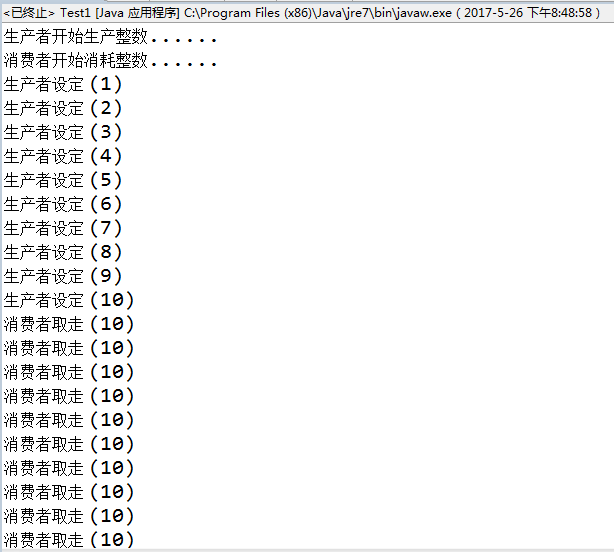
3.下面的程序是模拟了生产者——消费者问题,生产者生产10个数,消费者依次消费10个数,运行程序,看结果是否正常?存在什么问题?说明原因。使用synchronized, wait, notify解决程序出现的问题。写出修改的部分程序即可。
class Consumer implements Runnable {
    private Clerk clerk;
    public Consumer(Clerk clerk) {
        this.clerk = clerk;
    }
    public void run() {
        System.out.println("消费者开始消耗整数......");
        // 消耗10个整数
        for(int i = 1; i <= 10; i++) {
            try {
                 // 等待随机时间
                Thread.sleep((int) (Math.random() * 3000));
            }
            catch(InterruptedException e) {
                e.printStackTrace();
            }
            clerk.getProduct();// 从店员处取走整数
        }
    }
}
class Producer implements Runnable {
    private Clerk clerk;
    public Producer(Clerk clerk) {
        this.clerk = clerk;
    }
    public void run() {
        System.out.println( "生产者开始生产整数......");
        // 生产1到10的整数
        for(int product = 1; product <= 10; product++) {
            try {
                Thread.sleep((int) Math.random() * 3000);
            }
            catch(InterruptedException e) {
                e.printStackTrace();
            }
           clerk.setProduct(product); // 将产品交给店员
        }
    }
}
public class ProductTest {
    public static void main(String[] args) {
        Clerk clerk = new Clerk();
        Thread consumerThread = new Thread(new Consumer(clerk));
        Thread producerThread = new Thread(new Producer(clerk));
        consumerThread.start();
        producerThread.start();
    }
}
class Clerk {
    private int product = -1; // -1 表示目前没有产品
    // 这个方法由生产者呼叫
    public void setProduct(int product) {
        this.product = product;
        System.out.printf("生产者设定 (%d)%n", this.product);
    }
    // 这个方法由消费者呼叫
    public int getProduct() {
        int p = this.product;
        System.out.printf("消费者取走 (%d)%n", this.product);
        return p;
    }
}
运行结果
原因
- 没有进行代码的同步与唤醒
修改
  class Clerk {
      private int product = -1; // -1 表示目前没有产品
      private int p;

      // 这个方法由生产者呼叫
      public synchronized void setProduct(int product) {
          if (this.product != -1) {
              try {
                  super.wait();
              } catch (InterruptedException e) {
                  e.printStackTrace();
              }
          }
          this.product = product;
          p = this.product;
          System.out.printf("生产者设定 (%d)%n", this.product);
          getProduct();
          try {
              Thread.sleep(300);
          } catch (InterruptedException e) {
              e.printStackTrace();
          }
          this.product = -1;
          super.notify();
      }

      // 这个方法由消费者呼叫
      public synchronized int getProduct() {
          if (this.product == -1) {
              try {
                  super.wait();
              } catch (InterruptedException e) {
                  e.printStackTrace();
              }
          }
          try {
              Thread.sleep(300);
          } catch (InterruptedException e) {
              e.printStackTrace();
          }
          System.out.printf("消费者取走 (%d)%n", p);
          this.product = -1;
          super.notify();
          return this.product;
      }
  }
(二)实验总结
(1)
实验内容:
- 模拟三个老师同时分发80分作业,每个老师相当于一个线程。
程序设计思路:
- 创建Send类实现Runnable接口,实现run()方法,并且用synchronized关键字将sendWork()声明成同步方法。
- Test类创建Send类的对象,用Thread类的start()方法启动线程
(2)
实验内容:
- 模拟一个银行存款的程序。假设有两个储户都去银行往同一个账户进行存款,一次存100,每人存三次。要求储户每存一次钱,账户余额增加100,并在控制台输出当前账户的余额。
程序设计思路:
- 设计一个银行类,定义一个存储账户余额的变量以及一个存款的方法。
- 设计一个储户类,实现向账户存款3次,每一个储户是一个线程。
- 设计一个测试类,创建客户对象,启动线程。
问题:运行结果只存入了三次。
  class User implements Runnable {
      private int time = 3;
      Bank bank = new Bank();

      public void run() {
          while (true) {
              userDeposit();
              time--;
              if (time <= 0) {
                  break;
              }
          }
      }

      private synchronized void userDeposit() {
          if (time > 0) {
              try {
                  Thread.sleep(300);
              } catch (InterruptedException e) {
                  e.printStackTrace();
              }

              System.out.println(Thread.currentThread().getName()
              + "正在存钱,当前账户余额为" + bank.getMoney());
          }
      }
  }
原因
- 只是对一个用户存入的次数进行了限制。
解决方案:
  public void run() {
          for (int time = 0; time < 3; time++) {
              userDeposit();
      }
  }
(三)代码托管
- 码云commit历史截图






 扫一扫
扫一扫


 3012
3012

 被折叠的 条评论
为什么被折叠?
被折叠的 条评论
为什么被折叠?
 到【灌水乐园】发言





