
pyhton之os.path

本文介绍了Python中如何使用特殊变量__file__来获取当前文件的路径,并详细解释了os模块中的dirname和abspath函数的作用,帮助读者理解不同路径下的文件位置获取方法。
目录结构
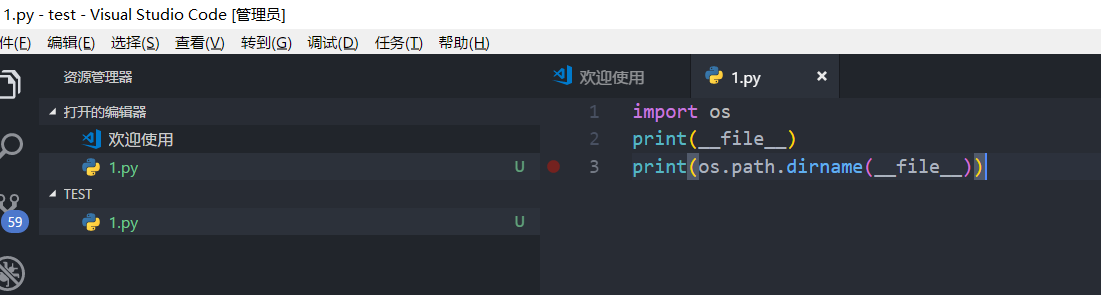
1347866-20180819125126766-229283348.png

file

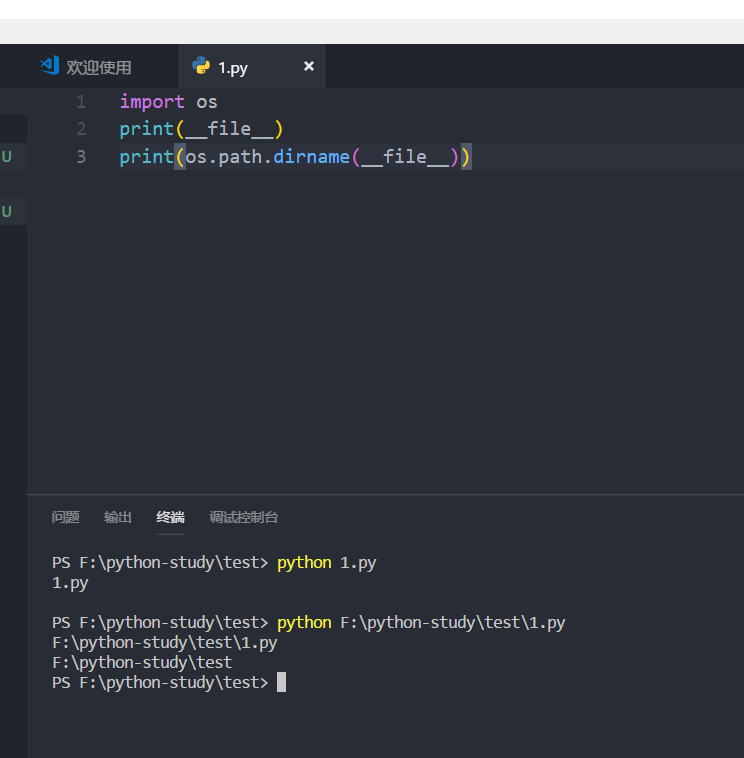
__file__表示了当前文件的path

以相对路径运行:python 1.py
结果:1.py
以绝对路径运行:python F:\python-study\test\1.py
结果:F:\python-study\test\1.py
os.path.dirname(path)

去掉文件名,返回目录,若print os.path.dirname(file)所在脚本是以绝对路径运行的,则会输出该脚本所在的绝对路径,若以相对路径运行,输出空目录
1347866-20180819125623088-934989218.png

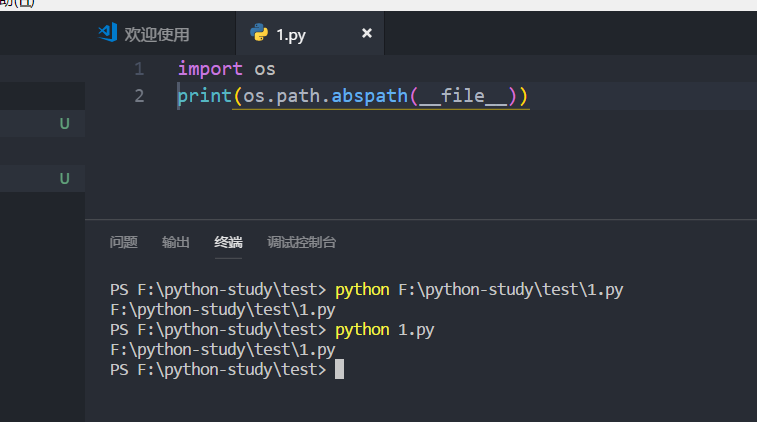
os.path.abspath(file)

获取当前文件的绝对路径,无论脚本是以绝对路径运行还是以相对路径运行
1347866-20180819130048523-1385361588.png

转载于:https://www.cnblogs.com/raind/p/9500997.html

### Python `os` 和 `os.path` 模块用法实例 #### 获取当前工作目录 为了获取程序运行时所在的文件夹位置,可以使用 `os.getcwd()` 函数。 ```python import os current_directory = os.getcwd() print(f"Current Working Directory is {current_directory}") ``` #### 列出指定目录的内容 如果想要查看某个特定文件夹内的所有文件和子文件夹列表,则可调用 `os.listdir(path)` 方法[^4]。 ```python directory_contents = os.listdir('.') for item in directory_contents: print(item) ``` #### 创建新目录 当需要创建一个新的文件夹时,可以通过 `os.mkdir(directory_name)` 来实现单层结构的新建操作;而多级嵌套的文件夹则应该采用 `os.makedirs(new_directories_path)`。 ```python new_folder = 'test_dir' if not os.path.exists(new_folder): os.mkdir(new_folder) nested_folders = './a/b/c/d/e/f/g/h/i/j/k/l/m/n/o/p/q/r/s/t/u/v/w/x/y/z' try: os.makedirs(nested_folders) except FileExistsError as e: pass # 文件已存在时不处理异常 finally: print('Directories created.') ``` #### 删除现有目录 对于不再使用的空文件夹,可以直接利用 `os.rmdir(folder_to_remove)` 进行移除。而对于含有内容的整个树形结构来说,则应当运用 `shutil.rmtree(non_empty_directory)` (注意这里引入了额外的标准库 shutil)[^1]。 ```python from pathlib import Path import shutil empty_test_dir = "empty_test" Path(empty_test_dir).mkdir(exist_ok=True) os.rmdir(empty_test_dir) # 只能删除空文件夹 non_empty_dir = "./temp/non-empty-dir/" Path(non_empty_dir).mkdir(parents=True, exist_ok=True) with open(os.path.join(non_empty_dir, "dummy.txt"), mode='w') as f: f.write("Dummy file.") shutil.rmtree(non_empty_dir) # 移除非空文件夹及其内部项 ``` #### 处理路径字符串 `os.path` 提供了一系列工具函数来帮助解析、组合以及规范化不同平台上的文件系统路径: - **拼接多个部分组成完整的路径**: 使用 `os.path.join(*paths)` ```python base = "/home/user/documents" file_name = "example.docx" full_path = os.path.join(base, file_name) print(full_path) ``` - **分离扩展名**: 调用 `os.path.splitext(file_with_extension)` 返回一对元组 `(root, ext)` ```python filename = '/path/to/file.ext' name_without_ext, extension = os.path.splitext(filename) print(name_without_ext, extension) ``` - **判断给定路径是否存在**: 应用 `os.path.exists(some_path)` ```python some_file_or_directory = '/etc/hosts' exists = os.path.exists(some_file_or_directory) print(f"'{some_file_or_directory}' exists:", exists) ``` - **检查是否为绝对路径**: 执行 `os.path.isabs(possible_absolute_path)` ```python relative_path = '../other/place/' absolute_check = os.path.isabs(relative_path) print(f"{relative_path} is absolute path? ", absolute_check) ``` 以上就是关于 Python 中 `os` 和 `os.path` 的一些基本功能展示。这些模块提供了丰富的接口让开发者能够方便地与操作系统交互并管理文件资源。
评论
成就一亿技术人!
拼手气红包6.0元
还能输入1000个字符  | 博主筛选后可见
 
红包 添加红包
表情包 插入表情
 条评论被折叠 查看
添加红包

请填写红包祝福语或标题

红包个数最小为10个

红包金额最低5元

当前余额3.43前往充值 >
需支付:10.00
成就一亿技术人!
领取后你会自动成为博主和红包主的粉丝 规则
hope_wisdom
发出的红包
实付
使用余额支付
点击重新获取
扫码支付
钱包余额 0

抵扣说明:

1.余额是钱包充值的虚拟货币,按照1:1的比例进行支付金额的抵扣。
2.余额无法直接购买下载,可以购买VIP、付费专栏及课程。

余额充值


