


 IntelliJ IDEA 10.5 EAP引入了新的Android平台项目配置方式,将Android平台视为项目的SDK之一,并从类路径中移除了标准JDK JAR包。此举意味着IDE不再补全不被Android支持的Java类,并正确标记这些类的使用错误。尽管如此,仍需Java SDK用于编译。
The recent EAP of IntelliJ IDEA 10.5 introduces a new presentation of Android platform inside a project.
Previously, you could configure Android SDK inside Android facet settings, while JDK played the role of the main Project/Module SDK. IntelliJ IDEA 10.5 considers Android platform itself as a Project/Module SDK: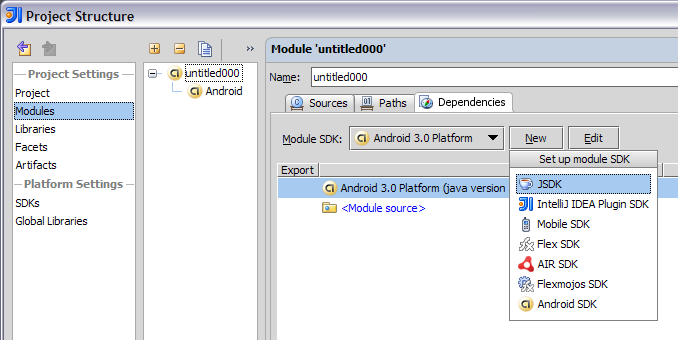
Thus, the standard JDK jars aren’t included to the classpath of your Android module. So, the IDE will not complete the java classes which are not supported by the Android platform anymore. Also, the usages of such classes will be correctly highlighted as errors: 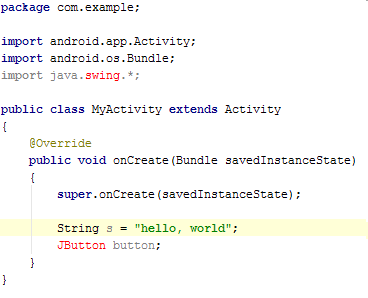
Note, that in addition to the Android SDK, you still need a Java SDK because IntelliJ IDEA uses it for compilation. You’ll be prompted for it while creating a new Android SDK.
It is important to mention that once you open an existing Android project in IntelliJ IDEA 10.5 it will be converted automatically, no manual configuration needed.
You are welcome to try it in the latest IntelliJ IDEA 10.5 EAP build and let us know what you think.





 扫一扫
扫一扫


 被折叠的 条评论
为什么被折叠?
被折叠的 条评论
为什么被折叠?
 到【灌水乐园】发言





