


 本文介绍了一款名为LunboViewPager的库,它扩展了ViewPager并集成了圆环指示器。支持自动切换、无限循环和用户触控暂停。适配于Activity/Fragment、RecyclerView及自定义页签,提供了设置圆点颜色、间距等高级功能。通过简单的配置和自定义适配器实现流畅轮播效果。
LunboViewPager
An enhancement to ViewPager and ViewPagerIndicator, implements banner effert.
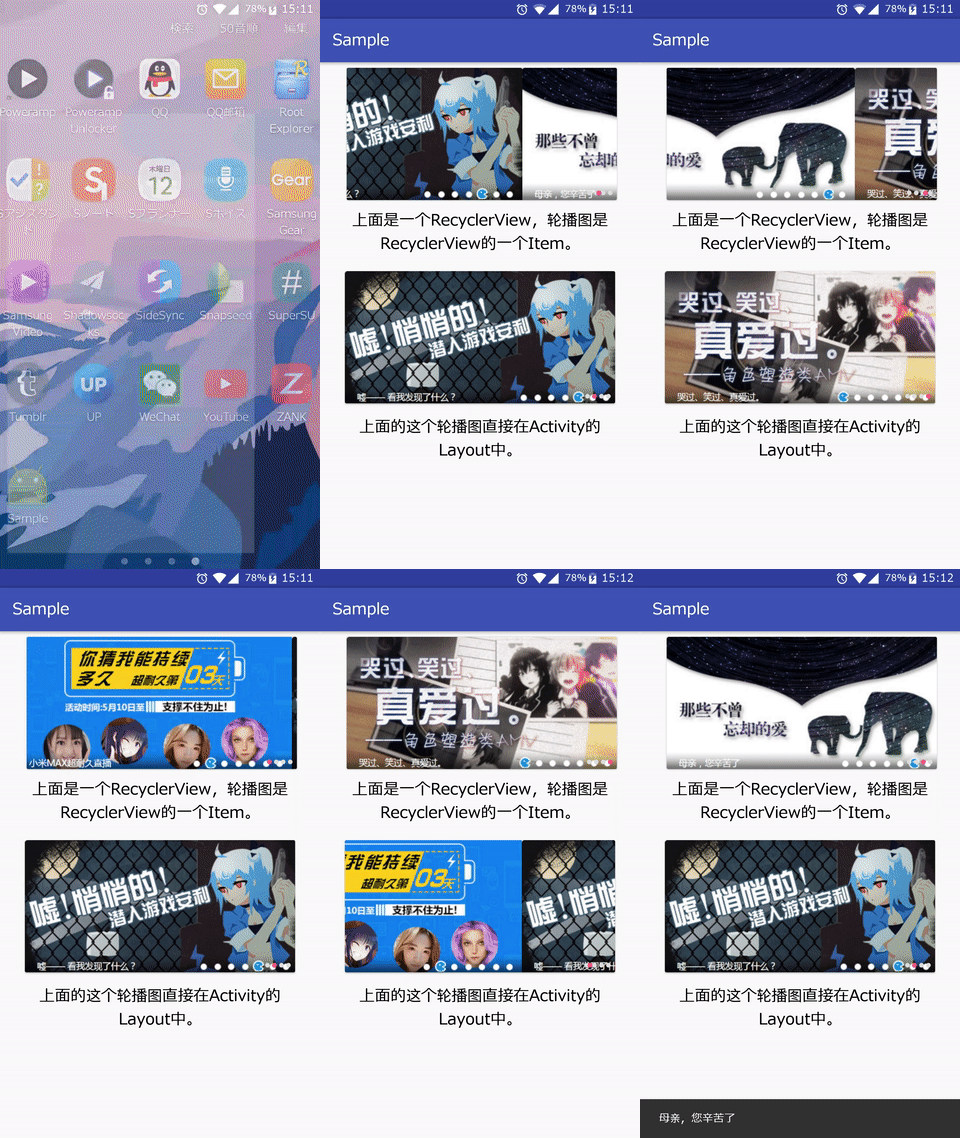
Your banner can be used in Activity / Fragment, or an item in RecyclerView.
Page indicator, infinite loop pages, automatical switch to next page, pause auto-switch on user touch.
Provides CirclePageIndicator (round point) indicator.
Import
1.Add binary
In your build.gradle, add
compile 'com.xdandroid:lunboviewpager:+'
2.Layout XML (Activity/Fragment/Item in RecyclerView)
Place the ViewPager in parallel with the CirclePageIndicator element.
android:layout_width="match_parent"
android:layout_height="match_parent"
android:background="@android:color/white">
android:id="@+id/vp_lunbo"
android:layout_width="352dp"
android:layout_height="176dp"/>
android:id="@+id/indicator_lunbo"
android:layout_width="wrap_content"
android:layout_height="wrap_content"
android:layout_gravity="bottom|right"
android:layout_marginBottom="6dp"
android:layout_marginRight="2dp"/>
4. Layout XML (Each page in ViewPager, usually composed of an ImageView / DraweeView and some other widgets)
xmlns:android="http://schemas.android.com/apk/res/android"
android:id="@+id/iv_lunbo"
android:scaleType="centerCrop"
android:layout_height="176dp"
android:layout_width="350dp"/>
For usage, please refer to the sample.
For use in Activity / Fragment
1.Set necessary custom attributes to ViewPager and indicator(OnPageChangeListener, Fill color of indicator, etc.)
For custom attributes available in indicator, you can refer to the API provided in JakeWharton/ViewPagerIndicator.
Supports wrap_content while JakeWharton's version not;
Adds 2 APIs to set and get the ratio of distance between circles to circle radius:
void CirclePageIndicator.setDistanceBetweenCircles(double timesToRadius_multiplier);
double CirclePageIndicator.getDistanceBetweenCirclesMultiplier()
//Set OnPageChangeListener
vp_lunbo.setOnPageChangeListener(onPageChangeListener);
//Set fill color for the circle currently chosen
indicator_lunbo.setFillColor(getResources().getColor(R.color.colorAccent));
//Set circle radius
indicator_lunbo.setRadius(UIUtils.dp2px(this, 3.25f));
//set the ratio of distance between circles to circle radius
indicator_lunbo.setDistanceBetweenCircles(3.0);
2.Instantiate Adapter
public Adapter(Context context);
You need to implement 4 methods in Adapter:
protected abstract int getViewPagerItemLayoutResId();//Set layout resource id for one page in ViewPager
protected abstract View showImage(View inflatedLayout, int position);
inflatedLayout: inflated View object from the resource id provided before.
Developers should use findViewById to get the ImageView / DraweeView object, then load image into widget using UIL, Picasso, Fresco, etc..., finally return the ImageView / DraweeView.
protected abstract int getImageCount();//Page count
protected abstract void onImageClick(View view, int position);//OnClickListener
Example:
new Adapter(MainActivity.this) {
protected View showImage(View inflatedLayout, int position) {
ImageView imageView = (ImageView) inflatedLayout.findViewById(R.id.iv_lunbo);
Picasso.with(MainActivity.this).load(list.get(position).getImageResId()).into(imageView);
return imageView;
}
protected int getViewPagerItemLayoutResId() {return R.layout.item_in_viewpager;}
protected int getImageCount() {return list.size();}
protected void onImageClick(View view, int position) {
Snackbar.make(view,list.get(position).getMessage(),Snackbar.LENGTH_SHORT).show();
}
}
3.Instantiate Proxy
public Proxy(List list, int interval, Adapter adapter);
interval: The time interval for automatically switch to next page.
4.Start infinite looping
void Proxy.onBindView(ViewPager viewPager,View indicator);
For use in an item of RecyclerView
1.Instantiate com.xdandroid.lunboviewpager.Adapter in the constructor of RecyclerView.Adapter
public com.xdandroid.lunboviewpager.Adapter(Context context);
You need to implement 4 methods in com.xdandroid.lunboviewpager.Adapter:
protected abstract int getViewPagerItemLayoutResId();//Set layout resource id for one page in ViewPager
protected abstract View showImage(View inflatedLayout, int position);
inflatedLayout: inflated View object from the resource id provided before.
Developers should use findViewById to get the ImageView / DraweeView object, then load image into widget using UIL, Picasso, Fresco, etc..., finally return the ImageView / DraweeView.
protected abstract int getImageCount();//Page count
protected abstract void onImageClick(View view, int position);//OnClickListener
Example:
new com.xdandroid.lunboviewpager.Adapter(context) {
protected View showImage(View inflatedLayout, int position) {
ImageView imageView = (ImageView) inflatedLayout.findViewById(R.id.iv_lunbo);
Picasso.with(context).load(list.get(position).getImageResId()).into(imageView);
return imageView;
}
protected int getViewPagerItemLayoutResId() {return R.layout.item_in_viewpager;}
protected int getImageCount() {return list.size();}
protected void onImageClick(View view, int position) {
Snackbar.make(view,list.get(position).getMessage(),Snackbar.LENGTH_SHORT).show();
}
}
2.Instantiate Proxy in the constructor of RecyclerView.Adapter
public Proxy(List list, int interval, com.xdandroid.lunboviewpager.Adapter adapter);
interval: The time interval for automatically switch to next page.
3.onBindViewHolder
Set necessary custom attributes to ViewPager and indicator(OnPageChangeListener, Fill color of indicator, etc.)
For custom attributes available in indicator, you can refer to the API provided in JakeWharton/ViewPagerIndicator.
Supports wrap_content while JakeWharton's version not;
Adds 2 APIs to set and get the ratio of distance between circles to circle radius:
void CirclePageIndicator.setDistanceBetweenCircles(double timesToRadius_multiplier);
double CirclePageIndicator.getDistanceBetweenCirclesMultiplier()
Finally, Add proxy.onBindView(holder.viewPager,holder.indicator);
Example:
@Override
public void onBindViewHolder(final MainAdapter.ViewHolder holder, int position) {
//Set fill color for the circle currently chosen
holder.indicator_lunbo.setFillColor(context.getResources().getColor(R.color.colorAccent));
//Set circle radius
holder.indicator_lunbo.setRadius(UIUtils.dp2px(holder.indicator_lunbo.getContext(), 3.25f));
//set the ratio of distance between circles to circle radius
holder.indicator_lunbo.setDistanceBetweenCircles(3.0);
proxy.onBindView(holder.vp_lunbo,holder.indicator_lunbo);
}





 扫一扫
扫一扫


 被折叠的 条评论
为什么被折叠?
被折叠的 条评论
为什么被折叠?
 到【灌水乐园】发言





