


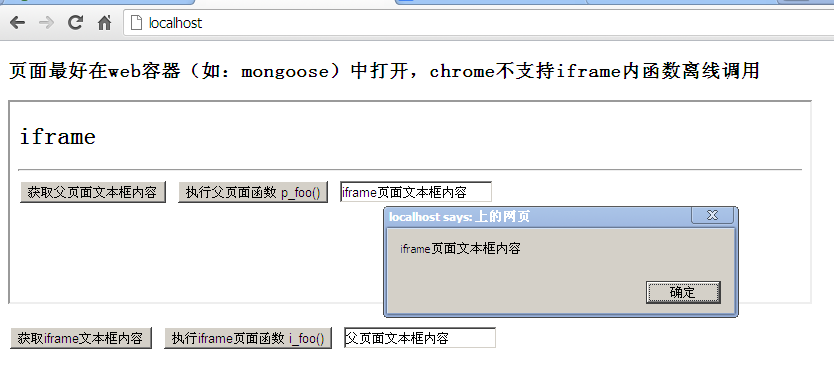
 本文通过一个具体实例展示了如何使用JavaScript在主页面与iframe子页面间进行双向通信,包括调用对方的函数及获取文本框内容。

iframe通常是页面内嵌的一个外部文件,我们可以通过Javascript访问iframe对象并操作iframe内嵌文件里面的DOM和Javascript对象。代码如下:
主页面文件index.html
<!DOCTYPE html>
<html>
<head>
<meta http-equiv="Content-Type" content="text/html; charset=utf-8" />
<title>index - iframe内部对象调用与反向调用[iTsai]</title>
</head>
<body>
<h3>页面最好在web容器(如:mongoose)中打开,chrome不支持iframe内函数离线调用</h3>
<iframe id="ifrm" name="ifrm" src="iframe.html" width="800" height="200"></iframe>
<br>
<br>
<input type="button" value="获取iframe文本框内容" onclick="getIframeTxt()">
<input type="button" value="执行iframe页面函数 i_foo()" onclick="call_i_foo()">
<input type="text" value="父页面文本框内容" id="p-txt">

<script type="text/javascript">
function p_foo(){
	alert('调用父页面 p_foo() 函数');
}
function getIframeTxt(){
	var iWindow = window.frames[0];//获取iframe页面window对象
	var iDocument = iWindow.document;////获取iframe页面document对象
	var txt = iDocument.getElementById("i-txt").value;
	alert(txt);
}
function call_i_foo(){
	window.frames[0].i_foo();
}
</script>
</body>
</html>
子页面文件iframe.html
<!DOCTYPE HTML>
<html>
<head>
<meta http-equiv="Content-Type" content="text/html; charset=utf-8">
<title>iframe - iframe内部对象调用与反向调用[iTsai]</title>
</head>
<body>
<h2>iframe</h2>
<hr/>
<input type="button" value="获取父页面文本框内容" onClick="getParentTxt()"/>
<input type="button" value="执行父页面函数 p_foo()" onClick="call_p_foo()"/>
<input type="text" value="iframe页面文本框内容" id="i-txt">
<script type="text/javascript">
	function i_foo(){
		alert('调用iframe面 i_foo() 函数');
	}
	function getParentTxt(){
		var pWindow = window.parent;//获取父页面window对象
		var pDocument = pWindow.document;////获取父页面document对象
		var txt = pDocument.getElementById("p-txt").value;
		alert(txt);
	}
	function call_p_foo(){
		window.parent.p_foo();
	}
</script>
</body>
</html>
页面最好在web服务器(如:mongoose)中打开,chrome不支持离线iframe内函数调用,被认为是不安全的脚本访问。





 扫一扫
扫一扫


 556
556

 被折叠的 条评论
为什么被折叠?
被折叠的 条评论
为什么被折叠?
 到【灌水乐园】发言





