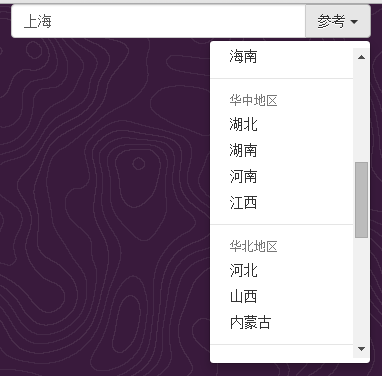
在前文 创建基于Bootstrap的下拉菜单的DropDownList的JQuery插件 中,实现了DropDownList的JQuery组件,但是留有遗憾。就是当下拉菜单出现滚动条的时候,滚动条会覆盖菜单右侧的两个圆角。使得下拉菜单左侧有2个圆角,右侧没有,看上去不是很完美。如下图所示:
本文的内容就是如何恢复右侧的圆角
先看看原本的下拉菜单的HTML结构:
<ul class = "dropdown-menu dropdown-menu-right" role = "menu" > <li><a href = "#" > Action</a></li> <li><a href = "#" > Another action</a></li> <li><a href = "#" > Something else here</a></li> <li class = "divider" ></li> <li><a href = "#" > Separated link</a></li> </ul>
从上面的结构可以看出,由ul标签实现下拉菜单的外观(通过引用dropdown-menu样式),由li标签实现菜单项(包括菜单、分隔符、组标题)。来看看ul和li标签对应的CSS:
.dropdown - menu { position: absolute ; top: 100% ; left: 0 ; z-index: 1000 ; display: none ; float: left ; min-width: 160px ; padding: 5px 0 ; margin: 2px 0 0 ; font-size: 14px ; text-align: left ; list-style: none ; background-color: #fff ; -webkit-background-clip: padding-box ; background-clip: padding-box ; border: 1px solid #ccc ; border: 1px solid rgba (0 , 0 , 0 , .15 ); border-radius: 4px ; -webkit-box-shadow: 0 6px 12px rgba (0 , 0 , 0 , .175 ); box-shadow: 0 6px 12px rgba (0 , 0 , 0 , .175 ); } .dropdown - menu > li > a { display: block ; padding: 3px 20px ; clear: both ; font-weight: normal ; line-height: 1.42857143 ; color: #333 ; white-space: nowrap ; } .dropdown - menu > li > a: hover, .dropdown - menu > li > a: focus { color: #262626 ; text-decoration: none ; background-color: #f5f5f5 ; }
由于a的样式是通过.dropdown - menu > li > a来实现的,故要实现a的外观必须是在含有样式dropdown-menu的ul里面的li的里面的a的。
于是,动了一个念头,在HTML结构里的ul里面的li里再嵌套一个包含样式dropdown-menu的ul,ul里面是li,li里面是a。
但是从上面的CSS可以看出,嵌套在里面的ul也会实现菜单的外观(圆角、投影、浮动等),故在该ul的标签里强制添加style属性,把一些样式强制性的去除(改成inherit,采用默认样式),这些样式包括display、position、top、float、padding、border、border-radius、-webkit-box-shadow、box-shadow。
再说说MaxHeight。本次修改后直接采用CSS的样式max-height,而减少对菜单高度的判断。会有疑问,如果浏览器不支持max-height怎么办?一是不支持max-height的浏览器比较少(IE6等),二是如果浏览器不支持max-height,也就不能很好的支持Bootstrap。故不必考虑浏览器是否支持max-height属性。由于里外有2个ul标签,我们需要对里面的ul标签应用max-height属性,故用UL=Obj.find("ul[style]")语句来找寻里面的ul标签(因为里面的ul含有style属性,而外面的ul没有)。
再说说JQuery的height方法。当调用JQuery的height方法来计算隐藏元素高度时,估计是先会显示元素,然后计算高度,再隐藏元素。这会有两个问题。一是显示再隐藏,速度很快,肉眼看不出,但是浏览器不会说谎,有时浏览器会额外显示滚动条。二是如果该元素的父元素也是隐藏的,则height方法会返回0。
完善版的源代码:
( function ( $) { jQuery. fn. DropDownList = function ( options) { var defaults = { InputName: "Q" , ButtonText: "示例" , ReadOnly: true , MaxHeight:- 1 , onSelect: $. noop (), } var options = $. extend ( defaults, options); return this . each ( function () { var o= options; var Obj= $( this ); var S= "<div class='input-group'>" ; S = S + "<input type='text' class='form-control' name='" + o. InputName + "' id='" + o. InputName + "' />" ; S = S + "<div class='input-group-btn'>" ; S = S + "<button type='button' class='btn btn-default dropdown-toggle' data-toggle='dropdown'>" + o. ButtonText + " <span class='caret'></span></button>" ; S = S + "<ul class='dropdown-menu dropdown-menu-right' role='menu' >" ; S = S + "<li><ul class='dropdown-menu ' style='display:inherit;position:inherit;top:0;float:inherit;padding:0;border:0px;border-radius:0px;-webkit-box-shadow: inherit;box-shadow: inherit;'>" ; var SelText, SelData; if ( o. Sections!== undefined ) { $. each ( o. Sections, function ( n, value) { if ( n> 0 ) { S= S + "<li class='divider'></li>" ; } if ( value. ItemHeader!== undefined ) { S = S + "<li class='dropdown-header'>" + value. ItemHeader + "</li>" ; } CreateItem ( value); } ); } else { CreateItem ( o); } function CreateItem ( Items) { $. each ( Items. Items, function ( n, Item) { if ( Item. ItemData=== undefined ) { Item. ItemData= Item. ItemText; } S= S + "<li><a href='#' ItemData='" + Item. ItemData + "' >" + Item. ItemText + "</a></li>" ; if ( Item. Selected== true ) { SelText= Item. ItemText; SelData= Item. ItemData; } } ); } S = S + "</ul></li></ul></div></div>" ; Obj. html ( S); var Input= Obj. find ( "input" ); if ( SelText!= "" ) { SetData ( SelText, SelData); } Obj. find ( "a" ). bind ( "click" , function ( e) { SetData ( $( this ). html (), $( this ). attr ( "ItemData" )); } ); if ( o. ReadOnly== true ) { Input. bind ( "cut copy paste keydown" , function ( e) { e. preventDefault (); } ); } if ( o. MaxHeight> 0 ) { var UL= Obj. find ( "ul[style]" ); UL. css ( { 'max-height' : o. MaxHeight, 'overflow' : 'auto' } ); } function SetData ( Text, Data) { Input. val ( Text); if ( o. onSelect) { o. onSelect ( o. InputName, Data); } } } ); } } )( jQuery);
样张:
这样通过两层的ul实现了下拉菜单,并且滚动条也没有覆盖右侧的两个圆角。较之上个版本,比较完善。


 本文介绍了一种在Bootstrap下拉菜单中解决滚动条覆盖圆角的问题的方法。通过在原有HTML结构基础上进行改进,引入了嵌套的ul元素,并调整了CSS样式,最终实现了即使出现滚动条也能保持完整圆角的效果。







 扫一扫
扫一扫


 135
135

 被折叠的 条评论
为什么被折叠?
被折叠的 条评论
为什么被折叠?
 到【灌水乐园】发言





