


更多内容请查看:BizTalk动手实验系列目录
XML Schema中的命名空间前缀限定包括对元素(Element)或属性(Attribute)的限定,即常见的如“<ns0:root>...</ns0:root>”之类的格式。一般情况下在BizTalk Schema编辑器中设置架构的属性
elementFormDefault /AttributeFormDefault
在该 schema 的目标命名空间中声明的元素的形式。该值必须是下列字符串之一: "qualified" 或 "unqualified"。 默认值为 "unqualified"。
"unqualified" 指示无须通过命名空间前缀限定目标命名空间的元素/属性。
"qualified" 指示必须通过命名空间前缀限定目标命名空间的元素属性。
另外可以直接在记录、元素、属性的属性窗口设置Form的值.
Form
如果该值是 “unqualified”,则无须通过命名空间前缀限定该元素。
如果该值是 “qualified”,则必须通过命名空间前缀限定该元素。
Schema中对于声明是可以继承的,但也是可以重写声明的。即如果在架构中声明了ElementFormDefault属性(全局声明)而子元素没有声明Form(局部声明)的话则该元素则继承ElemnetFormDefault属性。如果子元素重新声明了Form属性则该声明在该元素上优先于全局的声明。
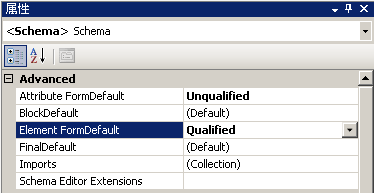
通过以上的设置通常就可以实现对架构,元素或属性的命名空间前缀限定。但在有些情况下虽然设置了Element FromDefault(Attribute一般为属性部声明)的值为UnQualified。但是使用生成实例生成的XML元素或记录还是会带命名空间前缀(如下XML),这种情况一般发生在使用Schema生成向导生成的Schema,从XDR(BizTalk 2002以前使用的Schema格式)转到XSD(BizTalk 2004以后使用的Schema 格式)。
 <
ns0:Root
DATE
="DATE_0"
xmlns:ns0
="http://schemasample.test"
>
<
ns0:Record
>
<
ns0:SubRecord
NUM
="NUM_0"
>
<
ns0:TestField
>
TestField_0
</
ns0:TestField
>
</
ns0:SubRecord
>
</
ns0:Record
>
</
ns0:Root
>
<
ns0:Root
DATE
="DATE_0"
xmlns:ns0
="http://schemasample.test"
>
<
ns0:Record
>
<
ns0:SubRecord
NUM
="NUM_0"
>
<
ns0:TestField
>
TestField_0
</
ns0:TestField
>
</
ns0:SubRecord
>
</
ns0:Record
>
</
ns0:Root
>
经过测试发现Schema的设置不能应用到子记录或元素的原因是记录的类型为引用类型,并且引用了全局的元素。
<?
xml version="1.0" encoding="utf-16"
?>
<
xs:schema
xmlns:b
="http://schemas.microsoft.com/BizTalk/2003"
xmlns
="http://orchtest.schema1/"
elementFormDefault
="unqualified"
targetNamespace="http://orchtest.schema1/"
xmlns:xs
="http://www.w3.org/2001/XMLSchema"
>
<
xs:annotation
>
<
xs:appinfo
>
<
b:schemaInfo
standard
="XML"
xmlns:b
="http://schemas.microsoft.com/BizTalk/2003"
root_reference
="Root"
displayroot_reference="Root"
/>
</
xs:appinfo
>
</
xs:annotation
>
<
xs:element
name
="Root"
>
<
xs:complexType
>
<
xs:sequence
>
<
xs:element
name
="Record1"
>
<
xs:complexType
/>
</
xs:element
>
<
xs:element
name
="Field1"
type
="xs:string"
/>
<
xs:element
name
="Field2"
type
="xs:string"
/>
<
xs:element
name
="Record2"
type
="Record2"
/>
<xs:element minOccurs="1" maxOccurs="1" ref="ExtRecord" />
</ xs:sequence >
</
xs:complexType
>
</
xs:element
>
<xs:element name="ExtRecord"> <xs:complexType> <xs:choice minOccurs="0"> <xs:element name="TestField"> <xs:simpleType> <xs:restriction base="xs:string" /> </xs:simpleType> </xs:element> </xs:choice> <xs:attribute name="NUM" type="xs:string" /> </xs:complexType> </xs:element>
<xs:complexType name="Record2"> <xs:annotation> <xs:appinfo> <b:fieldInfo xmlns:b="http://schemas.microsoft.com/BizTalk/2003" /></xs:appinfo> </xs:annotation> <xs:attribute name="Field" type="xs:string" /> </xs:complexType>
请注意上图的几个背景部分:
绿色部分 为在架构中声明全局属性即元素不需要命名空间前缀限定
灰色部分 为在Schema编辑器中自定义的Complex Type.
黄色部分 为转换向导生成的类型
粉色部分 为在Root节点引用ExtRecord元素的类型。
特别注意红色部分,如果没有加上红色部分的声明的话在BizTalk编辑器会显示所有元素。即会出现两个ExtRecord节点。
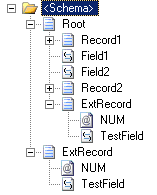
使用Schema生成实例生成的XML数据如下:
<
ns0:Root
xmlns:ns0
="http://OrchTest.Schema1"
>
<
Record1
/>
<
Field1
>
Field1_0
</
Field1
>
<
Field2
>
Field2_0
</
Field2
>
<
Record2
Field
="Field_0"
/>
<
ns0:ExtRecord
NUM
="NUM_0"
>
<
TestField
>
TestField_0
</
TestField
>
</
ns0:ExtRecord
>
</
ns0:Root
>
我们再来改变一下Schema(注意,此修改是在XML编辑器进行,而不是在BizTalk的Schema编辑器。右击Schema文件,选择打开方式,在对话框中选择XML编辑器)
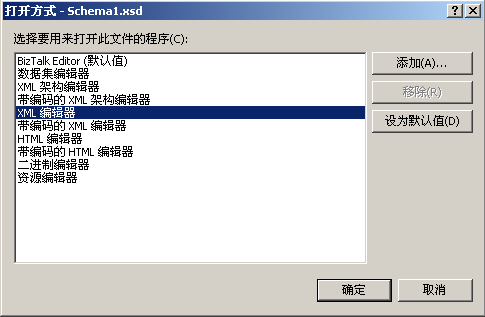
更改之后的XML如下:
<?
xml version="1.0" encoding="utf-16"
?>
<
xs:schema
xmlns:b
="http://schemas.microsoft.com/BizTalk/2003"
xmlns
="http://orchtest.schema1/"
elementFormDefault
="unqualified"
targetNamespace
="http://orchtest.schema1/"
xmlns:xs
="http://www.w3.org/2001/XMLSchema"
>
<
xs:annotation
>
<
xs:appinfo
>
<
b:schemaInfo
standard
="XML"
xmlns:b
="http://schemas.microsoft.com/BizTalk/2003"
root_reference
="Root"
/>
</
xs:appinfo
>
</
xs:annotation
>
<
xs:element
name
="Root"
>
<
xs:complexType
>
<
xs:sequence
>
<
xs:element
name
="Record1"
>
<
xs:complexType
/>
</
xs:element
>
<
xs:element
name
="Field1"
type
="xs:string"
/>
<
xs:element
name
="Field2"
type
="xs:string"
/>
<
xs:element
name
="Record2"
type
="Record2"
/>
<xs:element name="ExtRecord"> <xs:complexType> <xs:choice minOccurs="0"> <xs:element name="TestField"> <xs:simpleType> <xs:restriction base="xs:string" /> </xs:simpleType> </xs:element> </xs:choice> <xs:attribute name="NUM" type="xs:string" /> </xs:complexType> </xs:element>
</
xs:sequence
>
</
xs:complexType
>
</
xs:element
>
<
xs:complexType
name
="Record2"
>
<
xs:annotation
>
<
xs:appinfo
>
<
b:fieldInfo
xmlns:b
="http://schemas.microsoft.com/BizTalk/2003"
/>
</
xs:appinfo
>
</
xs:annotation
>
<
xs:attribute
name
="Field"
type
="xs:string"
/>
</
xs:complexType
>
</
xs:schema
>
保存Schema。生成实例如下:
<
ns0:Root
xmlns:ns0
="http://OrchTest.Schema1"
>
<
Record1
/>
<
Field1
>
Field1_0
</
Field1
>
<
Field2
>
Field2_0
</
Field2
>
<
Record2
Field
="Field_0"
/>
<
ExtRecord
NUM
="NUM_0"
>
<
TestField
>
TestField_0
</
TestField
>
</
ExtRecord
>
</
ns0:Root
>
经查证。XML Schema中的全局声明必须是唯一的,而全局模式中的每一个声明都自动进入目标名称空间。因此ElementFormDefault的设置不能作用于该元素。






 扫一扫
扫一扫


 348
348

 被折叠的 条评论
为什么被折叠?
被折叠的 条评论
为什么被折叠?
 到【灌水乐园】发言





