


上一博文提到查找上一响应者的方法,现在就通过代码测试验证一下。
一、首先看一下测试代码结构
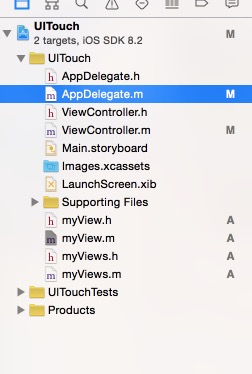
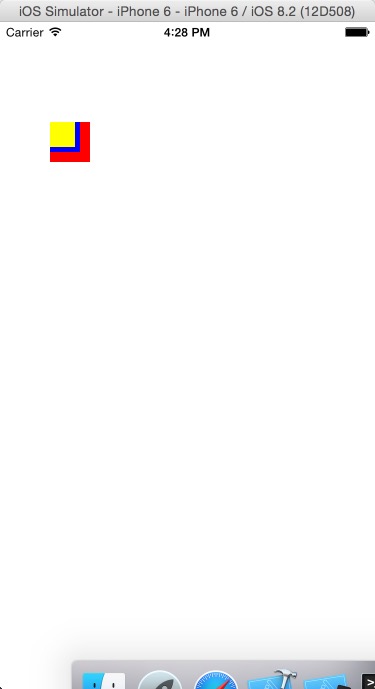
myViews基础myView,myView继承UIView。黄色是myviews的对象,蓝色是myView对象,红色是添加的View。
二、代码
1.在AppDelagate.m中添加

2.在ViewController中
#import "ViewController.h"
#import "myView.h"
#import "myViews.h"

@interface ViewController ()
@property(nonatomic,strong)UIView *view1;
@end

@implementation ViewController

- (void)viewDidLoad {
    [super viewDidLoad];
    self.view.tag=10003;
    self.view1=[[UIView alloc]init];
    self.view1.frame=CGRectMake(50, 100, 40, 40);
    self.view1.backgroundColor=[UIColor redColor];
    self.view1.tag=10001;
    [self.view addSubview:self.view1];

    myView *myview1=[[myView alloc]init];
    myview1.frame=CGRectMake(50, 100, 30, 30);
    myview1.backgroundColor=[UIColor blueColor];
    myview1.tag=10002;
//    userInteractionEnabled是否可以用户交互 YES可以响应点击事件
    myview1.userInteractionEnabled=YES;
    [self.view addSubview:myview1];

    myViews *myviews1=[[myViews alloc]init];
    myviews1.frame=CGRectMake(50, 100, 25, 25);
    myviews1.backgroundColor=[UIColor yellowColor];
    [self.view addSubview:myviews1];

}
-(void)touchesBegan:(NSSet *)touches withEvent:(UIEvent *)event
{
    UITouch *touch=[touches anyObject];
    //判断点击的是哪一个View 可以通过tag值 或通过==判断
   // NSLog(@"Yes or No:%d",self.view1==touch.view);
  //  NSLog(@"%ld",touch.view.tag);

    NSLog(@"控制器触屏开始滑动");
    //tapCount点击次数
    NSLog(@"%ld",touch.tapCount);

}
-(void)touchesMoved:(NSSet *)touches withEvent:(UIEvent *)event
{
    UITouch *touch=[touches anyObject];
    //locationInView 相对于参数View的当前位置
    CGPoint loactionPoint=[touch locationInView:self.view1];
    NSLog(@"%@",NSStringFromCGPoint(loactionPoint));
    //locationInView 相对于参数View的前一位置
    CGPoint prePoint=[touch previousLocationInView:self.view1];
    NSLog(@"%@",NSStringFromCGPoint(prePoint));
    CGFloat moveX=loactionPoint.x-prePoint.x;
    CGFloat moveY=loactionPoint.y-prePoint.y;
    NSLog(@"%f %f",moveX,moveY);
    CGPoint temp=self.view1.center;
    temp.x+=moveX;
    temp.y+=moveY;
    self.view1.center=temp;
}
-(void)touchesEnded:(NSSet *)touches withEvent:(UIEvent *)event
{
    NSLog(@"控制器触屏滑动结束");
}
-(void)touchesCancelled:(NSSet *)touches withEvent:(UIEvent *)event
{
    //一般应用在来电话等
    NSLog(@"控制器触屏取消");
}
- (void)didReceiveMemoryWarning {
    [super didReceiveMemoryWarning];
    // Dispose of any resources that can be recreated.
}

@end
在myView.m中
#import "myView.h"

@implementation myView

-(void)touchesBegan:(NSSet *)touches withEvent:(UIEvent *)event
{
    NSLog(@"子View触屏开始");
}
-(void)touchesMoved:(NSSet *)touches withEvent:(UIEvent *)event
{
    NSLog(@"子view触屏中");
}
-(void)touchesEnded:(NSSet *)touches withEvent:(UIEvent *)event
{
    NSLog(@"子view触屏结束");
}

@end
在myViews.m中
#import "myViews.h"

@implementation myViews

-(void)touchesBegan:(NSSet *)touches withEvent:(UIEvent *)event
{
    NSLog(@"子子View触屏开始");
}
-(void)touchesMoved:(NSSet *)touches withEvent:(UIEvent *)event
{
    NSLog(@"子子view触屏中");
}
-(void)touchesEnded:(NSSet *)touches withEvent:(UIEvent *)event
{
    NSLog(@"子子view触屏结束");
}


@end
三、运行效果图
四、验证
1.依次点击黄、蓝、红、白
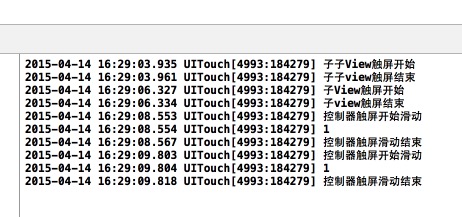
由上面运行结果可以看出:黄色、蓝色的响应者都是本身,红色未实现Touch方法,它的响应者为ViewController中的View,由于该View也未实现,但它属于是ViewController的View,所以它的响应者是ViewController.
2.注释myViews、ViewController中的Touch实现,依次点击黄、蓝、红、白
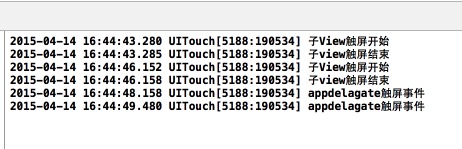
由于myViews、ViewController类中的Touch实现注释,黄色点击时找其父视图,则找到myView中的,而将控制器的Touch实现注释则红色、白色的响应者变成了Application,所以调用了Appdalegate中的Touch实现,类似父节点的查找。






 扫一扫
扫一扫


 1092
1092

 被折叠的 条评论
为什么被折叠?
被折叠的 条评论
为什么被折叠?
 到【灌水乐园】发言





