


DJSelectCityViewController.m
#import "DJSelectCityViewController.h"
#import "DJConstantValue.h"
#import "DJCityGroup.h"
#import "MJExtension.h"


@interface DJSelectCityViewController ()<UITableViewDataSource,UITableViewDelegate,UISearchBarDelegate>

/** 城市组列表 */
@property (nonatomic,strong) NSMutableArray *cityGroups;
@property (weak, nonatomic) IBOutlet UITableView *cityTableView;

@end

@implementation DJSelectCityViewController

- (void)viewDidLoad {
    [super viewDidLoad];

    self.title = @"选择城市";
    // 设置右侧索引栏字体颜色
    self.cityTableView.sectionIndexColor = [UIColor blackColor];

    [self setupNavLeftItem];
    [self loadCityData];

}

- (void)setupNavLeftItem {

    UIBarButtonItem *closeItem = [UIBarButtonItem itemWithTarget:self action:@selector(close) image:@"btn_navigation_close" highlighImage:@"btn_navigation_close_hl"];

    self.navigationItem.leftBarButtonItem = closeItem;

}


/** 加载城市数据 */
- (void)loadCityData {

     self.cityGroups = [DJCityGroup mj_objectArrayWithFilename:@"cityGroups.plist"];

}


/** 关闭当前界面 */
- (void)close {

    [self dismissViewControllerAnimated:YES completion:nil];

}


- (void)didReceiveMemoryWarning {
    [super didReceiveMemoryWarning];
    // Dispose of any resources that can be recreated.
}


#pragma mark - UITableView 数据源方法

- (NSInteger)numberOfSectionsInTableView:(UITableView *)tableView {

    return self.cityGroups.count;

}


- (NSInteger)tableView:(UITableView *)tableView numberOfRowsInSection:(NSInteger)section {

    DJCityGroup *cityGroup =  self.cityGroups[section];
    return cityGroup.cities.count;

}


- (UITableViewCell *)tableView:(UITableView *)tableView cellForRowAtIndexPath:(NSIndexPath *)indexPath {

    static NSString *ID = @"cityGroup";
    UITableViewCell *cell = [tableView dequeueReusableCellWithIdentifier:ID];
    if (!cell) {
        cell = [[UITableViewCell alloc] initWithStyle:UITableViewCellStyleSubtitle reuseIdentifier:ID];
    }
    DJCityGroup *cityGroup = self.cityGroups[indexPath.section];
    NSString *cityName = cityGroup.cities[indexPath.row];

    cell.textLabel.text = cityName;

    return cell;
}

#pragma mark - tableView 代理方法

- (NSString *)tableView:(UITableView *)tableView titleForHeaderInSection:(NSInteger)section {

    DJCityGroup *cityGroup = self.cityGroups[section];
    return cityGroup.title;

}


- (NSArray<NSString *> *)sectionIndexTitlesForTableView:(UITableView *)tableView {

    return [self.cityGroups valueForKeyPath:@"title"];

}


#pragma mark - UISearchBar 代理方法

/** SearchBar开始编辑 */
- (void)searchBarTextDidBeginEditing:(UISearchBar *)searchBar {

    // 隐藏导航栏
    [self.navigationController setNavigationBarHidden:YES animated:YES];


}

/** SearchBar结束编辑 */
- (void)searchBarTextDidEndEditing:(UISearchBar *)searchBar {

    // 显示导航栏
    [self.navigationController setNavigationBarHidden:NO animated:YES];


}

@end
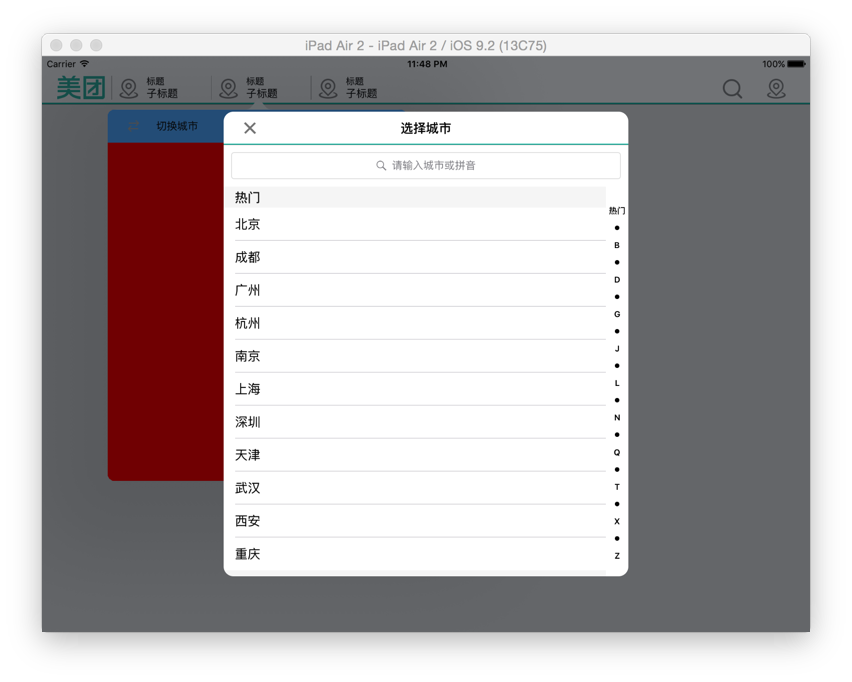
最终效果:






 扫一扫
扫一扫


 1158
1158

 被折叠的 条评论
为什么被折叠?
被折叠的 条评论
为什么被折叠?
 到【灌水乐园】发言





