


 本文介绍了解决SVN在使用HTTPS地址时出现的SSL握手失败问题的方法。通过卸载原有软件包、下载并安装指定版本的svn和neon源码包,配置环境变量等步骤,最终实现HTTPS方式下代码检出的功能。
svn: OPTIONS of 'https://192.168.11.185/svn/ahwater-cloud': SSL handshake failed: SSL error: Key usage violation in certificate has been detected. (https://192.168.11.185)

linux发行版:Centos
svn使用https地址,检出代码出错:SSL handshake failed: SSL error: Key usage violation in certificate has been detected.
使用命令:ldd svn |grep ssl .如果没有返回信息,那么就适用下面的方法。
Centos 6.6
1、卸载自带的svn和neon软件包
yum -y remove subversion
yum -y remove neon neon-devel
2、下载svn和neon的源码包
cd /usr/local/src
wget http://www.webdav.org/neon/neon-0.29.0.tar.gz
wget http://mirrors.tuna.tsinghua.edu.cn/apache/apr/apr-1.5.2.tar.gz
wget http://mirrors.tuna.tsinghua.edu ... r-util-1.5.4.tar.gz
wget http://archive.apache.org/dist/subversion/subversion-1.6.6.tar.gz
3、开始解压缩安装
3.1、安装neon
tar zxf neon-0.29.0.tar.gz
cd neon-0.29.0
./configure --prefix=/usr/local/neon --enable-shared --with-ssl=openssl
make && make install
3.2、安装subversion
tar zxf apr-1.5.2.tar.gz
cd apr-1.5.2
./configure --prefix=/usr/local/apr
make && make install
cd ..
tar zxf apr-util-1.5.4.tar.gz
cd apr-util-1.5.4
./configure --prefix=/usr/local/apr-util --with-apr=/usr/local/apr
make && make install
cd ..
tar zxf subversion-1.6.6.tar.gz
cd subversion-1.6.6
./configure --prefix=/usr/local/svn --with-neon=/usr/local/neon --with-apr=/usr/local/apr --with-apr-util=/usr/local/apr-util --with-ssl
make && make install
4、添加svn到环境变量
vim /etc/profile
PATH=$PATH:/usr/local/svn/bin
export PATH
保存退出
source /etc/profile
5、验证
执行命令 svn --version
svn, version 1.6.6 (r40053)
compiled Nov 3 2015, 13:41:17
Copyright (C) 2000-2009 CollabNet.
Subversion is open source software, see http://subversion.tigris.org/
This product includes software developed by CollabNet (http://www.Collab.Net/).
The following repository access (RA) modules are available:
* ra_neon : Module for accessing a repository via WebDAV protocol using Neon.
- handles 'http' scheme
- handles 'https' scheme
* ra_svn : Module for accessing a repository using the svn network protocol.
- with Cyrus SASL authentication
- handles 'svn' scheme
* ra_local : Module for accessing a repository on local disk.
- handles 'file' scheme
cd /usr/local/svn/bin/
ldd svn|grep ssl
libssl.so.10 => /usr/lib64/libssl.so.10 (0x00007fb33a874000)
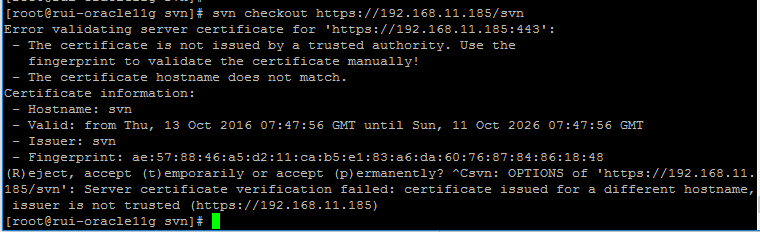
这时,再次使用svn co检出代码,发现它会问你:(R)eject, accept (t)emporarily or accept (p)ermanently?
键入p回车,就该输入用户名和密码来认证了。
have a nice day.





 扫一扫
扫一扫


 2679
2679

 被折叠的 条评论
为什么被折叠?
被折叠的 条评论
为什么被折叠?
 到【灌水乐园】发言





