


 本文详细介绍了如何在UEditor编辑器中自定义工具栏布局,隐藏用户管理图片的功能,以及如何修改默认的图片和文件上传路径。包括在editor_config.js文件中的配置调整,以及对于dialogs/image/image.html页面元素的样式修改。通过调整这些设置,可以优化UEditor的使用体验,同时确保图片上传的安全性和可控性。
1、自定义工具栏
在editor_config.js文件中,找到,toolbars:…并修改,例:
,toolbars:[["source","preview","fullscreen","print","searchreplace", "|",
"undo","redo", "|",
			"removeformat","formatmatch","autotypeset","blockquote","pasteplain","|",
            "unlink","link","anchor","spechars","separate","horizontal","insertunorderedlist","insertorderedlist","|",
            "rowspacingbottom","rowspacingtop","lineheight","justifyleft","justifycenter","justifyright","justifyjustify","indent", "|",
            "bold","italic","underline","strikethrough","superscript","subscript","forecolor","backcolor","paragraph","fontfamily","fontsize", "|",
            "inserttable","deletetable","mergeright","mergedown","splittorows","splittocols","splittocells","mergecells","insertcol","insertrow","deletecol","deleterow","insertparagraphbeforetable", "|",
"insertimage","music","emotion","insertvideo","attachment","wordimage","map","gmap","insertframe","date","time"]]工具之间使用的”|”表示普通分隔,如果强制换行则使用[]把工具括住
2、减少用户管理图片的功能(很多应用都有这个需求,只希望用户上传图片,并不希望他们可以看到其他图片的信息,因此我们需要隐藏红圈部分)
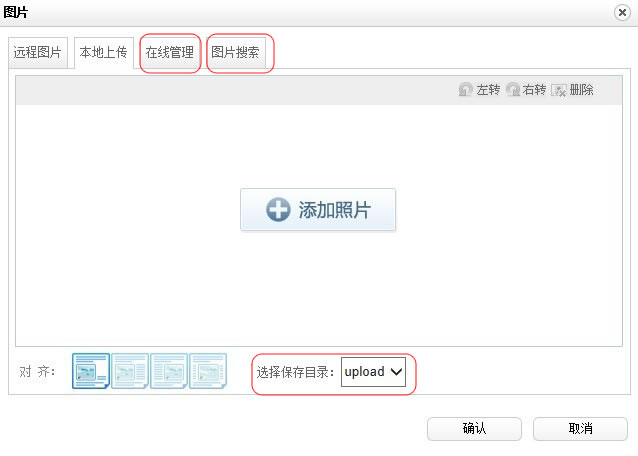
打开项目中的ueditor/dialogs/image/image.html,找到<span tabSrc="imgManager" 和
<span tabSrc="imgSearch" 还有 <div class="saveDir" 3个元素,都加上style=”display:none;”样式,把上述3个部分隐藏掉.
3、修改默认的图片和文件上传路径
Ueditor默认的图片和文件上传路径为/webname/ueditor/jsp/upload下
如果需要修改图片和文件的上传路径,不但需要修改editor_config.js配置文件,还要修改Uploader.java(某些情况还需要修改/webname/ueditor/jsp/下的imageUp.jsp和fileUp.jsp,具体根据需要而定)
例:在项目myDemo中,把默认图片的上传路径改为:/myDemo/userfiles/upload/images, 把文件上传路径改为:/myDemo/userfiles/upload/attachment
1) 修改editor_config.js配置文件,把imagePath, filePath, imageManagerPath 从原来的URL + “jsp/”都修改为”/myDemo/”。
2) 修改Uploader.java中的getPhysicalPath()方法,返回与editor_config.js中imagePath, filePath, imageManagerPath一样的值。修改后代码如下:
private String getPhysicalPath(String path) {
	//String servletPath = this.request.getServletPath();
	//String realPath = this.request.getSession().getServletContext().getRealPath(servletPath);
	//return new File(realPath).getParent() +"/" +path;
	return this.request.getSession().getServletContext().getRealPath("/") + "/" + path;
}修改fileUp.jsp文件,把up.setSavePath("upload ");改为up.setSavePath("userfiles/upload/attachment");
.





 扫一扫
扫一扫


 被折叠的 条评论
为什么被折叠?
被折叠的 条评论
为什么被折叠?
 到【灌水乐园】发言





