


JAX-RS概述
JAX-RS是Java提供用于开发RESTful Web服务基于注解(annotation)的API。JAX-RS旨在定义一个统一的规范,使得Java程序员可以使用一套固定的接口来开发REST应用,避免了依赖第三方框架。同时JAX-RS使用POJO编程模型和基于注解的配置并集成JAXB,可以有效缩短REST应用的开发周期。JAX-RS只定义RESTful API,具体实现由第三方提供,如Jersey、Apache CXF等。
JAX-RS包含近五十多个接口、注解和抽象类:
- javax.ws.rs包含用于创建RESTful服务资源的高层次(High-level)接 口和注解。
- javax.ws.rs.core包含用于创建RESTful服务资源的低层次(Low-level)接口和注解。
- javax.ws.rs.ext包含用于扩展JAX-RS API支持类型的APIs。
JAX-RS常用注解:
- @Path:标注资源类或方法的相对路径。
- @GET、@PUT、@POST、@DELETE:标注方法的HTTP请求类型。
- @Produces:标注返回的MIME媒体类型。
- @Consumes:标注可接受请求的MIME媒体类型。
- @PathParam、@QueryParam、@HeaderParam、@CookieParam、@MatrixParam、@FormParam:标注方法的参数来自于HTTP请求的位置。@PathParam来自于URL的路径,@QueryParam来自于URL的查询参数,@HeaderParam来自于HTTP请求的头信息,@CookieParam来自于HTTP请求的Cookie。
服务端
下面用CXF发布一个图书馆RESTFul服务,实现书籍的查询、添加、删除和修改。CXF发布RESTFul服务需要引入cxf-rt-frontend-jaxrs,pom.xml配置如下。
<project xmlns="http://maven.apache.org/POM/4.0.0" xmlns:xsi="http://www.w3.org/2001/XMLSchema-instance"
    xsi:schemaLocation="http://maven.apache.org/POM/4.0.0 http://maven.apache.org/xsd/maven-4.0.0.xsd">
    <modelVersion>4.0.0</modelVersion>

    <groupId>study</groupId>
    <artifactId>cxfrestful</artifactId>
    <version>0.0.1-SNAPSHOT</version>
    <packaging>jar</packaging>

    <name>cxfrestful</name>
    <url>http://maven.apache.org</url>

    <properties>
        <!-- CXF版本 -->
        <cxf.version>3.1.1</cxf.version>
    </properties>

    <dependencies>
        <!-- CXF -->
        <dependency>
            <groupId>org.apache.cxf</groupId>
            <artifactId>cxf-rt-frontend-jaxrs</artifactId>
            <version>${cxf.version}</version>
        </dependency>
        <dependency>
            <groupId>org.apache.cxf</groupId>
            <artifactId>cxf-rt-transports-http</artifactId>
            <version>${cxf.version}</version>
        </dependency>
        <!-- 如果在tomcat或者其他servlet容器中发布服务,不需要引用cxf-rt-transports-http-jetty -->
        <dependency>
            <groupId>org.apache.cxf</groupId>
            <artifactId>cxf-rt-transports-http-jetty</artifactId>
            <version>${cxf.version}</version>
        </dependency>
        <!-- End CXF -->
    </dependencies>
</project>
书籍XML格式
<Book>
    <author>尼古拉·奥斯特洛夫斯基</author>
    <id>10</id>
    <name>钢铁是怎样炼成的?</name>
    <price>3.0</price>
</Book>
书籍实体类
package com.study.cxfrestful.domain;

import javax.xml.bind.annotation.XmlRootElement;

/**
 * 书籍实体类
 */
@XmlRootElement(name = "Book")
public class Book {
    // id
    private String id;

    // 书名
    private String name;
    // 作者
    private String author;
    // 价格
    private Double price;

    public String getName() {
        return name;
    }

    public void setName(String name) {
        this.name = name;
    }

    public String getAuthor() {
        return author;
    }

    public void setAuthor(String author) {
        this.author = author;
    }

    public Double getPrice() {
        return price;
    }

    public void setPrice(Double price) {
        this.price = price;
    }

    public String getId() {
        return id;
    }

    public void setId(String id) {
        this.id = id;
    }
}
图书馆服务类
package com.study.cxfrestful.ws;

import java.util.HashMap;
import java.util.Map;

import javax.ws.rs.DELETE;
import javax.ws.rs.GET;
import javax.ws.rs.POST;
import javax.ws.rs.PUT;
import javax.ws.rs.Path;
import javax.ws.rs.PathParam;
import javax.ws.rs.Produces;
import javax.ws.rs.core.MediaType;
import javax.ws.rs.core.Response;

import com.study.cxfrestful.domain.Book;

/**
 * 图书馆服务
 *
 */
@Path("/library")
@Produces("text/xml")
public class LibraryService {
    private Map<String, Book> books = new HashMap<String, Book>();

    public LibraryService() {
        init();
    }

    /**
     * 获取
     *
     * @param id
     *            索引
     * @return 书
     */
    @GET
    @Path("/books/{id}/")
    public Book getBook(@PathParam("id") String id) {
        return books.get(id);
    }

    /**
     * 更新
     *
     * @param book
     * @return
     */
    @PUT
    @Path("/books/")
    public Response updateBook(Book book) {
        Response r;
        if (book == null) {
            r = Response.noContent().build();
            return r;
        }

        String id = book.getId();
        Book b = books.get(id);
        if (b != null) {
            books.put(id, book);
            r = Response.ok(true, MediaType.TEXT_PLAIN).build();
        } else {
            r = Response.notModified().build();
        }

        return r;
    }

    /**
     * 添加
     *
     * @param book
     * @return
     */
    @POST
    @Path("/books/")
    public Response addBook(Book book) {
        Response r;
        if (book == null) {
            r = Response.notModified().build();
        } else {
            books.put(book.getId(), book);
            r = Response.ok(true, MediaType.TEXT_PLAIN).build();
        }

        return r;
    }

    /**
     * 删除
     *
     * @param book
     * @return
     */
    @DELETE
    @Path("/books/{id}/")
    public Response deleteBook(@PathParam("id") String id) {
        Response r;
        Book book = books.get(id);

        if (book == null) {
            r = Response.notModified("id不存在").build();
        } else {
            books.remove(id);
            r = Response.ok(book, MediaType.APPLICATION_XML).build();
        }

        return r;
    }

    /**
     * 初始化,在图书馆里加几本书
     */
    private void init() {
        Book book = null;

        book = new Book();
        book.setAuthor("优快云");
        book.setId("blog");
        book.setName("如何使用博客");
        book.setPrice(3.0);
        books.put(book.getId(), book);

        book = new Book();
        book.setAuthor("优快云");
        book.setId("app");
        book.setName("如何下载优快云移动客户端");
        book.setPrice(30.0);
        books.put(book.getId(), book);

        book = new Book();
        book.setAuthor("优快云");
        book.setId("resource");
        book.setName("如何下载优快云资源");
        book.setPrice(5.0);
        books.put(book.getId(), book);

        book = new Book();
        book.setAuthor("优快云");
        book.setId("rs");
        book.setName("JAX-RS详解");
        book.setPrice(15.0);
        books.put(book.getId(), book);
    }

}
客户端
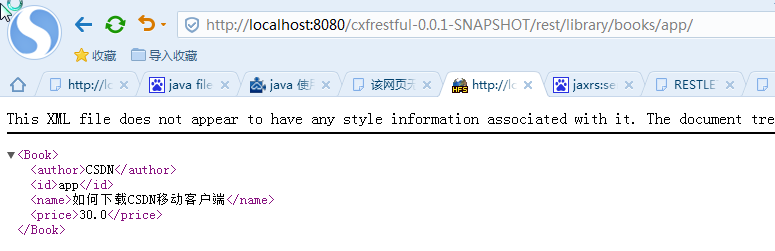
查询书籍信息,在浏览器中输入http://localhost:8280/rest/library/books/app/

下面用Fiddler模拟POST、DELETE和PUT请求。
添加书籍
<Book>
    <author>鲁迅</author>
    <id>11</id>
    <name>朝花夕拾</name>
    <price>20.0</price>
</Book>

添加返回结果
HTTP/1.1 200 OK
Date: Fri, 31 Jul 2015 06:50:30 GMT
Content-Type: text/plain Date: Fri, 31 Jul 2015 06:50:30 GMT Content-Length: 4 Server: Jetty(9.2.10.v20150310) true
修改书籍
<Book>
    <author>鲁迅</author>
    <id>11</id>
    <name>朝花夕拾</name>
    <price>200.0</price>
</Book>

返回结果
HTTP/1.1 200 OK
Date: Fri, 31 Jul 2015 06:52:24 GMT
Content-Type: text/plain Date: Fri, 31 Jul 2015 06:52:24 GMT Content-Length: 4 Server: Jetty(9.2.10.v20150310) true
删除书籍

返回结果
HTTP/1.1 200 OK
Date: Fri, 31 Jul 2015 06:54:36 GMT
Content-Type: application/xml Date: Fri, 31 Jul 2015 06:54:36 GMT Content-Length: 147 Server: Jetty(9.2.10.v20150310) <?xml version="1.0" encoding="UTF-8" standalone="yes"?><Book><author>鲁迅</author><id>11</id><name>朝花夕拾</name><price>200.0</price></Book>
Tomcat中发布RESTful
CXF在Tomcat中发布服务,需要spring-Web支持,pom.xml配置如下。
<project xmlns="http://maven.apache.org/POM/4.0.0" xmlns:xsi="http://www.w3.org/2001/XMLSchema-instance"
    xsi:schemaLocation="http://maven.apache.org/POM/4.0.0 http://maven.apache.org/xsd/maven-4.0.0.xsd">
    <modelVersion>4.0.0</modelVersion>

    <groupId>study</groupId>
    <artifactId>cxfrestful</artifactId>
    <version>0.0.1-SNAPSHOT</version>
    <packaging>jar</packaging>

    <name>cxfrestful</name>
    <url>http://maven.apache.org</url>

    <properties>
        <!-- CXF版本 -->
        <cxf.version>3.1.1</cxf.version>
        <!-- Spring版本 -->
        <spring.version>4.1.7.RELEASE</spring.version>
    </properties>

    <dependencies>
        <!-- Spring -->
        <dependency>
            <groupId>org.springframework</groupId>
            <artifactId>spring-aop</artifactId>
            <version>${spring.version}</version>
        </dependency>
        <dependency>
            <groupId>org.springframework</groupId>
            <artifactId>spring-aspects</artifactId>
            <version>${spring.version}</version>
        </dependency>
        <dependency>
            <groupId>org.springframework</groupId>
            <artifactId>spring-beans</artifactId>
            <version>${spring.version}</version>
        </dependency>
        <dependency>
            <groupId>org.springframework</groupId>
            <artifactId>spring-context</artifactId>
            <version>${spring.version}</version>
        </dependency>
        <dependency>
            <groupId>org.springframework</groupId>
            <artifactId>spring-core</artifactId>
            <version>${spring.version}</version>
        </dependency>
        <dependency>
            <groupId>org.springframework</groupId>
            <artifactId>spring-web</artifactId>
            <version>${spring.version}</version>
        </dependency>
        <!-- End Spring -->
        <!-- CXF -->
        <dependency>
            <groupId>org.apache.cxf</groupId>
            <artifactId>cxf-rt-frontend-jaxrs</artifactId>
            <version>${cxf.version}</version>
        </dependency>
        <dependency>
            <groupId>org.apache.cxf</groupId>
            <artifactId>cxf-rt-frontend-jaxrs</artifactId>
            <version>${cxf.version}</version>
        </dependency>
        <dependency>
            <groupId>org.apache.cxf</groupId>
            <artifactId>cxf-rt-transports-http</artifactId>
            <version>${cxf.version}</version>
        </dependency>
        <!-- 如果在tomcat或者其他servlet容器中发布服务,不需要引用cxf-rt-transports-http-jetty -->
        <dependency>
            <groupId>org.apache.cxf</groupId>
            <artifactId>cxf-rt-transports-http-jetty</artifactId>
            <version>${cxf.version}</version>
        </dependency>
        <!-- End CXF -->
    </dependencies>
</project>
在web.xml中添加CXFServlet
<?xml version="1.0" encoding="UTF-8"?>
<web-app xmlns:xsi="http://www.w3.org/2001/XMLSchema-instance"
    xmlns="http://java.sun.com/xml/ns/javaee"
    xsi:schemaLocation="http://java.sun.com/xml/ns/javaee http://java.sun.com/xml/ns/javaee/web-app_3_0.xsd"
    id="WebApp_ID" version="3.0">
    <display-name>cxfserver</display-name>

    <!-- Spring配置 -->
    <context-param>
        <param-name>contextConfigLocation</param-name>
        <param-value>classpath:beans.xml</param-value>
    </context-param>
    <listener>
        <listener-class>org.springframework.web.context.ContextLoaderListener</listener-class>
    </listener>
    <!-- End Spring配置 -->

    <!-- CXF Servlet -->
    <servlet>
        <servlet-name>cxfservlet</servlet-name>
        <servlet-class>org.apache.cxf.transport.servlet.CXFServlet</servlet-class>
        <load-on-startup>1</load-on-startup>
    </servlet>
    <servlet-mapping>
        <servlet-name>cxfservlet</servlet-name>
        <url-pattern>/rest/*</url-pattern>
    </servlet-mapping>
    <!-- End CXF Servlet -->

    <welcome-file-list>
        <welcome-file>index.html</welcome-file>
        <welcome-file>index.jsp</welcome-file>
    </welcome-file-list>
</web-app>
在WEB-INF文件夹下创建cxf-servlet.xml
<?xml version="1.0" encoding="UTF-8"?>
<beans xmlns="http://www.springframework.org/schema/beans"
    xmlns:aop="http://www.springframework.org/schema/aop"
    xmlns:xsi="http://www.w3.org/2001/XMLSchema-instance"
    xmlns:jaxrs="http://cxf.apache.org/jaxrs"
    xsi:schemaLocation="
        http://www.springframework.org/schema/aop
        http://www.springframework.org/schema/aop/spring-aop.xsd
        http://www.springframework.org/schema/beans
        http://www.springframework.org/schema/beans/spring-beans.xsd
        http://cxf.apache.org/jaxrs
        http://cxf.apache.org/schemas/jaxrs.xsd">
    <bean id="libraryServiceBean" class="com.study.cxfrestful.ws.LibraryService"></bean>

    <jaxrs:server id="libraryServer" address="/">
        <jaxrs:serviceBeans>
            <ref bean="libraryServiceBean"/>
        </jaxrs:serviceBeans>
    </jaxrs:server>
</beans>
Spring上下文配置beans.xml
<?xml version="1.0" encoding="UTF-8"?>
<beans xmlns="http://www.springframework.org/schema/beans"
    xmlns:xsi="http://www.w3.org/2001/XMLSchema-instance" xmlns:aop="http://www.springframework.org/schema/aop"
    xmlns:p="http://www.springframework.org/schema/p" xmlns:context="http://www.springframework.org/schema/context"
    xmlns:tx="http://www.springframework.org/schema/tx"
    xsi:schemaLocation="
    http://www.springframework.org/schema/aop http://www.springframework.org/schema/aop/spring-aop-4.0.xsd
    http://www.springframework.org/schema/beans http://www.springframework.org/schema/beans/spring-beans-4.0.xsd
    http://www.springframework.org/schema/context http://www.springframework.org/schema/context/spring-context-4.0.xsd
    http://www.springframework.org/schema/tx http://www.springframework.org/schema/tx/spring-tx-4.0.xsd">

    <!-- <context:annotation-config /> -->

    <!-- 使Spring支持自动检测组件,如注解的Repository、Service、Controller -->
    <context:component-scan base-package="com.study" />
</beans>
启动Tomcat,在浏览器中输入http://<地址>/cxfrestserver/rest即可看到服务







 扫一扫
扫一扫


 4213
4213

 被折叠的 条评论
为什么被折叠?
被折叠的 条评论
为什么被折叠?
 到【灌水乐园】发言





