


通常我们会涉及到上传文件和下载文件,在没接struts2框架之前,我们都是使用apache下面的commons子项目的FileUpload组件来进行文件的上传,但是那样做的话,代码看起来比较繁琐,而且不灵活,在学习了struts2后,struts2为文件上传下载提供了更好的实现机制,在这里我分别就文件下载和多文件上传的源代码进行一下讲
文件上传
首先先创建jsp页面(用于多文件上传)

<%@ page language="java" import="java.util.*" pageEncoding="UTF-8"%>
<%
    String path = request.getContextPath();
    String basePath = request.getScheme() + "://"
            + request.getServerName() + ":" + request.getServerPort()
            + path + "/";
%>
<%@ taglib uri="/struts-tags" prefix="s"%>
<!DOCTYPE HTML PUBLIC "-//W3C//DTD HTML 4.01 Transitional//EN">
<html>
<head>
<base href="<%=basePath%>">

<title>登录页面</title>

</head>

<body>

    <s:form action="upload.action" enctype="multipart/form-data" method="post">

        <s:file name="upload" label="选择文件" />
        <br />
        <s:file name="upload" label="选择文件" />
        <br />
        <s:file name="upload" label="选择文件" />
        <br />
        <s:submit name="submit" value="上传文件"></s:submit>
    </s:form>

</body>
</html>
success.jsp页面(用来显示上传成功后的文件和文件类型)
<%@ page language="java" import="java.util.*" pageEncoding="UTF-8"%>
<%
    String path = request.getContextPath();
    String basePath = request.getScheme() + "://"
            + request.getServerName() + ":" + request.getServerPort()
            + path + "/";
%>
<%@ taglib uri="/struts-tags" prefix="s"%>
<!DOCTYPE HTML PUBLIC "-//W3C//DTD HTML 4.01 Transitional//EN">
<html>
<head>
<base href="<%=basePath%>">

<title>成功页面</title>

</head>

<body> 您所上传的文件是:<s:property value="uploadFileName"/><br/> 文件类型:<s:property value="uploadCOntentType"/> </body> </html>
接下来创建UploadAction类
package cn.happy.action;

import java.io.File;
import java.io.FileInputStream; import java.io.FileOutputStream; import org.apache.struts2.ServletActionContext; import com.opensymphony.xwork2.ActionContext; import com.opensymphony.xwork2.ActionSupport; public class UploadAction extends ActionSupport { // 上传文件的属性 private File[] upload; // 上传文件的类型 private String[] uploadContentType; // 上传文件的名称 private String[] uploadFileName; // 上传文件的地址 private String savePath; @Override public String execute() throws Exception { byte[] buffer=new byte[1024]; for (int i = 0; i < upload.length; i++) { //建立上传文件的输入流 FileInputStream fis=new FileInputStream(getUpload()[i]); //建立上传文件的输出流, getImageFileName()[i] FileOutputStream fos=new FileOutputStream(getSavePath()+"\\"+getUploadFileName()[i]); int length=fis.read(buffer); while(length>0){ fos.write(buffer,0,length); length = fis.read(buffer); } fis.close(); fos.flush(); fos.close(); } return SUCCESS; } public String getSavePath() { return ServletActionContext.getServletContext().getRealPath(savePath); } public void setSavePath(String savePath) { this.savePath = savePath; } public File[] getUpload() { return upload; } public void setUpload(File[] upload) { this.upload = upload; } public String[] getUploadContentType() { return uploadContentType; } public void setUploadContentType(String[] uploadContentType) { this.uploadContentType = uploadContentType; } public String[] getUploadFileName() { return uploadFileName; } public void setUploadFileName(String[] uploadFileName) { this.uploadFileName = uploadFileName; } }
最后编写配置文件struts.xml
<?xml version="1.0" encoding="UTF-8" ?>
<!DOCTYPE struts PUBLIC
    "-//Apache Software Foundation//DTD Struts Configuration 2.3//EN"
    "http://struts.apache.org/dtds/struts-2.3.dtd">

<struts>
    <!-- 动态方法调用 -->

    <constant name="struts.devMode" value="false" />


    <package name="default" namespace="/" extends="struts-default">

        <action name="upload" class="cn.happy.action.UploadAction" method="execute">
            <param name="savePath">/image</param>
           <result name="success">/upload/success.jsp</result>
        </action>
    </package>
</struts>
实现效果展示
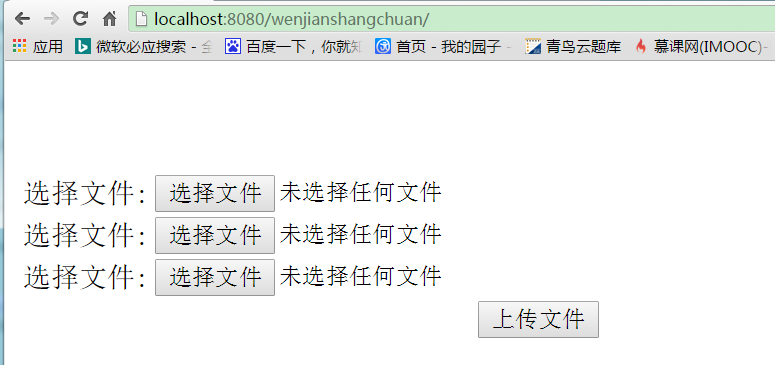
选择文件后
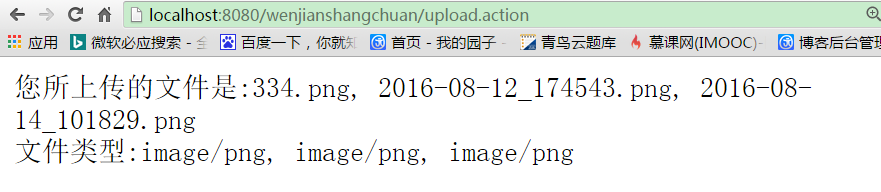
文件下载
编写jsp页面
<%@ page language="java" import="java.util.*" pageEncoding="utf-8"%>
<%
String path = request.getContextPath();
String basePath = request.getScheme()+"://"+request.getServerName()+":"+request.getServerPort()+path+"/";
%>

<!DOCTYPE HTML PUBLIC "-//W3C//DTD HTML 4.01 Transitional//EN">
<html>
  <head>
    <base href="<%=basePath%>">

    <title>My JSP 'index.jsp' starting page</title>
  </head>

  <body>
   <a href="download.action?fileName=1.jpg">点击此处下载文档</a>
  </body>
</html>
创建FileDownAction类
package action;

import java.io.BufferedInputStream;
import java.io.FileInputStream; import java.io.FileNotFoundException; import java.io.IOException; import java.io.InputStream; import org.apache.struts2.ServletActionContext; import com.opensymphony.xwork2.ActionSupport; public class FileDownAction extends ActionSupport { //读取下载文件的目录 private String inputPath; //下载的文件名 private String FileName; //读取下载文件的输入流 private InputStream inputStream; //下载文件的类型 private String conetntType; //创建InputStream输入流 public InputStream getInputStream() throws IOException { System.out.println("123"); String path=ServletActionContext.getServletContext().getRealPath(inputPath); return new BufferedInputStream(new FileInputStream(path+"\\"+FileName)); } @Override public String execute() throws Exception{ return SUCCESS; } public String getInputPath() { return inputPath; } public String getFileName() { return FileName; } public String getConetntType() { return conetntType; } public void setInputPath(String inputPath) { this.inputPath = inputPath; } public void setFileName(String fileName) { FileName = fileName; } public void setInputStream(InputStream inputStream) { this.inputStream = inputStream; } public void setConetntType(String conetntType) { this.conetntType = conetntType; } }
编写配置文件struts.xml
<?xml version="1.0" encoding="UTF-8" ?>
<!DOCTYPE struts PUBLIC
    "-//Apache Software Foundation//DTD Struts Configuration 2.3//EN"
    "http://struts.apache.org/dtds/struts-2.3.dtd">

<struts>
    <constant name="struts.devMode" value="true"></constant>
         <package name="default" namespace="/" extends="struts-default">
            <action name="download" class="action.FileDownAction">
                <param name="inputPath">/image</param>
                <result name="success" type="stream">
                <param name="contentType">application/octet-stream</param>
                <param name="inputName">inputStream</param>
                <param name="contentDisposition">attachment;Filename="${FileName}"</param>
                <param name="bufferSize">4096</param>
                </result>
            </action>
         </package>


</struts>
最后在webRoot目录下创建image文件里面保存下载





 扫一扫
扫一扫


 被折叠的 条评论
为什么被折叠?
被折叠的 条评论
为什么被折叠?
 到【灌水乐园】发言





