


 本文介绍Fiddler这款强大的Web调试代理工具,它能够记录计算机与互联网之间的所有HTTP(S)流量,允许用户检查流量、设置断点及修改进出的数据。文章详细介绍了Fiddler的下载、系统需求配置步骤,并提供了如何将Fiddler配置为代理服务器的方法,以及如何通过Fiddler跟踪HTTP请求的具体流程。
1.Introduce
Fiddler is a WebDebugging Proxy which logs all HTTP(S) traffic between your computer and theInternet. Fiddler allows you to inspect traffic, set breakpoints, and"fiddle" with incoming or outgoing data. Fiddler includes a powerfulevent-based scripting subsystem, and can be extended using any .NET language.
Fiddler is freewareand can debug traffic from virtually any application that supports aproxy, including Internet Explorer, Google Chrome, Apple Safari, MozillaFirefox, Opera, and thousands more. You can also debug traffic from populardevices like Windows Phone, iPod/iPad, and others.
2.Download software
1.Fiddler
http://www.fiddler2.com/fiddler2/version.asp
3.System Requirements
1.Windows XP to Windows 8
2..NET Framework v2.0 or later
3.8 MB disk space / 1ghzprocessor
4.512 MB RAM (2GB+ highlyrecommended)
4.Configure Fiddler as a proxy server
1.In windows OS.
2.Double click to install.
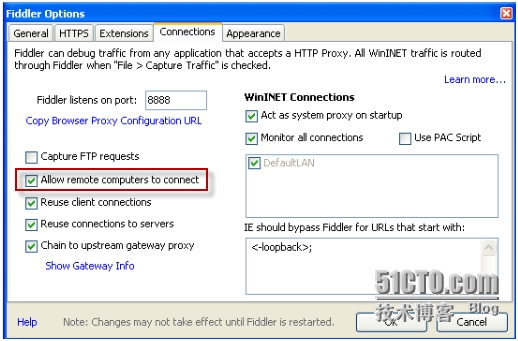
3.Configure Fiddler, click Tools> Fiddler Options > Connections and check the box labeled Allowremote computers to connect. You will need to restart Fiddler for thechange to take effect, and you may need to reconfigure your firewall to allowincoming connections to the Fiddler process.
5.Configure Mac client
1.In Mac client.
2.Click the Apple Menu andclick System Preferences. Click the Network icon and click the Advancedbutton. Click the Proxies tab. Enable the Web Proxy (HTTP) and SecureWeb Proxy (HTTPS) options to point to the IPv4 address of the virtualmachine; also specify that the proxy runs on port 8888. 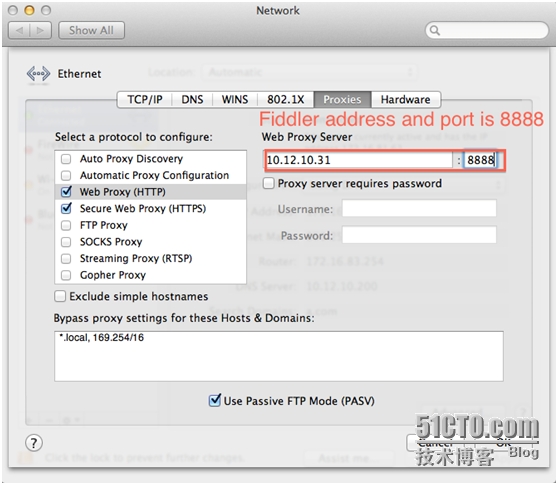
6.Trace where http request go
1.Start Fiddler in Fiddler proxyserver.
2.In Mac client, import Servicerecord and start Citrix Receiver.
3.Start application/Desktop.
4.In Fiddler proxy server->Websession. We can trace where the Http requests go.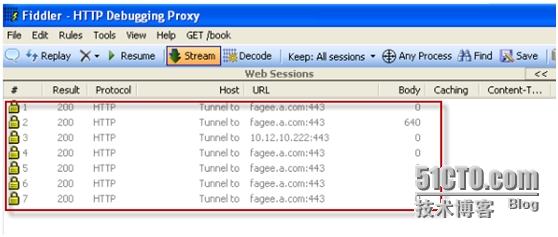
转载于:https://blog.51cto.com/huifu/1406615





 扫一扫
扫一扫


 1162
1162

 被折叠的 条评论
为什么被折叠?
被折叠的 条评论
为什么被折叠?
 到【灌水乐园】发言





