


 本文介绍了iOS平台特定功能,可在NavigationPage的导航栏上将页面标题显示为大标题,适用于iOS 11及以上设备。文中说明了在XAML和C#中启用大标题的方法,还提到可通过Page.LargeTitleDisplay属性覆盖页面行为,并介绍了LargeTitleDisplayMode枚举的三个值。
IOS 上的大型页面标题Large Page Titles on iOS
10/24/2018
本文内容
此 iOS 平台特定用于在的导航栏上将页面标题显示为大标题 NavigationPage ,适用于使用 iOS 11 或更高版本的设备。This iOS platform-specific is used to display the page title as a large title on the navigation bar of a NavigationPage, for devices that use iOS 11 or greater. 当用户开始滚动内容时,较大的标题将左对齐并使用较大的字体,并转换为标准标题,以便有效地使用屏幕房地产。A large title is left aligned and uses a larger font, and transitions to a standard title as the user begins scrolling content, so that the screen real estate is used efficiently. 但在横向方向,标题将返回到导航栏的中心,以优化内容布局。However, in landscape orientation, the title will return to the center of the navigation bar to optimize content layout. 它通过将 NavigationPage.PrefersLargeTitles 附加属性设置为值在 XAML 中使用 boolean :It's consumed in XAML by setting the NavigationPage.PrefersLargeTitles attached property to a boolean value:
xmlns:x="http://schemas.microsoft.com/winfx/2009/xaml"
xmlns:ios="clr-namespace::::no-loc(Xamarin.Forms):::.PlatformConfiguration.iOSSpecific;assembly=:::no-loc(Xamarin.Forms):::.Core"
...
ios:NavigationPage.PrefersLargeTitles="true">
...
或者,可以使用 Fluent API 从 c # 使用它:Alternatively it can be consumed from C# using the fluent API:
using :::no-loc(Xamarin.Forms):::.PlatformConfiguration;
using :::no-loc(Xamarin.Forms):::.PlatformConfiguration.iOSSpecific;
...
var navigationPage = new :::no-loc(Xamarin.Forms):::.NavigationPage(new iOSLargeTitlePageCS());
navigationPage.On().SetPrefersLargeTitles(true);
NavigationPage.On方法指定此平台特定的仅在 iOS 上运行。The NavigationPage.On method specifies that this platform-specific will only run on iOS. The NavigationPage.SetPrefersLargeTitle method, in the :::no-loc(Xamarin.Forms):::.PlatformConfiguration.iOSSpecific namespace, controls whether large titles are enabled.
如果在上启用了大标题 NavigationPage ,则导航堆栈中的所有页面都将显示大标题。Provided that large titles are enabled on the NavigationPage, all pages in the navigation stack will display large titles. 通过将 Page.LargeTitleDisplay 附加属性设置为枚举的值,可以在页面上覆盖此行为 LargeTitleDisplayMode :This behavior can be overridden on pages by setting the Page.LargeTitleDisplay attached property to a value of the LargeTitleDisplayMode enumeration:
xmlns:ios="clr-namespace::::no-loc(Xamarin.Forms):::.PlatformConfiguration.iOSSpecific;assembly=:::no-loc(Xamarin.Forms):::.Core"
Title="Large Title"
ios:Page.LargeTitleDisplay="Never">
...
或者,可以使用 Fluent API 从 c # 重写页面行为:Alternatively, the page behavior can be overridden from C# using the fluent API:
using :::no-loc(Xamarin.Forms):::.PlatformConfiguration;
using :::no-loc(Xamarin.Forms):::.PlatformConfiguration.iOSSpecific;
...
public class iOSLargeTitlePageCS : ContentPage
{
public iOSLargeTitlePageCS(ICommand restore)
{
On().SetLargeTitleDisplay(LargeTitleDisplayMode.Never);
...
}
...
}
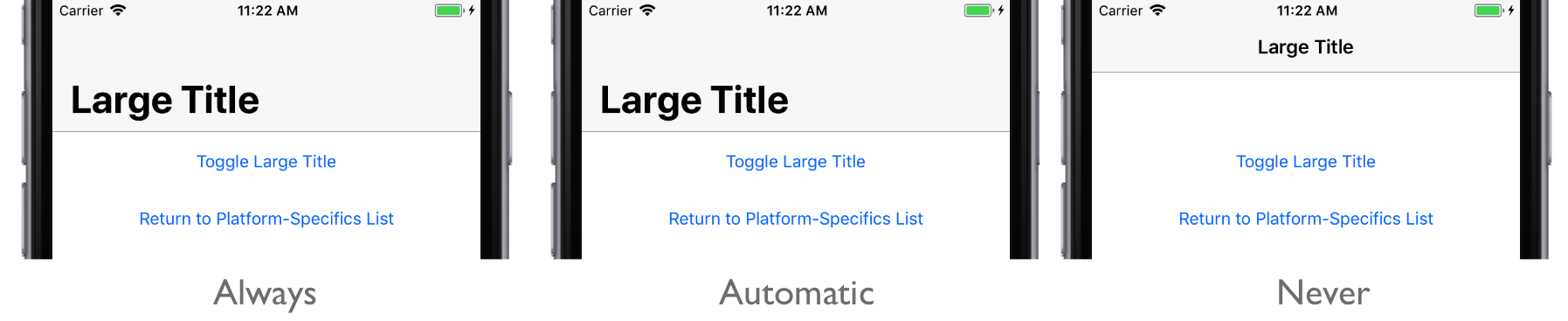
Page.On方法指定此平台特定的仅在 iOS 上运行。The Page.On method specifies that this platform-specific will only run on iOS. Page.SetLargeTitleDisplay命名空间中的方法 :::no-loc(Xamarin.Forms):::.PlatformConfiguration.iOSSpecific 控制中的大型标题行为 Page , LargeTitleDisplayMode 枚举提供三个可能的值:The Page.SetLargeTitleDisplay method, in the :::no-loc(Xamarin.Forms):::.PlatformConfiguration.iOSSpecific namespace, controls the large title behavior on the Page, with the LargeTitleDisplayMode enumeration providing three possible values:
Always –强制导航栏和字体大小使用大格式。Always – force the navigation bar and font size to use the large format.
Automatic –使用与导航堆栈中的上一项相同的样式 (大或较小) 。Automatic – use the same style (large or small) as the previous item in the navigation stack.
Never –强制使用常规的小格式导航栏。Never – force the use of the regular, small format navigation bar.
此外,该 SetLargeTitleDisplay 方法可用于通过调用返回当前的方法来切换枚举值 LargeTitleDisplay LargeTitleDisplayMode :In addition, the SetLargeTitleDisplay method can be used to toggle the enumeration values by calling the LargeTitleDisplay method, which returns the current LargeTitleDisplayMode:
switch (On().LargeTitleDisplay())
{
case LargeTitleDisplayMode.Always:
On().SetLargeTitleDisplay(LargeTitleDisplayMode.Automatic);
break;
case LargeTitleDisplayMode.Automatic:
On().SetLargeTitleDisplay(LargeTitleDisplayMode.Never);
break;
case LargeTitleDisplayMode.Never:
On().SetLargeTitleDisplay(LargeTitleDisplayMode.Always);
break;
}
因此,指定的 LargeTitleDisplayMode 将应用于 Page ,后者控制大标题行为:The result is that a specified LargeTitleDisplayMode is applied to the Page, which controls the large title behavior:
相关链接Related links





 扫一扫
扫一扫


 201
201

 被折叠的 条评论
为什么被折叠?
被折叠的 条评论
为什么被折叠?
 到【灌水乐园】发言





