


 本文介绍了ConstraintLayout的三种大小设置模式:默认的拉伸模式(spread)、自适应的wrap模式和基于比例的percent模式。详细讲解了每个模式的用法,并通过实例展示了如何在实际项目中运用,包括Toolbar中的文字布局和不同尺寸的视图设置。
ConstraintLayout有三种大小设置模式:
spread(默认:拉伸)
wrap(自适应)
percent(百分比)
可通过app:layout_constraintWidth_default、app:layout_constraintHeight_default设置
此时android:layout_width、android:layout_height都需设置为0dp
1.spread模式
此模式为默认模式,表示约束条件下的最大尺寸。 用法:
......
app:layout_constraintStart_toEndOf="@+id/ivNav"
app:layout_constraintEnd_toStartOf="@+idrent"
android:layout_width="0dp"
......" />
2.wrap模式
自适应大小,但又不超过约束条件下的最大尺寸,常用在Toolbar中间的标题设置。 用法(左View为ivNav,右View为ivEnd,文本在中间显示且末尾缩略):
android:id="@+id/tvT"
android:text="我是一个长长长长长长长长长长长长长长长长长长长长长长长长长长长长长长长长"
android:textSize="19sp"
android:textColor="#FFFFFF"
android:singleLine="true"
android:ellipsize="end"
app:layout_constraintStart_toEndOf="@+id/ivNav"
app:layout_constraintEnd_toStartOf="@+id/ivEnd"
app:layout_constraintTop_toTopOf="parent"
app:layout_constraintBottom_toBottomOf="parent"
android:layout_width="0dp"
app:layout_constraintWidth_default="wrap"
android:layout_height="wrap_content" />
3.percent模式
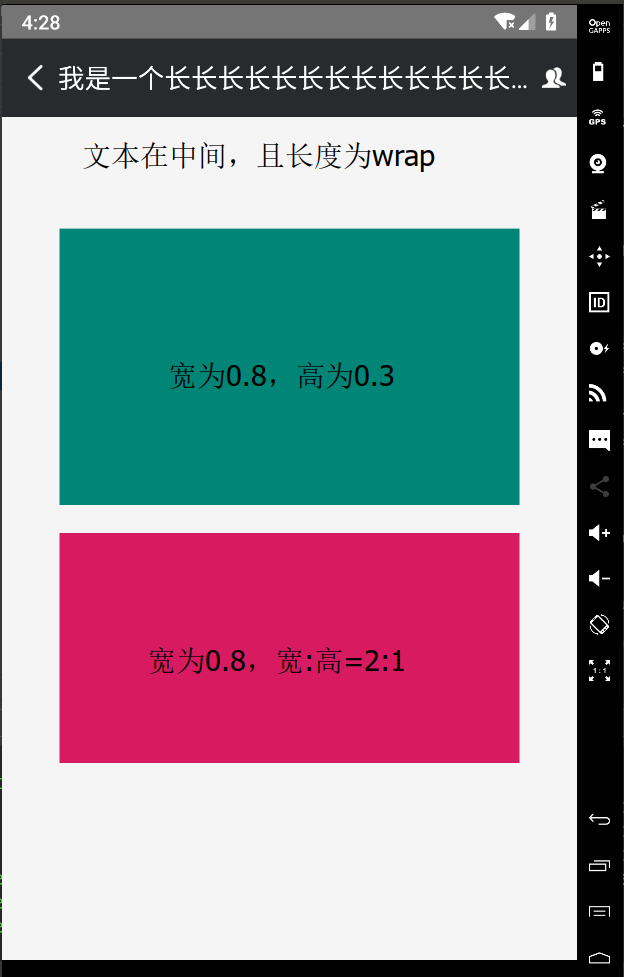
百分比模式,可设置布局对于父布局的百分比大小。 用法(宽为0.8,高为0.3):
android:id="@+id/vP"
android:layout_width="0dp"
android:layout_height="0dp"
android:background="@color/colorPrimary"
android:layout_marginTop="80dp"
app:layout_constraintWidth_default="percent"
app:layout_constraintWidth_percent="0.8"
app:layout_constraintHeight_default="percent"
app:layout_constraintHeight_percent="0.3"
app:layout_constraintLeft_toLeftOf="parent"
app:layout_constraintRight_toRightOf="parent"
app:layout_constraintTop_toBottomOf="@+id/tbT" />
指定宽高比
可通过app:layout_constraintDimensionRatio设置的宽高比,此时相应的android:layout_width或android:layout_height应设置为0dp 用法(宽为0.8,宽高比为2:1):
android:id="@+id/vR"
android:background="@color/colorAccent"
app:layout_constraintWidth_default="percent"
app:layout_constraintWidth_percent="0.8"
app:layout_constraintDimensionRatio="2:1"
android:layout_marginTop="20dp"
app:layout_constraintTop_toBottomOf="@+id/vP"
app:layout_constraintLeft_toLeftOf="parent"
app:layout_constraintRight_toRightOf="parent"
android:layout_width="0dp"
android:layout_height="0dp" />
最后为效果图:





 扫一扫
扫一扫


 660
660

 被折叠的 条评论
为什么被折叠?
被折叠的 条评论
为什么被折叠?
 到【灌水乐园】发言





