


 博主遇到一个问题,在Android Studio中导入并编译了aar库,项目可以正常运行,但IDE无法识别库中的类,导致没有代码补全功能。问题同样存在于其他通过相同方式导入的aar库。在build.gradle文件中可以看到相关依赖配置。寻求解决方案。
I am having a problem with Android Studio recognizing classes inside an @aar library imported locally.
So... I've made a library and exported is an aar file. Inside android studio I selected Import Module and them Import .JAR or .AAR Package.
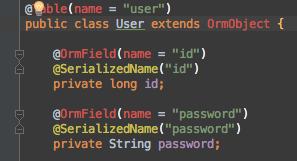
The project compiles and works with the classes inside the aar file but Android studio can not find the classes or offer any auto completion of so all.
Here is a few of screenshots:


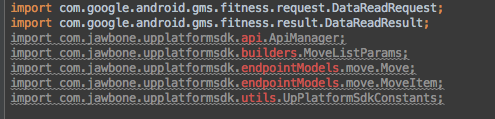
The same problem also happens with other @aar libraries imported the same way:
Any suggestions?
Edit:
build.gradle:
...
dependencies {
compile fileTree(dir: 'libs', include: ['*.jar'])
compile project(':UpPlatformSdk')
compile project(':simpleorm')
... // more libraries here
}
settings.gradle:
include ':app', ':UpPlatformSdk', ':wear', ':simpleorm'





 扫一扫
扫一扫


 2992
2992

 被折叠的 条评论
为什么被折叠?
被折叠的 条评论
为什么被折叠?
 到【灌水乐园】发言





