


 DirectOracleAccess为在线交易和批量处理应用提供高性能访问Oracle数据库的功能。支持直接访问接口、数组获取、PL/SQL块等,简化数据库操作并提高效率。无需中间件即可部署应用程序,减少版本依赖和配置问题。此外,还支持Oracle包、记录锁定、自动序列值生成等功能。
High performance
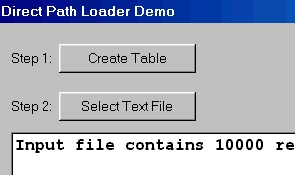
Both online transaction and batch processing applications can benefit from Oracle's performance features. Direct Oracle Access, as the name suggests, directly accesses the Oracle Interface. This guarantees optimal performance for standard database access functions. Support for Array Fetching, Array DML, PL/SQL Blocks, PL/SQL Tables, Local Statement Caching and the Direct Path Load Engine enable you to optimize your application's performance critical functions even more.
Easy application distribution
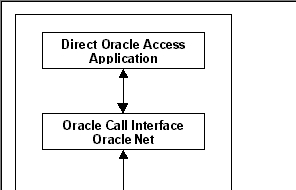
A Direct Oracle Access application does not require middleware like the BDE or ODBC, it merely requires Oracle SQL*Net or Net8. Consequently you can deploy your application without many of the version dependency or configuration problems typically involved with middleware installation.
Oracle Package support
Most PL/SQL code in Oracle databases is programmed in packages. Direct Oracle Access provides a TOraclePackage component that allows you to easily call packaged program units without detailed declarations of these program units and their parameters.
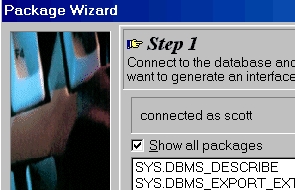
Furthermore Direct Oracle Access includes a Package Wizard that can generate classes to encapsulate the program units and record types defined in packages. This will make your Oracle packages a natural extension of the Object Pascal or C++ language.
TOracleDataSet
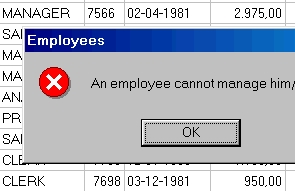
The dataset component in Direct Oracle Access supports Oracle record locking, record refreshing, server generated values, automatic sequence value generation, and BLOB compression. Master/detail relations can automatically be setup if a foreign key exists between the master and detail table or if the master table contains one or more collection columns or attributes (nested table or varray).
The TOracleDataSet can use much of the information in the Oracle Dictionary at run time. Server Constraints can be checked on the client, and constraint error messages can be read from a message table. Format masks, range values and default values can also be read from the dictionary. This allows you to create applications with a minimum amount of 'database knowlegde' compiled into the executable, dynamically adopting changes in the database without even recompiling it.
Query By Example mode
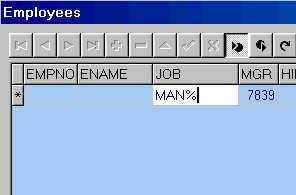
The TOracleDataSet component has a Query By Example mode that enables you to provide QBE Forms in your application without any additional programming, and without any additional components or controls. The resulting QBE queries are performed on the Oracle Server, so that performance will be optimal and network traffic will be minimal. The user can supply simple query values such as JONES or 100, can include wildcard characters for string values such as JON%, and can include comparison operators such as >,
Oracle Monitor
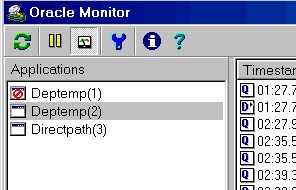
To monitor the database access activities of your Direct Oracle Access application you can use the Oracle Monitor utility. It displays the SQL, variables, timestamp, elapsed time, network statistics, database statistics and query execution plan of each activity. This can be helpful to find performance bottlenecks, for tuning purposes, and to solve application errors.
Alert and Pipe events
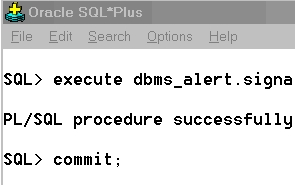
The Oracle Server includes a dbms_alert and dbms_pipe package for event processing. The TOracleEvent in Direct Oracle Access can function as a receiver for these events. It works in a background thread of your application, and can propagate database events to the familiar object events. These events can occur synchronously or asynchronously with the main thread of your application.
SQL scripts
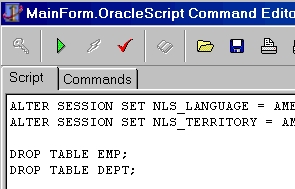
If you need to execute many data definition language (DDL) statements, for example to perform the database installation part of your application, you can use the TOracleScript component. It has a property editor that allows you to develop the script and the individual commands. The extendible script language follows the basic SQL*Plus syntax and supports all SQL statements. It also supports substitution variables to make your scriptscustomizable.
Advanced Queueing
To take advantage of the Advanced Queuing option of Oracle8 you can make use of the TOracleQueue component. The TOracleQueue component encapsulates the basic functionality of the DBMS_AQ package. It provides a convenient way to enqueue messages into a queue or to dequeue messages from a queue. Messages can be dequeued in a background thread of your application, and the events that are generated in threaded mode can occur synchronously or asynchronously with the main thread of your application.
Session Pooling
In server applications that frequently need to create sessions to process requests from client applications, it may be useful to use connection pooling. Without a pooling concept, each request could lead to an actual database logon and logoff. By using the TOracleSessionPool component, you can maintain a pool of database sessions that can be used and reused for different requests. You can define the minimum an maximum number of sessions in the pool, define the TimeOut behavior for idle sessions in the pool, and preset the username, password and database.
Support for Oracle specific features
Direct Oracle Access supports many Oracle specific features. Besides the features mentioned above, it supports Oracle8 and Oracle8i features like LOB Locators, Objects & References, XMLTYPE, Timestamps, Scrollable Queries, Password Expiration, External Procedure development, and the Oracle Services for MTS..
System requirements
Direct Oracle Access requires a Windows 95, 98, ME, NT4, 2000, XP, Vista, Windows 7 or Windows 8 client, with Oracle SQL*Net, Net 8, Net 9, Net 10, Net 11 or Net 12 installed. The supported Oracle Server versions are 7.x, 8.x, 8i, 9i, 10g, 11g and 12c on any platform. Direct Oracle Access is available for all recent versions of Delphi and C++Builder.






 扫一扫
扫一扫


 3067
3067

 被折叠的 条评论
为什么被折叠?
被折叠的 条评论
为什么被折叠?
 到【灌水乐园】发言





