


1、渐变字体
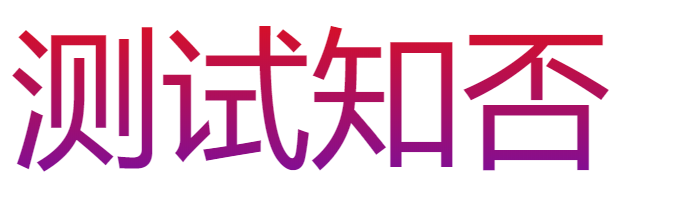
主要是看:-webkit-background-clip: text; 该属性
<style>
        .b1{
          width: 500px;
          height: 200px;
          font-size: 100px;
          background-image: linear-gradient(to bottom, rgb(233, 16, 16), rgb(61, 13, 236));
          -webkit-background-clip: text;
          color: transparent;
          /* -webkit-text-fill-color: transparent; */
        }
      </style>
    </head>
    <body>
      <div class="b1">
        <div class="b2">测试知否</div>
      </div>
    </body>
2、镂空字体
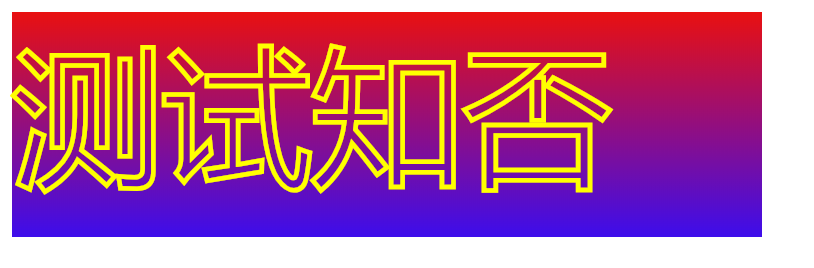
主要是:-webkit-text-stroke: 3px yellow; 该属性。
.b1{
          width: 500px;
          height: 150px;
          font-size: 100px;
          background-image: linear-gradient(to bottom, rgb(233, 16, 16), rgb(61, 13, 236));
          /* -webkit-background-clip: text; */
          color: transparent;
          -webkit-text-stroke: 3px yellow;
        }
3、input框提示信息颜色


<style>
      /* .b1{
        -webkit-text-stroke: 1px yellow;
      } */
      input::-webkit-input-placeholder { color: red; }/* WebKit browsers */
      input:-moz-placeholder { color: red; }/* Mozilla Firefox 4 to 18 */
      input::-moz-placeholder { color: red; }/* Mozilla Firefox 19+ */
      input:-ms-input-placeholder { color: red; }/* Internet Explorer 10+ */
    </style>
  </head>
  <body>
    <input class="b1" type="text" placeholder="测试知否">
  </body>
4、给图片加上内阴影
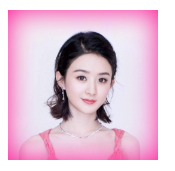
通过 box-shadow 属性可以给DIV增加外阴影,而 inset 这个属性则可以变为内阴影
这里有个小技巧通过给图片设置相对定位并给上叠层顺序为 -1 就可以实现图片内阴影
<style>
      .b1{
        box-shadow:inset 0 0 30px #FF1493;
        display:inline-block;
      }
      img{
        position: relative;
        display: block;
        z-index: -1;
      }
    </style>
  </head>
  <body>
    <div class="b1">
      <img src="./ly.png" width="100px">
    </div>
  </body>
5、3/4圆
其实3/4圆弧可以用一句css就能解决,border-left:2px solid transparent; 绘出圆后,将一侧边框设置为透明即可搞定
#cir{
    width: 100px;
    height: 100px;
    border: 2px solid red;
    border-radius: 50%;
    border-left: 2px solid transparent;
    transform: rotate(45deg);
}





 扫一扫
扫一扫


 被折叠的 条评论
为什么被折叠?
被折叠的 条评论
为什么被折叠?
 到【灌水乐园】发言





