


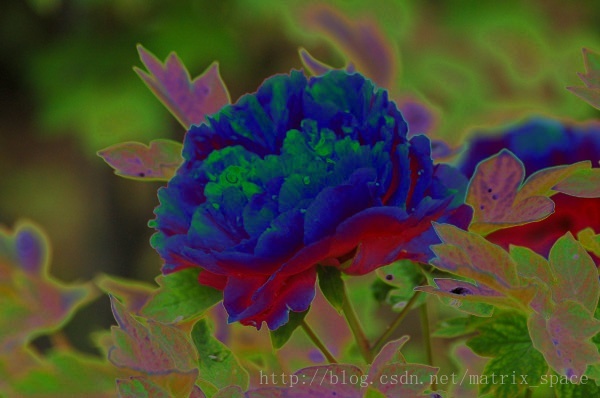
 本文介绍了一种使用OpenCV实现的“曝光过度”视觉效果的方法。通过将输入图像转换为浮点类型并应用简单的数学运算来模拟过曝效果。最终通过显示和保存处理后的图像来验证算法的有效性。
算法原理可以参考:
#ifndef PS_ALGORITHM_H_INCLUDED
#define PS_ALGORITHM_H_INCLUDED

#include <iostream>
#include <string>
#include "cv.h"
#include "highgui.h"
#include "cxmat.hpp"
#include "cxcore.hpp"

using namespace std;
using namespace cv;


void Show_Image(Mat&, const string &);

#endif // PS_ALGORITHM_H_INCLUDED

/*
This program will generate
 "over exposure " effect.

*/

#include "PS_Algorithm.h"
#include <time.h>

using namespace std;
using namespace cv;

int main(void)
{
    string Img_name("4.jpg");
    Mat Image_in;
    Image_in=imread(Img_name);
    // Show_Image(Image_in, Img_name);
    Mat Image_out(Image_in.size(), CV_32FC3);
    Image_in.convertTo(Image_out, CV_32FC3);


    int nrows=Image_in.rows;
    int ncols=Image_in.cols;

    cout<<"Rows: "<<nrows<<endl;
    cout<<"Cols: "<<ncols<<endl;

    Image_out=-1*Image_in+255;

    cv::min(Image_in, Image_out, Image_out);

    Show_Image(Image_out, "out.jpg");

    imwrite( "Out.jpg",Image_out);


    waitKey();
    cout<<"All is well."<<endl;

}

#include "PS_Algorithm.h"
#include <iostream>
#include <string>

using namespace std;
using namespace cv;

void Show_Image(Mat& Image, const string& str)
{
    namedWindow(str.c_str(),CV_WINDOW_AUTOSIZE);
    imshow(str.c_str(), Image);

}
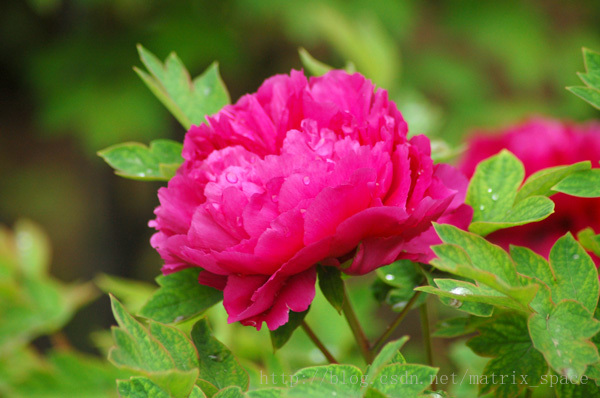
原图:
效果图:





 扫一扫
扫一扫


 1283
1283

 被折叠的 条评论
为什么被折叠?
被折叠的 条评论
为什么被折叠?
 到【灌水乐园】发言





