


 本文提供了一个使用.NET 2.0中的GZipStream类进行文件压缩和解压缩的示例程序。通过该程序,用户可以选择源文件及指定目标路径来执行压缩或解压缩操作。
用.net2.0中的using System.IO.Compression;
实现加压和解压的源码。
关于.net2.0中的加压解压类:
GZipStream类表示 GZip 数据格式,它使用无损压缩和解压缩文件的行业标准算法。这种格式包括一个检测数据损坏的循环冗余校验值。此外还有另一个加压类DeflateStream;
程序界面: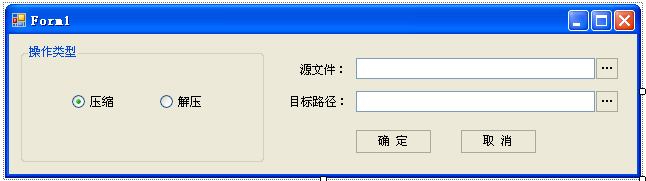
程序清单:
using
System;
using System.Collections.Generic;
using System.ComponentModel;
using System.Data;
using System.Drawing;
using System.Text;
using System.Windows.Forms;
using System.IO;
using System.IO.Compression;
namespace zipTest
{
public partial class Form1 : Form
{
public Form1()
{
InitializeComponent();
}
/* 取消 */
private void button4_Click( object sender, EventArgs e)
{
this .Close();
}
/* 确定 */
private void button3_Click( object sender, EventArgs e)
{
bool success = false ; // 默认失败
string err = "" ;
try
{
if (r_compress.Checked == true )
{
success = GzipCompress(t_source.Text, t_dis.Text);
}
if (r_deCompress.Checked == true )
{
success = GzipDecompress(t_source.Text, t_dis.Text);
}
}
catch (Exception ex)
{
err = ex.Message.ToString();
}
if (success == false )
MessageBox.Show( " 操作失败! " + err);
else
MessageBox.Show( " 操作成功! " );
}
/* 选择源文件 */
private void button1_Click( object sender, EventArgs e)
{
if (openFileDialog1.ShowDialog() == DialogResult.OK)
{
t_source.Text = openFileDialog1.FileName;
}
}
/* 选择目标路径 */
private void button2_Click( object sender, EventArgs e)
{
if (folderBrowserDialog1.ShowDialog() == DialogResult.OK)
{
t_dis.Text = folderBrowserDialog1.SelectedPath;
}
}
/* 加压 */
public bool GzipCompress( string sourceFile, string disPath)
{
// 路径合法性检测
if ( ! File.Exists(sourceFile))
throw new FileNotFoundException();
if ( ! Directory.Exists(disPath))
throw new DirectoryNotFoundException();
if ( ! disPath.EndsWith( " \\ " ))
disPath += " \\ " ;
// 生成压缩后文件名
string oldName = Path.GetFileNameWithoutExtension(sourceFile);
string newName = oldName + " 压缩文件.gzip " ;
bool result = true ; // 默认成功
FileStream fs1 = null ;
FileStream fs2 = null ;
GZipStream zips = null ;
try
{
fs1 = new FileStream(sourceFile, FileMode.Open, FileAccess.Read);
fs2 = new FileStream(disPath + newName, FileMode.OpenOrCreate, FileAccess.Write);
zips = new GZipStream(fs2, CompressionMode.Compress);
byte [] tempb = new byte [fs1.Length];
fs1.Read(tempb, 0 , ( int )fs1.Length);
zips.Write(tempb, 0 , tempb.Length);
}
catch
{
result = false ; // 执行失败
}
finally
{
if (zips != null )
zips.Close();
if (fs1 != null )
fs1.Close();
if (fs2 != null )
fs2.Close();
}
return result;
}
/* 解压 */
public bool GzipDecompress( string sourceFile, string disPath)
{
// 路径合法性检测
if ( ! File.Exists(sourceFile))
throw new FileNotFoundException();
if ( ! Directory.Exists(disPath))
throw new DirectoryNotFoundException();
if ( ! disPath.EndsWith( " \\ " ))
disPath += " \\ " ;
// 生成解压后的文件名
string outFile = disPath + Path.GetFileNameWithoutExtension(sourceFile);
bool result = true ; // 默认成功
FileStream fs1 = null ;
FileStream fs2 = null ;
GZipStream zips = null ;
try
{
fs1 = new FileStream(sourceFile, FileMode.Open, FileAccess.Read);
fs2 = new FileStream(outFile, FileMode.OpenOrCreate, FileAccess.Write);
zips = new GZipStream(fs1, CompressionMode.Decompress);
byte [] tempb = new byte [ 100 ];
int size = 0 ;
while ( true )
{
size = zips.Read(tempb, 0 , 100 );
if (size > 0 )
fs2.Write(tempb, 0 , size);
else
break ;
}
}
catch
{
result = false ; // 执行失败
}
finally
{
if (zips != null )
zips.Close();
if (fs1 != null )
fs1.Close();
if (fs2 != null )
fs2.Close();
}
return result;
}
}
}
using System.Collections.Generic;
using System.ComponentModel;
using System.Data;
using System.Drawing;
using System.Text;
using System.Windows.Forms;
using System.IO;
using System.IO.Compression;
namespace zipTest
{
public partial class Form1 : Form
{
public Form1()
{
InitializeComponent();
}
/* 取消 */
private void button4_Click( object sender, EventArgs e)
{
this .Close();
}
/* 确定 */
private void button3_Click( object sender, EventArgs e)
{
bool success = false ; // 默认失败
string err = "" ;
try
{
if (r_compress.Checked == true )
{
success = GzipCompress(t_source.Text, t_dis.Text);
}
if (r_deCompress.Checked == true )
{
success = GzipDecompress(t_source.Text, t_dis.Text);
}
}
catch (Exception ex)
{
err = ex.Message.ToString();
}
if (success == false )
MessageBox.Show( " 操作失败! " + err);
else
MessageBox.Show( " 操作成功! " );
}
/* 选择源文件 */
private void button1_Click( object sender, EventArgs e)
{
if (openFileDialog1.ShowDialog() == DialogResult.OK)
{
t_source.Text = openFileDialog1.FileName;
}
}
/* 选择目标路径 */
private void button2_Click( object sender, EventArgs e)
{
if (folderBrowserDialog1.ShowDialog() == DialogResult.OK)
{
t_dis.Text = folderBrowserDialog1.SelectedPath;
}
}
/* 加压 */
public bool GzipCompress( string sourceFile, string disPath)
{
// 路径合法性检测
if ( ! File.Exists(sourceFile))
throw new FileNotFoundException();
if ( ! Directory.Exists(disPath))
throw new DirectoryNotFoundException();
if ( ! disPath.EndsWith( " \\ " ))
disPath += " \\ " ;
// 生成压缩后文件名
string oldName = Path.GetFileNameWithoutExtension(sourceFile);
string newName = oldName + " 压缩文件.gzip " ;
bool result = true ; // 默认成功
FileStream fs1 = null ;
FileStream fs2 = null ;
GZipStream zips = null ;
try
{
fs1 = new FileStream(sourceFile, FileMode.Open, FileAccess.Read);
fs2 = new FileStream(disPath + newName, FileMode.OpenOrCreate, FileAccess.Write);
zips = new GZipStream(fs2, CompressionMode.Compress);
byte [] tempb = new byte [fs1.Length];
fs1.Read(tempb, 0 , ( int )fs1.Length);
zips.Write(tempb, 0 , tempb.Length);
}
catch
{
result = false ; // 执行失败
}
finally
{
if (zips != null )
zips.Close();
if (fs1 != null )
fs1.Close();
if (fs2 != null )
fs2.Close();
}
return result;
}
/* 解压 */
public bool GzipDecompress( string sourceFile, string disPath)
{
// 路径合法性检测
if ( ! File.Exists(sourceFile))
throw new FileNotFoundException();
if ( ! Directory.Exists(disPath))
throw new DirectoryNotFoundException();
if ( ! disPath.EndsWith( " \\ " ))
disPath += " \\ " ;
// 生成解压后的文件名
string outFile = disPath + Path.GetFileNameWithoutExtension(sourceFile);
bool result = true ; // 默认成功
FileStream fs1 = null ;
FileStream fs2 = null ;
GZipStream zips = null ;
try
{
fs1 = new FileStream(sourceFile, FileMode.Open, FileAccess.Read);
fs2 = new FileStream(outFile, FileMode.OpenOrCreate, FileAccess.Write);
zips = new GZipStream(fs1, CompressionMode.Decompress);
byte [] tempb = new byte [ 100 ];
int size = 0 ;
while ( true )
{
size = zips.Read(tempb, 0 , 100 );
if (size > 0 )
fs2.Write(tempb, 0 , size);
else
break ;
}
}
catch
{
result = false ; // 执行失败
}
finally
{
if (zips != null )
zips.Close();
if (fs1 != null )
fs1.Close();
if (fs2 != null )
fs2.Close();
}
return result;
}
}
}
在前一版本的基础上改进了一些地方
把压缩文件名加进压缩后的文件中,解压还原成原文件而不是无尾文件
如果这个版本代码难解,可以先看看上一版本
界面:
代码清单:
using
System;
using System.Collections.Generic;
using System.ComponentModel;
using System.Data;
using System.Drawing;
using System.Text;
using System.Windows.Forms;
using System.IO;
using System.IO.Compression;
namespace zipTest
{
public partial class Form1 : Form
{
public Form1()
{
InitializeComponent();
}
/* 取消 */
private void button4_Click( object sender, EventArgs e)
{
this .Close();
}
/* 确定 */
private void button3_Click( object sender, EventArgs e)
{
bool success = false ; // 默认失败
string err = "" ;
try
{
if (r_compress.Checked == true )
{
success = GzipCompress(t_source.Text, t_dis.Text);
}
if (r_deCompress.Checked == true )
{
success = GzipDecompress(t_source.Text, t_dis.Text);
}
}
catch (Exception ex)
{
err = ex.Message.ToString();
}
if (success == false )
MessageBox.Show( " 操作失败! " + err);
else
MessageBox.Show( " 操作成功! " );
}
/* 选择源文件 */
private void button1_Click( object sender, EventArgs e)
{
if (openFileDialog1.ShowDialog() == DialogResult.OK)
{
t_source.Text = openFileDialog1.FileName;
}
}
/* 选择目标路径 */
private void button2_Click( object sender, EventArgs e)
{
if (folderBrowserDialog1.ShowDialog() == DialogResult.OK)
{
t_dis.Text = folderBrowserDialog1.SelectedPath;
}
}
/* 加压 */
public bool GzipCompress( string sourceFile, string disPath)
{
// 路径合法性检测
if ( ! File.Exists(sourceFile))
throw new FileNotFoundException();
if ( ! Directory.Exists(disPath))
throw new DirectoryNotFoundException();
if ( ! disPath.EndsWith( " \\ " ))
disPath += " \\ " ;
// 生成压缩后文件名
string oldName = Path.GetFileNameWithoutExtension(sourceFile);
string newName = oldName + " 压缩文件.gzip " ;
bool result = true ; // 默认成功
FileStream fs1 = null ;
FileStream fs2 = null ;
GZipStream zips = null ;
try
{
fs1 = new FileStream(sourceFile, FileMode.Open, FileAccess.Read);
fs2 = new FileStream(disPath + newName, FileMode.OpenOrCreate, FileAccess.Write);
zips = new GZipStream(fs2, CompressionMode.Compress);
byte [] tempb = new byte [fs1.Length];
fs1.Read(tempb, 0 , ( int )fs1.Length);
// 将加压前文件名保存到加压前的数组中
// 第一个字节保存文件名的长度,
byte [] exb = System.Text.Encoding.Unicode.GetBytes(Path.GetFileName(sourceFile));
byte [] lastb = new byte [fs1.Length + exb.Length + 1 ];
lastb[ 0 ] = Convert.ToByte(exb.Length);
exb.CopyTo(lastb, 1 );
tempb.CopyTo(lastb, exb.Length + 1 );
// 压缩文件
zips.Write(lastb, 0 , lastb.Length);
}
catch (Exception ex)
{
result = false ; // 执行失败
throw ex;
}
finally
{
if (zips != null )
zips.Close();
if (fs1 != null )
fs1.Close();
if (fs2 != null )
fs2.Close();
}
return result;
}
/* 解压 */
public bool GzipDecompress( string sourceFile, string disPath)
{
// 路径合法性检测
if ( ! File.Exists(sourceFile))
throw new FileNotFoundException();
if ( ! Directory.Exists(disPath))
throw new DirectoryNotFoundException();
if ( ! disPath.EndsWith( " \\ " ))
disPath += " \\ " ;
bool result = true ; // 默认成功
FileStream fs1 = null ;
FileStream fs2 = null ;
MemoryStream ms = null ;
GZipStream zips = null ;
try
{
fs1 = new FileStream(sourceFile, FileMode.Open, FileAccess.Read);
ms = new MemoryStream();
zips = new GZipStream(fs1, CompressionMode.Decompress);
byte [] tempb = new byte [ 100 ];
int size = 0 ;
while ( true )
{
size = zips.Read(tempb, 0 , 100 );
if (size > 0 )
ms.Write(tempb, 0 , size);
else
break ;
}
byte [] resultb = new byte [ms.Length];
// 分析出加压前的文件名exName
ms.Position = 0 ;
ms.Read(resultb, 0 , ( int )ms.Length);
int exlen = Convert.ToInt16(resultb[ 0 ]);
string exName = System.Text.Encoding.Unicode.GetString(resultb, 1 ,exlen);
string outFile = disPath + exName;
fs2 = new FileStream(outFile, FileMode.OpenOrCreate, FileAccess.Write);
fs2.Write(resultb, exlen + 1 , resultb.Length - exlen - 1 );
}
catch (Exception ex)
{
result = false ; // 执行失败
throw ex;
}
finally
{
if (zips != null )
zips.Close();
if (fs1 != null )
fs1.Close();
if (fs2 != null )
fs2.Close();
if (ms != null )
ms.Close();
}
return result;
}
}
}
using System.Collections.Generic;
using System.ComponentModel;
using System.Data;
using System.Drawing;
using System.Text;
using System.Windows.Forms;
using System.IO;
using System.IO.Compression;
namespace zipTest
{
public partial class Form1 : Form
{
public Form1()
{
InitializeComponent();
}
/* 取消 */
private void button4_Click( object sender, EventArgs e)
{
this .Close();
}
/* 确定 */
private void button3_Click( object sender, EventArgs e)
{
bool success = false ; // 默认失败
string err = "" ;
try
{
if (r_compress.Checked == true )
{
success = GzipCompress(t_source.Text, t_dis.Text);
}
if (r_deCompress.Checked == true )
{
success = GzipDecompress(t_source.Text, t_dis.Text);
}
}
catch (Exception ex)
{
err = ex.Message.ToString();
}
if (success == false )
MessageBox.Show( " 操作失败! " + err);
else
MessageBox.Show( " 操作成功! " );
}
/* 选择源文件 */
private void button1_Click( object sender, EventArgs e)
{
if (openFileDialog1.ShowDialog() == DialogResult.OK)
{
t_source.Text = openFileDialog1.FileName;
}
}
/* 选择目标路径 */
private void button2_Click( object sender, EventArgs e)
{
if (folderBrowserDialog1.ShowDialog() == DialogResult.OK)
{
t_dis.Text = folderBrowserDialog1.SelectedPath;
}
}
/* 加压 */
public bool GzipCompress( string sourceFile, string disPath)
{
// 路径合法性检测
if ( ! File.Exists(sourceFile))
throw new FileNotFoundException();
if ( ! Directory.Exists(disPath))
throw new DirectoryNotFoundException();
if ( ! disPath.EndsWith( " \\ " ))
disPath += " \\ " ;
// 生成压缩后文件名
string oldName = Path.GetFileNameWithoutExtension(sourceFile);
string newName = oldName + " 压缩文件.gzip " ;
bool result = true ; // 默认成功
FileStream fs1 = null ;
FileStream fs2 = null ;
GZipStream zips = null ;
try
{
fs1 = new FileStream(sourceFile, FileMode.Open, FileAccess.Read);
fs2 = new FileStream(disPath + newName, FileMode.OpenOrCreate, FileAccess.Write);
zips = new GZipStream(fs2, CompressionMode.Compress);
byte [] tempb = new byte [fs1.Length];
fs1.Read(tempb, 0 , ( int )fs1.Length);
// 将加压前文件名保存到加压前的数组中
// 第一个字节保存文件名的长度,
byte [] exb = System.Text.Encoding.Unicode.GetBytes(Path.GetFileName(sourceFile));
byte [] lastb = new byte [fs1.Length + exb.Length + 1 ];
lastb[ 0 ] = Convert.ToByte(exb.Length);
exb.CopyTo(lastb, 1 );
tempb.CopyTo(lastb, exb.Length + 1 );
// 压缩文件
zips.Write(lastb, 0 , lastb.Length);
}
catch (Exception ex)
{
result = false ; // 执行失败
throw ex;
}
finally
{
if (zips != null )
zips.Close();
if (fs1 != null )
fs1.Close();
if (fs2 != null )
fs2.Close();
}
return result;
}
/* 解压 */
public bool GzipDecompress( string sourceFile, string disPath)
{
// 路径合法性检测
if ( ! File.Exists(sourceFile))
throw new FileNotFoundException();
if ( ! Directory.Exists(disPath))
throw new DirectoryNotFoundException();
if ( ! disPath.EndsWith( " \\ " ))
disPath += " \\ " ;
bool result = true ; // 默认成功
FileStream fs1 = null ;
FileStream fs2 = null ;
MemoryStream ms = null ;
GZipStream zips = null ;
try
{
fs1 = new FileStream(sourceFile, FileMode.Open, FileAccess.Read);
ms = new MemoryStream();
zips = new GZipStream(fs1, CompressionMode.Decompress);
byte [] tempb = new byte [ 100 ];
int size = 0 ;
while ( true )
{
size = zips.Read(tempb, 0 , 100 );
if (size > 0 )
ms.Write(tempb, 0 , size);
else
break ;
}
byte [] resultb = new byte [ms.Length];
// 分析出加压前的文件名exName
ms.Position = 0 ;
ms.Read(resultb, 0 , ( int )ms.Length);
int exlen = Convert.ToInt16(resultb[ 0 ]);
string exName = System.Text.Encoding.Unicode.GetString(resultb, 1 ,exlen);
string outFile = disPath + exName;
fs2 = new FileStream(outFile, FileMode.OpenOrCreate, FileAccess.Write);
fs2.Write(resultb, exlen + 1 , resultb.Length - exlen - 1 );
}
catch (Exception ex)
{
result = false ; // 执行失败
throw ex;
}
finally
{
if (zips != null )
zips.Close();
if (fs1 != null )
fs1.Close();
if (fs2 != null )
fs2.Close();
if (ms != null )
ms.Close();
}
return result;
}
}
}





 扫一扫
扫一扫


 8223
8223

 被折叠的 条评论
为什么被折叠?
被折叠的 条评论
为什么被折叠?
 到【灌水乐园】发言





