


English Version: http://dflying.dflying.net/1/archive/122_build_your_own_actions_in_aspnet_atlas.html
Action是ASP.NET Atlas中继承于Sys.Action基类的的一类组件,用来实现一类由某个事件引发的事件处理功能。Action与事件处理函数的功能类似,但它是一类泛化了的事件处理组件,用来描述一些常见的,通用的事件处理方法,例如调用某个方法,设定某个对象的某个属性,引发一个PostBack等。
我们都知道,目前为止,Atlas最好的参考手册就是它的源代码。我们可以从源代码中找到如下三种Atlas的内建Action,他们都继承于Sys.Action基类:
- Sys.InvokeMethodAction:用来调用一个指定的函数。
- Set.SetPropertyAction:用来设定某个对象的某个属性值。
- Sys.WebForms.PostBackAction:用来引发一个PostBack。
在实际的项目中,仅仅使用以上三个内建的Action往往是不够的,我们通常会需要自己定义一些在项目中常用的Action。幸运的是,在Atlas完备的架构中,创建自定义的Action将是非常简单的事情。下面让我们通过一个简单的AlertAction示例来熟悉自定义Action的方法。当某个指定的事件被引发时,AlertAction将显示给用户一个JavaScript提示对话框,内含指定的文字。
通常的,创建自定义的Action有如下四个步骤:
- 继承于Sys.Action基类。
- 定义您的Action类的属性。在AlertAction的示例中,我们需要指定一个message属性用来保存将要显示给用户的内容。
- 实现performAction()方法,以执行您需要的自定义操作。这个方法将被Action基类自动调用。在我们的示例中,只是简单的使用JavaScript中的内建alert()函数来弹出对话框,并显示message属性中的内容。
- 为您的自定义Action 在getDescriptor()方法中添加相关的类型说明。
下面是AlertAction的JavaScript代码。上述四个步骤在代码内以注释的形式标出。将下面的代码保存为AlertAction.js。

 Sys.AlertAction
=
function
()
Sys.AlertAction
=
function
()
 {
{ Sys.AlertAction.initializeBase(this); // step 2 var _message;
 this.get_message = function() { return _message;
 } this.set_message = function(value) { _message = value; } // step 4 this.getDescriptor = function() { var td = Sys.AlertAction.callBaseMethod(this, 'getDescriptor'); td.addProperty('message', String); return td; } // step 3 this.performAction = function() { alert(_message); return null; }
 }
}
 //
step 1
Sys.AlertAction.registerSealedClass('Sys.AlertAction', Sys.Action);Sys.TypeDescriptor.addType('script', 'alertAction', Sys.AlertAction);
//
step 1
Sys.AlertAction.registerSealedClass('Sys.AlertAction', Sys.Action);Sys.TypeDescriptor.addType('script', 'alertAction', Sys.AlertAction);
让我们在页面中测试一下这个AlertAction。这里需要在页面上添加的仅仅是一个Button,用来引发我们的AlertAction。下面是ASPX文件中的HTML定义。不要忘记在ScriptManager中添加对AlertAction.js文件的引用。
<
atlas:ScriptManager
EnablePartialRendering
="true"
ID
="ScriptManager1"
runat
="server"
>
<
Scripts
>
<atlas:ScriptReference Path="AlertAction.js" />
</
Scripts
>
</
atlas:ScriptManager
>
<
div
>
<
input
id
="myButton"
type
="button"
value
="Click Me!"
/>
</
div
>
下面是Atlas脚本定义,十分简单,这里不再赘述。
<
script
type
="text/xml-script"
>
<
page
xmlns:script
="http://schemas.microsoft.com/xml-script/2005"
>
<
components
>
<
button
id
="myButton"
>
<
click
>
<
alertAction
message
="Button Clicked!"
/>
</
click
>
</
button
>
</
components
>
</
page
>
</
script
>
浏览器中的运行结果: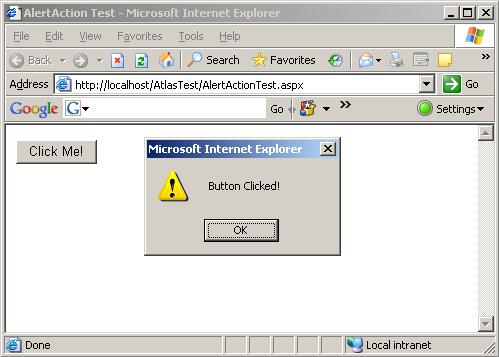
上述示例程序可以在此下载:http://files.cnblogs.com/dflying/AtlasActionDemo.zip





 扫一扫
扫一扫


 124
124

 被折叠的 条评论
为什么被折叠?
被折叠的 条评论
为什么被折叠?
 到【灌水乐园】发言





