


 本文介绍了一个使用Golang编写的简单Web应用示例。该应用包括一个登录表单,用于接收用户的姓名并显示个性化的欢迎消息。通过分析此示例代码,读者可以了解如何设置基本的Web应用程序,并使用模板引擎来呈现动态内容。
golang web
一个简单的web Demo.
项目目录结构
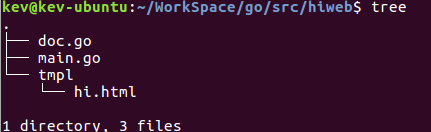
main.go
// web project main.go
package main

import (
    "log"
    "net/http"
    "text/template"
)

type WebData struct {
    Name string
}

var name string

func rootHandler(w http.ResponseWriter, r *http.Request) {
    t, _ := template.ParseFiles("tmpl/hi.html")
    if r.Method == "GET" {

    } else {
        //请求
        name = r.FormValue("name")
        log.Println("username:", name)
    }
    if len(name) > 0 {
        wd := WebData{
            Name: name,
        }
        t.Execute(w, &wd)
    } else {
        t.Execute(w, nil)
    }

    http.Redirect(w, r, "/", http.StatusCreated)
}

// A simple say hi exmaple, sending and receive data from web
func main() {
    http.HandleFunc("/", rootHandler)
    port := ":8080"
    log.Println("serving at localhost", port)
    // start serving
    err := http.ListenAndServe(port, nil)
    if err != nil {
        log.Fatal("ListenAndServe: ", err)
    }
}
hi.html
<!DOCTYPE html>
<html>
<head>
<meta http-equiv="Content-Type" content="text/html; charset=utf-8">
<title>Wiki made using Golang</title>
</head>
<h1>Hi Web</h1>
<form action="/hi" method="post">
     <label for="name">Your Name</label>
     <input type="text" id="name" name="name">
     <button type="submit">Login</button>
  </form>
    <p>Hi,{{.Name}}</p>
</html>





 扫一扫
扫一扫


 被折叠的 条评论
为什么被折叠?
被折叠的 条评论
为什么被折叠?
 到【灌水乐园】发言





