


 本文介绍如何使用DispatcherTimer定时获取Windows Phone 7 (WP7) 设备的系统信息,包括设备制造商、名称、ID等,并展示如何在UI上实时更新这些信息。
假设你现在需要从WP7手机上获取一些系统信息,以便确认当前系统是否满足游戏或应用程序的最小硬件需求。轩辕在将给各位演示下实现这个功能有多么的简单。因为轩辕目前还没有拿到WP7手机,所以这篇文章将在模拟器上展开系统信息获取的实现。
下面是我们的示例将要获取的系统信息:
设备厂商
设备名称
设备ID
固件版本
硬件版本
总内存
应用程序当前使用内存
应用程序使用内存峰值
在下面这个示例中,轩辕将使用DispatcherTimer计时器每三秒获取一些系统信息,标将上面的列出的信息在8个textblock控件中展现出来。下面为应用程序的展现截图:
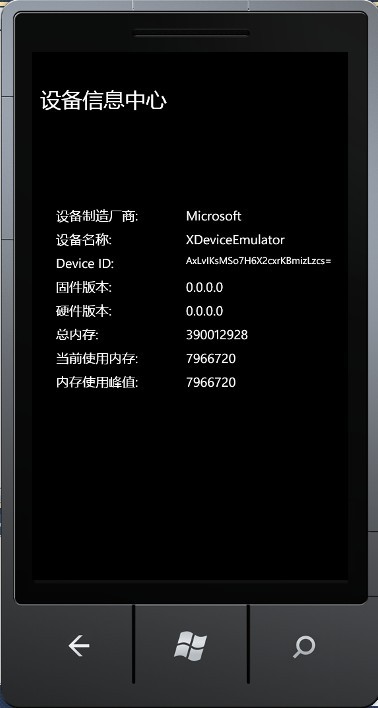
下面是XAML的代码:
x:Class ="WindowsPhoneApplication2.MainPage"
xmlns ="http://schemas.microsoft.com/winfx/2006/xaml/presentation"
xmlns:x ="http://schemas.microsoft.com/winfx/2006/xaml"
xmlns:phone ="clr-namespace:Microsoft.Phone.Controls;assembly=Microsoft.Phone"
xmlns:shell ="clr-namespace:Microsoft.Phone.Shell;assembly=Microsoft.Phone"
xmlns:d ="http://schemas.microsoft.com/expression/blend/2008"
xmlns:mc ="http://schemas.openxmlformats.org/markup-compatibility/2006"
mc:Ignorable ="d" d:DesignWidth ="480" d:DesignHeight ="768"
FontFamily =" {StaticResource PhoneFontFamilyNormal} "
FontSize =" {StaticResource PhoneFontSizeNormal} "
Foreground =" {StaticResource PhoneForegroundBrush} "
SupportedOrientations ="Portrait" Orientation ="Portrait"
shell:SystemTray.IsVisible ="True" >
< Grid x:Name ="LayoutRoot" Background ="Transparent" >
< StackPanel x:Name ="TitlePanel" Margin ="12,17,0,751" ></ StackPanel >
< Grid x:Name ="ContentPanel" Margin ="12,161,12,0" >
< TextBlock Height ="30" HorizontalAlignment ="Left" Margin ="24,40,0,0" Name ="textBlock1" Text ="设备制造厂商: " VerticalAlignment ="Top" />
< TextBlock Height ="30" HorizontalAlignment ="Left" Margin ="221,40,0,0" Name ="textBlock2" Text ="" VerticalAlignment ="Top" Width ="229" />
< TextBlock Height ="30" HorizontalAlignment ="Left" Margin ="24,76,0,0" Name ="textBlock3" Text ="设备名称: " VerticalAlignment ="Top" />
< TextBlock Height ="30" HorizontalAlignment ="Left" Margin ="221,76,0,0" Name ="textBlock4" Text ="" VerticalAlignment ="Top" Width ="229" />
< TextBlock Height ="30" HorizontalAlignment ="Left" Margin ="24,112,0,0" Name ="textBlock5" Text ="Device ID: " VerticalAlignment ="Top" />
< TextBlock Height ="30" HorizontalAlignment ="Left" Margin ="221,112,0,0" Name ="textBlock6" Text ="" VerticalAlignment ="Top" Width ="229" FontSize ="15" />
< TextBlock Height ="30" HorizontalAlignment ="Left" Margin ="24,148,0,0" Name ="textBlock7" Text ="固件版本: " VerticalAlignment ="Top" />
< TextBlock Height ="30" HorizontalAlignment ="Left" Margin ="221,148,0,0" Name ="textBlock8" Text ="" VerticalAlignment ="Top" Width ="229" />
< TextBlock Height ="30" HorizontalAlignment ="Left" Margin ="24,184,0,0" Name ="textBlock9" Text ="硬件版本: " VerticalAlignment ="Top" />
< TextBlock Height ="30" HorizontalAlignment ="Left" Margin ="221,184,0,0" Name ="textBlock10" Text ="" VerticalAlignment ="Top" Width ="229" />
< TextBlock Height ="30" HorizontalAlignment ="Left" Margin ="24,220,0,0" Name ="textBlock11" Text ="总内存: " VerticalAlignment ="Top" />
< TextBlock Height ="30" HorizontalAlignment ="Left" Margin ="221,220,0,0" Name ="textBlock12" Text ="" VerticalAlignment ="Top" Width ="229" />
< TextBlock Height ="30" HorizontalAlignment ="Left" Margin ="24,256,0,0" Name ="textBlock13" Text ="当前使用内存: " VerticalAlignment ="Top" />
< TextBlock Height ="30" HorizontalAlignment ="Left" Margin ="221,256,0,0" Name ="textBlock14" Text ="" VerticalAlignment ="Top" Width ="229" />
< TextBlock Height ="30" HorizontalAlignment ="Left" Margin ="24,292,0,0" Name ="textBlock15" Text ="内存使用峰值: " VerticalAlignment ="Top" />
< TextBlock Height ="30" HorizontalAlignment ="Left" Margin ="221,292,0,0" Name ="textBlock16" Text ="" VerticalAlignment ="Top" Width ="229" />
</ Grid >
< TextBlock Height ="60" HorizontalAlignment ="Left" Margin ="12,17,0,0" Name ="textBlock17" Text ="设备信息中心" VerticalAlignment ="Top" FontSize ="32" Width ="402" />
</ Grid >
</ phone:PhoneApplicationPage >
接下来让我们写一些代码来获取系统信息。首先我们需要创建一个DispatcherTimer计时器对象。
在使用DispatcherTimer对象时你需要在项目中引用System.Windows.Threading这个命名空间。
接下来我们需要声明一个字符串变量以展现Device ID。
因为通过系统函数返回的Device ID是以Byte类型返回的,所有我们需要将Device ID转化为字符串类型进行呈现。
{
byte [] result = null ;
object uniqueId;
if (DeviceExtendedProperties.TryGetValue( " DeviceUniqueId " , out uniqueId))
{
result = ( byte [])uniqueId;
}
val = Convert.ToBase64String(result);
return result;
}
完成上面的步骤后,我们就需要在页面的构造函数中启动计时器,以便定时获取设备系统信息了。下面是构造函数中的部分代码:
timer.Interval = new TimeSpan( 0 , 0 , 3 );
timer.Tick += new EventHandler(timer_Tick);
timer.Start();
GetDeviceUniqueID();
下面是计时器的定时程序:
{
try
{
textBlock2.Text = DeviceExtendedProperties.GetValue( " DeviceManufacturer " ).ToString();
textBlock4.Text = DeviceExtendedProperties.GetValue( " DeviceName " ).ToString();
textBlock6.Text = val;
textBlock8.Text = DeviceExtendedProperties.GetValue( " DeviceFirmwareVersion " ).ToString();
textBlock10.Text = DeviceExtendedProperties.GetValue( " DeviceHardwareVersion " ).ToString();
textBlock12.Text = DeviceExtendedProperties.GetValue( " DeviceTotalMemory " ).ToString();
textBlock14.Text = DeviceExtendedProperties.GetValue( " ApplicationCurrentMemoryUsage " ).ToString();
textBlock16.Text = DeviceExtendedProperties.GetValue( " ApplicationPeakMemoryUsage " ).ToString();
}
catch (Exception ex)
{
}
}
我们可以使用DeviceExtendedProperties这个类来获取WP7设备的系统属性,关于该类的更多信息你可以参考MSDN的相关文档,地址如下:
http://msdn.microsoft.com/en-us/library/ff941122(v=VS.92).aspx
在模拟器中启动程序后,我们就可以看到文章最上面的系统信息显示了。因为我们使用的是模拟器,所有Device ID是并不是一个真实的硬件唯一标识。如果在WP7真机上运行该程序,那么Device ID、硬件版本、固件版本都会是真实值。尝试下吧.............





 扫一扫
扫一扫


 被折叠的 条评论
为什么被折叠?
被折叠的 条评论
为什么被折叠?
 到【灌水乐园】发言





