


 该博客展示了如何使用Java进行网络文件大小获取、内容下载以及MD5校验值计算。通过`FileUtils`工具类,可以便捷地完成网络文件的I/O操作,包括读取文件大小、下载文件内容到字节数组,并计算文件的MD5哈希值,确保文件完整性和一致性。
Java 读取网络资源文件 获取文件大小 MD5校验值
封装一个文件操作工具类:
package c;
import java.io.*;
import java.net.HttpURLConnection;
import java.net.MalformedURLException;
import java.net.URL;
/**
* @author Jayvee
* @Description: todo 文件操作
*/
public class FileUtils {
/**
* @author Jayvee
* @Description: todo 获取网络文件的大小
*/
public static int getFileLength(String url1) throws IOException {
int length = 0;
URL url;
try {
url = new URL(url1);
HttpURLConnection urlcon = (HttpURLConnection) url.openConnection();
//根据响应获取文件大小
length = urlcon.getContentLength();
urlcon.disconnect();
} catch (MalformedURLException e) {
// TODO Auto-generated catch block
e.printStackTrace();
} catch (IOException e) {
// TODO Auto-generated catch block
e.printStackTrace();
}
return length;
}
/**
* 从输入流中获取字节数组
* @author Jayvee
* @param inputStream
* @return
* @throws IOException
*/
public static byte[] readInputStream(InputStream inputStream) throws IOException {
byte[] buffer = new byte[1024];
int len = 0;
ByteArrayOutputStream bos = new ByteArrayOutputStream();
while ((len = inputStream.read(buffer)) != -1) {
bos.write(buffer, 0, len);
}
bos.close();
return bos.toByteArray();
}
/**
* @author Jayvee
* @Description: todo
*/
public static byte[] downLoadFromUrl(String urlStr) throws IOException {
URL url = new URL(urlStr);
HttpURLConnection conn = (HttpURLConnection) url.openConnection();
InputStream inputStream = conn.getInputStream();
//获取自己数组
byte[] getData = readInputStream(inputStream);
return getData;
}
/**
* @author Jayvee
* @Description: todo
*/
public static byte[] readFromByteFile(String pathname) throws IOException {
File filename = new File(pathname);
BufferedInputStream in = new BufferedInputStream(new FileInputStream(filename));
ByteArrayOutputStream out = new ByteArrayOutputStream(1024);
byte[] temp = new byte[1024];
int size = 0;
while ((size = in.read(temp)) != -1) {
out.write(temp, 0, size);
}
in.close();
byte[] content = out.toByteArray();
return content;
}
}
try {
int fileSize = FileUtils.getFileLength("http://pic.962.net/up/2018-1/2018191570320420.jpg"); // 获取文件大小
byte[] file = FileUtils.downLoadFromUrl("http://pic.962.net/up/2018-1/2018191570320420.jpg"); // 获取文件内容
System.out.println("文件大小:" + fileSize + " 字节");
System.out.println("文件内容:" + file);
} catch (IOException e) {
e.printStackTrace();
}
执行结果:
文件大小:4979 字节
文件内容:[B@7dc5e7b4
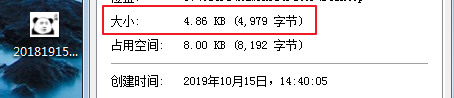
获取网络文件的md5校验值:
try {
byte[] file = FileUtils.downLoadFromUrl("http://pic.962.net/up/2018-1/2018191570320420.jpg"); // 获取文件内容
System.out.println(DigestUtils.md5DigestAsHex(file)); // 文件内容md5校验
} catch (IOException e) {
e.printStackTrace();
}
执行结果:
cc2fdb7b2366a086f30e5af3c63b230c





 扫一扫
扫一扫


 1306
1306

 被折叠的 条评论
为什么被折叠?
被折叠的 条评论
为什么被折叠?
 到【灌水乐园】发言





