


 WoeUSB是一个Linux程序,能够从Windows安装光盘或映像创建Windows USB安装启动盘。支持Windows Vista到Windows 10的各种版本和PE,并提供命令行工具和GUI界面。该项目源自未维护的WinUSB软件,用户可以克隆GitHub仓库进行源码编译安装。
WoeUSB



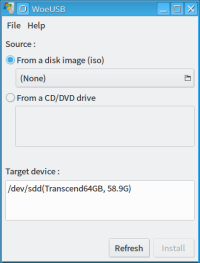
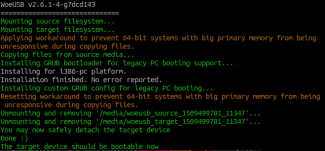
A Linux program to create a Windows USB stick installer from a real Windows DVD or image.
This package contains two programs:
woeusb: A command-line utility that enables you to create your own bootable Windows installation USB storage device from an existing Windows Installation disc or disk image
woeusbgui: A GUI wrapper of woeusb based on WxWidgets
Supported images:
Windows Vista, Windows 7, Window 8.x, Windows 10. All languages and any version (home, pro...) and Windows PE are supported.
Supported bootmodes:
Legacy/MBR-style/IBM PC compatible bootmode
Native UEFI booting is supported for Windows 7 and later images (limited to the FAT filesystem as the target)
This project is a fork of Congelli501's WinUSB software, which has not been maintained since 2012, according to the official website.
Installation
Prebuilt Packages
Note that prebuilt packages are not necessarily the latest release and we are NOT responsible for the trustworthiness of these packages. Regarding any related issues contact its maintainer first.
Official Distribution Packages
Fedora packages maintained by mprahl
openSUSE packages maintained by guoyunhe
Gentoo packages maintained by pacho
Third-party Distribution Packages
Arch Linux packages maintained by darkfm
Ubuntu packages maintained by WebUpd8
Build from Source
The following are the instructions to install WoeUSB if prebuilt version is not available or too old.
Acquire WoeUSB's Source Code
Clone WoeUSB's Git repository to your local machine using git clone https://github.com/slacka/WoeUSB.git
NOTE: We no longer support building from source archives provided in the GitHub Releases page as the software version is not set.
Setting the Application Version String
This step is required for generating the proper version name based on the Git tags. This step should be repeated if the version is changed.
$./setup-development-environment.bash
Install WoeUSB's Build Dependencies
# For Debian-based distributions (NOTE: For your convenience, this package is already provided in the release page)
$sudoapt-get installdevscripts equivs gdebi-core
$cd
$mk-build-deps # NOTE: Currently, due to Debian Bug #679101, this command will fail if the source path contains spaces.
$sudogdebi woeusb-build-deps__all.deb
# For Fedora > 22
$sudodnf installwxGTK3-devel
# For Fedora 22
$sudodnf installwxGTK-devel dh-autoreconf.noarch
# For Opensuse
$sudozypper inwxGTK3-3_2-devel dh-autoreconf devscripts
Build & Install WoeUSB
# For Debian-based distributions
$dpkg-buildpackage -uc -b # NOTE: Currently, due to a bug in the build system, this command will fail if the source's path contains space or single quotes, refer to issue #84 for details
$sudogdebi ../woeusb__.deb
# Generic method
$autoreconf --force --install # Most non-Debian derived distros will need this
$./configure
$make
$sudomake install
License
WoeUSB is distributed under the GPL license.





 扫一扫
扫一扫


 639
639

 被折叠的 条评论
为什么被折叠?
被折叠的 条评论
为什么被折叠?
 到【灌水乐园】发言





