


 本文翻译自《如何将Power BI模型的尺寸减少90%》一文,分享了如何有效降低Power BI数据模型的大小,以提高性能和效率。
power bi
Have you ever wondered what makes Power BI so fast and powerful when it comes to performance? So powerful, that it performs complex calculations over millions of rows in a blink of an eye.
您是否想过什么使Power BI在性能方面如此之快和强大? 如此强大,它可以在一瞬间对数百万行执行复杂的计算。
In this series of articles, we will dig deep to discover what is “under the hood” of Power BI, how your data is being stored, compressed, queried, and finally, brought back to your report. Once you finish reading, I hope that you will get a better understanding of the hard work happening in the background and appreciate the importance of creating an optimal data model in order to get maximum performance from the Power BI engine.
在本系列文章中,我们将深入研究以发现Power BI的“内幕”,以及如何存储,压缩,查询您的数据,最后将它们带回到您的报告中。 阅读完本书后,我希望您能更好地了解在后台进行的艰苦工作,并希望了解创建最佳数据模型以从Power BI引擎获得最佳性能的重要性。
After we laid the theoretical ground for understanding architecture behind VertiPaq storage engine, and which types of compression it uses to optimize your Power BI data model, it’s the right moment to make our hands dirty and apply our knowledge in real-life case!
在为理解VertiPaq存储引擎背后的体系结构以及用于优化Power BI数据模型的压缩类型奠定了理论基础之后 ,是时候动手动手,并在实际案例中运用我们的知识了!
起点= 777 MB (Starting point = 777 MB)
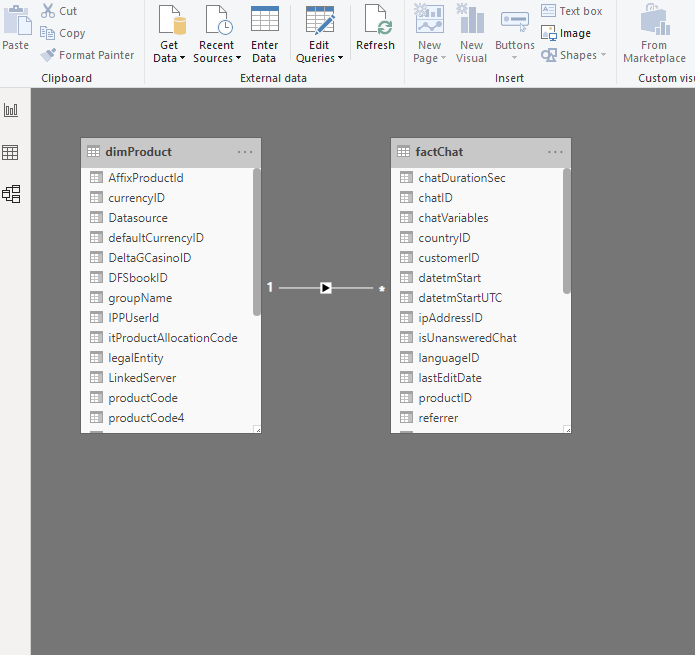
Our data model is quite simple, yet memory exhaustive. We have a fact table (factChat) which contains data about live support chats and one dimension table (dimProduct), that relates to a fact table. Our fact table has around 9 million rows, which should not be a big deal for Power BI, but the table was imported as it is, without any additional optimization or transformation.
我们的数据模型非常简单,但内存却无穷。 我们有一个事实表(factChat),其中包含有关实时支持聊天的数据,以及一个与事实表相关的一维表(dimProduct)。 我们的事实表大约有900万行,这对于Power BI来说应该不是什么大问题,但是该表是按原样导入的,没有进行任何其他优化或转换。
Now, this pbix file consumes whopping 777 MB!!! You can’t believe it? Just take a look:
现在,这个pbix文件消耗了777 MB! 你不敢相信吗? 看看吧:

Just remember this picture! Of course, I don’t need to tell you how much time this report needs to load or refresh, and how our calculations are slow because of the file size.
只要记住这张照片! 当然,我不需要告诉您此报告需要加载或刷新多少时间,并且由于文件大小而导致我们的计算速度变慢。
……甚至更糟! (…and it’s even worse!)
Additionally, it’s not just 777 MBs that takes our memory, since memory consumption is being calculated taking into account the following factors:
此外,占用内存的不仅仅是777 MB,因为要考虑以下因素来计算内存消耗:
- PBIX file PBIX文件
Dictionary (you’ve learned about the dictionary in this article)
字典(您已经在本文中了解了字典)
- Column hierarchies 列层次结构
- User-defined hierarchies 用户定义的层次结构
- Relationships 人际关系
Now, if I open Task Manager, go to the Details tab and find the msmdsrv.exe process, I will see that it burns more than 1 GB of the memory!
现在,如果我打开任务管理器,请转到“详细信息”选项卡并找到msmdsrv.exe进程,我将看到它消耗了超过1 GB的内存!

Oh, man, that really hurts! And we haven’t even interacted with the report! So, let’s see what we can do to optimize our model…
哦,老兄,真痛! 而且我们甚至都没有与报告互动! 因此,让我们
 最低0.47元/天 解锁文章






 扫一扫
扫一扫


 2114
2114

 被折叠的 条评论
为什么被折叠?
被折叠的 条评论
为什么被折叠?
 到【灌水乐园】发言





