



 本文介绍了一个简单的JavaScript/jQuery代码片段,用于在用户更改表单中输入框的值时实时更新所有输入框的数值总和。通过jQuery简化了元素的选择和迭代过程。
文章源自:http://viralpatel.net/blogs/sum-html-textbox-values-using-jquery-javascript/
Sum HTML Textbox Values using jQuery / JavaScript
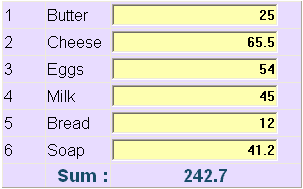
Here is a small code snippet to sum the values of all textboxes in a form in JavaScript using jQuery. I wrote it for some functionality and thought to share it with you all. The requirement is simple, whenever user modify the value of a textbox, the fresh sum should be calculated and displayed on the form. I used jQuery for this as it provides simple way of selecting elements and iterating through them.
Source Code
Following is the complete source code.
<html>
<head>
<title>Sum Html Textbox Values using jQuery/JavaScript</title>
<style>
body {
font-family: sans-serif;
}
#summation {
font-size: 18px;
font-weight: bold;
color:#174C68;
}
.txt {
background-color: #FEFFB0;
font-weight: bold;
text-align: right;
}
</style>
<script src="https://ajax.googleapis.com/ajax/libs/jquery/1.7.1/jquery.min.js"></script>
</head>
<body>
<table width="300px" border="1" style="border-collapse:collapse;background-color:#E8DCFF">
<tr>
<td width="40px">1</td>
<td>Butter</td>
<td><input class="txt" type="text" name="txt"/></td>
</tr>
<tr>
<td>2</td>
<td>Cheese</td>
<td><input class="txt" type="text" name="txt"/></td>
</tr>
<tr>
<td>3</td>
<td>Eggs</td>
<td><input class="txt" type="text" name="txt"/></td>
</tr>
<tr>
<td>4</td>
<td>Milk</td>
<td><input class="txt" type="text" name="txt"/></td>
</tr>
<tr>
<td>5</td>
<td>Bread</td>
<td><input class="txt" type="text" name="txt"/></td>
</tr>
<tr>
<td>6</td>
<td>Soap</td>
<td><input class="txt" type="text" name="txt"/></td>
</tr>
<tr id="summation">
<td> </td>
<td align="right">Sum :</td>
<td align="center"><span id="sum">0</span></td>
</tr>
</table>
<script>
$(document).ready(function(){
//iterate through each textboxes and add keyup
//handler to trigger sum event
$(".txt").each(function() {
$(this).keyup(function(){
calculateSum();
});
});
});
function calculateSum() {
var sum = 0;
//iterate through each textboxes and add the values
$(".txt").each(function() {
//add only if the value is number
if(!isNaN(this.value) && this.value.length!=0) {
sum += parseFloat(this.value);
}
});
//.toFixed() method will roundoff the final sum to 2 decimal places
$("#sum").html(sum.toFixed(2));
}
</script>
</body>
</html>
Let us step by step see what above code is doing.
- First the
$(document).ready()is called which gets triggered whenever the webpage is loaded. - Inside
$(document).ready(), we selected all textboxes by the class name “.txt” and iterate through each of them and added event handler on keydown event. Thus whenever keypress event will occur, the code will triggercalculateSum()function. Note that you may want to change the selector code that suits your html elements. In this case we selected textboxes based on class=”txt” as all textbox has this class. - The keydown event triggers the function
calculateSum(). In this function again we iterate through each textboxes and sum up the values in a variable sum. Note that we have checked whether the value is number before adding it to the sum. - Finally we update the innerHTML property of span #sum using
$("#sum").html(sum)code. You may want to display the sum in some textbox or some other place.





 扫一扫
扫一扫


 2059
2059

 被折叠的 条评论
为什么被折叠?
被折叠的 条评论
为什么被折叠?
 到【灌水乐园】发言





