






Hi,大家好!
最近的天气怎么这么热的,开着小毛驴办点事,感觉都被融化了,这周我们还是接着讲邮件的功能。邮件的发送功能会了,今天我们当然就要来讲收件功能了。
收件的话,我们这里还是要借助outlook来实现,这样就不需要第三方的DLL了,如果和发送一样,用CDO来实现的话,服务器只支持非 SSL 的 POP3,OK费话不多说,我们直接开干,老规矩,开始前,先给个一键三连吧!
1、创建表
首先,我们需要创建一张表,用于保存邮件数据,表结构如下:
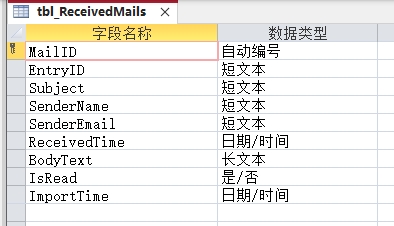
表中保存了一些具体的信息,邮件唯一ID(防重复)、发件人姓名、邮箱地址、邮件主题、正文内容、接收时间、处理状态。
2、创建窗体
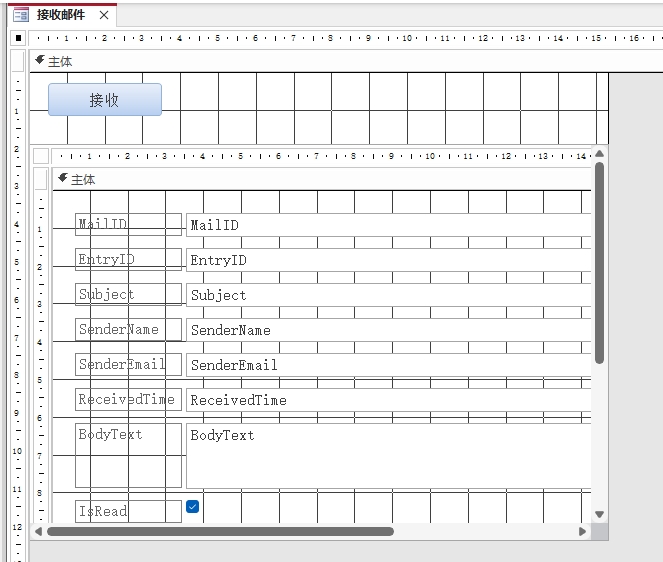
接收窗体就不用像发送窗体这么复杂了,只要放两个控件,具体如图:
3、添加代码
接着,我们就可以用来添加代码了,具体代码如下:
Public Sub ReceiveOutlookMails()Dim olApp As Outlook.ApplicationDim olNamespace As Outlook.NameSpaceDim olInbox As Outlook.MAPIFolderDim olMail As Outlook.MailItemDim olItem As ObjectDim db As DAO.DatabaseDim rs As DAO.RecordsetDim i As IntegerDim newMailCount As IntegerOn Error GoTo ErrorHandler' 连接到 OutlookSet olApp = GetOutlookApp()Set olNamespace = olApp.GetNamespace("MAPI")' 获取收件箱Set olInbox = olNamespace.GetDefaultFolder(olFolderInbox)' 打开数据库表Set db = CurrentDbSet rs = db.OpenRecordset("tbl_ReceivedMails", dbOpenDynaset)newMailCount = 0' 遍历收件箱中的邮件(从最新开始)For i = olInbox.Items.Count To 1 Step -1Set olItem = olInbox.Items(i)' 确保是邮件项If TypeOf olItem Is Outlook.MailItem ThenSet olMail = olItem' 检查邮件是否已导入If Not IsMailImported(olMail.entryID) Then' 导入新邮件rs.AddNewrs!entryID = olMail.entryIDrs!Subject = Left(Nz(olMail.Subject, ""), 255)rs!SenderName = Left(Nz(olMail.SenderName, ""), 100)rs!senderEmail = Left(GetSenderEmail(olMail), 100)rs!ReceivedTime = olMail.ReceivedTimers!BodyText = olMail.Bodyrs!IsRead = Not olMail.UnReadrs!ImportTime = Now()rs.UpdatenewMailCount = newMailCount + 1End IfEnd If' 避免处理过多邮件导致超时If newMailCount >= 50 Then Exit ForNext i' 关闭资源rs.CloseSet rs = NothingSet db = Nothing' 显示结果MsgBox "成功导入 " & newMailCount & " 封新邮件!", vbInformation, "邮件接收完成"Me.F_ReceivedMails_List.RequeryExit SubErrorHandler:MsgBox "邮件接收出错:" & Err.Description, vbCritical, "错误"' 清理资源On Error Resume NextIf Not rs Is Nothing Then rs.CloseSet rs = NothingSet db = NothingSet olMail = NothingSet olInbox = NothingSet olNamespace = NothingSet olApp = NothingEnd Sub' 获取或创建 Outlook 应用程序实例Private Function GetOutlookApp() As Outlook.ApplicationDim olApp As Outlook.ApplicationOn Error Resume Next' 尝试连接现有的 Outlook 实例Set olApp = GetObject(, "Outlook.Application")If olApp Is Nothing Then' 如果没有运行,则创建新实例Set olApp = CreateObject("Outlook.Application")End IfOn Error GoTo 0Set GetOutlookApp = olAppEnd Function' 检查邮件是否已导入Private Function IsMailImported(entryID As String) As BooleanDim db As DAO.DatabaseDim rs As DAO.RecordsetDim sql As StringSet db = CurrentDbsql = "SELECT EntryID FROM tbl_ReceivedMails WHERE EntryID = '" & entryID & "'"Set rs = db.OpenRecordset(sql)IsMailImported = Not rs.EOFrs.CloseSet rs = NothingSet db = NothingEnd Function' 获取发件人邮箱地址Private Function GetSenderEmail(olMail As Outlook.MailItem) As StringDim senderEmail As StringOn Error Resume Next' 尝试获取发件人邮箱地址If olMail.SenderEmailType = "EX" Then' Exchange 地址senderEmail = olMail.Sender.GetExchangeUser.PrimarySmtpAddressElse' SMTP 地址senderEmail = olMail.SenderEmailAddressEnd IfIf senderEmail = "" ThensenderEmail = olMail.SenderEmailAddressEnd IfOn Error GoTo 0GetSenderEmail = senderEmailEnd FunctionPrivate Sub Command0_Click()Call ReceiveOutlookMailsEnd Sub
4、运行测试
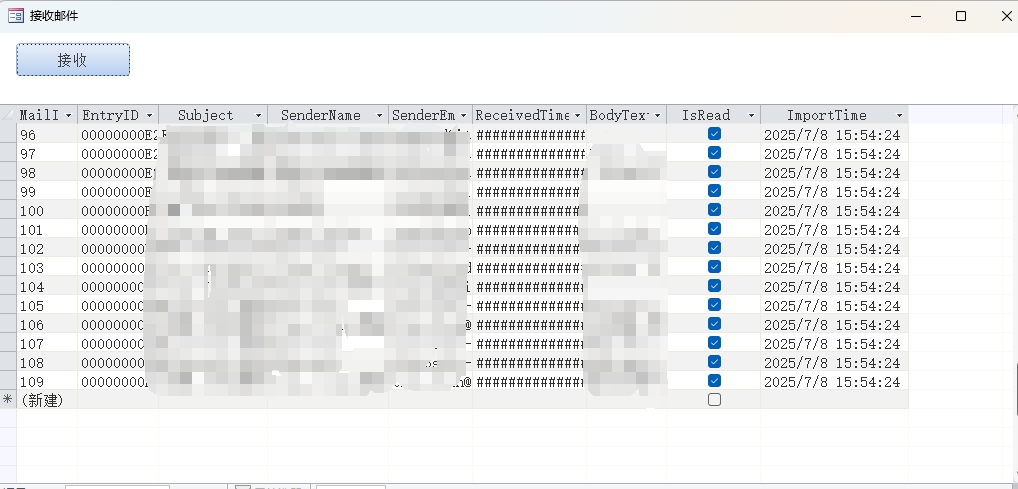
最后,就是运行测试了,运行效果不错,大家快去试一下吧!





 扫一扫
扫一扫


 7193
7193

 被折叠的 条评论
为什么被折叠?
被折叠的 条评论
为什么被折叠?
 到【灌水乐园】发言





