


#使用java开发的原生android简易聊天AI对话项目 大模型api使用硅基流动的。文章中的示例图片及视频全部由下面的代码生成。
#示例视频
原生android 仿deepseek 对话的简易聊天项目
以下是一些运行时的主要代码逻辑,非常的简易,适合刚学习android的同学参照学习
#主界面UI代码 RelativeLayout 相对布局不用处理,如使用约束布局可能需要对窗口进行键盘抬起的监听,由于是个学习的demo,我的示例中使用的RelativeLayout布局
<?xml version="1.0" encoding="utf-8"?>
<RelativeLayout xmlns:android="http://schemas.android.com/apk/res/android"
    xmlns:app="http://schemas.android.com/apk/res-auto"
    xmlns:tools="http://schemas.android.com/tools"
    android:id="@+id/main"
    android:layout_width="match_parent"
    android:layout_height="match_parent"
    android:background="@color/white"
    tools:context=".MainActivity">
    <RelativeLayout
        android:id="@+id/toolbar"
        android:layout_width="match_parent"
        android:layout_height="50dp"
        android:layout_alignParentTop="true"
        >
        <TextView
            android:id="@+id/main_title"
            android:layout_width="match_parent"
            android:layout_height="wrap_content"
            android:layout_centerInParent="true"
            android:background="@color/white"
            android:gravity="center"
            android:paddingStart="80dp"
            android:paddingEnd="80dp"
            android:singleLine="true"
            android:text="@string/main_title"
            android:textSize="16sp"
            android:textStyle="bold" />
        <ImageView
            android:layout_width="40dp"
            android:layout_height="40dp"
            android:layout_alignParentEnd="true"
            android:layout_centerInParent="true"
            android:paddingEnd="15dp"
            android:src="@mipmap/top_is" />
    </RelativeLayout>
    <LinearLayout
        android:id="@+id/deepseek_title"
        android:layout_width="wrap_content"
        android:layout_height="wrap_content"
        android:layout_centerInParent="true"
        android:orientation="vertical"
        android:paddingStart="50dp"
        android:paddingEnd="50dp">
        <ImageView
            android:layout_width="80dp"
            android:layout_height="80dp"
            android:layout_gravity="center"
            android:src="@mipmap/deepseek" />

        <TextView
            android:layout_width="wrap_content"
            android:layout_height="wrap_content"
            android:layout_gravity="center"
            android:text="@string/deepseek"
            android:textSize="24sp"
            android:textStyle="bold" />
        <TextView
            android:layout_width="wrap_content"
            android:layout_height="wrap_content"
            android:gravity="center"
            android:text="@string/seekdesc"
            android:textColor="@color/textdefault"
            android:textSize="16sp"

            />
    </LinearLayout>

    <androidx.recyclerview.widget.RecyclerView
        android:id="@+id/chat_list_view"
        android:layout_width="match_parent"
        android:layout_height="0dp"
        android:layout_above="@+id/bottom"
        android:layout_below="@+id/toolbar"
        tools:listitem="@layout/message_item_layout"
        android:paddingBottom="0dp"
        android:clipToPadding="false"
        />

    <LinearLayout
        android:id="@+id/bottom"
        android:layout_width="match_parent"
        android:layout_height="wrap_content"
        android:layout_alignParentBottom="true"
        android:layout_marginBottom="10dp"
        android:layout_marginTop="20dp"
        android:orientation="vertical">

        <EditText
            android:id="@+id/message_text"
            style="@style/imExitStyle"
            android:layout_width="match_parent"
            android:layout_height="wrap_content"
            android:hint="给deepseek发送消息"
            android:textColorHint="@color/textdefault"
            android:textSize="15sp" />

        <LinearLayout
            android:id="@+id/bottom_fn"
            android:layout_width="match_parent"
            android:layout_height="wrap_content"
            android:layout_marginTop="10dp"

            android:orientation="horizontal">

            <LinearLayout
                style="@style/bottom_fn"
                android:layout_width="wrap_content"
                android:layout_height="wrap_content">

                <ImageView
                    android:layout_width="25dp"
                    android:layout_height="25dp"
                    android:layout_gravity="center"
                    android:src="@mipmap/sd" />

                <TextView
                    android:layout_width="wrap_content"
                    android:layout_height="wrap_content"
                    android:layout_gravity="center"
                    android:layout_marginLeft="5dp"
                    android:text="深度思考(V3)" />
            </LinearLayout>

            <LinearLayout
                style="@style/bottom_fn"
                android:layout_width="wrap_content"
                android:layout_height="wrap_content"
                android:layout_marginStart="0dp">

                <ImageView
                    android:layout_width="25dp"
                    android:layout_height="25dp"
                    android:layout_gravity="center"
                    android:src="@mipmap/online_off" />

                <TextView
                    android:layout_width="wrap_content"
                    android:layout_height="wrap_content"
                    android:layout_gravity="center"
                    android:layout_marginLeft="6dp"
                    android:text="联网搜索" />
            </LinearLayout>

            <LinearLayout
                android:layout_width="0dp"
                android:layout_height="match_parent"
                android:layout_weight="1"
                android:gravity="right"
                android:paddingEnd="20dp">

                <ImageView
                    android:id="@+id/add"
                    android:layout_width="30dp"
                    android:layout_height="30dp"
                    android:layout_gravity="center"
                    android:layout_marginEnd="8dp"
                    android:src="@mipmap/add" />

                <ImageView
                    android:id="@+id/send"
                    android:layout_width="35dp"
                    android:layout_height="35dp"
                    android:layout_gravity="center"
                    android:src="@mipmap/send" />
            </LinearLayout>

        </LinearLayout>
    </LinearLayout>

</RelativeLayout>
#主界面java 逻辑代码
package com.example.deepseek;

import android.annotation.SuppressLint;
import android.graphics.Color;
import android.graphics.Rect;
import android.os.Bundle;
import android.os.Handler;
import android.os.Looper;
import android.text.Editable;
import android.text.TextWatcher;
import android.util.Log;
import android.view.View;
import android.view.ViewGroup;
import android.view.ViewTreeObserver;
import android.view.inputmethod.InputMethodManager;
import android.widget.EditText;
import android.widget.ImageView;
import android.widget.LinearLayout;
import android.widget.TextView;
import android.widget.Toast;

import androidx.activity.EdgeToEdge;
import androidx.annotation.NonNull;
import androidx.appcompat.app.AppCompatActivity;
import androidx.constraintlayout.widget.ConstraintLayout;
import androidx.core.graphics.Insets;
import androidx.core.view.ViewCompat;
import androidx.core.view.WindowInsetsCompat;
import androidx.recyclerview.widget.LinearLayoutManager;
import androidx.recyclerview.widget.RecyclerView;

import com.example.deepseek.adapter.ChatAdapter;
import com.example.deepseek.entity.Answer;
import com.example.deepseek.entity.ChatEntity;
import com.example.deepseek.entity.Message;
import com.example.deepseek.entity.Question;
import com.example.deepseek.entity.StreamAnswer;
import com.example.deepseek.util.OkHttpUtils;
import com.google.gson.Gson;

import java.io.BufferedReader;
import java.io.IOException;
import java.io.InputStream;
import java.io.InputStreamReader;
import java.util.ArrayList;
import java.util.List;

import okhttp3.Call;
import okhttp3.Callback;
import okhttp3.MediaType;
import okhttp3.OkHttpClient;
import okhttp3.Request;
import okhttp3.RequestBody;
import okhttp3.Response;

public class MainActivity extends AppCompatActivity implements View.OnClickListener {

    private EditText editText;
    private ImageView imageView;
    private LinearLayout bottomLayout;
    private LinearLayout linearLayout;
    private List<ChatEntity> chatEntities = new ArrayList<>();
    private RecyclerView recyclerView;
    private TextView textView;
    private ChatAdapter chatAdapter;
    private String baseUrl = "your api"; //我使用的是硅基流动的
    private String TAG = "main";

    @Override
    protected void onCreate(Bundle savedInstanceState) {
        super.onCreate(savedInstanceState);
        setContentView(R.layout.activity_main);
        editText = findViewById(R.id.message_text);
        imageView = findViewById(R.id.send);
        recyclerView = findViewById(R.id.chat_list_view);
        linearLayout = findViewById(R.id.deepseek_title);
        textView = findViewById(R.id.main_title);
        imageView.setImageAlpha(122);
        imageView.setOnClickListener(this);
        LinearLayoutManager layoutManager = new LinearLayoutManager(this);
        recyclerView.setLayoutManager(layoutManager);

        editText.requestFocus();
        editText.addTextChangedListener(new TextWatcher() {
            @Override
            public void beforeTextChanged(CharSequence s, int start, int count, int after) {

            }

            @Override
            public void onTextChanged(CharSequence s, int start, int before, int count) {
                if (count > 0) {
                    imageView.setImageAlpha(255);
                } else {
                    imageView.setImageAlpha(122);
                }
            }

            @Override
            public void afterTextChanged(Editable s) {

            }
        });
    }

    @Override
    public void onClick(View v) {
        if (v.getId() == R.id.send) {
            String content = editText.getText().toString();
            linearLayout.setVisibility(View.GONE);
            ChatEntity chatEntity_send = new ChatEntity(content, 0);
            ChatEntity chatEntity_rec = new ChatEntity("", 1);
            chatEntities.add(chatEntity_send);
            chatEntities.add(chatEntity_rec);
            textView.setText(chatEntities.get(0).getContent());
            chatAdapter = new ChatAdapter(chatEntities);
            recyclerView.setAdapter(chatAdapter);
            recyclerView.smoothScrollToPosition(chatAdapter.getItemCount() - 1);
            editText.getText().clear();
            Question question = new Question(content);
            String json = new Gson().toJson(question);
            Log.d(TAG, "onClick: " + json);
            receiveMessage(json);
        }
    }

    public void receiveMessage(String question) {

        OkHttpUtils.getInstance().doPost(baseUrl, question, new Callback() {
            @Override
            public void onFailure(@NonNull Call call, @NonNull IOException e) {
                Log.d(TAG, "onFailure: " + e.getMessage());
            }

            @Override
            public void onResponse(@NonNull Call call, @NonNull Response response) throws IOException {

                runOnUiThread(new Runnable() {
                    @Override
                    public void run() {
                        try {
                            InputStream inputStream = response.body().byteStream();
                            BufferedReader reader = new BufferedReader(new InputStreamReader(inputStream));
                            String line;
                            String contentStr = "";
                            while ( (line = reader.readLine()) != null ) {
                                if(!line.isEmpty() && !line.equals("data: [DONE]")) {
                                    String newLine = "{" + line +"}";
                                    StreamAnswer answer = new Gson().fromJson(newLine, StreamAnswer.class);
                                    String message = answer.getAnswer().getChoices().get(0).getDelta().getContent();
                                    contentStr+=message;
                                    ChatEntity chatEntity = chatEntities.get(chatEntities.size() - 1);
                                    chatEntity.setContent(contentStr);
                                    chatEntities.set(chatEntities.size() - 1, chatEntity);
                                    chatAdapter.notifyItemChanged(chatEntities.size() - 1);
                                }
                            }
                            RecyclerView.LayoutManager layoutManager1 = recyclerView.getLayoutManager();
                            if(layoutManager1 !=null) {
                                int lastVisibleItemPosition = ((LinearLayoutManager) layoutManager1).findLastVisibleItemPosition();
                                if (lastVisibleItemPosition != RecyclerView.NO_POSITION && lastVisibleItemPosition < recyclerView.getAdapter().getItemCount()) {
                                    // 获取对应的 ViewHolder
                                    RecyclerView.ViewHolder viewHolder = recyclerView.findViewHolderForAdapterPosition(lastVisibleItemPosition);

                                    if (viewHolder != null) {
                                        // 获取子项的 View
                                        View lastItemView = viewHolder.itemView;
                                        // 获取高度
                                        int lastItemHeight = lastItemView.getHeight();
                                        recyclerView.setClipToPadding(false);
                                        recyclerView.setPadding(recyclerView.getPaddingLeft(),recyclerView.getPaddingTop(),recyclerView.getPaddingRight(),lastItemHeight +20);
                                    }
                                }

                            }
                            contentStr = "";
                        } catch (Exception e) {
                            ChatEntity chatEntity = chatEntities.get(chatEntities.size() - 1);
                            chatEntity.setContent("服务器异常,请稍后重试!");
                            chatEntities.set(chatEntities.size() - 1, chatEntity);
                            chatAdapter.notifyItemChanged(chatEntities.size() - 1);
                            Log.d(TAG, "run: " + e.getMessage());
                        }

                    }
                });

            }
        });


    }


}
#数据类
package com.example.deepseek.entity;

/**
 * 聊天类实体
 */
public class ChatEntity {
    //发送类型
    public static final int SEND = 0;
    //接收类型
    public static final int RECEIVE = 1;

    private String content;

    //收发类型
    private int type;

    public ChatEntity( String content, int type) {

        this.content = content;
        this.type = type;
    }

    public String getContent() {
        return content;
    }

    public int getType() {
        return type;
    }

    public void setContent(String content) {
        this.content = content;
    }

    public void setType(int type) {
        this.type = type;
    }
}
#数据类2
package com.example.deepseek.entity;

import java.util.List;

public class Answer {
    private String id;
    private String model;
    private List<Choice> choices;
    public void setId(String id) {
        this.id = id;
    }
    public String getId() {
        return id;
    }
    public void setModel(String model) {
        this.model = model;
    }
    public String getModel() {
        return model;
    }

    public List<Choice> getChoices() {
        return choices;
    }

    public void setChoices(List<Choice> choices) {
        this.choices = choices;
    }
}
#数据类3
package com.example.deepseek.entity;

public class Message {
    private String role = "user";
    private String content;

    public Message( String content) {
        this.content = content;
    }

    public String getRole() {
        return role;
    }

    public void setRole(String role) {
        this.role = role;
    }

    public String getContent() {
        return content;
    }

    public void setContent(String content) {
        this.content = content;
    }
}
#数据类4
package com.example.deepseek.entity;

import com.example.deepseek.util.OkHttpUtils;

import java.util.ArrayList;
import java.util.List;

public class Question {
    private String model = "Qwen/Qwen2.5-72B-Instruct";
    private List<Message> messages;
    private Boolean stream = true;


    public Question(String message) {
        messages = new ArrayList<>();
        Message messageArr = new Message(message);
        if(messages.size()>0) {
            messages.set(0,messageArr);
        }else {
            messages.add(messageArr);
        }
    }

    public Boolean getStream() {
        return stream;
    }

    public void setStream(Boolean stream) {
        this.stream = stream;
    }

    public List<Message> getMessages() {
        return messages;
    }

    public void setMessages(List<Message> messages) {
        this.messages = messages;
    }

    public String getModel() {
        return model;
    }

    public void setModel(String model) {
        this.model = model;
    }

}
#数据类5
package com.example.deepseek.entity;

public class Choice {
    private Integer index;
    private StreamMessage delta;

    public Integer getIndex() {
        return index;
    }

    public void setIndex(Integer index) {
        this.index = index;
    }

    public StreamMessage getDelta() {
        return delta;
    }

    public void setDelta(StreamMessage delta) {
        this.delta = delta;
    }
}
#聊天的适配器代码
package com.example.deepseek.adapter;

import android.view.LayoutInflater;
import android.view.View;
import android.view.ViewGroup;
import android.widget.LinearLayout;
import android.widget.ProgressBar;
import android.widget.TextView;

import androidx.annotation.NonNull;
import androidx.recyclerview.widget.RecyclerView;

import com.example.deepseek.R;
import com.example.deepseek.entity.ChatEntity;

import java.util.ArrayList;
import java.util.List;

public class ChatAdapter extends RecyclerView.Adapter<ChatAdapter.ViewHolder> {

    List<ChatEntity> chatEntityList =new ArrayList<>();

    public ChatAdapter(List<ChatEntity> chatEntityList) {
        this.chatEntityList = chatEntityList;
    }

    @NonNull
    @Override
    public ViewHolder onCreateViewHolder(@NonNull ViewGroup parent, int viewType) {
        View inflate = LayoutInflater.from(parent.getContext()).inflate(R.layout.message_item_layout,parent,false);
        return new ViewHolder(inflate);
    }

    @Override
    public void onBindViewHolder(@NonNull ViewHolder holder, int position) {
        ChatEntity chatEntity = chatEntityList.get(position);
        if (chatEntity.getType() == chatEntity.SEND) {
            holder.leftLayout.setVisibility(View.GONE);
            holder.rightLayout.setVisibility(View.VISIBLE);
            holder.rightContentTextView.setText(chatEntity.getContent());
        } else {
            holder.rightLayout.setVisibility(View.GONE);
            holder.leftLayout.setVisibility(View.VISIBLE);
            if(chatEntity.getContent().isEmpty()) {
                holder.progressBar.setVisibility(View.VISIBLE);
            }else {
                holder.progressBar.setVisibility(View.GONE);
                holder.leftContentTextView.setText(chatEntity.getContent());
            }
        }
    }

    @Override
    public int getItemCount() {
        return chatEntityList.size();
    }
    static class ViewHolder extends RecyclerView.ViewHolder  {
        TextView leftContentTextView;
        LinearLayout leftLayout;
        TextView rightContentTextView;
        LinearLayout rightLayout;
        ProgressBar progressBar;
        public ViewHolder(@NonNull View itemView) {
            super(itemView);
            leftContentTextView = (TextView) itemView.findViewById(R.id.left_content);
            leftLayout = (LinearLayout) itemView.findViewById(R.id.left_bubble);
            rightContentTextView = (TextView) itemView.findViewById(R.id.right_content);
            rightLayout = (LinearLayout) itemView.findViewById(R.id.right_bubble);
            progressBar = itemView.findViewById(R.id.progressBar);
        }
    }
}
#封装的okhttp 请求代码
package com.example.deepseek.util;

import android.util.Log;

import org.json.JSONArray;

import java.io.IOException;
import java.util.Map;

import okhttp3.Callback;
import okhttp3.FormBody;
import okhttp3.Interceptor;
import okhttp3.MediaType;
import okhttp3.OkHttpClient;
import okhttp3.Request;
import okhttp3.RequestBody;
import okhttp3.Response;
import okhttp3.logging.HttpLoggingInterceptor;

public class OkHttpUtils {
    /**
     * 单例模式
     */
    private static OkHttpUtils okHttpUtils = null;

    private OkHttpUtils() {
    }

    public static OkHttpUtils getInstance() {
        //双层判断,同步锁
        if (okHttpUtils == null) {
            synchronized (OkHttpUtils.class) {
                if(okHttpUtils == null){
                    okHttpUtils = new OkHttpUtils();
                }
            }
        }
        return okHttpUtils;
    }

    /**
     * 单例模式
     * 封装OkhHttp
     * synchronized同步方法
     */
    private static OkHttpClient okHttpClient = null;

    private static synchronized OkHttpClient getOkHttpClient() {
        if (okHttpClient == null) {
            //拦截器
            HttpLoggingInterceptor interceptor = new HttpLoggingInterceptor(new HttpLoggingInterceptor.Logger() {
                @Override
                public void log(String message) {
                    //拦截日志消息
                    Log.i("lj", "log: " + message);
                }
            });
            //设置日志拦截器模式
            interceptor.setLevel(HttpLoggingInterceptor.Level.BODY);

            okHttpClient = new OkHttpClient.Builder()
                    //日志拦截器
                    .addInterceptor(interceptor)
                    //应用拦截器
                    .addInterceptor(new Interceptor() {
                        @Override
                        public Response intercept(Chain chain) throws IOException {
                            Request request = chain.request()
                                    .newBuilder()
                                    .addHeader("source", "android")
                                    .build();

                            return chain.proceed(request);
                        }
                    })
                    .build();
        }
        return okHttpClient;
    }

    /**
     * doGet
     */
    public void doGet(String url, Callback callback) {
        //创建okhttp
        OkHttpClient okHttpClient = getOkHttpClient();
        Request request = new Request.Builder()
                .url(url)
                .build();
        okHttpClient.newCall(request).enqueue(callback);
    }

    /**
     * doPost
     */
    public void doPost(String url, Map<String, String> params, Callback callback) {
        OkHttpClient okHttpClient = getOkHttpClient();
        //请求体
        FormBody.Builder formBody = new FormBody.Builder();
        for (String key : params.keySet()) {
            //遍历map集合
            formBody.add(key, params.get(key));
        }
        Request request = new Request.Builder()
                .url(url)
                .post(formBody.build())
                .addHeader("Authorization","Bearer sk-gvyrsdjkleevdmyqwhdhljpbaeyzmtxrjbeqxbrotzgwrjpw")
                .addHeader("Content-Type", "application/json")
                .build();
        okHttpClient.newCall(request).enqueue(callback);
    }
    public void doPost(String url, String jsonBody, Callback callback) {
        OkHttpClient okHttpClient = getOkHttpClient();
        RequestBody requestBody = RequestBody.create(jsonBody, MediaType.get("application/json; charset=utf-8"));
        Request request = new Request.Builder()
                .url(url)
                .post(requestBody)
                .addHeader("Authorization","Bearer sk-gvyrsdjkleevdmyqwhdhljpbaeyzmtxrjbeqxbrotzgwrjpw")
                .addHeader("Content-Type", "application/json")
                .build();
        okHttpClient.newCall(request).enqueue(callback);
    }
}
#备注 刚学习 代码不够精简,主要是java 开发android 已经慢慢被废弃了,后面又重新学习kotlin 开始新的练习,不过仅供参考,希望对你的学习有所帮助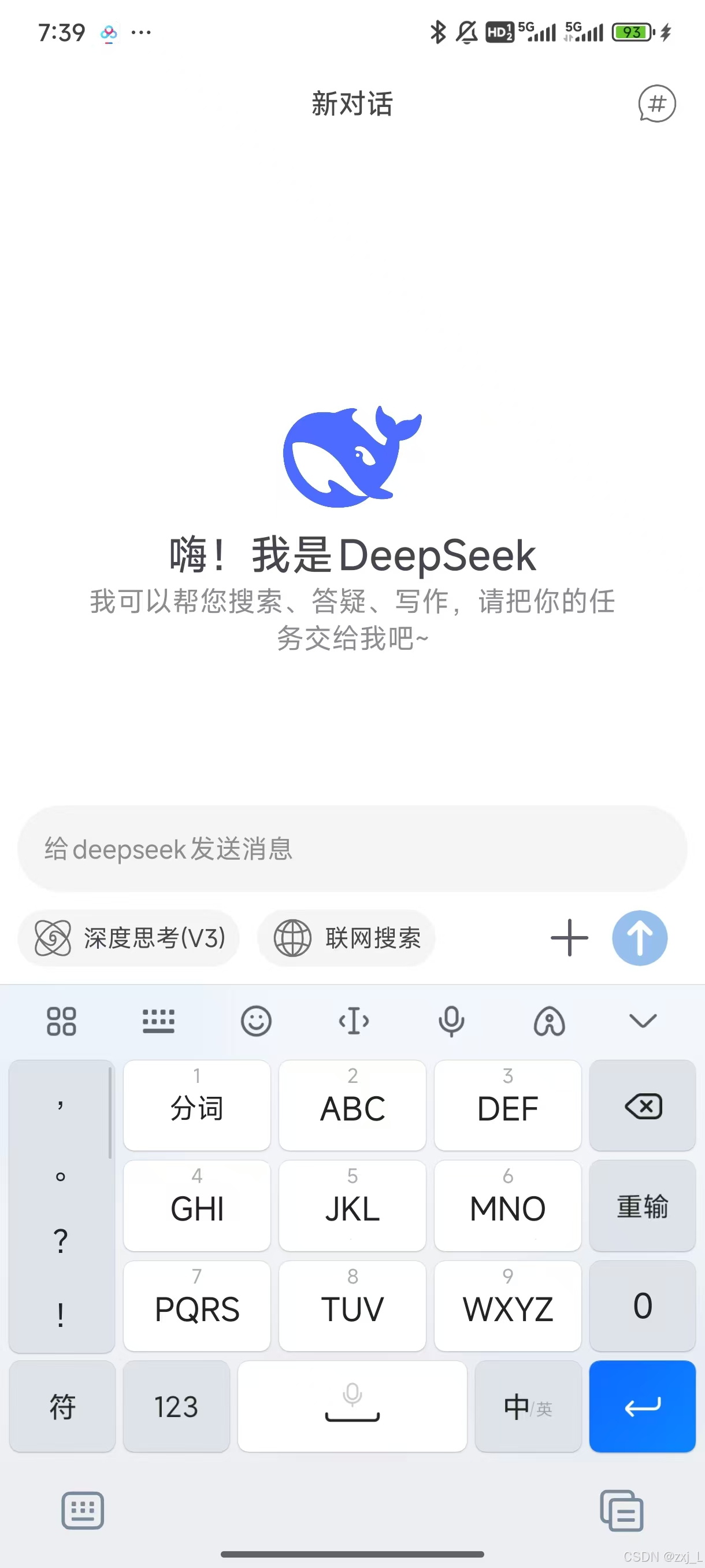





 扫一扫
扫一扫


 1355
1355


 到【灌水乐园】发言



