


 本文介绍了React-Hook-Form,一个功能强大的React表单验证库,具有高性能和易于使用的特性。文章详细讲解了其基本用法、表单状态监听、自定义校验规则、表单组件的封装以及表单联动,帮助前端开发者更高效地处理表单验证和管理。
表单校验对于前端来说无疑是个繁琐的事情,好在后台管理组件库例如Antd、Element帮我们解决了这些麻烦。可是对于C端说,UI设计师总会为网站定制个性的表单页面,这不得不需要我们切图搞起来。既然结构层和表示层需要我们亲自动手,而表单校验的行为层逻辑总是相似的,有没有一款好用又方便、又接地气又高逼格的库让我们解放双手呢?唉,还真有,那就是今天推荐的React-Hook-Form,Github上Star有30多k。看它的官方文档真是享受,因为它让我感觉原来组件还能这样封装,逻辑还能这样处理,格局打开了。有种醍醐灌顶的感觉,妈妈,原来我又会了。

基本用法
我们来看下它的基本用法
import { useForm } from "react-hook-form";

function Demo() {const { register, handleSubmit, formState: { errors } } = useForm();const onSubmit = handleSubmit((data) => console.log(data))return (<div className="Demo"><form onSubmit={onSubmit}><input {...register("name")} /><input {...register("desc", { required: "请输入描述" })} />{errors.desc && <span>{errors.desc.message}</span>}<input type="submit" /></form></div>);
}

export default Demo;
非常方便,只需要将使用register('name')注册一个name的表单项,并将返回值注入到input框中。如果input框是必填项,register方法提供第二个参数,register("desc", { required: "请输入描述" })。我们可以从formState.errors字段获取校验的错误信息进行显示。接着handleSubmit是一个高阶函数,可传入回调函数。handleSubmit(data => console.log(data))返回onSubmit函数,当我们触发onSubmit时可在回调函数中获取表单数据。
register还可以自定义校验规则,例如
register("name", {validate: (value) => {if (/^[A-Za-z]+$/i.test(value)) {return true;}return "只允许输入英文字母";},
})
当然,一些常用的min、max、minLength等校验属性都是可以直接使用。
你可能会好奇<input {...register("name")} />中register到底返回了哪些字段给到表单项,我们应该大概猜到无非就是onChange、value之类的属性,啀,还不完全定对。它返回的主要字段有name、onChange、onBlur、ref,没有value?没有!React Hook Form 注重减少重渲染以达到高性能的目的,采用非受控组件的方式。通过ref拿到input、select、textarea等原生组件节点来设置value值。
由于不需要特意使用useState来实时存储表单数据,因此我们输入框输入等操作时,并不会影响组件重新渲染。

formState监听表单状态
useForm还返回了formState字段,里面有校验错误信息、是否在校验、是否提交等等属性。
const {formState: { errors, isDirty, isValidating, isSubmitted// ...},
} = useForm();
这些属性被开发者使用且改变时,才会触发组件渲染,不使用时不会造成重渲染。什么意思呢?我们使用errors字段来看下区别。
没有使用errors字段,不会触发重渲染 
使用errors字段,当errors变化时会自动触发重渲染,获取最新的errors数据 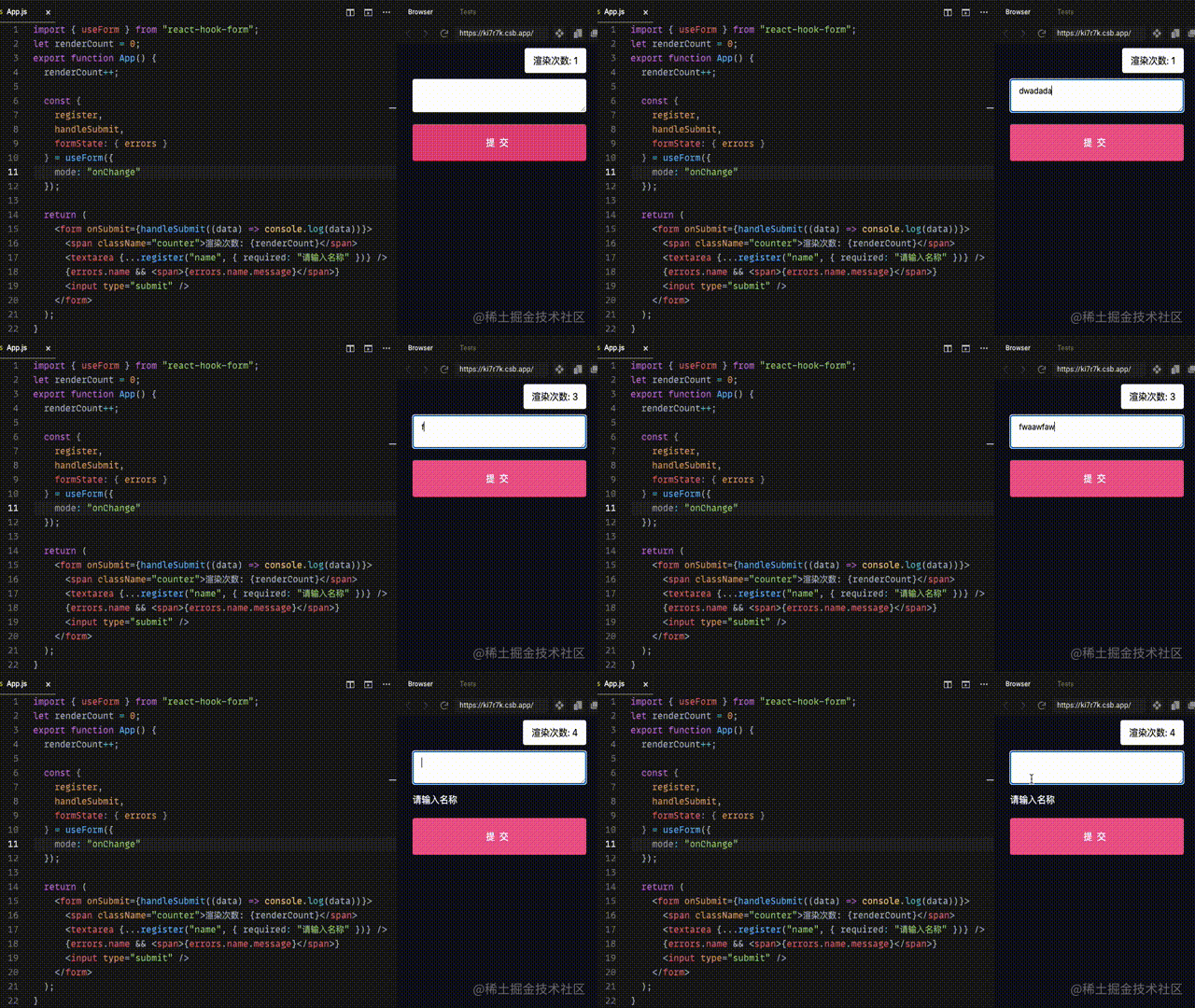
只需要依据我们是否解构使用来判断,是否需要监听errors变化。第一眼看上去是不是很神奇,很有灵性,不需要开发者操心,就可以避免一些不必要的性能消耗。那它是怎么做到的呢?仔细想想我们怎么监听是否使用了某个字段,当然就是我们老生常谈的Object.defineProperty或者Proxy。还真是,源码传送门
大概的思路就是
const initialFormState = {isDirty: false,isValidating: false,errors: {},// ...
}

function useForm() {const [formState, updateFormState] = useState({ ...initialFormState })const _formControl = React.useRef({control: {_formState: { ...initialFormState },_proxyFormState: {}}});// ...// 对formState进行代理_formControl.current.formState = getProxyFormState(formState, _formControl.current.control);return _formControl.current;
}

function getProxyFormState(formState, control) {const result = {};for (const key in formState) {Object.defineProperty(result, key, {get: () => {// 只要开发者解构使用了某个字段,即触发了get方法,则设置该字段代理状态为truecontrol._proxyFormState[key] = true;return formState[key];},});}return result
}
useForm只用了一个useState,一般不会去更新state的状态,而是用useRef创建的_formControl.control._formState来存储最新值,这样保证不会触发组件更新。
例如errors字段有变动了,才会更新useState的值
// errors有变化时,且_proxyFormState.errors === true
if (_formControl.control._proxyFormState.errors) {// 更新useState中的值,触发重渲染updateFormState({ ...control._formState });
}
register返回的ref
解决了我们的好奇,接着往下讲。前面说到register("name")返回的一些字段name、onChange、onBlur、ref等会挂载到表单组件上,那如果我们本身需要拿到表单组件的ref,或者监听事件怎么办?
function Demo() {const inputRef = useRef(null);const { register, handleSubmit } = useForm();const { ref, onBlur, ...rest } = register("name", {required: "请输入名称",});return (<form onSubmit={handleSubmit((data) => console.log(data))}><inputonBlur={(e) => {onBlur(e);// 处理blur事件console.log("blur");}}ref={(e) => {ref(e);// 拿到输入框refinputRef.current = e;}}{...rest}/><input type="submit" /></form>);
}
那你要说register上述方式不得劲啊,有时候自己封装的表单组件没有提供ref,或者就是不想通过ref来绑定。那也是可以手动setValue。
const CustomInput = ({ name, label, value, onChange }) => (<><label htmlFor={name}>{label}</label><input name={name} value={value} onChange={onChange} /></>
);

function Demo() {const {register,handleSubmit,setValue,setError,watch,formState: { errors },} = useForm({ defaultValues: { name: '' } });const onValidateName = (value) => {if (!value) {setError("name", { message: "请输入" });} else if (!/^[A-Z]/.test(value)) {setError("name", { message: "首字符必须为大写字母" });}};useEffect(() => {register("name");}, []);return (<formonSubmit={handleSubmit((data) => {// 手动添加触发onSubmit时校验if (!onValidateName(data.name)) {return;}console.log(`提交:${JSON.stringify(data)}`);})}><CustomInputlabel="名称"name="name"value={watch("name")}onChange={(value) => {// 手动添加触发onChange时校验onValidateName(value);setValue("name", value);}}/>{errors.name && <span>{errors.name.message}</span>}<input type="submit" /></form>);
}
可以看到,如果我们需要受控组件的方式可以使用value={watch("name")}传递给组件(当然不一定需要)。
如果需要输入操作时能够触发校验规则,只能够手动添加了,上面我们封装了onValidateName校验函数,为了让输入改变和提交表单时校验规则一致,所以在onChange和handleSubmit回调函数中都添加了校验。
看起来是麻烦了点,如果一定要受控组件并且不一定能提供ref,这个库也为我们考虑了这种情况,提供了Controller组件给我们,这样就简洁一点了。
import { Controller, useForm } from "react-hook-form";

const CustomInput = ({ name, label, value, onChange }) => (<><label htmlFor={name}>{label}</label><input name="name" value={value} onChange={onChange} /></>
);

function Demo() {const {control,handleSubmit,formState: { errors },} = useForm({defaultValues: {name: "",},});return (<formonSubmit={handleSubmit((data) => {console.log(`提交:${JSON.stringify(data)}`);})}><Controllerrender={({ field }) => <CustomInput label="名称" {...field} />}name="name"control={control}rules={{required: {value: true,message: "请输入",},pattern: {value: /^[A-Z]/,message: "首字符必须为大写字母",},}}/>{errors.name && <span>{errors.name.message}</span>}<input type="submit" /></form>);
}
还是回归到最初,如果我们能提供ref,还是尽量提供吧。非受控组件至少能减少渲染次数。例如使用forwardRef
const CustomInput = forwardRef(({ name, label, onChange, onBlur }, ref) => (<><label htmlFor={name}>{label}</label>	<input name={name} onChange={onChange} onBlur={onBlur} ref={ref} /></>
));
表单联动
前面说到React-hook-form使用的是非受控组件方案,那如果我们需要实时获取监听最新的表单值呢?可以如下
function Demo() {const { watch } = useForm();// 监听单个值const name = watch('name');// 监听多个值const [name2, desc] = watch(['name', 'desc'])// 监听所有值useEffect(() => {const { unsubscribe } = watch((values) => {console.log("values", values);});return () => unsubscribe();}, []);return (<form><input {...register("name")} /><input {...register("desc", { required: "请输入描述" })} /></form>);
}
这里使用了观察者模式,只要我们对需要观察的字段值改变了,才会触发组件渲染。
那么使用watch,我们可以很容易做到表单联动
export default function Demo() {const { register, watch, handleSubmit } = useForm({shouldUnregister: true,});const [data, setData] = useState({});return (<div className="App"><form onSubmit={handleSubmit(setData)}><div><label htmlFor="name">名称:</label><input {...register("name")} /></div><div><label htmlFor="more">更多:</label><input type="checkbox" {...register("more")} /></div>{watch("more") && (<div><label>年龄:</label><input type="number" {...register("age")} /></div>)}<input type="submit" /></form><div>提交数据:{JSON.stringify(data)}</div></div>);
}
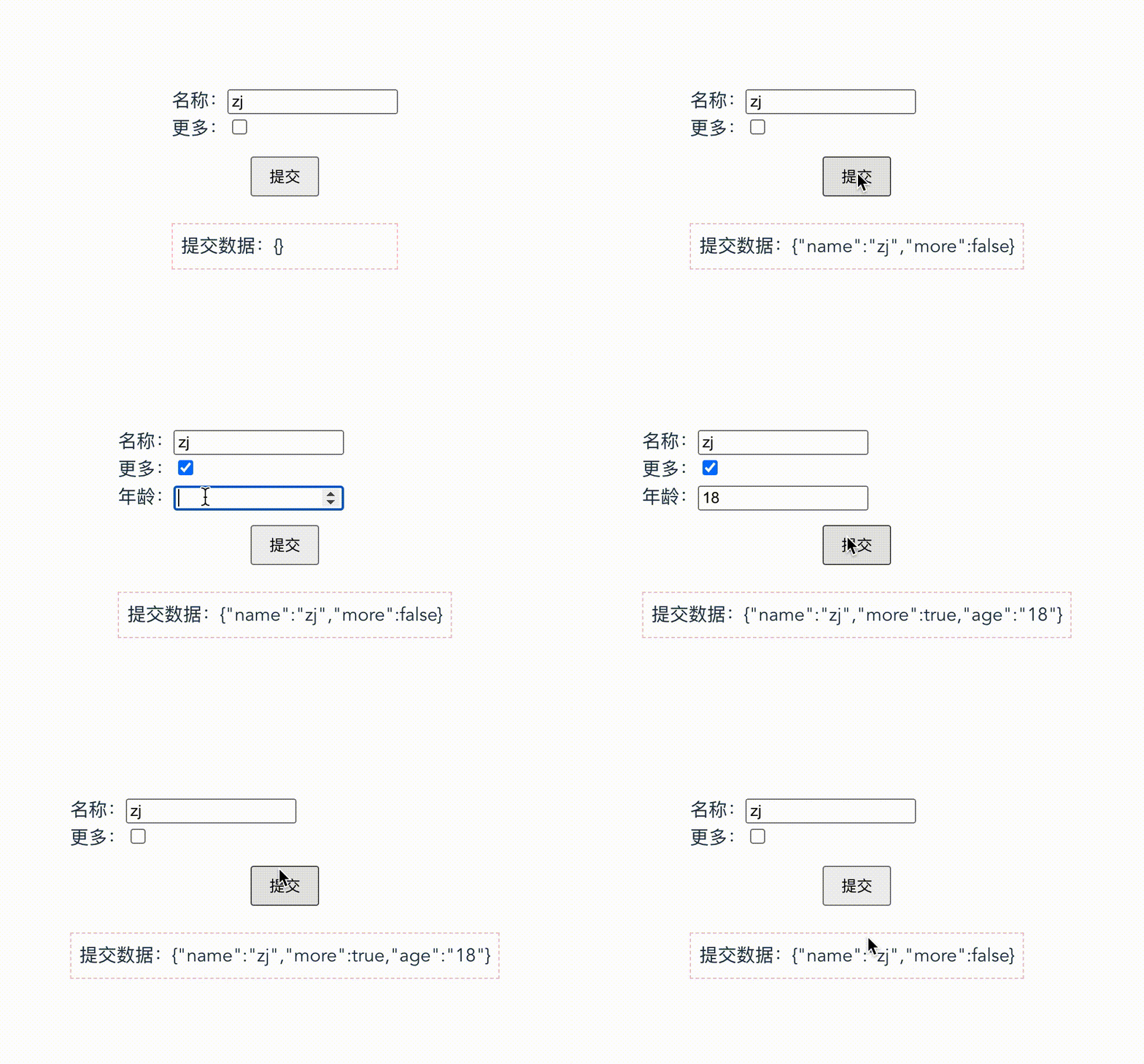
是不是很方便,传入useForm({ shouldUnregister: true });,就可以自动取消注册不需要的表单项,比如上面的年龄。Reat-hook-form又是咋做到自动取消注册不要的表单项呢,还是从ref上。
首先询问下<input ref={e => console.log(e)} />一般从挂载到注销会打印几次?一般两次,第一次打印input的dom节点,另一次打印null。
所以React-hook-form也是判断null时取消注册的,下面也描述下简单做法
const _names = {unMount: new Set()
}
ref(ref) {if (ref) {register(name, options);} else {options.shouldUnregister && unMount.add(name);}
}
然后在useEffect中取消注册
 useEffect({const _removeUnmounted = () => {for (const name of _names.unMount) {unregister(name)}_names.unMount = new Set();}_removeUnmounted()
})
我们现在了解了基本原理,那前面说不提供ref的组件咋么办,shouldUnregister是不会起作用,那只能手动移除了
export default function Demo() {const { register, watch, handleSubmit, unregister, setValue } = useForm();const [data, setData] = useState({});const more = watch("more");useEffect(() => {if (more) {register("age");} else {unregister("age");}}, [more]);return (<div className="App"><form onSubmit={handleSubmit(setData)}><div><label htmlFor="name">名称:</label><input {...register("name")} /></div><div><label htmlFor="more">更多:</label><input type="checkbox" {...register("more")} /></div>{more && (<CustomInputlabel="年龄"name="age"onChange={(value) => setValue("age", value)}/>)}<input type="submit" /></form><div>提交数据:{JSON.stringify(data)}</div></div>);
}
或者使用上面说的库提供的Controller组件
基于React-hook-form封装表单组件
最后,假设我们开发好了我们的表单组件,再结合React-hook-form校验库使用,就可以完成我们网站专属的表单页啦。如果我们的表单组件在网站或项目中多个地方用到,也许我们可以再进一层封装。如下使用是不是简介很多。
function Demo() {const [data, setData] = useState({});return (<div className="App"><Form onFinish={setData}><FormItem label="名称" name="name" rule={{ required: "请输入名称" }}><CustomInput /></FormItem><FormItem label="性别" name="gender" rule={{ required: "请选择性别" }}><CustomSelect options={["男", "女", "其他"]} /></FormItem></Form><div>提交数据:{JSON.stringify(data)}</div></div>);
}
我们现在来动手简单实现一个。首先是我们自定义开发的表单组件,例如输入框、选择框等。
const CustomInput = React.forwardRef(({ size = "middle", ...rest }, ref) => (<input {...rest} className={`my-input my-input-${size}`} ref={ref} />
));

const CustomSelect = React.forwardRef(({ size = "middle", options, placeholder = "请选择", ...rest }, ref) => (<select {...rest} className={`my-select my-select-${size}`} ref={ref}><option value="">{placeholder}</option>{options.map((value) => (<option key={value} value={value}>{value}</option>))}</select>)
);
紧接着我们封装Form容器组件
const Form = ({ children, defaultValues, onFinish }) => {const {handleSubmit,register,formState: { errors },} = useForm({ defaultValues });return (<form onSubmit={handleSubmit(onFinish)}>{React.Children.map(children, (child) =>child.props.name? React.cloneElement(child, {...child.props,register,error: errors[child.props.name],key: child.props.name,}): child)}<input type="submit" /></form>);
};
一般Form中的children就是FormItem组件,我们对其props补充了register方法和error。
然后我们再来封装下FormItem组件
const FormItem = ({ children, name, label, register, rule, error }) => {// 简单处理:判断FormItem 只能传入一个childconst child = React.Children.only(children);return (<div><label htmlFor={name}>{label}</label>{React.cloneElement(child, {...child.props,...register(name, rule),name,})}{error && <span>{error.message}</span>}</div>);
};
FormItem组件的children一般就是输入框、选择框等,我们调用register方法将返回的ref、onChange等属性再补充到输入框、选择框等表单组件上。
至此,我们自行封装的表单组件库demo版就完成啦。那其实我们还有很多容错判断、更多功能还没有处理,可以慢慢添加。例如我们需要有重置表单的功能
function Demo() {const [data, setData] = useState({});const formRef = useRef();return (<div className="App"><Form onFinish={setData} ref={formRef}><FormItem label="名称" name="name" rule={{ required: "请输入名称" }}><CustomInput /></FormItem></Form><div onClick={() => formRef.current.reset()}>重置</div></div>);
}
那么我们的Form组件就需要把useForm返回的方法等暴露出去
const Form = React.forwardRef(({ children, defaultValues, onFinish }, ref) => {const form = useForm({ defaultValues });const {handleSubmit,register,formState: { errors },} = form;React.useImperativeHandle(ref, () => form);return (<form onSubmit={handleSubmit(onFinish)}>{React.Children.map(children, (child) =>child.props.name? React.cloneElement(child, {...child.props,register,error: errors[child.props.name],key: child.props.name,}): child)}<input type="submit" /></form>);
});
好啦太多需要补充了,就不一一述说。
最后
整理了75个JS高频面试题,并给出了答案和解析,基本上可以保证你能应付面试官关于JS的提问。


有需要的小伙伴,可以点击下方卡片领取,无偿分享





 扫一扫
扫一扫


 133
133

 被折叠的 条评论
为什么被折叠?
被折叠的 条评论
为什么被折叠?
 到【灌水乐园】发言





