


示例展示:
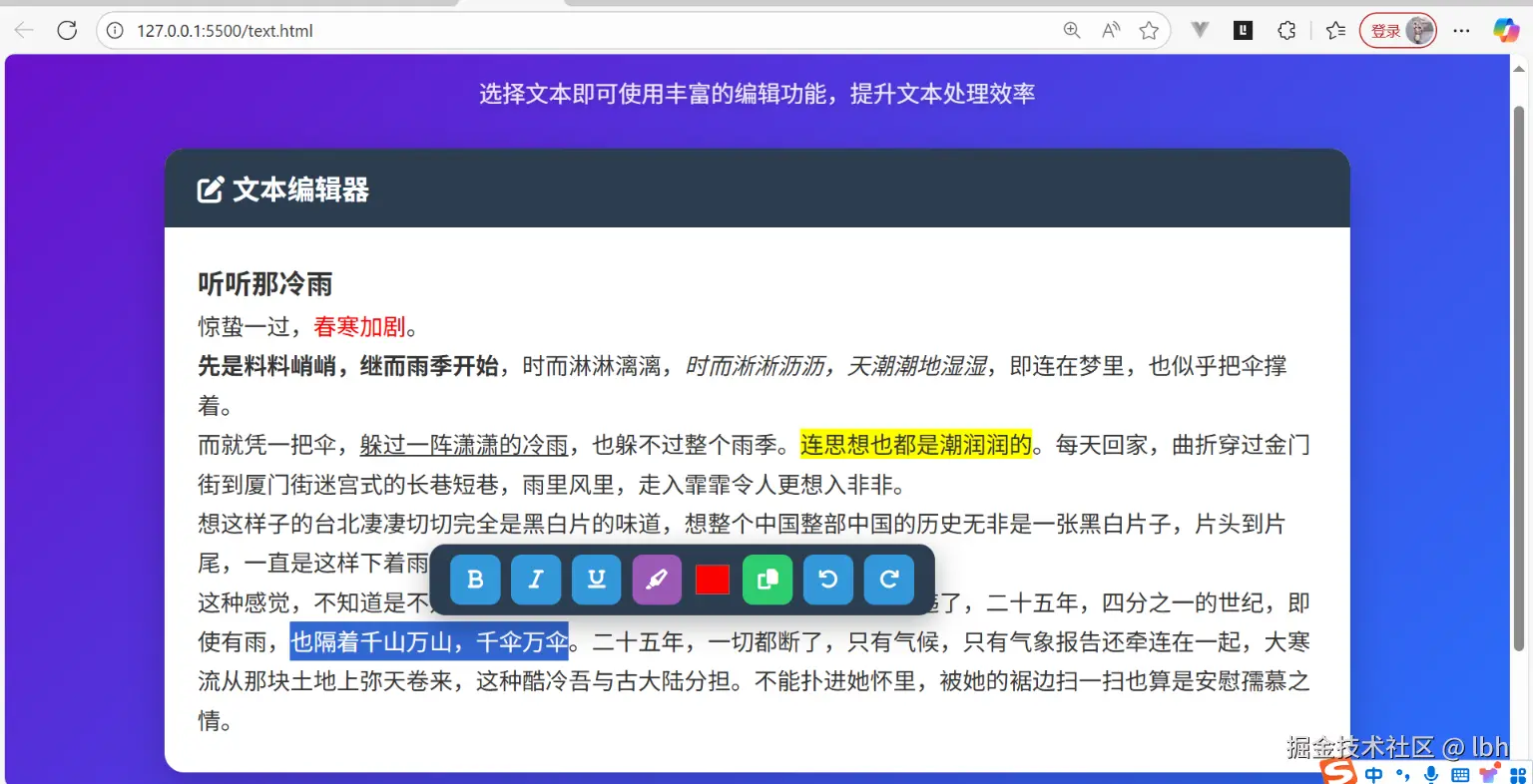
其实核心是在网页中获取用户鼠标选中的文本,通过 JavaScript 的 window.getSelection() 方法来实现。这个方法返回一个 Selection 对象,该对象包含了关于选中文本的信息,最后有贴上完整代码。
功能概述
-
富文本编辑功能:用户可以在编辑区域输入和格式化文本
-
智能工具栏:当用户选中文本时,会自动弹出浮动工具栏
-
格式操作:
- 文本加粗/斜体/下划线
- 高亮标记
- 文字颜色修改
- 复制文本
- 撤销/重做操作
-
历史记录:支持撤销(ctrl+z)和重做(ctrl+y)功能
-
响应式设计:适配不同屏幕尺寸
逻辑代码:
<script>
      document.addEventListener("DOMContentLoaded", () => {


        const textEditor = document.getElementById("textEditor");
        const textToolbar = document.getElementById("textToolbar");
        const btnBold = document.getElementById("btnBold");
        const btnItalic = document.getElementById("btnItalic");
        const btnUnderline = document.getElementById("btnUnderline");
        const btnHighlight = document.getElementById("btnHighlight");
        const colorPicker = document.getElementById("colorPicker");
        const btnCopy = document.getElementById("btnCopy");
        const btnUndo = document.getElementById("btnUndo");
        const btnRedo = document.getElementById("btnRedo");

        // 操作历史记录
        const history = {


          states: [],
          currentIndex: -1,
        };

        // 保存编辑器状态
        function saveState() {


          const html = textEditor.innerHTML;

          // 避免保存相同状态
          if (history.states[history.currentIndex] === html) return;

          // 移除当前索引之后的状态
          history.states = history.states.slice(0, history.currentIndex + 1);
          history.states.push(html);
          history.currentIndex++;
        }

        // 初始化状态
        saveState();

        // 显示工具栏
        function showToolbar() {


          const selection = window.getSelection();
          if (!selection.toString().trim()) {


            textToolbar.style.display = "none";
            return;
          }

          const range = selection.getRangeAt(0);
          const rect = range.getBoundingClientRect();
          const editorRect = textEditor.getBoundingClientRect();

          // 计算工具栏位置
          let top = rect.top + window.scrollY - textToolbar.offsetHeight - 8;
          let left =
            rect.left +
            window.scrollX +
            rect.width / 2 -
            textToolbar.offsetWidth / 2;

          // 边界检查 - 确保工具栏在可视区域内
          if (top < window.scrollY) {


            top = rect.bottom + window.scrollY + 8;
          }

          if (left < editorRect.left) {


            left = editorRect.left + 10;
          } else if (left + textToolbar.offsetWidth > editorRect.right) {


            left = editorRect.right - textToolbar.offsetWidth - 10;
          }

          textToolbar.style.display = "flex";
          textToolbar.style.top = top + "px";
          textToolbar.style.left = left + "px";
        }

        // 隐藏工具栏
        function hideToolbar() {


          textToolbar.style.display = "none";
        }

        // 执行格式命令
        function formatCommand(command, value = null) {


          saveState();
          document.execCommand(command, false, value);
          textEditor.focus();
        }

        // 高亮文本
        function toggleHighlight() {


          saveState();
          if (document.queryCommandState("hiliteColor")) {


            document.execCommand("hiliteColor", false, "transparent");
          } else {


            document.execCommand("hiliteColor", false, "#FFFF00");
          }
          textEditor.focus();
        }

        // 复制文本
        function copyText() {


          const selection = window.getSelection();
          navigator.clipboard
            .writeText(selection.toString())
            .then(() => {


              btnCopy.innerHTML = '<i class="fas fa-check"></i>';
              setTimeout(() => {


                btnCopy.innerHTML = '<i class="fas fa-copy"></i>';
              }, 1500);
            })
            .catch((err) => {


              console.error("复制失败:", err);
            });
          textEditor.focus();
        }

        // 撤销操作
        function undo() {


          if (history.currentIndex > 0) {


            history.currentIndex--;
            textEditor.innerHTML = history.states[history.currentIndex];
          }
          textEditor.focus();
        }

        // 重做操作
        function redo() {


          if (history.currentIndex < history.states.length - 1) {


            history.currentIndex++;
            textEditor.innerHTML = history.states[history.currentIndex];
          }
          textEditor.focus();
        }

        // 事件监听
        textEditor.addEventListener("mouseup", showToolbar);
        textEditor.addEventListener("keyup", showToolbar);
        textEditor.addEventListener("input", saveState);

        document.addEventListener("mousedown", (e) => {


          if (!textToolbar.contains(e.target)) {


            hideToolbar();
          }
        });

        // 加粗
        btnBold.addEventListener("click", () => formatCommand("bold"));
        // 倾斜
        btnItalic.addEventListener("click", () => formatCommand("italic"));
        // 下划线
        btnUnderline.addEventListener("click", () =>formatCommand("underline"));
        btnHighlight.addEventListener("click", toggleHighlight);

        colorPicker.addEventListener("input", (e) => {


          formatCommand("foreColor", e.target.value);
        });

        btnCopy.addEventListener("click", copyText);
        btnUndo.addEventListener("click", undo);
        btnRedo.addEventListener("click", redo);

        // 窗口大小变化时重新定位工具栏
        window.addEventListener("resize", () => {


          if (textToolbar.style.display === "flex") {


            showToolbar();
          }
        });
      });
    </script>
核心功能实现
1. DOM 加载与初始化
document.addEventListener("DOMContentLoaded", () => {

    ... });
- 确保页面 DOM 完全加载后再执行脚本。
- 避免因元素未加载导致的
null错误。
2. 工具栏显示逻辑:showToolbar()
富文本编辑器中的“浮动格式栏”
触发条件
mouseup:鼠
 最低0.47元/天 解锁文章






 扫一扫
扫一扫


 780
780

 被折叠的 条评论
为什么被折叠?
被折叠的 条评论
为什么被折叠?
 到【灌水乐园】发言





