

iOS应用内跳转系统设置相关界面的方法

本文详细介绍如何在iOS应用中实现跳转至系统设置界面的功能,包括蓝牙、Wi-Fi、通知等常见设置项,以及如何跳转至第三方应用的设置界面。

iOS应用内跳转系统设置相关界面的方法

        在iOS开发中,有时会有跳转系统设置界面的需求,例如提示用户打开蓝牙或者WIFI,提醒用户打开推送或者位置权限等。在iOS6之后,第三方应用需要跳转系统设置界面,需要在URL type中添加一个prefs值,如下图:
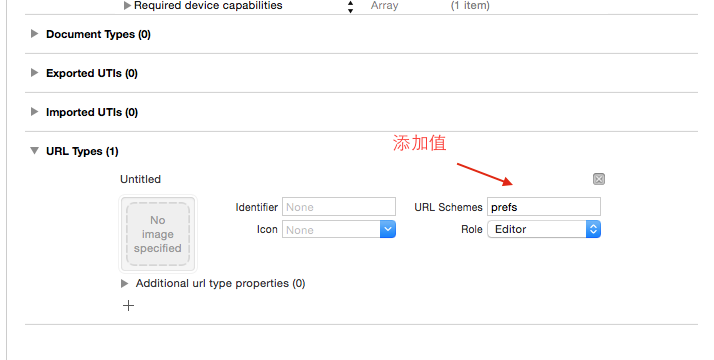
        跳转系统设置根目录中的项目使用如下的方法:

?
1
2
3
4
5
6
7
8
9
10
11
12
13
14
15
16
17
18
          _array = @[
                @{@ "系统设置" :@ "prefs:root=INTERNET_TETHERING" },
                @{@ "WIFI设置" :@ "prefs:root=WIFI" },
                @{@ "蓝牙设置" :@ "prefs:root=Bluetooth" },
                @{@ "系统通知" :@ "prefs:root=NOTIFICATIONS_ID" },
                @{@ "通用设置" :@ "prefs:root=General" },
                @{@ "显示设置" :@ "prefs:root=DISPLAY&BRIGHTNESS" },
                @{@ "壁纸设置" :@ "prefs:root=Wallpaper" },
                @{@ "声音设置" :@ "prefs:root=Sounds" },
                @{@ "隐私设置" :@ "prefs:root=privacy" },
                @{@ "APP Store" :@ "prefs:root=STORE" },
                @{@ "Notes" :@ "prefs:root=NOTES" },
                @{@ "Safari" :@ "prefs:root=Safari" },
                @{@ "Music" :@ "prefs:root=MUSIC" },
                @{@ "photo" :@ "prefs:root=Photos" }
                ];
         NSURL * url = [NSURL URLWithString:[_array[index] allValues].firstObject];
         [[UIApplication sharedApplication]openURL:url];

如果要跳转第三方应用的设置界面中,使用prefs:root=boundleId的方式,boundleId是第三方应用的boundleId。

        如果需要继续向项目内层进行跳转,可以通过添加path路径的方式,如下:

?
1
2
3
4
5
6
7
8
9
10
11
12
13
14
               _array = @[
                @{@ "关于本机" :@ "prefs:root=General&path=About" },
                @{@ "软件升级" :@ "prefs:root=General&path=SOFTWARE_UPDATE_LINK" },
                @{@ "日期时间" :@ "prefs:root=General&path=DATE_AND_TIME" },
                @{@ "Accessibility" :@ "prefs:root=General&path=ACCESSIBILITY" },
                @{@ "键盘设置" :@ "prefs:root=General&path=Keyboard" },
                @{@ "VPN" :@ "prefs:root=General&path=VPN" },
                @{@ "壁纸设置" :@ "prefs:root=Wallpaper" },
                @{@ "声音设置" :@ "prefs:root=Sounds" },
                @{@ "隐私设置" :@ "prefs:root=privacy" },
                @{@ "APP Store" :@ "prefs:root=STORE" },
                @{@ "还原设置" :@ "prefs:root=General&path=Reset" },
                @{@ "应用通知" :@ "prefs:root=NOTIFICATIONS_ID&path=应用的boundleId" }
                ];

----------------------------------------------------------------------------------------------------------------------


如下是跳转到系统设置诸多界面的url 

  1. prefs:root=General&path=About
  2. prefs:root=General&path=ACCESSIBILITY
  3. prefs:root=AIRPLANE_MODE
  4. prefs:root=General&path=AUTOLOCK
  5. prefs:root=General&path=USAGE/CELLULAR_USAGE
  6. prefs:root=Brightness
  7. prefs:root=General&path=Bluetooth
  8. prefs:root=General&path=DATE_AND_TIME
  9. prefs:root=FACETIME
  10. prefs:root=General
  11. prefs:root=General&path=Keyboard
  12. prefs:root=CASTLE
  13. prefs:root=CASTLE&path=STORAGE_AND_BACKUP
  14. prefs:root=General&path=INTERNATIONAL
  15. prefs:root=LOCATION_SERVICES
  16. prefs:root=ACCOUNT_SETTINGS
  17. prefs:root=MUSIC
  18. prefs:root=MUSIC&path=EQ
  19. prefs:root=MUSIC&path=VolumeLimit
  20. prefs:root=General&path=Network
  21. prefs:root=NIKE_PLUS_IPOD
  22. prefs:root=NOTES
  23. prefs:root=NOTIFICATIONS_ID
  24. prefs:root=Phone
  25. prefs:root=Photos
  26. prefs:root=General&path=ManagedConfigurationList
  27. prefs:root=General&path=Reset
  28. prefs:root=Sounds&path=Ringtone
  29. prefs:root=Safari
  30. prefs:root=General&path=Assistant
  31. prefs:root=Sounds
  32. prefs:root=General&path=SOFTWARE_UPDATE_LINK
  33. prefs:root=STORE
  34. prefs:root=TWITTER
  35. prefs:root=General&path=USAGE
  36. prefs:root=VIDEO
  37. prefs:root=General&path=Network/VPN
  38. prefs:root=Wallpaper
  39. prefs:root=WIFI
  40. prefs:root=INTERNET_TETHERING
复制代码


使用方法: 

  1. [[UIApplication sharedApplication] openURL:[NSURL URLWithString:@"prefs:root=General&path=Keyboard"]];
复制代码


然而不幸的是,ios 5.1之后系统不再支持这些url跳转调用到系统。 
引用 
Yep, saw this (and many more), even implemented it in a test application. Really need to get the definative word from APPL, but the community concensus opinion is APPL disallowed it in 5.1 after it was publically "discovered/published", so applications containing it won't be accepted. 

08/01/12 Update: Asked Apple through my developer account if there is a way to programmatically launch the WiFi Settings dialog. Here is the response: 

"Our engineers have reviewed your request and have concluded that there is no supported way to achieve the desired functionality given the currently shipping system configurations." 


From:  http://stackoverflow.com/questions/8246070/ios-launching-settings-restrictions-url-scheme  

所以,要么我们干脆干掉这个功能。要么,变态了。 
  1. - (void) showLocationAlert {

  2.                 if ([CLLocationManager authorizationStatus] != kCLAuthorizationStatusAuthorized) {

  3.                         //Check whether Settings page is openable (iOS 5.1 not allows Settings page to be opened via openURL:)
  4.                         if ([[UIApplication sharedApplication] canOpenURL:[NSURL URLWithString:@"prefs:root=LOCATION_SERVICES"]]) {
  5.                             UIAlertView *alert = [[UIAlertView alloc]initWithTitle:@"Error" message:@"You must enable location service,Turn on location service to allow \"YourApp\" to determine your location" delegate:self cancelButtonTitle:@"Settings" otherButtonTitles:@"Cancel", nil];
  6.                             [alert show];

  7.                         }
  8.                         else {
  9.                             UIAlertView *alert = [[UIAlertView alloc]initWithTitle:@"Error" message:@"You must enable location service" delegate:self cancelButtonTitle:@"Cancel" otherButtonTitles:@"OK", nil];
  10.                             [alert show];
  11.                         }
  12.                  }
  13.             }


  14.   - (void) alertView:(UIAlertView *)alertView clickedButtonAtIndex:(NSInteger)buttonIndex  {
  15.           if (buttonIndex == 0) {
  16.                 [[UIApplication sharedApplication] openURL:[NSURL URLWithString:@"prefs:root=LOCATION_SERVICES"]];
  17.             }

  18.         }


From: 

http://my.oschina.net/u/2340880/blog/619224

http://bbs.9ria.com/thread-189867-1-1.html


评论
添加红包

请填写红包祝福语或标题

红包个数最小为10个

红包金额最低5元

当前余额3.43前往充值 >
需支付:10.00
成就一亿技术人!
领取后你会自动成为博主和红包主的粉丝 规则
hope_wisdom
发出的红包
实付
使用余额支付
点击重新获取
扫码支付
钱包余额 0

抵扣说明:

1.余额是钱包充值的虚拟货币,按照1:1的比例进行支付金额的抵扣。
2.余额无法直接购买下载,可以购买VIP、付费专栏及课程。

余额充值


