





 本文详细介绍了贝塞尔曲线的概念及在游戏开发中的具体应用,包括如何通过代码实现不同类型的贝塞尔曲线运动效果,如移动到指定位置、跳动等,并提供了具体的代码示例。
bool THelloWorld::onTouchBegan(TTouch* touch, TEvent* event)
{
	auto sprite =  (TSprite*)(this->getChildByTag(1000));
	static int nTempIdx = 0;

	switch (nTempIdx++)
	{
	case 0: // 移动到鼠标的位置
		{
			sprite->runAction( TMoveTo::create(1, touch->getLocation()));
		} break;
	case 1: // 往右边移动 200.0f
		{
			sprite->runAction( TMoveBy::create(1, TPoint(200.0f, 0.0f)));
		} break;
	case 2: // 倒着执行 往右边移动 200.0f, 这里等于往左移动 200.0f
		{
			sprite->runAction( TMoveBy::create(1, TPoint(200.0f, 0.0f))->reverse());
		} break;
	case 3: // 跳到鼠标的位置, 跳高度50,  跳4次
		{
			sprite->runAction( TJumpTo::create(1, touch->getLocation(), 50, 4));
		} break;
	case 4: // 往右边跳 200.0f 跳高度50,  跳4次
		{
			sprite->runAction( TJumpBy::create(1, TPoint(200.0f, 0.0f), 50, 4));
		} break;
	case 5: // 倒着执行 往右边跳 200.0f
		{
			sprite->runAction( TJumpBy::create(1, TPoint(200.0f, 0.0f), 50, 4)->reverse());
		} break;
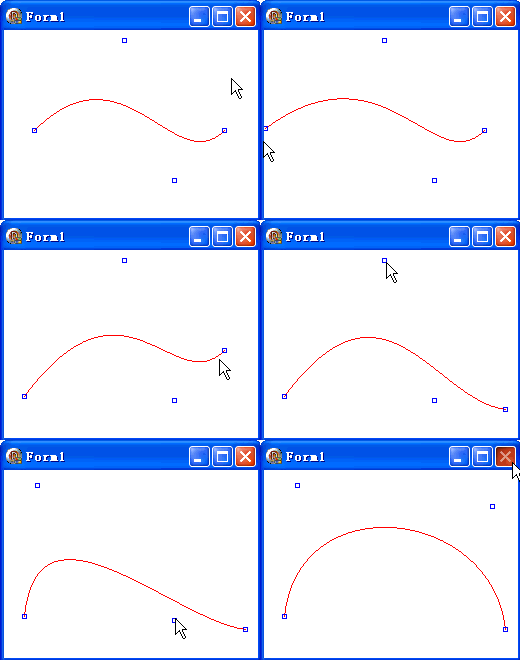
	case 6: // 贝塞尔曲线..
		{
			TBezierConfig bezier;
			bezier.controlPoint_1 = g_ClientMidPoint;
			bezier.controlPoint_2 = TPoint(300.0f, 50.0f);
			bezier.endPosition    = touch->getLocation();
			sprite->runAction( TBezierTo::create(1, bezier));
		} break;
	case 7: // 贝塞尔曲线..
		{
			TBezierConfig bezier;
			bezier.controlPoint_1 = g_ClientMidPoint;
			bezier.controlPoint_2 = touch->getLocation();
			bezier.endPosition    = TPoint(100.0f, 0.0f);
			sprite->runAction( TBezierBy::create(1, bezier));
		} break;
	default:
		{
			nTempIdx = 0;
		}
	}

    CCLOG("THelloWorld::onTouchBegan id = %d, x = %f, y = %f", touch->getID(), touch->getLocation().x, touch->getLocation().y);
    return true;
}
关于贝塞尔曲线,,实在是难以理解.
可以参考这几篇博客
http://www.cnblogs.com/del/archive/2007/12/27/1017374.html
http://www.cnblogs.com/del/archive/2008/06/10/1216569.html
http://www.cnblogs.com/del/archive/2008/06/10/1216606.html





 扫一扫
扫一扫


 1448
1448

 被折叠的 条评论
为什么被折叠?
被折叠的 条评论
为什么被折叠?
 到【灌水乐园】发言





