


 本文详细介绍了Python编程中的标识符规则、关键字列表、字符串表示、编码、用户输入输出、缩进、多行代码、注释、数据类型(如整数、浮点数、字符串等)以及各种运算符(算术、比较、逻辑),帮助初学者掌握基本语法。
1. 标识符
在Python中,标识符是用来标记变量、函数、类等命名的。它们可以由字母、数字和下划线组成,但不能以数字开头。标识符也不能与Python的关键字重复。
示例:
my_variable = 10def my_function():passclass MyClass:pass
2. 关键字
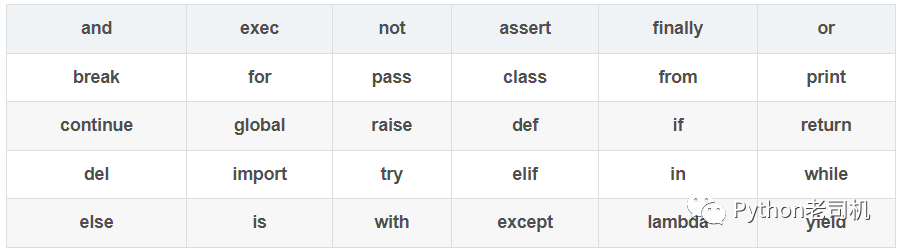
Python有一些特殊的关键字,它们具有特定的含义,不能用作标识符。比如`if`、`for`、`while`等。
示例:
if True:print("This is an if statement")for i in range(5):print(i)
如下表格列出了常见的关键字:
3. 引号
Python中字符串可以使用单引号或双引号表示。两者没有区别,只需保持一致即可。
示例:
string1 = 'Hello, World!'string2 = "Hello, World!"print(string1)print(string2)
4. 编码
Python默认使用UTF-8编码,同时支持国际化字符。
示例:
string = "中文字符"print(string)
5. 输入输出
可以使用`input()`函数获取用户输入,使用`print()`函数进行输出。
示例:
name = input("请输入您的名字:")print("您好," + name)
6. 缩进
在Python中,缩进是非常重要的,它决定了代码块的层级关系。一般使用4个空格或者一个制表符进行缩进。
示例:
if True:print("This is indented code")print("Still inside the if block")print("Outside the if block")
7. 多行
可以使用反斜杠`\`或者使用括号`()`将一行代码分成多行。
示例:
# 使用反斜杠分行a = 1 + 2 + \3 + 4# 使用括号分行b = (1 + 2 +3 + 4)print(a)print(b)
8. 注释
注释用于解释代码的作用,提高代码的可读性。在Python中,单行注释使用`#`,多行注释使用三引号`'''`或者`"""`。
示例:
# This is a single-line comment'''This is amulti-line comment'''print("Hello, World!")
9. 数据类型
Python支持多种数据类型,包括整数、浮点数、字符串、列表、元组、字典等。
示例:
x = 10y = 3.14name = "John"my_list = [1, 2, 3]my_tuple = (4, 5, 6)my_dict = {"name": "John", "age": 20}print(x)print(y)print(name)print(my_list)print(my_tuple)print(my_dict)
10. 运算符
Python提供了丰富的运算符,包括算术运算符、比较运算符、逻辑运算符等。
算术运算符:`+`、`-`、`*`、`/`、`%`、`**`、`//`
比较运算符:`==`、`!=`、`>`、`<`、`>=`、`<=`
赋值运算符:`=`
逻辑运算符:`and`、`or`、`not`
示例:
x = 10y = 20z = x + yprint(z)is_equal = x == yprint(is_equal)is_greater = x > yprint(is_greater)is_true = not (x < y)print(is_true)
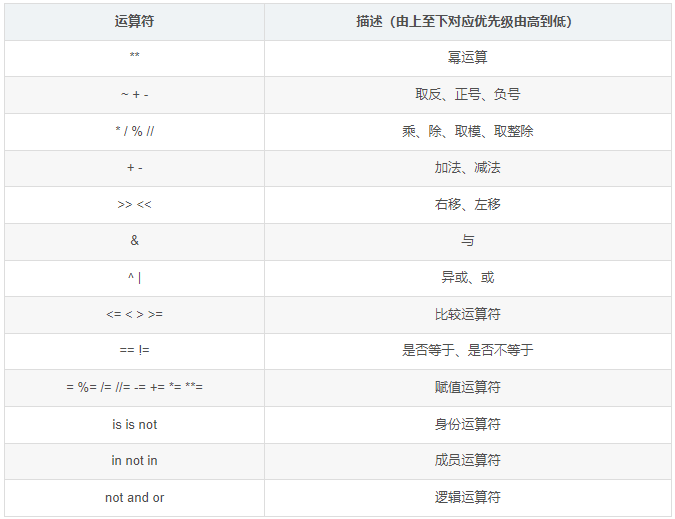
不同的运算符有不同的优先级,可以使用括号来改变运算的顺序。
示例:
x = 10y = 20z = 30result = x + y * zprint(result)result_with_brackets = (x + y) * zprint(result_with_brackets)
常见运算符的优先级如下:





 扫一扫
扫一扫


 4277
4277

 被折叠的 条评论
为什么被折叠?
被折叠的 条评论
为什么被折叠?
 到【灌水乐园】发言





