



 本文介绍了如何利用Fiddler抓取API请求并导出为HAR文件,然后转换成HttpRunner可识别的YML格式,进行API测试。首先安装Fiddler和HttpRunner,接着过滤并导出目标API的HAR文件,再通过HttpRunner工具将HAR转换为YML,将YML用例放入测试框架中,进行参数化和数据驱动,最后运行API测试。
1. 安装fiddler.
2. 安全httprunner. 请参考官网文档http://cn.httprunner.org/Installation/
3. fiddler导出对应API的操作和响应为har文件。记得过滤只想要的host不然抓的东西太多,看得眼花。
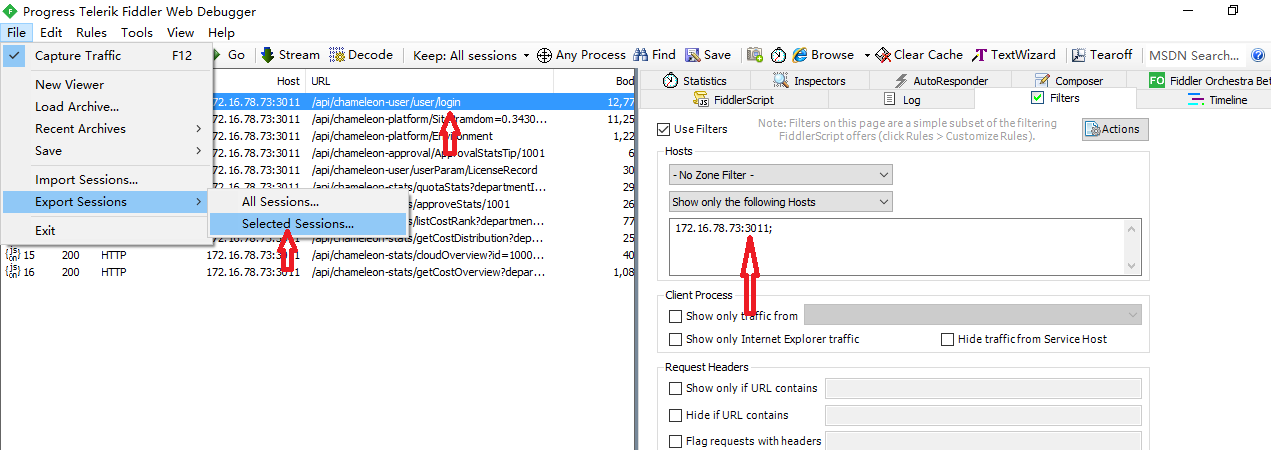
4. 导出的用例为har格式。需要应用httprunner里的工具转成yml格式。语法如下。

5. 用例导出后,拷贝到http脚手架生成的test cases文件夹下。需要做合适参数化,或者数据驱动。
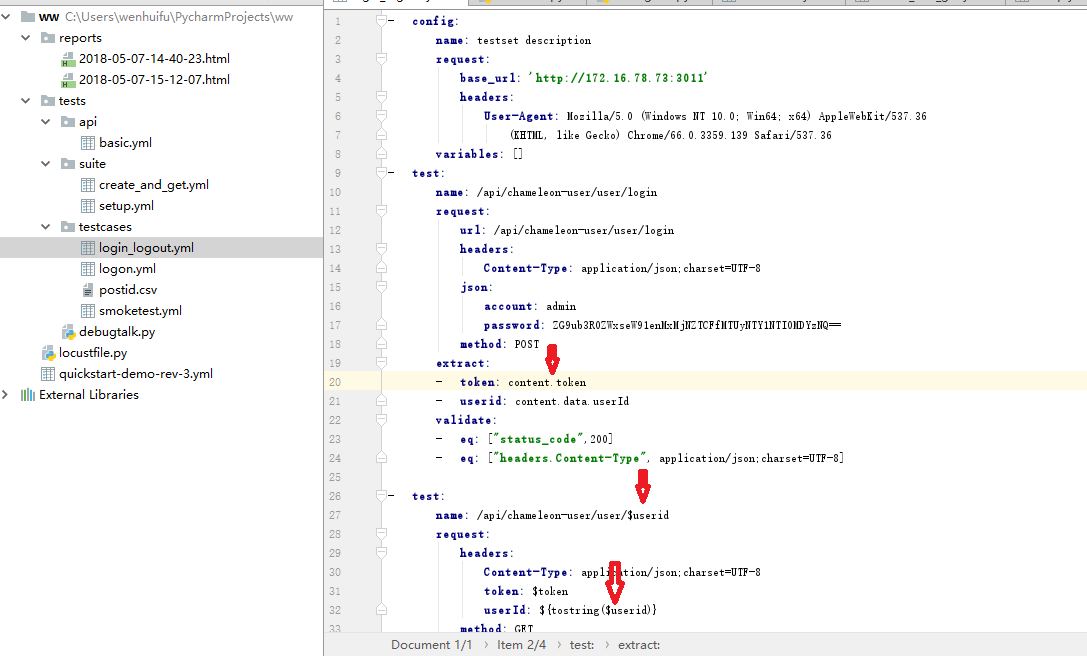
6. 全部导出的请求代码如下。需要为yml格式。供日后参考。
-   config:
        name: testset description
        request:
            base_url: 'http://172.16.78.73:3011'
            headers:
                User-Agent: Mozilla/5.0 (Windows NT 10.0; Win64; x64) AppleWebKit/537.36
                    (KHTML, like Gecko) Chrome/66.0.3359.139 Safari/537.36
        variables: []
-   test:
        name: /api/chameleon-user/user/login
        request:
            url: /api/chameleon-user/user/login
            headers:
                Content-Type: application/json;charset=UTF-8
            json:
                account: admin
                password: ZG9ub3R0ZWxseW91enMxMjNZTCFfMTUyNTY1NTI0MDYzNQ==
            method: POST
        extract:
        -   token: content.token
        -   userid: content.data.userId
        validate:
        -   eq: ["status_code",200]
        -   eq: ["headers.Content-Type", application/json;charset=UTF-8]

-   test:
        name: /api/chameleon-user/user/$userid
        request:
            headers:
                Content-Type: application/json;charset=UTF-8
                token: $token
                userId: ${tostring($userid)}
            method: GET
            url: /api/chameleon-user/user/$userid
        validate:
        -   eq:
            - status_code
            - 200
        -   eq:
            - headers.Content-Type
            - application/json;charset=UTF-8

-   test:
        name: /api/chameleon-user/user/logout
        request:
            url: /api/chameleon-user/user/logout
            headers:
                Content-Type: application/json;charset=UTF-8
                token: $token
                userId: ${tostring($userid)}
            method: GET

        validate:
        -   eq: ["status_code", 200]
        -   eq: ["headers.Content-Type", application/json;charset=UTF-8]
7. 运行api测试。






 扫一扫
扫一扫


 2217
2217

 被折叠的 条评论
为什么被折叠?
被折叠的 条评论
为什么被折叠?
 到【灌水乐园】发言





