



 博客介绍了HTML表格标签相关内容,如rowspan可设置字段值跨多行,colspan可设置跨多列,还介绍了设置背景颜色、表格标题、边框、内容与单元格距离、单元格间距以及内容水平和垂直对齐方式等属性。
1.表格标签<table>
rowspan="2" :该字段值跨2行;
colspan="2" :该字段值跨2列;
bgcolor 设置背景颜色;
<caption></caption> 用于设置表格标题;
border = "1" 设置表格的边框为一个像素宽;
cellpadding="2" 表格中的内容和单元格之间的距离
cellspacing="0" 单元格和单元格之间的距离;
align=”left/center/right” 内容在单元格中的水平对齐方式;
valign =”top/middle/bottom” 内容在单元格中垂直对齐方式;
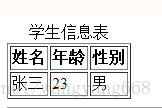
<table border="1">
	<caption>学生信息表</caption>
	<tr><!--行标签-->
		<th>姓名</th><!--表头-->
		<th>年龄</th>
		<th>性别</th>
	</tr>
        <tr>
		<td>张三</td>
		<td>23</td>
		<td>男</td>
	</tr>
</table>
结果如图:





 扫一扫
扫一扫


 1709
1709

 被折叠的 条评论
为什么被折叠?
被折叠的 条评论
为什么被折叠?
 到【灌水乐园】发言





