

Spring Cloud 2.2.2 源码之三十五@RefreshScope详解一

本文深入解析SpringCloud中@RefreshScope注解的实现原理,详细阐述其在类实例化过程中的作用及生命周期,包括ClassPathBeanDefinitionScanner的doScan、AnnotationConfigUtils的applyScopedProxyMode及ScopedProxyUtils的createScopedProxy等关键步骤。

RefreshScope注解类实例化基本流程

在这里插入图片描述

@RefreshScope作用

主要声明一个类的对象的作用域和刷新相关,既不是单例也不是原型,而且是会进行动态代理的。@Scope("refresh")表示他是跟refresh的作用域相关。
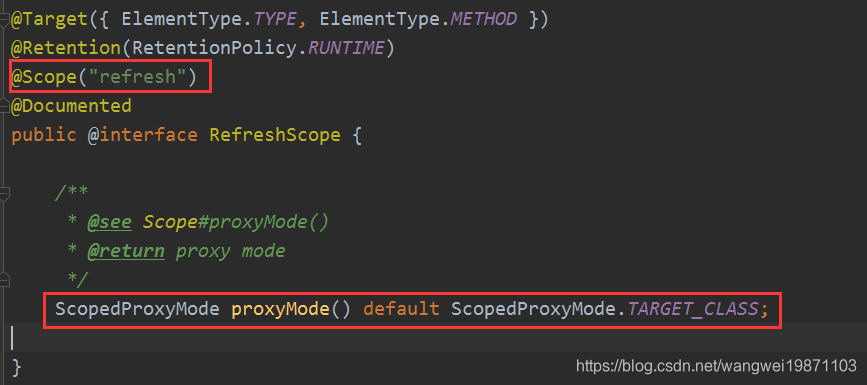
在这里插入图片描述
生命周期跟RefreshScope相关。
在这里插入图片描述

@Scope回顾这个的作用

如果我们这样写,这个类会被扫描进容器,我们来看看扫描的时候是怎么做的。
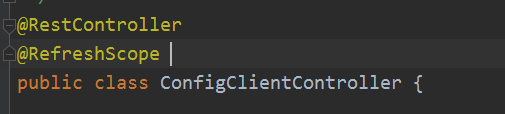
如果我们把这个用在

ClassPathBeanDefinitionScanner的doScan

扫描的时候会进行scope的解析和设置,然后进行代理的设置。
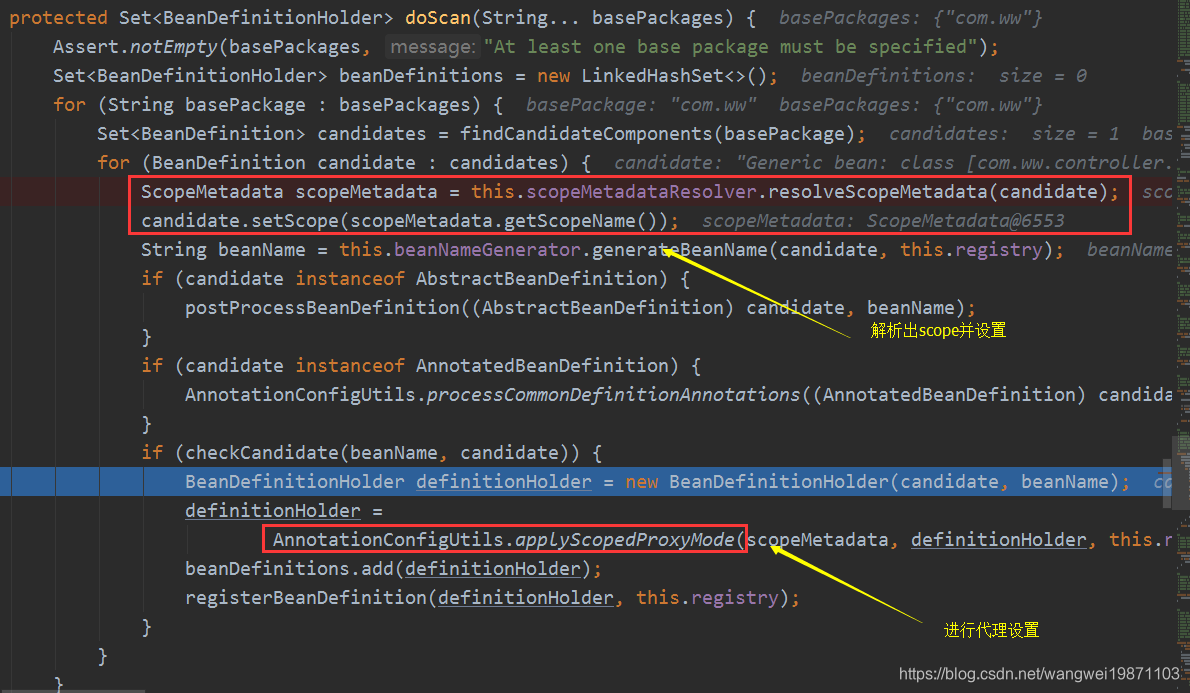
在这里插入图片描述

AnnotationConfigUtils的applyScopedProxyMode

因为前面RefreshScope注解设置了代理目标这个属性,所以这里会进行Scoped代理设置。
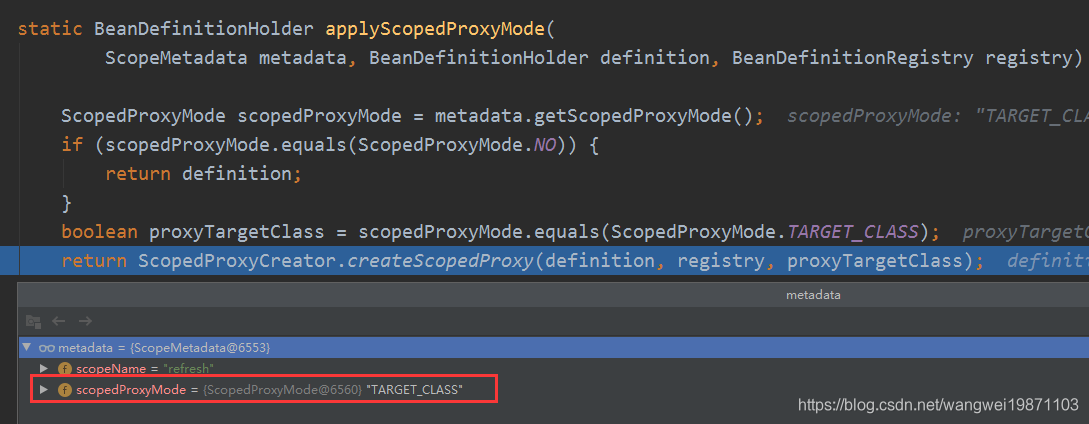
在这里插入图片描述

ScopedProxyUtils的createScopedProxy

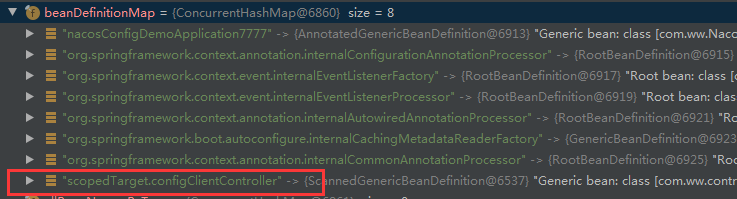
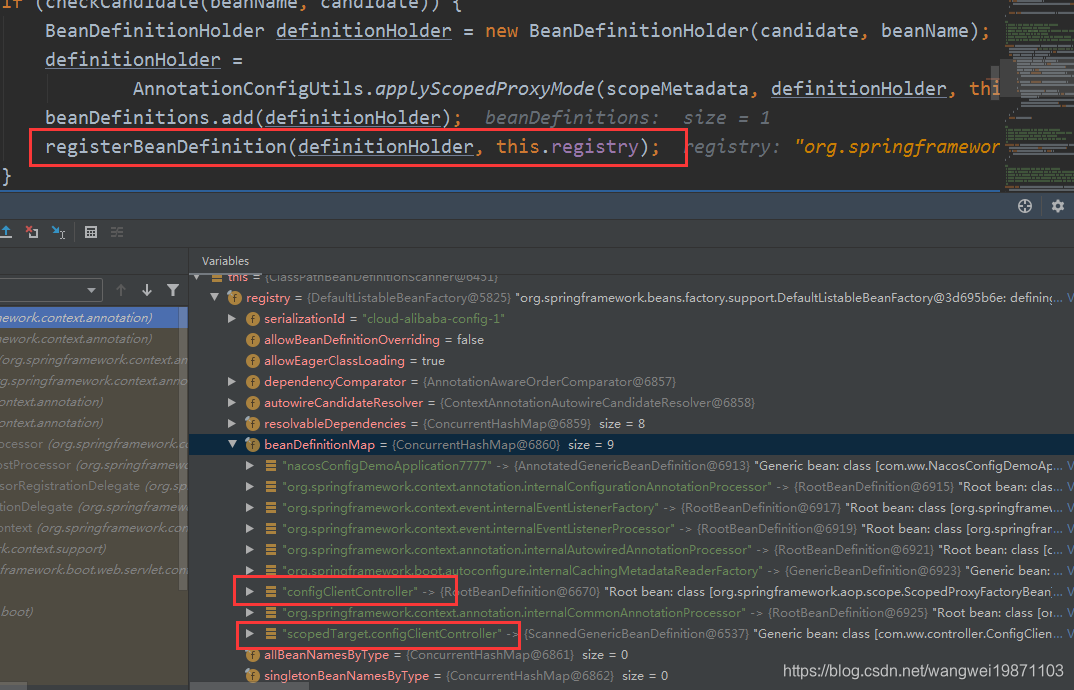
创建一个代理bean定义来包装,并且设置好属性,然后注册到容器里,这里注意被代理对象的beanName被改成scopedTarget.xxx了,而代理对象的名字才是被代理对象原来的名字。

public static BeanDefinitionHolder createScopedProxy(BeanDefinitionHolder definition,
			BeanDefinitionRegistry registry, boolean proxyTargetClass) {
		//原bean名字
		String originalBeanName = definition.getBeanName();
		//原bean定义
		BeanDefinition targetDefinition = definition.getBeanDefinition();
		//代理bean名字,加了scopedTarget.前缀
		String targetBeanName = getTargetBeanName(originalBeanName);

		//创建代理bean定义,类型是ScopedProxyFactoryBean
		RootBeanDefinition proxyDefinition = new RootBeanDefinition(ScopedProxyFactoryBean.class);
		//设置装饰的bean定义,把原bean定义放进去
		proxyDefinition.setDecoratedDefinition(new BeanDefinitionHolder(targetDefinition, targetBeanName));
		//设置原bean定义
		proxyDefinition.setOriginatingBeanDefinition(targetDefinition);
		proxyDefinition.setSource(definition.getSource());
		proxyDefinition.setRole(targetDefinition.getRole());
		//添加属性
		proxyDefinition.getPropertyValues().add("targetBeanName", targetBeanName);
		if (proxyTargetClass) {
			targetDefinition.setAttribute(AutoProxyUtils.PRESERVE_TARGET_CLASS_ATTRIBUTE, Boolean.TRUE);
			// ScopedProxyFactoryBean's "proxyTargetClass" default is TRUE, so we don't need to set it explicitly here.
		}
		else {
			proxyDefinition.getPropertyValues().add("proxyTargetClass", Boolean.FALSE);
		}

		// Copy autowire settings from original bean definition.
		proxyDefinition.setAutowireCandidate(targetDefinition.isAutowireCandidate());
		proxyDefinition.setPrimary(targetDefinition.isPrimary());
		if (targetDefinition instanceof AbstractBeanDefinition) {
			proxyDefinition.copyQualifiersFrom((AbstractBeanDefinition) targetDefinition);
		}

		// The target bean should be ignored in favor of the scoped proxy.
		targetDefinition.setAutowireCandidate(false);
		targetDefinition.setPrimary(false);

		// 注册原bean定义,名字是scopedTarget.XXX
		registry.registerBeanDefinition(targetBeanName, targetDefinition);

		// Return the scoped proxy definition as primary bean definition
		// (potentially an inner bean).
		return new BeanDefinitionHolder(proxyDefinition, originalBeanName, definition.getAliases());
	}

注册被代理对象bean定义:
在这里插入图片描述
但是外面最后还有一次注册,是注册代理对象的bean定义,名字没变,其实就是多了一个代理的,configClientXXX是代理对象,scopedTarget.configClientXXX是被代理对象:
在这里插入图片描述
下篇继续说后面怎么实例化。

好了,今天就到这里了,希望对学习理解有帮助,大神看见勿喷,仅为自己的学习理解,能力有限,请多包涵

**Spring Cloud Consul 2.2.2** 是 Spring Cloud 提供的用于将 **Consul** 集成到 Spring Boot 应用中的模块,属于 `Spring Cloud Hoxton` 版本系列的部分。它使得基于 Spring 的微服务能够轻松实现服务注册与发现、分布式配置管理、服务健康检查和分布式锁等功能。 > ✅ 模块名称:`spring-cloud-starter-consul-*` > 📦 版本:`2.2.2.RELEASE` > 🔗 官网地址:[https://spring.io/projects/spring-cloud-consul](https://spring.io/projects/spring-cloud-consul) > 💡 核心理念:**“让 Spring Boot 应用无缝接入 HashiCorp Consul,构建高可用微服务体系”** --- ### 🎯 核心功能 | 功能 | 说明 | |------|------| | ✅ **服务注册与发现** | 自动向 Consul 注册服务,并从 Consul 获取其他服务实例列表 | | ✅ **分布式配置中心** | 支持从 Consul KV 存储加载配置,支持动态刷新 | | ✅ **健康检查自动集成** | 应用启动后自动注册 `/actuator/health` 健康端点到 Consul | | ✅ **Key-Value 监听机制** | 配置变更时自动触发 `@RefreshScope` 刷新 | | ✅ **Ribbon / LoadBalancer 集成** | 实现客户端负载均衡(兼容旧版 Ribbon 或新版 Spring Cloud LoadBalancer) | --- ### 💡 快速入门示例(Spring Boot + Consul) #### 1. 添加依赖(Maven) ```xml <!-- 服务发现 --> <dependency> <groupId>spring-cloud</groupId> <artifactId>spring-cloud-starter-consul-discovery</artifactId> <version>2.2.2.RELEASE</version> </dependency> <!-- 分布式配置(可选) --> <dependency> <groupId>spring-cloud</groupId> <artifactId>spring-cloud-starter-consul-config</artifactId> <version>2.2.2.RELEASE</version> </dependency> <!-- Web 支持 --> <dependency> <groupId>org.springframework.boot</groupId> <artifactId>spring-boot-starter-web</artifactId> </dependency> <!-- Actuator(推荐) --> <dependency> <groupId>org.springframework.boot</groupId> <artifactId>spring-boot-starter-actuator</artifactId> </dependency> ``` --- #### 2. 启动 Consul(本地测试) ```bash # 使用 Docker 启动单节点 Consul docker run -d --name consul -p 8500:8500 -p 8600:8600/udp \ consul agent -server -bootstrap -ui -client=0.0.0.0 ``` 访问 [http://localhost:8500](http://localhost:8500) 查看 Consul UI。 --- #### 3. 配置文件(application.yml) ```yaml spring: application: name: user-service # Consul 中显示的服务名 cloud: consul: host: localhost port: 8500 discovery: enabled: true service-name: ${spring.application.name} instance-id: ${spring.application.name}:${vcap.application.instance_id:${random.value}} health-check-path: /actuator/health health-check-interval: 15s prefer-ip-address: true register-health-check: true config: enabled: true format: KEY_VALUE data-key: config prefix: config profile-separator: '::' watch: enabled: true wait-time: 55 delay: 1000 ``` > ⚠️ Consul 默认使用 HTTP 端口 `8500`,无需额外证书即可通信。 --- #### 4.个简单控制器 ```java @RestController @RefreshScope // 支持配置热更新 public class ConfigController { @Value("${app.message:Hello Default}") private String message; @GetMapping("/hello") public String hello() { return "Hello from user-service => " + message; } } ``` --- #### 5. 在 Consul KV 中添加配置(通过 UI 或 CLI) 路径格式(根据 `prefix` 和 `service-name` 构造): ``` config/user-service/app.message = "Hello from Consul!" ``` 重启应用或等待监听触发后,访问 `/hello` 将返回: ``` Hello from user-service => Hello from Consul! ``` --- ### 🏗️ 核心组件详解 #### 1. **服务注册与发现流程** ```text +------------------+ Register +------------------+ | Spring Boot App | --------------> | Consul Server | | (user-service) | | (Service Catalog)| +------------------+ +------------------+ ↑ | | Get Instances | 返回所有 healthy 实例 +------------------------------------+ via DiscoveryClient ``` Java 调用示例: ```java @Autowired private DiscoveryClient discoveryClient; public void findServices() { List<ServiceInstance> instances = discoveryClient.getInstances("order-service"); for (ServiceInstance instance : instances) { System.out.println(instance.getServiceId() + " -> " + instance.getUri()); } } ``` 结合 `RestTemplate` + `@LoadBalanced` 可实现负载调用: ```java @Bean @LoadBalanced public RestTemplate restTemplate() { return new RestTemplate(); } // 使用服务名调用 ResponseEntity<String> response = restTemplate.getForEntity( "http://order-service/api/orders", String.class); ``` --- #### 2. **配置管理机制** Consul KV 结构建议: ``` config/ ├── user-service/ │ └── app.message = "Hi User" ├── order-service/ │ └── payment.timeout = "5000" └── shared/ └── logging.level.root = "INFO" ``` Spring Cloud Consul 会自动加载: - `${prefix}/${spring.application.name}/...` - `${prefix}/shared/...` (共享配置) 启用方式: ```yaml spring.cloud.consul.config.prefix: config spring.cloud.consul.config.default-context: shared ``` > ✅ 支持 `@RefreshScope` 注解实现配置热更新(需暴露 `/actuator/refresh`) --- #### 3. **健康检查机制** Consul 定期访问 `/actuator/health`,若状态为 `UP` 则认为服务正常,否则标记为不健康并从服务列表中剔除。 自定义健康指标: ```java @Component public class CustomHealthIndicator implements HealthIndicator { @Override public Health health() { int errorCode = check(); // perform some specific health check if (errorCode != 0) { return Health.down().withDetail("Error Code", errorCode).build(); } return Health.up().build(); } } ``` --- ### ✅ 高级特性详解 #### 1. **分布式配置热刷新(@RefreshScope)** ```java @Component @RefreshScope public class AppConfig { @Value("${app.timeout:3000}") private long timeout; public long getTimeout() { return timeout; } } ``` 当 Consul 中 `app.timeout` 修改后,下次调用该 Bean 时会重新绑定值。 > 🔁 触发原理:Spring Cloud Context Refresh 事件 + CGLIB 动态代理 --- #### 2. **支持多种配置格式** 除了默认的 `KEY_VALUE`,还支持: | 格式 | 说明 | |------|------| | `FILES` | 加载整个目录下的文件 | | `PROPERTIES` | Java Properties 格式 | | `YAML` | YAML 配置块 | | `FORMATTED` | 自定义解析器处理结构化内容 | 示例(YAML): ```yaml spring.cloud.consul.config.format: YAML ``` KV 中设置: ``` config/user-service/data = app: name: User Service timeout: 5000 ``` --- #### 3. **Watch 机制(监听变更)** ```java @Component public class ConfigWatcher { @EventListener public void handleContextRefresh(ContextRefreshedEvent event) { System.out.println("Configuration reloaded!"); } } ``` 底层通过长轮询 Consul 的 `/v1/kv/config?recurse&wait=55s&index=` 实现高效监听。 --- #### 4. **服务元数据扩展** ```yaml spring.cloud.consul.discovery.tags[0]: version=1.0.0 spring.cloud.consul.discovery.tags[1]: region=beijing ``` 可用于路由规则、灰度发布等场景。 --- ### ⚠️ 局限性与挑战 | 问题 | 说明 | |------|------| | ❌ **强依赖外部 Consul 集群** | 若 Consul 不可用,可能导致应用启动失败 | | ❌ **Watch 有延迟** | 最小间隔约 1 秒以上,不适合超实时场景 | | ❌ **不支持加密配置** | KV 明文存储,敏感信息需配合 Vault 使用 | | ❌ **版本迭代放缓** | 自 Spring Cloud 2020 起转向更通用的 `Config Data` 模型 | | ❌ **与 Kubernetes 原生服务模型重叠** | K8s 已有 Service/DNS/ConfigMap,Consul 多用于多集群服务网格前传 | --- ### 🔁 替代方案对比 | 方案 | 是否推荐 | 说明 | |------|----------|------| | **Spring Cloud Consul** | ✅ 适合混合环境或多数据中心服务发现 | | **Spring Cloud Zookeeper** | ⚠️ 类似用途,但社区较小 | | **Eureka** | ⚠️ Netflix 已停更,但仍稳定可用 | | **Kubernetes Services + DNS** | ✅ 原生推荐,适用于纯 K8s 环境 | | **Istio + Pilot** | ✅ 服务网格时代首选,提供高级流量控制 | --- ### ✅ 最佳实践建议 1. **合理命名服务** > 使用小写、连字符分隔,避免特殊字符。 2. **开启健康检查** > 确保故障实例及时下线。 3. **使用共享配置路径** > 如 `shared`, `common` 减少重复配置。 4. **限制 Watch 范围** > 避免监听过多键导致性能下降。 5. **结合 Vault 管理敏感信息** > Consul 不适合存密码,应只放非密配置。 6. **启用 ACL(Access Control List)** > 生产环境必须开启权限控制。 7. **部署高可用 Consul 集群** > 至少 3~5 个 Server 节点。 --- ### ✅ 总结:Spring Cloud Consul 2.2.2 的定位 | 项目 | 结论 | |------|------| | **技术价值** | 实现了 Spring Boot 与 Consul 的深度集成,简化微服务治理 | | **当前状态** | 稳定维护中,适用于 Spring Boot 2.x + Consul 架构 | | **核心优势** | 零代码侵入、自动注册、配置热更新、健康检查体化 | | **适用场景** | - 多语言微服务共存环境<br>- 跨云或多数据中心部署<br>- 需要统配置中心的企业系统 | | **新项目建议** | 若已在使用 Consul,则强烈推荐;否则在纯 K8s 环境下可优先考虑 Istio 或 External Secrets Operator | > 📣 **句话总结:它是“Spring Boot 微服务对接 Consul”的标准桥梁,是构建跨平台服务治理体系的关键环。** ---
评论
添加红包

请填写红包祝福语或标题

红包个数最小为10个

红包金额最低5元

当前余额3.43前往充值 >
需支付:10.00
成就一亿技术人!
领取后你会自动成为博主和红包主的粉丝 规则
hope_wisdom
发出的红包
实付
使用余额支付
点击重新获取
扫码支付
钱包余额 0

抵扣说明:

1.余额是钱包充值的虚拟货币,按照1:1的比例进行支付金额的抵扣。
2.余额无法直接购买下载,可以购买VIP、付费专栏及课程。

余额充值



