



本文同步发表于我的微信公众号,微信搜索 程语新视界 即可关注,每个工作日都有文章更新
一、OTA升级安装流程
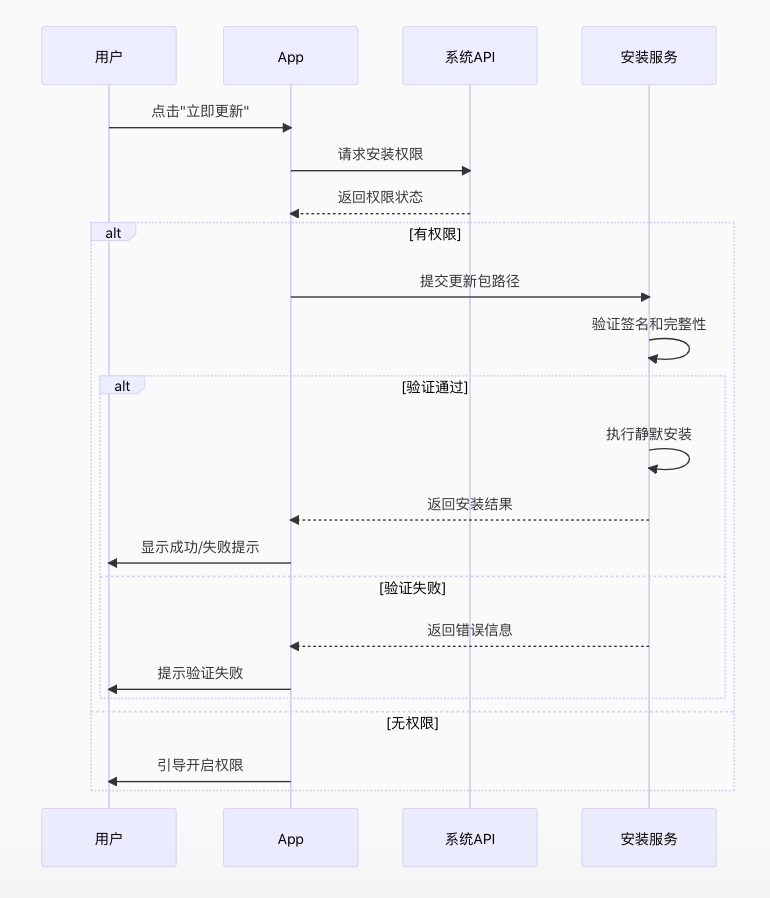
二、安装逻辑实现
1. 请求安装权限
鸿蒙应用需要获取ohos.permission.INSTALL_BUNDLE权限才能安装应用
在module.json5中添加权限声明:
{
  "module": {
    "requestPermissions": [
      {
        "name": "ohos.permission.INSTALL_BUNDLE",
        "reason": "用于应用OTA更新"
      }
    ]
  }
}动态请求权限:
import abilityAccessCtrl from '@ohos.abilityAccessCtrl';

async function requestInstallPermission() {
  const atManager = abilityAccessCtrl.createAtManager();

  try {
    const grantStatus = await atManager.requestPermissionsFromUser(
      getContext(),
      ['ohos.permission.INSTALL_BUNDLE']
    );

    return grantStatus.authResults[0] === abilityAccessCtrl.GrantStatus.PERMISSION_GRANTED;
  } catch (err) {
    console.error('权限请求失败:', err);
    return false;
  }
}
2. 执行安装操作
使用@ohos.bundle.installer模块进行安装
import installer from '@ohos.bundle.installer';
import common from '@ohos.app.ability.common';

async function installUpdate(hapPath: string) {
  const context = getContext() as common.UIAbilityContext;

  try {
    // 1. 获取BundleInstaller实例
    const bundleInstaller = await installer.getBundleInstaller();

    // 2. 设置安装参数
    const installParam: installer.InstallParam = {
      installFlag: installer.InstallFlag.REPLACE_EXISTING,
      userId: 100 // 当前用户ID
    };

    // 3. 执行安装
    await new Promise<void>((resolve, reject) => {
      bundleInstaller.install(hapPath, installParam, (err, data) => {
        if (err) {
          console.error('安装失败:', err.code, err.message);
          reject(err);
        } else {
          console.log('安装成功');
          resolve();
        }
      });
    });

    return true;
  } catch (error) {
    console.error('安装异常:', error);
    return false;
  }
}
3. 完整的OTA安装流程实现
import fs from '@ohos.file.fs';
import hash from '@ohos.util.hash';
import request from '@ohos.request';

class OtaManager {
  private updateUrl = 'https://your-update-server.com/latest.hap';
  private hapPath: string = '';

  // 完整的OTA流程
  async performOTAUpdate() {
    try {
      // 1. 请求安装权限
      const hasPermission = await this.requestInstallPermission();
      if (!hasPermission) {
        this.showToast('请授权安装权限');
        return;
      }

      // 2. 下载更新包
      this.showProgressDialog('下载中...');
      const downloadSuccess = await this.downloadUpdate();
      this.dismissProgressDialog();

      if (!downloadSuccess) {
        this.showAlert('下载更新失败');
        return;
      }

      // 3. 验证更新包
      const isValid = await this.validateHap();
      if (!isValid) {
        this.showAlert('更新包校验失败');
        return;
      }

      // 4. 请求用户确认安装
      this.showInstallConfirmation();
    } catch (error) {
      console.error('OTA流程异常:', error);
      this.showAlert('更新过程中发生错误');
    }
  }

  // 下载更新包
  private async downloadUpdate(): Promise<boolean> {
    const context = getContext();
    this.hapPath = context.filesDir + '/update.hap';

    const downloadTask = request.downloadFile(context, {
      url: this.updateUrl,
      filePath: this.hapPath
    });

    return new Promise((resolve) => {
      downloadTask.on('progress', (receivedSize: number, totalSize: number) => {
        const percent = Math.floor((receivedSize / totalSize) * 100);
        this.updateProgress(`下载中 ${percent}%`);
      });

      downloadTask.on('complete', () => {
        console.log('下载完成');
        resolve(true);
      });

      downloadTask.on('fail', () => {
        console.error('下载失败');
        resolve(false);
      });
    });
  }

  // 验证HAP包完整性和签名
  private async validateHap(): Promise<boolean> {
    try {
      // 1. 检查文件是否存在
      if (!fs.accessSync(this.hapPath)) {
        console.error('HAP文件不存在');
        return false;
      }

      // 2. 验证文件哈希(示例使用SHA256)
      const fileHash = await this.calculateFileHash(this.hapPath);
      const expectedHash = await this.getExpectedHash(); // 从服务器获取预期哈希

      if (fileHash !== expectedHash) {
        console.error('文件哈希不匹配');
        return false;
      }

      // 3. 验证签名(伪代码,实际需要更复杂的实现)
      /*
      const signatureValid = await this.verifySignature(this.hapPath);
      if (!signatureValid) {
        return false;
      }
      */

      return true;
    } catch (error) {
      console.error('验证失败:', error);
      return false;
    }
  }

  // 计算文件哈希
  private async calculateFileHash(filePath: string): Promise<string> {
    const file = fs.openSync(filePath, fs.OpenMode.READ_ONLY);
    const hashObj = new hash.Hash(hash.Hash.SHA256);
    const buffer = new ArrayBuffer(4096);

    let bytesRead;
    while ((bytesRead = fs.readSync(file.fd, buffer)) > 0) {
      const chunk = new Uint8Array(buffer.slice(0, bytesRead));
      hashObj.update(chunk);
    }

    fs.closeSync(file);
    return hashObj.digest().toUpperCase();
  }

  // 显示安装确认对话框
  private showInstallConfirmation() {
    AlertDialog.show({
      title: '安装更新',
      message: '下载完成,是否立即安装新版本?',
      buttons: [
        {
          text: '取消',
          color: '#667788'
        },
        {
          text: '安装',
          color: '#FF0000',
          onClick: async () => {
            this.showProgressDialog('安装中...');
            const success = await this.installUpdate(this.hapPath);
            this.dismissProgressDialog();

            if (success) {
              this.showAlert('安装成功,请重启应用');
            } else {
              this.showAlert('安装失败');
            }
          }
        }
      ]
    });
  }
}
三、注意事项
1. 安全验证要点
- 完整性检查:下载后验证文件的哈希值
- 签名验证:确保更新包来自可信来源
- 权限控制:仅允许授权用户执行安装
2. 安装参数选项
| 参数 | 选项 | 说明 |
|---|---|---|
| installFlag | REPLACE_EXISTING | 替换现有应用 |
| FREE_INSTALL | 自由安装(无签名验证) | |
| RETAIN_DATA | 保留应用数据 | |
| userId | 100 | 当前用户 |
| 0 | 所有用户 |
3. 错误处理
// 安装错误处理示例
bundleInstaller.install(hapPath, installParam, (err) => {
  if (err) {
    switch (err.code) {
      case 201:
        console.error('安装包不存在');
        break;
      case 202:
        console.error('安装包验证失败');
        break;
      case 203:
        console.error('签名不一致');
        break;
      case 204:
        console.error('版本不兼容');
        break;
      default:
        console.error('未知错误', err.code);
    }
  }
});
四、企业级实现
1. 差分更新优化
// 使用差分更新减小下载体积
async function applyPatchUpdate() {
  const oldFile = context.filesDir + '/current.apk';
  const patchFile = context.filesDir + '/patch.diff';
  const newFile = context.filesDir + '/new.apk';

  // 下载增量包
  await downloadPatchFile(patchFile);

  // 应用增量更新
  if (bsdiff.applyPatch(oldFile, newFile, patchFile)) {
    return newFile;
  } else {
    // 增量更新失败,回退到完整包下载
    return downloadFullPackage();
  }
}
2. 安装后验证
// 安装后验证应用完整性
async function verifyAfterInstall(bundleName: string) {
  const bundleManager = bundle.getBundleManager();
  const bundleInfo = await bundleManager.getBundleInfo(bundleName, 0);

  const installedVersion = bundleInfo.versionName;
  const expectedVersion = this.getLatestVersion();

  if (installedVersion !== expectedVersion) {
    console.error('版本不匹配,可能安装失败');
    return false;
  }

  const packageInfo = bundleInfo.packages[0];
  const signatureValid = verifySignature(packageInfo.signature);

  return signatureValid;
}
3. 安装失败恢复策略
// 安装失败处理流程
async function safeInstall(hapPath: string) {
  try {
    // 创建系统备份
    await backupApplicationData();

    // 尝试安装
    const result = await installUpdate(hapPath);

    if (!result) {
      throw new Error('安装失败');
    }

    // 验证安装
    if (!verifyAfterInstall()) {
      // 回滚到备份
      await restoreFromBackup();
      return false;
    }

    return true;
  } catch (error) {
    console.error('安装失败:', error);
    await restoreFromBackup();
    return false;
  }
}
五、总结
- 权限是前提:必须获取
ohos.permission.INSTALL_BUNDLE权限 - 验证是关键:安装前必须校验文件完整性和签名
- 用户确认不可少:需要明确的用户确认步骤
- 错误处理要完善:处理常见的安装失败场景
- 安全始终第一:遵循最小权限原则和安全最佳实践
实际开发中,建议使用官方提供的@ohos.update接口(如果设备支持),对于无法使用系统更新的场景,再考虑使用上述的BundleInstaller方法。





 扫一扫
扫一扫


 1136
1136

 被折叠的 条评论
为什么被折叠?
被折叠的 条评论
为什么被折叠?
 到【灌水乐园】发言





