



 本文详细介绍如何在SpringBoot项目中使用RestTemplate调用RESTful服务。通过具体示例,展示了如何配置RestTemplate并请求远程服务,获取随机JSON数据。
原文首发于:https://www.fangzhipeng.com/springboot/2017/07/11/springboot11-restTemplate/
本文出自方志朋的博客
在微服务都是以HTTP接口的形式暴露自身服务的,因此在调用远程服务时就必须使用HTTP客户端。我们可以使用JDK原生的URLConnection、Apache的Http Client、Netty的异步HTTP Client, Spring的RestTemplate。
这篇文章主要介绍怎么用请求一个 Restful的web服务。我将用restTemplate去请求一个服务: http://gturnquist-quoters.cfapps.io/api/random.
构架工程
创建一个springboot工程,去请求RESTFUL的服务。这个服务是 http:///gturnquist-quoters.cfapps.io/api/random ,这个url会随机返回Json字符串。
在Spring项目中,提供了一个非常简便的类,叫RestTemplate,它可以很简便的请求url服务。
先来看看 RestTemplate常用的几个方法:
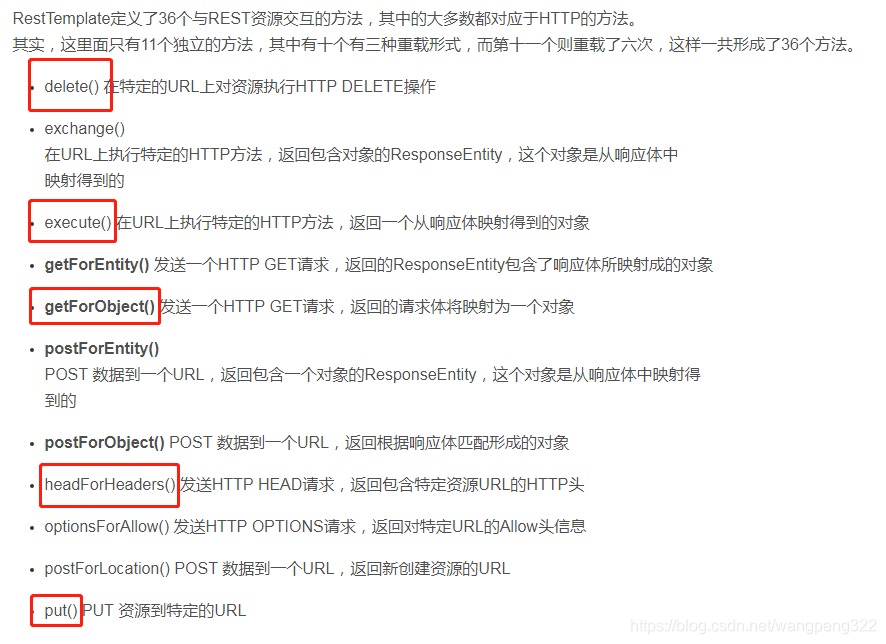
通过RestTemplate请求服务,需要先context中注册一个RestTemplate bean。代码如下:
    @Bean
    public RestTemplate restTemplate(RestTemplateBuilder builder) {
        return builder.build();
    }

    @Bean
    public CommandLineRunner run(RestTemplate restTemplate) throws Exception {
        return args -> {
            String quote = restTemplate.getForObject(
                    "http://gturnquist-quoters.cfapps.io/api/random", String.class);
            log.info(quote.toString());
        };
    }
运行程序,控制台打印:
{
“type”: “success”,
“value”: {
“id”: 6,
“quote”: “It embraces convention over configuration, providing an experience on par with frameworks that excel at early stage development, such as Ruby on Rails.”
}
}





 扫一扫
扫一扫


 281
281

 被折叠的 条评论
为什么被折叠?
被折叠的 条评论
为什么被折叠?
 到【灌水乐园】发言





